Windows 7 Clipboard History
Just like previous versions of Windows, Windows 7 doesn’t provide a tool to log clipboard history. This is a serious setback, since clipboard history can be a integral part of many people’s productivity(including mine). There are many 3rd party clipboard programs which can monitor clipboard activity, among them is the much liked Clipdiary. The clipboard managers are designed to log all clipboard data, and provide an easy way to use the required clipboard item in any active application. If you are looking for an alternative clipboard tool for Windows 7, meet Clipboard History. This tool will keep a log of every word/text that you copy to the clipboard, and let you use selected clipboard item anywhere you want.
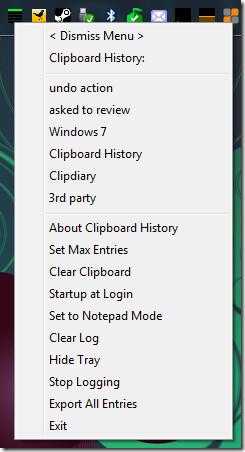
It is not much advanced like Clipdiary but allows user to quickly copy their previous word/text from the start menu tray. You can set it to startup at login, set the program to run in notepadmode, clear log, hide tray(and bring it back by hitting z+x+c hotkey), stop logging, and export entries.
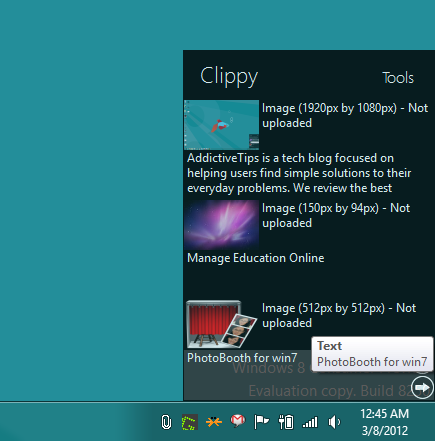
If Clipboard History fails to work on Windows 7, you can try out Clippy – a system tray application for Windows that lets you manage clipboard items, including both text and images. Clicking the system tray icon shows all saved clipboard items, allowing you to quickly select any clipboard item to paste it in required application. You can check out our complete review here.

Actually, no, I changed that link to what it used to be. That way the link in the original post should work again.
http://www.cdunn.net/web/Clipboard_History.html
Updated link for Clipboard Historian:
http://cdunn.net/web/clipboardhistorian.htm
Signed, the author of the little tool. But keep in mind that I haven’t worked on it in a long time, so it’s not guaranteed to work… but it looks like the original poster tested in on Windows 7.
make a right click on the arrow and you will see it
Link is down 🙁 Tampa Attorney
The main problem being, if you are looking for this feature you already lost the data you wish to retrieve and it being such a rare thing to happen since you usually paste immediately into something like notepad what you wish to keep. So this information after the fact is pretty useless, other than the oh crap win7 doesn’t log anything so I lost that for good bit of info.
RE: “Windows 7 has not provided no tool …” Are you kidding me? You obviously slept through 3rd grade English. That or you are despearte for a competent translator or proof reader.
Thanks for pointing out a huge typo. Will correct it…
RE: “despearte…” Are you kidding me? You obviously slept through 3rd grade English too.
That or you are desperate for a competent typist or proof reader.
Wahahahahahaha
I thought of another one have your website check the referers any that are not right send all the images upside down with a right side up watermark with your addictve tips dot com logolol
you could try putting this in your template it stops people from highlighting text <script language=”JavaScript1.2″>function disableselect(e){return false}function reEnable(){return true}document.onselectstart=new Function (”return false”)if (window.sidebar){document.onmousedown=disableselectdocument.onclick=reEnable}</script>
Coudent you put a trap in your rss to end up on a page that basically say's ” what you were reading was written by me and the site you were on is just a <del>troll</del> guy tring to make money from my content and I would not trust him with anything especially when it comes to sending him money for anything .
I haven't tried this but this stealing content is quite common in blogosphere(millions of spammy blogs). If you know about a method that helps in preventing this, email me. 😉
I viewed the source from emdma and he has this in there<div class=”post-content singleEntry”> <div><div readability=”38″> <!– #single-top .aside –> Windows 7 has not provided no tool to log clipboard history. This is a serious setback, since clipboard history can be a integral part of many people’s productivity(including mine). There are many 3rd party clipboard programs which can monitor clipboard activity, among them is the much liked Clipdiary.
emdma is a spam blog and I have tried many times to report it to Google Webmaster. It would be grateful if you folks could do the same, mark the spammers as spammers, they deserve it anyway.
I just looked at my last post it came out wrong the link ” clipdiary ” comes back to this site I dident know you could put html in here and it would work most people disable that so the user's arnt directed to questonable sites
Most spam blogs have a script running which automatically copies the whole RSS feed post and paste them into their spammy blogs, irrespective of HTML. So this spam blog copied my post and the link as well which redirected to my own site ofcourse.
Why is this post word-for-word of this one:http://emdma.com/windows-7-clipboard-history
The one on addictive tips says it was written on By Nakodari | Published: October 17, 2009 and the one on the emdma site say's Written on October 18, 2009 at 1:32 am by EMDMAso someone did what I did to put those dates here copy paste err well they probally did Ctrl + a then Ctrl + v
missed one Ctrl + a Ctrl + cthen Ctrl + V
Hey Josh, Thanks for providing the mirror. I wonder why the developer took it down, perhaps his server could not handle the load or perhaps some other reason.I have now added this mirror in the post.
It's odd, but this link to the author's (Christian Dunn) site doesn't work for me either, and his site doesn't have any information about the program. I did some Google searches (“Clipboard History” +CDunn), and what's even stranger is that I found his program on a few freeware download sites, and some of them listed the program as titled “Clipboard Historian.” But none of the freeware site download links worked either, even though they listed the app was just added on Oct 16, 2009.However, I was able to find a working link to a mirror via Google's cached pages:http://www.freewarefiles.com/downloads_counter….The first download link on that page won't work, since it points to the developer's site. Use the second link, which is a mirrored copy hosted by the freeware site.I wonder why this guy pulled his app offline everywhere only a couple days after posting it…
Hey Josh, Thanks for providing the mirror. I wonder why the developer took it down, perhaps his server could not handle the load or perhaps some other reason.I have now added this mirror in the post.
It's odd, but this link to the author's (Christian Dunn) site doesn't work for me either, and his site doesn't have any information about the program. I did some Google searches (“Clipboard History” +CDunn), and what's even stranger is that I found his program on a few freeware download sites, and some of them listed the program as titled “Clipboard Historian.” But none of the freeware site download links worked either, even though they listed the app was just added on Oct 16, 2009.However, I was able to find a working link to a mirror via Google's cached pages:http://www.freewarefiles.com/downloads_counter….The first download link on that page won't work, since it points to the developer's site. Use the second link, which is a mirrored copy hosted by the freeware site.I wonder why this guy pulled his app offline everywhere only a couple days after posting it…
Link down, C. Dunn's homepage gives me no download URL. Mirror?
It's odd, but this link to the author's (Christian Dunn) site doesn't work for me either, and his site doesn't have any information about the program. I did some Google searches (“Clipboard History” +CDunn), and what's even stranger is that I found his program on a few freeware download sites, and some of them listed the program as titled “Clipboard Historian.” But none of the freeware site download links worked either, even though they listed the app was just added on Oct 16, 2009.However, I was able to find a working link to a mirror via Google's cached pages:http://www.freewarefiles.com/downloads_counter….The first download link on that page won't work, since it points to the developer's site. Use the second link, which is a mirrored copy hosted by the freeware site.I wonder why this guy pulled his app offline everywhere only a couple days after posting it…
Hey Josh, Thanks for providing the mirror. I wonder why the developer took it down, perhaps his server could not handle the load or perhaps some other reason.I have now added this mirror in the post.