How to Connect Your Computer to Your TV: Step-by-Step Guide
Have you ever wondered If you could watch your flickr photos and youtube videos on your TV screen through you PC, if yes then this is the right place for you to find out how to connect your PC or laptop to your TV, so that you could do whole lot of things other than watching videos, your word documents, excel spreadsheets on you TV screen.
It is very easy to set up the connection between your PC to your TV and can be done very cheaply, and in some cases free. The cost only comes in with cables and adapters which are cheap. It should be possible for everyone to achieve for well under $100. This post will cover the procedures of connecting your computer to your television. We will cover lots of different scenarios so I hope by the end of this article, you’ll able to achieve this goal.
WHAT YOU NEED
- A Computer, desktops and laptops will both work. You will require a spare output from your video card (in some PC there are build-in outputs). Modern laptops often use USB-C (DisplayPort Alt Mode or Thunderbolt) or HDMI.
- A Television with some type of AUX input. For best results, look for HDMI ports that support 4K/60 Hz and HDR.
- A Stereo with some type of AUX input (optional if your TV speakers are fine). HDMI carries audio; otherwise you can use a 3.5mm-to-RCA lead or optical out if available.
AUX stands for Auxiliary, which means an input from an external source. Most televisions have these as they are what you would use to connect your DVD to it.
CHECK WHAT IS THE INPUT TYPE OF YOUR TV
- HDMI: High Definition Multimedia Interface: The simplest, best-quality option on most TVs and laptops today. One HDMI cable carries both video and audio, supports 1080p and 4K (and higher on newer ports/cables). Use High Speed/Ultra High Speed HDMI cables for 4K/60 and HDR, and make sure your TV input supports 4K/60 and HDCP 2.2 for streaming apps.
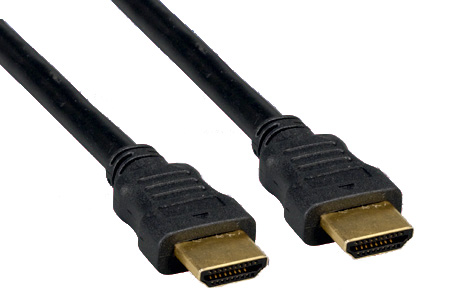
- DisplayPort / USB-C (DP Alt Mode/Thunderbolt): Common on PCs and newer laptops via USB-C. Many USB-C ports can output video using DisplayPort Alt Mode; some require a USB-C→HDMI or USB-C→DisplayPort adapter. Not all USB-C ports support video—check your device specs.
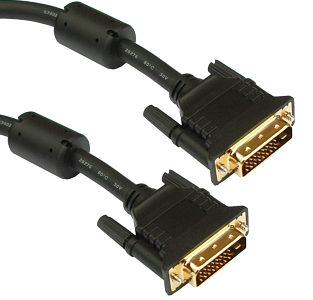
- DVI: Digital Visual Interface: Older but still seen on desktop GPUs. Works with adapters to HDMI (video only—add a separate audio cable).
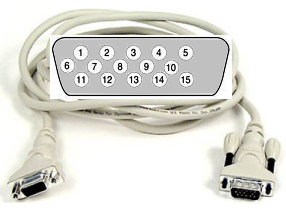
- VGA/XGA: Video Graphics Array: Very old analog connection. Image can be soft and often limited in resolution on TVs. Use only if nothing else is available (you’ll also need a separate audio cable).
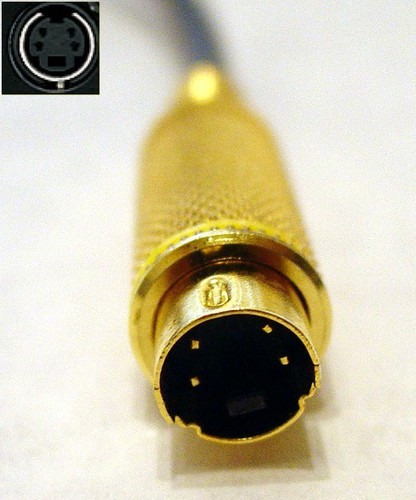
- S-Video / RCA (Composite): Legacy options only. Fine for old gear, but poor quality for text and modern content. Prefer HDMI or USB-C where possible.
How to decide which connection to use?
- If computer has HDMI and TV has HDMI – Use HDMI (video + audio).
- If computer has USB-C (DP Alt Mode/Thunderbolt) and TV has HDMI – Use a USB-C→HDMI adapter/cable (look for 4K/60 & HDCP 2.2).
- If computer has DisplayPort and TV has HDMI – Use a DP→HDMI adapter. For 4K/60, choose an active adapter that supports HDMI 2.0/HDCP 2.2.
- If computer has DVI and TV has HDMI – Use a DVI→HDMI adapter (video only) + separate audio.
- If both sides have VGA – Use VGA (last resort) + separate audio.
- Legacy mixes (S-Video/RCA) – Use matching adapters; expect low picture quality.
How To Configure Your Video Drivers:
- Windows 11/10: Connect the cable, power on TV, select the HDMI input. Press Win+P to choose Duplicate, Extend, or Second screen only. Or go to Settings > System > Display to set resolution/refresh rate and identify displays. For wireless displays (Miracast), install the “Wireless Display” optional feature and use Settings > System > Display > Connect to a wireless display.
- macOS (Ventura/Sonoma+): Go to Apple menu > System Settings > Displays to arrange screens, set resolution/refresh rate, and enable HDR if supported. For audio over HDMI, open System Settings > Sound > Output and choose your TV/receiver.
- Laptops: Many models also support a quick monitor toggle via Fn + a function key with a screen icon.
Wireless Options (when you can’t run a cable): On Windows, use Project > Connect to a wireless display (Miracast). On Macs/iPhones, use AirPlay to a TV with AirPlay-2 support or Apple TV. From any desktop browser, you can cast a Chrome tab or your desktop to a Chromecast/Google TV.
Configure Your Vista Or Xp: These legacy steps are no longer required for modern systems. Use the Windows 11/10 or macOS instructions above for current devices.
After these steps you’ll surely be having videos both on your computer and your TV set. Now its the time for audio configuration, especially if you want to connect 5.1 audio for surround sound.
How To Configure Your Audio:
- HDMI to TV/AVR: Audio is included. If you don’t hear sound, select your TV/receiver in Windows Sound > Output or macOS Sound > Output.
- USB-C/DP→HDMI adapters: Most pass audio; pick one that lists HDMI 2.0/HDCP 2.2 if you need 4K/60 & streaming app compatibility.
- Analog setups: Use a 3.5mm stereo plug to RCA pair cable between the PC’s headphone out and the stereo/TV’s AUX in.
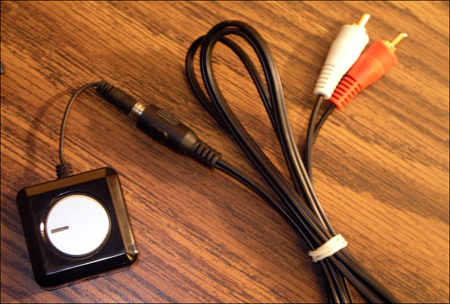
This procedure can also be applied when connecting PC to a Projector.
Quick Tips & FAQs
4K at 60 Hz & HDR:
Use HDMI 2.0 (or newer) on both ends and a certified High Speed/Ultra High Speed HDMI cable. For DP/USB-C sources, choose an active DP→HDMI 2.0/2.1 adapter that supports HDCP 2.2.
USB-C port not outputting video?
Not all USB-C ports support video. Check your laptop’s specs for “DisplayPort Alt Mode” or Thunderbolt.
Overscan / edges cut off:
Set the TV’s input to “PC” mode if available, disable overscan on the TV, or use the scaling/underscan slider in Windows/macOS display settings.
No sound over HDMI:
Pick the TV/receiver as the output device in system sound settings. Some DVI/older adapters carry video only—use a separate audio cable.
Approx. costs (typical street prices):
HDMI cable ($8–$20), USB-C→HDMI 4K/60 adapter ($15–$40), DP→HDMI 4K/60 active adapter ($20–$45), long certified Ultra High Speed HDMI 2.1 cable for gaming ($20–$40), Chromecast/Google TV or Apple TV for wireless casting ($29–$149).
Casting from Chrome:
Open Chrome → menu → Cast → choose Cast tab or Cast screen.
Now it’s all done, we hope that you wont find any difficulties connecting, but if you are, do leave your queries in comments.

It is not possible to accomplish connecting both video and audio from your computer to your TV without either a PC input on your TV or an audio/video signal combiner. The special device required for this is costly. I found a cheap one once on Amazon but it quit working after a few months and they are now, no longer available.
I have a set of computer speakers remoted to underneath my TV with simple connections from my computer. A cheap audio signal splitter will allow you to have sound at both your TV and your computer with two sets of computer speakers. They are usually on the shelf at Walmart. The audio on the cheap computer units while not as good as a quality sound bar is quite reasonable. The video is of course simplicity itself. Use an HDMI signal splitter with signal booster to connect both your TV and your PC monitor and set your TV’s or TV and monitor, for the appropriate HDMI connection. I use a 50 inch set for my TV and a 43 inch TV for my monitor. The two splitters and booster are quite reasonable. The cables about the same cost as the HDMI splitter/booster.
I am trying [in vain] to connect my e-machines desktop computer to my Panasonic Viera TH-42PX60U via HDMI out of the CPU into the TV. Neither device seems to sense the other. Any ideas?
My TV is HDMI support but my laptop is VGA,then what i do sir?
What if your TV has HDMI and your computer has VGA
I am computer dumb. All I can get on the TV it the windows logo. I am using VGA. Anybody know what to do?
Does the tv need to be on a certain channel?
I have a dell inspiron one built all in pc. so therefore no externa; video hookup port. I did buy a usb to vga adapter and a vga to rca converter box, it’s running off windows 7 and on our old toshiba tube tv it ran fine. Nothing was changed except i swapped tvs to a 30 i JVC I’art it has all the connections and i hooked it up to video 1 nothing, i hooked to video 2 nothing same for video 3, yet all 3 work on our dvd player. It does get video. HELP i think the pc isnt detecting external device
Hi.I prefer you all to connect your laptops to the TV with a wireless modem!
follow the picture!
its easy to join
Would USB to USB work?
im looking for a cable to conect my laptop to tv with sound and picture in one cable mt tv is hd and has hdmi conections tryed a hdmi cable but no sound and the picture isnt the size of yo screen its bigger than the screen aneyoune know wat the proper cable is
This has helped me understand what cables I need. But plugging them will be a another story. You have given me the guts to try. Thanks from all of us who just don’t know all this textie stuff. So envious.
Very good and very helpful article
i have connected my s-cable to both my laptop and tv and yet theres still nothing on the screen
how do i find video card to change settings on computer to transfer over to TV? when i follow these steps, once i go into advanced, how do i find the tab that corresponds with the video card? i can’t find this. any help?? Thx
Go into your “Control Panel” and load up your “Display” propertiesClick the “Settings” tab and you will probably still see one monitor depending on what type of connection you used.Click “Advanced” and then select the tab that corresponds to your “Video Card” in my case it was Geforce 6600 GT.
Here you have all the options for your card. If you are using a Nvidia card, click on n-View Display Settings, otherwise, whichever option shows you multiple display types.
I can’t get my acer aspire 6930g to recognize my second monitor hooked via hdmi to VGA cable any solution?
Ok I dont know if Im the only one with this problem but I have my Gateway desktop computer hooked up to my Samsung LCD TV via HDMI so I can watch movies stored on my PC on my TV. However, if I switch HDMI inputs on my TV to use my cable box or Xbox and then try to go back to my computer input, the screen just goes black; and it stays that way until I disconnect and reconnect the HDMI cable from the back of the TV. I have to do this every single time I switch back to my PC’s HDMI input in order for it to work. Is there any way around this??
Denton 9th here I was wrong on my last post. I have one cable with vga end and hdmi end {on my laptop vga plugs in and on my tv hdmi plugs in} I don’t have the same plugin of any kind on them both. Please can you help me? running windows 7 on pc an email would be fine if you can if not I will just check posts.
I have laptop with dvi and tv with hdmi can’t get it to worl what do i need to do
my pc has vga and tv has hdmi what should i use?
I have a laptop with VGA output and HDTV with PC-DVI input — How can I manage?
From Saravanan SMKKB,
Thanks Guys.
what are u writing
i just bought a vga to hdmi cord because my tv only has the hdmi connection and my computer only the vga but when i hook it up nothing comes up on the tv???? can you help me
how to connect my satellite box to my HP Desktop computer
pluged in my hdm1 to my lab top and tv was working fine till i turned my computer off when i restarted it my computer keeps flashing on and off .
thank you very much .
GARY!
Hi How do I connect a Sony Vaio Desktop into a flat screen tv?
how do i connect my tv to my laptop to get sound with a vga cable? do i get a jack 3.5mm cable into my laptop microphone and then the RCA into my tv?
I have an HP laptop with HDMI port and I want to connect it to my tv having only RCA ports, (3 colors- red, white, yellow).
How do I do it. Please help me.
i have hdmi to 3rca cable to connect laptop to tv but i cand do this plz help me what can i do ?
I have a Dell Inspiron Desk top with windows Vista, I hooked it up to my Samsung LCD tv HDMI to tv & DVI in computer, get very clear picture. having problem with sound, have RCA cable & hooked the r &w to tv and the other end to computer and no sound. Itried everything still no sound from TV, also had a bar speaker tried that & worked fine.
I have tried the simple HDMI from HP Presario Laptop to tv hdmi and cannot get any signal from my laptop to my tv??? any suggestions – what am I doing wrong???
I wuznt able 2 hook laptop up 2 my flat screen! can somebody plz help me?
can i connect creative inspire t6160 5.1 connect to laptops?how can i connect it ?do i need it sound card?
Its a great article and would be very significant for us before connecting our computer to TV. The methods described above will definitely help us for connection between PC to TV.
i have a sony viao and i connected the hdmi in to my tv but i cant see the movie on the tv. its playing on the laptop but not on the tv can anybody help?
I have compaq presario cq61laptop with gforce 103m graphic card I bought marai 32″ LCD hdmi capable tv I try to connect my laptop with LCD tv but no display and sound come on LCD tv please help me thanks
i will help
I have connected tv and the display is fine. I have used the stereo plug to connect audio but there is no sound. I have checked all of the common problems like mute etc. Please help
HOW DO I CONNECT MY VISTA LAPTOP TO MY SAMSUNG LED TV? I HAVE A VGA CABLE.WHAT DO I DO?THANKS
My Sony Vaio VGN-S260P is connected and displaying on a Samsung 46″ wide screen flat TV via VGA cable. I select PC as the video source on the Samsung, and then reboot the laptop so the connection is made. My O/S is WinXP and the Vaio has 1GIG RAM, and a Mobility Radeon 9200 video card. However, the TV screen flickers every 8 secs or so. The Vaio only has 60mhz refresh rate, and I set it to the highest setting of 1280×800 (32-bit color). If there are Samsung settings to modify, I haven’t found them yet. Any suggestions to remove the flickering?
Hello, so I followed the directiong for hooking up myacer laptop with hdmi to my lg lcd, but when I plugged the hdmi to my acer it flickered and flashed, and went crazy. So am I correct in asuming that it will not work? I only have hdmi and vga hook ups on my acer no s video. any advice?
@evelyn – DVI only has video. You will need a separate cable to connect the headphone port to your tv or have a tv with HDMI
Hey .. I brought a HDMI to DVI cable, and connected it.. I was told that if I get this cable.. I will be able to connect my laptop to my tv and I will get both audio and video. However I only get video no audio? Please help thank you.
Hello !
I have a problem to connect my laptop (acer aspire 6930) to my new flat-television (philips serie 5000 LCD)… The HDMI cables are ok and I have done all the things you’ve said on the panel control but there’s still nothing on my tv screen… Can you help me please ?
i m not been able to connect to my laptop computer to my sharp tv. I bought HDMI cord, but still no picture help me
hey, What if you connect the DVI and HDMI-DVI cord but all that shows up on the T.V. screen is the purple background the apple has what do i do??? very confused!!!
yes
i have dell tower computer and i want to connect with tv… how i can get display of computer on tv…i have samsang 29″ tv.. having much pins behind tv.. plz anyone help me and mail me
zaibutt115@yahoo.com
Thanks
zaigham
i HAVE JUST HAD THE SAME PROBLEM YOU NEED TO GET A DVI TO VGA LEAD YOU CAN GET IT FROM AMAZON VERY CHEAP THIS WILL WORK
Hi, this is Daniel North.Wow! This post is really very appreciable. your post is very advantageous for me and very good. It is very easy to set up the connection between your PC to your TV and can be done very cheaply, and in some cases free. The cost only comes in with cables and adapters which are cheap. It should be possible for everyone to achieve for well under $100. This post will cover the procedures of connecting your computer to your television. We will cover lots of different scenarios so I hope by the end of this article, you’ll able to achieve this goal.
=====================================
Daniel North
I connected my computer to my LCD TV and everything worked fine on its own without changing any settings. A few hours later the screen on the TV started going funny and now my TV doesn’t work with my HDMI connected to my computer or PS3. The TV a Sharp 42″ Aquios still works for cable and the computer a Dell laptop still works. Is it my HDMI cable that went bad or something more? Any help would be greatly appreciated.
I’m connected – thank you!!
Great display medium for my Seychelles honeymoon pictures!
I have video when I take the cable that connects my monitor to my hard drive and connect to my TV. However, there is no sound. What should I do?
I got a acer desktop computer Windows Vista Home Premium and my tower has a HDMI output to plug in hdmi into my computer.When I go to sounds it obviously says not plugged in Nvida HDmi Output cause obviously I don't got the cable yet.I am wondering if my video card is already built into my computer which it looks like it is but can't tell.So my question to you is if I got a HDMI cable and plugged it into my pc tower and then plugged it into the back of my tv do you think it would work?
Hi, Thanks for a nice post and good knowledge, sometimes I am really confused when I have to work with many types of adapters, this guide is terrific.
i have a laptop with hdmi port and want to connect it to a tv with only rca port(3 coloured red,white,yellow)how do i do it
I have a VGA on my laptop and a HDMI on my tv, can i connect with a VGA/HDMI cable and will that send audio? Or do i need an addtional 3.5mm Y connector to send audio from the headphone jaack on the laptop to the audio inputs on the TV?
Pudiera conectar mi pc al dvd y hacer la conexion del dvd al tv, la pc tiene salida hdmi mas no el tv por eso intento hacerlo utilizando el dvd ya ke este tiene tanto el hdmi como el rca que es la entrada que tiene el tv, es posible hacer la conexion
my video card settings dos not have a multi screan tab and i dont no how to forc it to detect my tv pleaz help
my computer is a 2006 hp with xp and the video card is a
ATI MOBILITY RADEON Xpress 200 Series
also i am using a s-video to aux cord it has s-video and sound jak on one side and the three collor red whit and yellow on the other
and it will let me hook the computer to my other tv but it has a s-video to s-video
so pleaz help if you can
my video card settings dos not have a multi screan tab and i dont no how to forc it to detect my tv pleaz help
my computer is a 2006 hp with xp and the video card is a
ATI MOBILITY RADEON Xpress 200 Series
my laptop has hdmi output and the tv has s video. how is posible to put them connected. thenk you.
Update: My television ALSO has component connectors (in addition to DVI-D & S-video)
My laptop has VGA and my television has DVI Input and S-video. Is there a way to hook my laptop to my television to watch movies through the DVI Input on the television?
Thank you so much for your help
My laptop has VGA and my television has DVI Input and S-video. Is there a way to hook my laptop to my television to watch movies through the DVI Input on the television?
Thank you so much for your help
hello…how do you connect a Compaq presario c714nr that has I believe an “Intel 965 Express Chipset” video card to a tv/over-head and so on incase of a presentation?
Hope it is possible and that I don’t need to upgrade anything.
Please let me know…
also, try looking at this website. its awesome!
http://diamondcase.com/Knowledge/Knowledge_HTML/PC_On_TV.HTML
Amazing site! love the easy layout
I have an Acer Extensa 4420 and I wanted to connect it too my HDTV. I have a 7 port s-video that are for both tv and laptop. Can you help me with the step by step directions of how to connect the two. Thank you.
really
oh yes please i would like m……… i know
Hi,
I have an Acer Laptop with S-Video output and an television with RCA and DVD COMPONENT in (i.e the 3 coloured cables)input. Is there any way to connect the laptop to the TV??? If so how? please help.
Machine Configuration is
Acer Aspire 5052AWXMi, ATI Radeon Xpress 1100 chipset
hey there.. nice guide.
my tv has 3-pin rca input, while my laptop has a 7-pin s-video output. i got a cable which connects to both, but all i see on the tv screen is a lot of flicker and some windows components (like the start button etc.) flying by… any help would be greatly appreciated.
Thanks for the info! I’ve been wanting to do this for some time. I enjoy your site.
I am able to get the video when I connect via HDMI from my Sony Vaio laptop to Plasma TV but no sign of audio. Am I missing any config on laptop??? Any help would be appreciated
yes i would like to help
i am not able to hear any thing from my t.v when i connect my laptop to my lcd using hdmi cable although i can see the video .are there any settings i need to do in my laptop,,plz tell
hahahahahha that is really funny
ok ok i wont be funny again my brother djessi and rory went out to go to leeds to go shoping
i got it now
i understand now
i know all of it now i will tell you tomorow
change email
aaaaaaaaaaaaaaaaaaaaaaaaaaaaaaaaaaaaaaaaaaaaaaaaaaaaaaaaaaaaaaaaaaaaaaaaaaaaaaaaaaaaaaaaaaaaaaaaaaaaaaaaaaaaaaaaaaaaaaaaaaaaaaaaaaaaaaaaaaaaaaaaaaaaaaaaaaaaaaaaaaaaaaaaaaaaaaaaaaaaaaaaaaaaaaaaaaaaaaaaaaaaaahhhhhhhhhhhhhhhhhhhhhhhhhhhhhhhhhhhhhhhhhhhhhhhhhhhhhhhhhhhhhhhhhhhhhhhhhhhhhhhhhhhhhhhhhhhhhhhhhhhhhhhhhhhhhhhhhhhhhhhhhhhhhhhhhhhhhhhhhhhhhhhhhhhhhhhhhhhhhhhhhhhhhhhhhhhhhhhhhhhhhhhhhhhhhhhhhhhhhhhhhhhhhhhhhhhhhhhhhhhhhhhhhhhhhhhhhhhhhhhhhhhhhhhhhhhhhhhhhhhhhhhhhhhhhhhhhhhhhhhhhhhhhhhhhhhhhhhhhhhhhhhhhhhhhhhhhhhaaaaaaaaaaaaaaaaaaaaaaaaaaaaaaaaaaaaaaaaaaaaaaaaaaaaaaaaaaaaaaaaaaaaaaaaaaaaaaaaaaaaaaaaaaaaaaaaaaaaaaaaaaaaaaaaaaaaaaaaaaaaaaaaaaaaaaaaaaaaaaaaaaaaaaaaaaaaaaaaaaaaaaaaaaaaaaaaaaaaaaaaaaaaaaaaaaaaaaaaaaaaaaaaaaaaaaaaaaaaaaaaaaaaaaaaaaaaaaaaaaaaaaaaaaaaaaaaaaaaaaaaagggggggggggggggggggggggggggggggggggggggggggggggggggggggggggggggggggggggggggggggggggggggggggggggggggggggggggggggggggggggggggggggggggggggggggggggggggggggggggggggggggggggggggggggggggggggggguuuuuuuuuuuuuuuuuuuuuuuuuuuuuuuuuuuuuuuuuuuuuuuuuuuuuuuuuuuuuuuuuuuuuuuuuuuuuuuuuuuuuuuuuuuuuuuuuuuuuuuuuuuuuuuuuuuuuuuuuuuuuuuuuuuuuuuuuuuueeeeeeeeeeeeeeeeeeeeeeeeeeeeeeeeeeeeeeeeeeeeeeeeeeeeeeeeeeeeeeeeeeeeeeeeeeeeeeeeeeeeeeeeeeeeeeeeeeeeeeeeeeeeeeeeeeeeeeeeeeeeee
i got it
@ Brain
It is very simple, Just buy a DVI to HDMI cable to connect your apple computer to Television (obviously with HDMI imports). And you are done !
I have hooked my apple laptop up to my tv and when I do so my desktop shows up on the tv but when I start the dvd it doesn't start playing on the tv. can you help?
Hello, how do you connect a imac 9.0 OS computer to a flat-screen television, please email me steps on how to do this, if there is a way, thankyou….!
Brian-
thats all
I found your site on technorati and read a few of your other posts. Keep up the good work. I just added your RSS feed to my Google News Reader. Looking forward to reading more from you down the road!