Root Any Android Device And Samsung Captivate With Super One-Click App
In case you were looking for a single click root for virtually every Android device, then there is some good news for you. Senior XDA member, CLShortFuse has recently posted a Super One Click Root utility app that not only allows you to root your Android handset but also gives certain useful options like Allow Non Market Apps as well as phone unlock code delivery. This application has been hailed by many of XDA members in the thread and according to app creator:
…I made it. I tested it. It works…
Apart from universally rooting several Android handsets, SuperOneClick provides a single click root for Samsung Captivate on Android 2.2 Froyo as well.
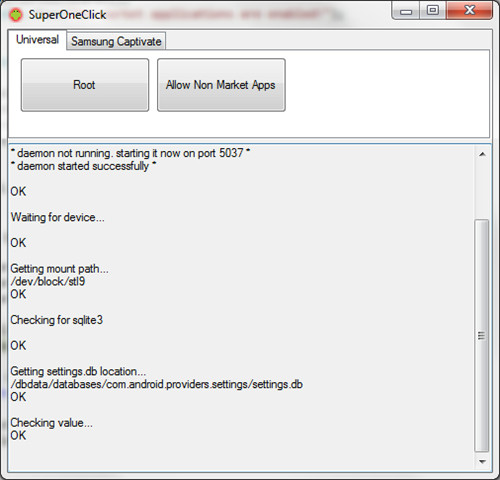
Here is the step by step guide on rooting your Android handset / Samsung Captivate with Super One Click Rooting Application.
This app needs .Net Framework 2.0 or higher to operate.
- The first step is to download Super One Click Root App and save it on your desktop.
- Once this is done, connect your phone to the computer. it is important to note that after connecting the phone, you must not mount SD card.
- Now go to phone settings and enable USB Debugging.
- Once this is done, launch SuperOneClick.exe by double clicking.
- Now click on Universal tab on screen if you are going to root any Android device like Nexus One, Galaxy S, Droid etc. Click on Samsung Captivate if that’s you phone.
- Now simply click on Root tab and wait for the process to finish. It will take some time so hang in there.
- After the rooting is complete, click Allow Non Market Apps if you need to.
There you go! you now have a rooted handset ready to accept any custom ROM.
Please note that:
- Sprint EVO 4G (HTC Supersonic)
- Droid Incredible (HTC Incredible)
- HTC Desire GSM
- HTC Desire CDMA (HTC BravoC)
- HTC Aria
- Droid Eris (HTC DesireC)
- HTC Wildfire (HTC Buzz)
will only have a single level root with this app and you will only be able to allow non-market apps after root. You can use UnRevoked One Click Root for these devices in order to gain complete tier rooting access of the device.
Here is a video tutorial on deploying Super One Click root on Android devices:
Reference Links:

very good
Hi,
Is it still possible to get superoneclick anywhere as the link does not work?
Cheers Fritz
is mono really needed to run this little “scripter” ?
I am unable to root my lg p350 phone with any of the methods as stated above..
what should I do in such a case??
will it work on micromax canvas hd??
Is it safe and does it work for Lenovo IdeaTab S2109A-F?
I wish the hacker group anonomous would give the manufactures hell untill they make all their smart phones and tablets rooted out of the box reguardless if I buy from a retail store or by ordering it.
Of course theres supper one click is not avalable to download. If you say it is please show me the direct link thats not a dead link.Also I dont want to be sent to an unrelated site.
Will any SD card do(do they mean the micro sd card or the sim card)? If they mean the micro sd card,I am missing mine,but have a blank one.Will it work? I have a T-Mobile Samsung Galaxy S(SGH-T959V) with Firmware 2.2.1 and Kernel version 2.6.32.9 Build# Froyo VUVKD1
Does this work for Acer iconia a501
dose this work on galaxy note 10.1
Hi i want to Root my IDEOS U8150, Will it work on that. My Smartphone is not Unlocked? Will it unlock it as well?
link is broken or file
I must be a dummy cause I’m so lost. I need. Help
I noticed these comments are from a long time ago. If i try rooting my phone is someone gonna reply if i need help with it? And do you kno if the LG marqee is compatable with this program?
waiting for device, , , what am i suppose to do, now? also, when i went to setting, it said serial number, not available. does this have anything to do with my rooting issue?
i’ve got a problem with superoneclick. it sees my phone, okay, whatever, but it always gets stuck running psneuter. it won’t go any farther. i’ve been sitting here waiting for it to do something, but nothing is happening. samsung transform ultra is the phone. please help!
Awesome. Just rooted the Pocketboock A10 (Foxconn) Tablet.
How come the lg optimus is never mentioned?
Both sites (this and its referred link) are a waste of time. Zip file is
USELESS. Just a ploy to get you to sign up to file server. HOW STUPID
ARE THEY? You’d think the first file you get from the site would be
intact and usable.
the author says he wrote it? BIG DEAL. No good to anyone, when then find the ZIP IS Corrupt.
I want to root my sanding i500 running 2.3..how would I do that.
I won’t to root xperia arc s..but, I don’t now how to use what super one click version to root my arc s..please help me
has anyone rooted an htc thunderbolt? if so does this method work for it?
hmmm it takes too long imo .. im waiting for it like 15 minutes and still “Running psneuter”
I am trying to use SuperOneClick to root my Optimus V. I enable bugged and unmounted my SD card. I’m not too familiar with the SDK manager. Do I simply have to have it open? Any packages I try to install on it fail. I have Java SDK installed also. When I click root, it stops at “Shell root step 3” and never fully finishes? What am I doing wrong? I feel like I am not following the steps for “running SDK” correctly. Thanks.
In my device it didn’t work! I’ve researching in a lot of website, but unsuccessfully.I have a hsg -x6. If anyone knows hot to root this model. Please post!
when it gets to ‘ waiting on device ‘ . it says not responding .
please help!!!!!everytime i do it it works untill it said ‘waiting for the device’ then if i click it it says ‘not responding!!!!!’ please help!!! i really want to root my phone!!! btw i have a HTC Wildfire S. <3
um how long does it usally take when you click on the root tab how long does it usally take anyone that has donr it can you please anwser my question
Ok, I tried rooting my Galaxy Prevail, but it says it doesn’t have drivers installed. what do I do? Allow it?, please let me know ghostofdragons@gmail.com
I’ll root my Galaxy Gio in a moment, and i’d like to know, if I’ll be able to “update” to at least an optimized version of Ice Cream Sandwich?
Will this work on a casio comando gz one android phone?
Will this work on a casio comando gz one android phone?
I am getting a message Deamon not running start on port 5037, how do I do that?
Thanks ,I have rooted my galaxy I5510 without any problem
Im trying to root my mytouch 3g but it says waiting for device 🙁
Is there a procedure fo t mobile g1
Samsung Mesmerize hangs on step 7 “waiting for device” The other steps work great it seems.
Worked for my mini xperia pro running 2.1-update1 firmware! thanks so much ! now just need to figure out how to get a custom rom onto it.. and how to install apps 2 sd…
Security Essentials found a virus in the root file and wouldn’t let it run.
Using 2.2 version when trying to root Samsung Captivate running 2.2 Froyo, 3 different attempts left the app stalling and locked up at Step 7 ‘wait for device’. I then downloaded and tried 2.1.1 and everything went off without a hitch.
BTW: Using Viewer 7; Windows 7
Waiting for device…zzzzzz….crashed. Fail.
Hi… is it need samsung usb driver GT i5700 to install? i just choose USB debugging mode and “new hardware found ” message appears on the screen… I never use the cd driver & its already lost..
please some advice…
My verizon galaxy tab wants to run software update, will it screwup my root?
can someone help me.
i just bought a new, acer liquid e ferrari edition.
my problem is, what do i need to root it. or a link that can show me how to root it.
please sir..
and i’m having a problem with the battery, it easily wears off. what can i do to make it last longer…
please reply.
thanks in advance
Went as far as “Getting Mount Path” and hung. Tried removing SD card too. Same result.
Samsung Replenish
will this work with the huawei ascend from metropcs
Any know what to do after this? MY screen stays on this
Starting ADB Server…
* daemon not running. starting it now on port 5037 *
* daemon started successfully *
OK
Waiting for device…
OK
Pushing rageagainstthecage…
30 KB/s (5392 bytes in 0.171s)
OK
chmod rageagainstthecage…
OK
Running rageagainstthecage…
OK
Killing ADB Server…
OK
Starting ADB Server…
* daemon not running. starting it now on port 5037 *
* daemon started successfully *
OK
Waiting for device…
OK
Running rageagainstthecage…
ROOTED
Getting mount path…
Will superponeclick work on a phone with no andriod OS (samsung gt-s5620 – monte)
I have successfully rooted my XPERIA X10 mini pro…but dunno how to use it, how do i go about it?? and make my phone app free
Now that i have successfully rooted my Xperia X10 mini pro, using SUPER ONE CLICK, i cant understand how to use that, how do i go about and make my phone app free? when i am clicking on the app it is showing NO APPS IN THE LIST, so how do i add apps there??? PLEASE HELP !!
Just got a samsung galaxy precedent… It runs on a 2.2 froyo. Does anyone know if rooting works for my device it has very little memory and i dont want to mess it up…
It works also for lg-540 updated to android 2.1 but you must select ragegaint… option in the exploit checkbox.
‘Remounting /system with read-write access…
mount: Operation not permitted
FAILED’
how to solve this problem
how to solve this problem
after this message i rebooted my phone same thing comes again and again
“Remounting /system with read-write access…
mount: Operation not permitted
FAILED”
All,
How did you overcome the following:
“Remounting /system with read-write access…
mount: Operation not permitted
FAILED”
Thanks
Can I root my Xoom wifi? answers pls to tinaag [arroba ] gmail. com
will this work with a tablet running 2.1?
this works amazingly. i have been trying forever to sideload apps on my samsung captivate, this made it so much easier.
I have followed the instructions and the process stalls on step #6. Any ideas? Up to that point each step seem to complete with the message “ok”
yes, Yes, YES! Finally something that actually works! I wasted 3.5 hours trying to root my Froyo 2.2. Galaxy S (US T-Mobile) with no measure of success at all. I gave up on that crap and spent 45 seconds with Superoneclick and I’m rooted! Its super simple, and it works. Thank You!
I can’t root my phone wit universal root as failed to root ~~no fu goo~
~ this message appeared
I installed it said root and it worked well but later i reset my phone and installed it again after that it says rooting and but not rooting but rebooting and i am unable to delete super user from my phone tell me how to uninstall it.
Can you please provide a guide for the Sanyo VIO.
Thank you
Rooted Samsung Captivate with Android 2.2. Worked like a charm, once I had the Android drivers and .NET framework installed. The tethering app works fantastic too.
Once I got all the AT&T bloatware removed, the phone got a lot more responsive and faster.
Thanks so much, guys. You’re awesome!
DO NOT DOWNLOAD!! IT DOES NOT WORK!!
IT IS NOTHING BUT SHIT
Can a Pantech Mirach IM-A690L on Android 2.2.1 be rooted using this method? My searches have yielded no results.
“Please scroll to the bottom of our procedures” What is that and where do I find it?
Works fine with Xperia X10 mini pro, thx!
How can I install apps to my Sd-card instead of the phone memory?
Pls e-mail me: acs.zsuzska@gmail.com
i got this??
SuperOneClick v1.6.5.0
***Requires root permission! Watch your phone to allow Superuser commmands***
Killing ADB Server…
OK
Starting ADB Server…
* daemon not running. starting it now on port 5037 *
* daemon started successfully *
OK
Waiting for device…
OK
Checking for sqlite3
Pushing sqlite3…
cannot stat ‘C:\Users\Tim\Desktop\SuperOneClickv1.6.5-ShortFuse\sqlite3’: No such file or directory
OK
chmod sqlite3…
Unable to chmod /data/local/tmp/sqlite3: No such file or directory
OK
Getting settings.db location…
/dbdata/databases/com.android.providers.settings/settings.db
OK
Checking value… (requires root)
Could not run command with ROTC root.
FAILED
scratch that got it now
i was trying to root my lg optimous however when i did the root it fails any sugestions
Now what I want to know is will this work with a Verizon Incredible 2 with 2.2.1 Froyo?
cannot get the unlock code for my captivate…it always fails… :-/
The problem is , the SuperOneClick gose to not responding even befor i plug in the phone , witch is wierd , no ?
this terrible program locks up every time i try to use it
Says “Not Responding” after “waiting for device”?????
Help please.
Success after downloading drivers from PDA.net. How ever so SU icon nor do i have SU permission. Any help with this? On a Samsung Galaxy Indulge (metropcs) SCHr910 2.2.1
Super One Click program keeps saying “not responding” when it gets to waiting for device. I tried it a couple different ways, with and without mounting, ensuring usb debugging was enabled. Not sure what I’m doing wrong. I’m running a Captivate with the leaked 2.2.
download the drivers for your phone to your PC. Helped me get passed that. Used pda.net.
What drivers are you talking about? I have a samsung captivate the website only shows me sponsored links.
same thing
My Dell Streak is use Android 2.2 with :
Baseband : GAUSB1A131800-EU
Kernel : 2.6.32.9-perf
Build : 12821
is success to ROOT !!!!
i got the way to root in here : http://forum.pocketables.net/showthread.ph…9182&page=2
with this step :
This is what worked for me. On Dell’s 318 Build. I put debugging on, turned off my Streak:
1. Get a copy of Super One Click 1.7.0
2. Turn off Phone
3. Start Super One Click BY RIGHT CLICKING ON THE PROGRAM AND SELECTING “RUN AS ADMINISTRATOR”
4. When the program starts, check rageagainstthecage exploit
5. Click Run in Super One Click (do NOT turn the phone on yet)
6. When Super One Click says “waiting for device”, plug in phone and turn it on
7. Wait for a while while the phone boots up. Tons of messages will go by. Sometimes it looks like it is hanging. It is not
8. Finished! You should be nice and rooted.
After 3 days finally i finished “How to root my Dell Streak Android 2.2 build 12821”
Hopely this can be help the other whom not yet success to root Dell Streak.
This is the process :
SuperOneClick v1.7.0.0
Killing ADB Server…
OK
Starting ADB Server…
* daemon not running. starting it now on port 5037 *
* daemon started successfully *
OK
Waiting for device…
OK
Pushing rageagainstthecage…
35 KB/s (5392 bytes in 0.147s)
OK
chmod rageagainstthecage…
OK
Running rageagainstthecage…
OK
***IF IT KEEPS LOOPING, TRY DISABLING USB DEBUGGING NOW***
Killing ADB Server…
OK
Starting ADB Server…
* daemon not running. starting it now on port 5037 *
* daemon started successfully *
OK
Waiting for device…
OK
Running rageagainstthecage…
ROOTED
Pushing busybox…
2144 KB/s (1062992 bytes in 0.484s)
OK
chmod busybox…
OK
Getting mount path…
/dev/block/mtdblock6
OK
Reading OS Version properties…
Version: 2.2
OK
Remounting system with read-write access…
OK
Pushing su-v2…
312 KB/s (26264 bytes in 0.082s)
OK
chmod su…
OK
Creating /system/xbin…
mkdir failed for /system/xbin, File exists
OK
Copying busybox (/system/xbin/)…
OK
chmod busybox (/system/xbin/)…
OK
Installing busybox (/system/xbin/)…
OK
Pushing Superuser.apk…
1523 KB/s (196521 bytes in 0.126s)
OK
Remounting system with read-only access…
OK
Running a SU test…
Success!
I got many errors but it still worked for my Captivate 2.2
First I did
Universal: Root
Universal: Allow non market apps
(reboot phone)
Samsung captivate: unlock code
all my root required apps work and I get Amazon AppStore to work 100% so far . . . only if it would make the Netflix app stream videos 🙂 but I can dream can’t I
Website says that the site is unsafe. Viruses???
Anyone try this on the thunderbolt yet?
dear sir please help me me root HTC wildfire to super onclick roo but dhis messege
I ‘m was using stock Wildfire ROM 2.1 which I bought from india and i recently upgraded it to stock 2.2 with the update, now I want to root my phone, I decided to give super one click a try, for that i installed .net framework 3 and did whatever was required, below are the status messages that I get on my super one click app on my computer while doing so and I got stock after that, it reboots automatically but no super user icon , Please somebody help me, below are statues:
SuperOneClick v1.7.0.0
Killing ADB Server…
OK
Starting ADB Server…
* daemon not running. starting it now on port 5037 *
* daemon started successfully *
OK
Waiting for device…
OK
Pushing psneuter…
762 KB/s (585731 bytes in 0.750s)
OK
chmod psneuter…
OK
Running psneuter…
OK
***IF IT KEEPS LOOPING, TRY DISABLING USB DEBUGGING NOW***
Killing ADB Server…
* server not running *
OK
Starting ADB Server…
* daemon not running. starting it now on port 5037 *
* daemon started successfully *
OK
Waiting for device…
OK
Running psneuter…
ROOTED
Pushing busybox…
651 KB/s (1062992 bytes in 1.593s)
OK
chmod busybox…
OK
Getting mount path…
/dev/block/mtdblock3
OK
Reading OS Version properties…
Version: 2.2.1
OK
Remounting system with read-write access…
OK
Pushing su-v2…
failed to copy ‘C:\Documents and Settings\C03\My Documents\Downloads\SuperOneClickv1.7-ShortFuse\su-v2’ to ‘/system/bin/su’: Out of memory
OK
chmod su…
Unable to chmod /system/bin/su: No such file or directory
OK
Creating /system/xbin…
mkdir failed for /system/xbin, File exists
OK
Copying busybox (/system/xbin/)…
cp: can’t create ‘/system/xbin/busybox’: Cannot allocate memory
OK
chmod busybox (/system/xbin/)…
Unable to chmod /system/xbin/busybox: No such file or directory
OK
Installing busybox (/system/xbin/)…
/system/xbin/busybox: not found
FAILED
ro.product.brand=htc_asia_india
ro.product.model=HTC Wildfire
ro.build.id=FRG83D
ro.build.date=??? 12??? 8 03:04:05 CST 2010
ro.build.date.utc=1291748645
ro.product.device=buzz
net.enable.prefer.apn=1
ro.build.version.codename=REL
ro.ril.disable.fd.plmn.prefix=23402,23410,23411
ro.product.cpu.abi=armeabi
ro.build.tags=release-keys
ro.product.manufacturer=HTC
ro.com.google.clientidbase=android-htc
ro.product.name=htc_buzz
ro.build.user=root
ro.build.type=user
ro.build.host=AA105
ro.build.version.sdk=8
ro.ril.oem.ecclist=100,101,102
ro.product.board=buzz
ro.build.display.id=FRG83D
ro.ril.gprsclass=12
ro.ril.hsxpa=1
ro.product.locale.language=ldpi
ro.ril.hsdpa.category=8
ro.build.version.release=2.2.1
ro.ril.enable.sdr=0
ro.build.version.incremental=299250
ro.ril.enable.a52=0
ro.ril.enable.a53=1
Thanks! Very easy! Wished DIS/G/LF was like this. Thanks again!
Great ..thanks…everything worked great. I had just upgraded to android 2.2, because I can not wait for the att supposed update. Anyway, rooted fine on my captivate. I know it works, because i have root explorer app running now.
Phil
dosent work and when its looping i undo the debugging and the page says notresponding ? any help please just email me or somethin. ASAP
while rooting optimus s it reads; reading OS version properties any other issues like this one please help
THIS WORKED AMAZING! I am an Android first time user and this was by far the easiest way to do it! THANKYOU SOOOO MUCH!
hensobla: Is your Android a Captivate…if not, what is it. I just loaded Froyo on my Captivate, and I want to root it with SuperOne-click…but am worried about compatibility problems. Clue me in, please.
this is the best way to root in the world i got a stock mt3g didnt clear nothing or have to do anything and it rooted just well it said something about if it keeps looping press debugging now so i let it ride one more time and everything was great now to start the over clocking 🙂
I get this message while trying to root:
Pushing su…
failed to copy ‘C:\Users\Merce\Desktop\SuperOneClickv1.5.5-ShortFuse\su’ to ‘/system/bin/su’: Out of memory
Is that memory issue a problem in my HTC Tattoo? How can I fix it?
Thanks
so, while trying to root, I get this. It says “rooted”, however when I unplug and reboot, it’s not rooted.
Killing ADB Server…
OK
Starting ADB Server…
* daemon not running. starting it now on port 5037 *
* daemon started successfully *
OK
Waiting for device…
OK
Running rageagainstthecage…
ROOTED
Getting mount path…
me toooo
I have a Captivate running the leaked version of 2.2. When trying SuperOneClick, this is what I get:
Killing ADB Server…
OK
Starting ADB Server…
* daemon not running. starting it now on port 5037 *
* daemon started successfully *
OK
Waiting for device…
OK
Preparing to copy nv_data.bin to sd…
OK
Copying nv_data.bin to sd…
/efs/nv_data.bin: Permission denied
FAILED
Suggestions?
Just ran into this problem today, also running the leaked 2.2 for captivate. Got the same exact error, I followed the instructions above exactly, put in into debugger, then plugged it in, then i rooted it through the universal one click, rather than the captivate specific, worked fine. I know you posted this a while ago, but hope it helped anyway
i’m having the same problem have you figured anything out about why its doing that becasue ive not been able to find anything out on why its doing it
will this work with the verizon fascinate?
Does this work with latest Samsung S i9000 Froyo upgrade XXJPP?
hello , i rooted my x10i and was work fine but after reinstall my mobile software i try to root again but not work , i run titanium on my mobile but fail to access root .. please somebody help…
have the same problem on my samsung s5830
I rooted my droid x with this method but i had to extract the zip file on the root of my sd card and run it from my cd card The directions say do not mount SD card but It still worked, I am rooted, but i was wondering what happens if you mount the sd card? Would I still be able to unroot later on? This was the only way to root, it would not let me root my phone without mounting sd card. Can someone plz help?? Plz email me @ alexdiaz973@gmail.com
Thanks
It was a typo. He meant do not unmount SD card, doing so would cut the rooting short, probably crashing your phone and damaging the OS. You can only root with the SD card mounted.
Thanks for the details. I would like to root my Samsung Galaxy i7500. And also like upgrade my current firm ware 1.5 to a better one. Please help me
hi i just used this to root my sonyerricsonx10i on android 2.1 on 13/02/2011
it worked first time with no probs 🙂
cheers for making this 🙂
I can’t get it to work with my x10, it won’t pick up the device, any tips? Can’t find a setting to enable usb debugging.
go to “apps/development and there it is
^^