Root Samsung Galaxy Spica i5700 With LeshaK’s Kernel
As promised, I am back with a complete, step-by-step guide to rooting Samsung’s Galaxy Spica/Lite/Portal i5700 Android handset, using LeshaK’s Kernel Spica v.LK2.02. Not only is this root easy without any complex commands, but also it brings nicety such as full root, su+Superuser, support for ext2, ext3 and ext4 SD card partitions, recovery mode, etc.
A few things before I begin with the walkthrough. First, the whole credit for this guide, the kernel used and everything else goes to LeshaK, the administrator of Samdroid forum. I have just simplified his guide for average users, since most of the forum is in Russian. Second, this guide assumes that your device is running on firmware 2.1, any version above JC3, and you know how to use Odin. If you want to know how to upgrade your firmware, check out our 2.1 update guide for Spica.
Third, this guide also assumes that your Samsung Android drivers (USB modem and Composite device) are properly installed, and that you have Android Debug Bridge (adb) properly configured. If not, check our the 2.1 update guide for drivers, and tutorial for setting up adb.
Please remember that any modifications to your firmware are potentially dangerous, and while they reward greatly, you must proceed at your own risk. If you don’t know what you are doing, it is advisable to avoid rather than having a bricked device. You have been warned!
This process will not delete any of your files or settings, both in SD card and internal memory.
Without further ado, here’s how to gain root and flash LeshaK’s kernel 2.02.
To begin with, download these two files.
- (https://www.addictivetips.com/app/uploads/android/samsung/galaxy-spica/LK2-02-1_update.zip) LK2-02-1_update.zip
- (https://www.addictivetips.com/app/uploads/android/samsung/galaxy-spica/i5700_LK2-02_PDA.zip) i5700_LK2-02_PDA.zip
Also download the Odin Multiloader for Android here if you don’t have it already. You need the spica_jc3.ops file for this guide, which we have bundled with Odin.
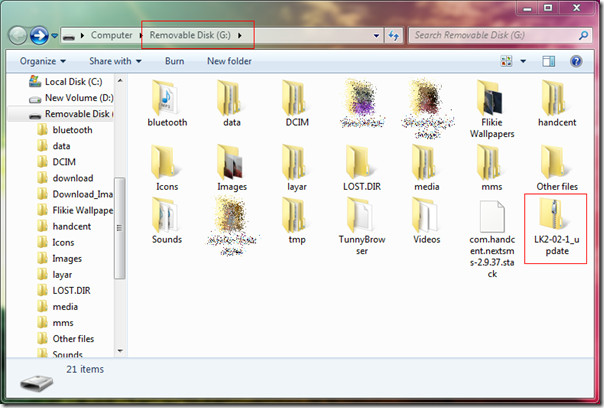
Mount your SD card, and place LK2-02-1_update.zip in the root of SD card (it should be inside the root folder of the card, not any subfolder). See the screenshot below.
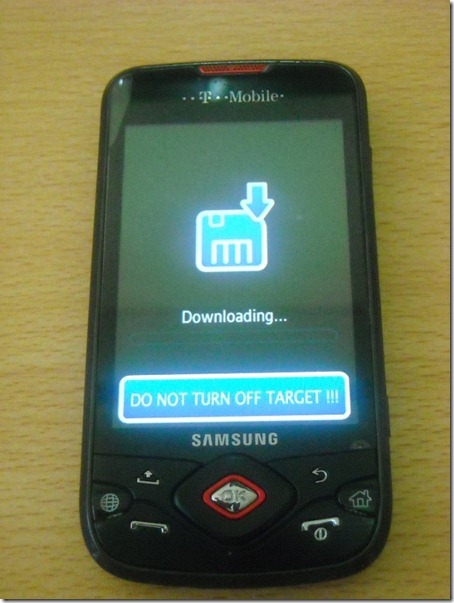
Unmount the SD card in Windows, turn phone off and remove your SIM card just to be safe. Let the SD card remain inserted, and put the device in Download Mode by pressing and holding Volume Down + Camera + Call End keys. The phone screen should look like this:
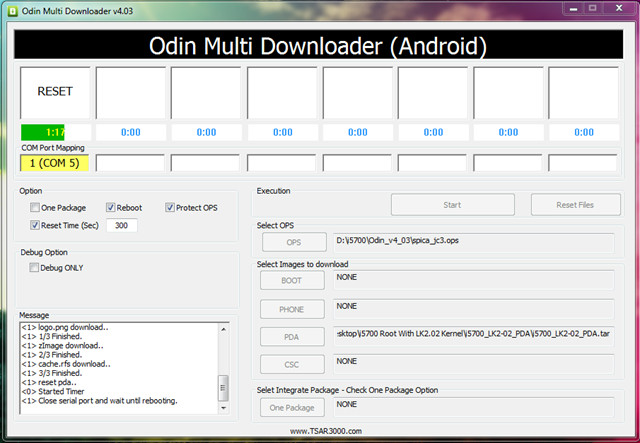
Your phone should not be connected with the PC at this time via USB cable. Run Odin as administrator, and load the extracted i5700_LK2-02_PDA.tar file as PDA in Odin. Load spica_jc3.ops as the OPS file. You may need to click Reset Files once before Odin will clear previous settings. Make sure your selections match the screenshot below.
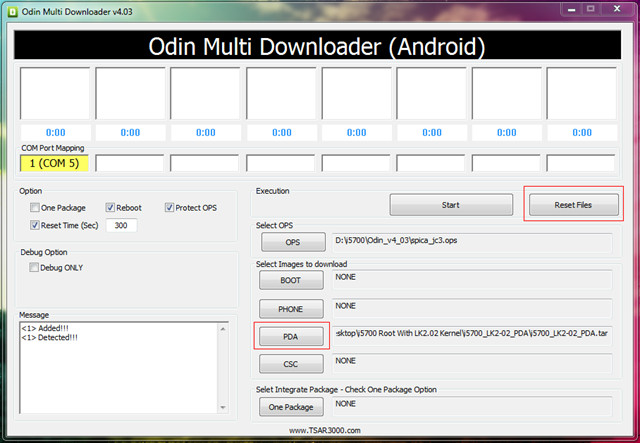
With your device in Download Mode, attach it to the PC via USB cable. The message box will now show the Added and Detected message, as shown above. If all is set and handset has been detected, click the Start button to begin flashing the new kernel to the device.
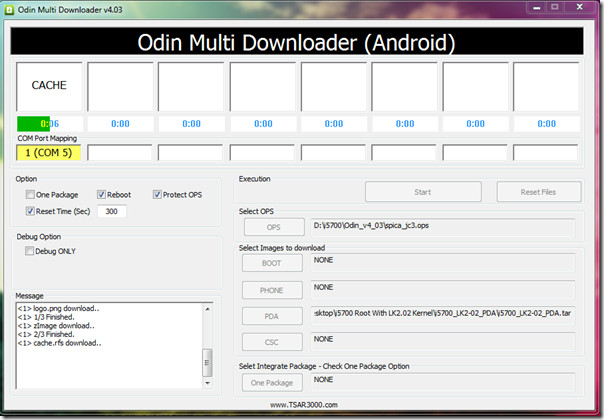
Wait for the flash to finish until the following screen appears. The device will reboot during this time and enter recovery mode.
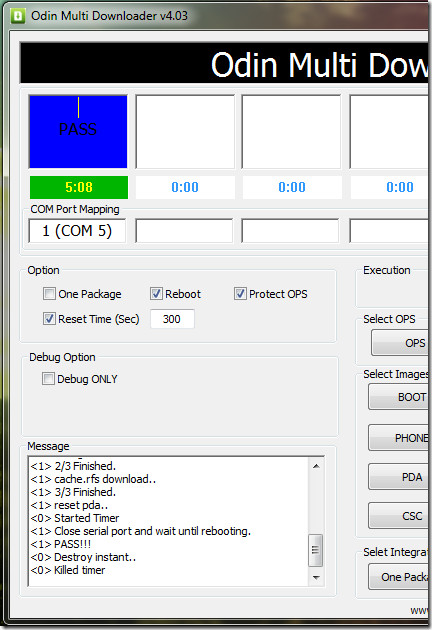
To be safe, wait for the process to finish entirely, which shall be indicated by a ‘PASS’ replacing the ‘RESET’ message.
Meanwhile, your phone’s screen will be showing the following image.
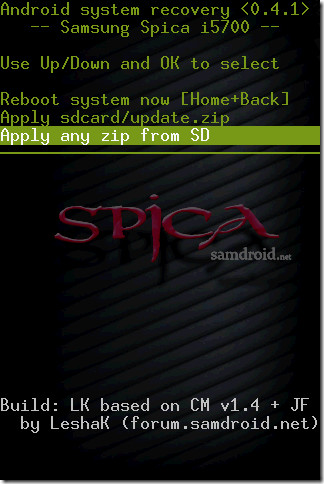
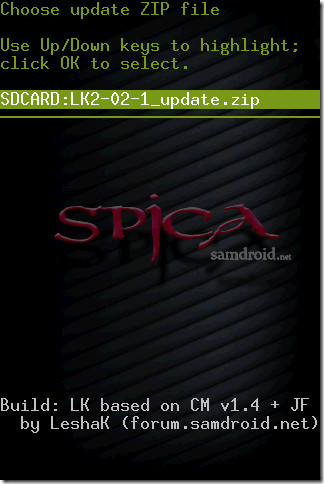
Use the D-pad to move up and down between options. Select ‘Apply any zip from SD’ and press OK button. The next screen will show all the zip files present in the root of your SD card. Select the one indicated in the screenshot below, and press OK.
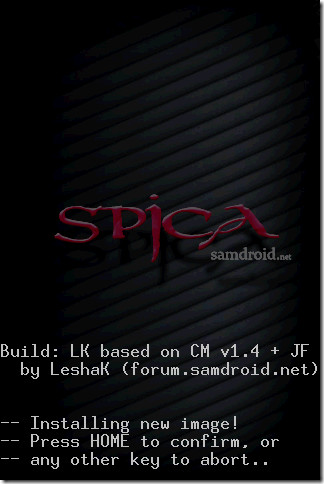
You will be asked for confirmation to install the update. Press the Home button to confirm.
The update will install, delete some files, copy some more, and after about a minute you will see the following screen.
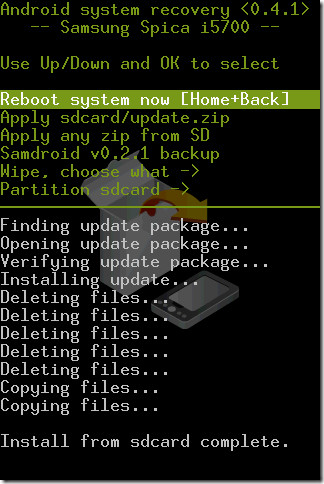
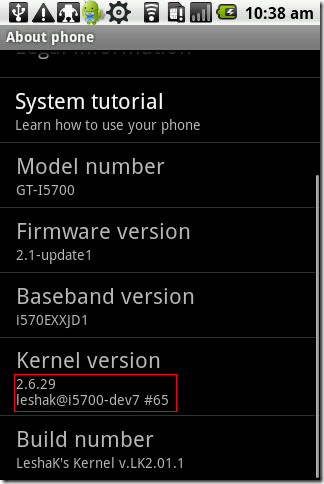
Reboot the device by either clicking OK on Root system now, or press the Home + Back keys together. The device will reboot once more and that’s it: you have successfully rooted your Spica. Go to Settings > About Phone on your device and scroll down to verify the new kernel.
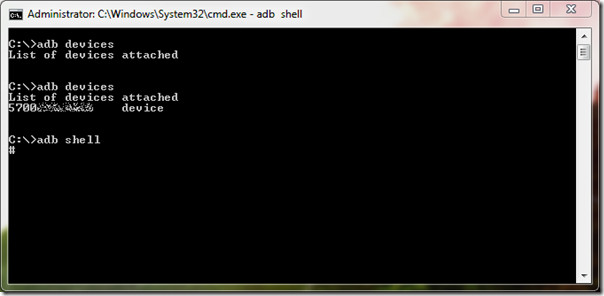
You may also run the adb command to verify su status, indicated by the command prompt showing ‘#’ instead of ‘$’ when you access the shell.
With LeshaK’s Kernel 2.02, you get the following advantages (as mentioned on the Samdroid forum)
1. Fully rebuilds Spica Linux Kernel from Samsung sources, plus:
– full root in adb (you can use cp etc, not only cat)
– root – su+Superuser
– add Netfilter/iptables (Walldroid, Wifi Tether)
– support ext2/ext3/ext4
– cifs (smb – support windows network shares)
– squashfs (for recovery utils)
2. Recovery
– apply update.zip files (android install/update system)
– samdroid backup – create .tar file (system + data), restore via Odin
– wipe (data, cache, dalvik-cache)
– you can repartition your SD card on 2 partitions FAT32 + ext2
3. Apps2sd based on CyanogenMod apps2sd
– move applications from internal memory to SD card with two partitions (FAT32 + ext2/3/4)
Soon I will come up with a guide on configuring and using apps2sd on Spica. Meanwhile, happy rooting and good luck. Please use this process with care, we are not responsible for bricked devices. Feedback, questions and general comments are greatly appreciated.

i have a problem w/ busybox….help..
hey guys…… i encounter big problem with my samsung spica… I went to dev tool and went to pointer location and check its under (something set pointer etc..) suddenly my phone hangs and restart and i see pattern on my screen like a cross line and then it hangs and restart and so on i cannot open already my phone… what should i do? i need your help guys thank you… can you email me your answer guys at gadreel123@yahoo.com.. GODBLESS!!!
good morning, i went to repair cellphone last night to unlock my samsung GT15007 but something happened to my cell they can not reboot my cellphone and reset the root according to them. what will i do to reset the root and to unlock my cellphone? thank you for responding. God bless
Successfully updated my Spica after lots of retires.
Phone details:
Model Number – GT-15700
Firmware version – 2.1-update1
Baseband Version – i570EDDJC5
Kernal Version – 2.6.29 shun.cho@SE-S605 #2
Build Number – ECLAIR.DDJC5
Thinks that I tried to get rid of the connection problem.
– Make sure Kies is not running. In the task manager kill Kies and Kies tray agent
– For the samsung “Downloading…” screen make sure phone is not connected to usb
– Before running Odin, make sure phone is not connected.
– Ran Odin as administrator and in Window XP SP2 compatibility mode. I was on Win7 64 bit
– Connected phone after started odin. check if it detects the phone or not. Also check In device manager that both samsung drivers are shown.
– Now start the upgrade and it will work 🙂
if when I download requires an internet connection?
Hi guys, I have Samsung Galaxy Spica (Phone: i5700XXIK1). I flashed it 6 months ago with firmware JE1 to android 2.1. Can I do this root with my phone ? With wich firmware ? Thanks.
Works like a charm! Thanx for this explendid guide.
my phone is not being found by odin HELP 🙁
Great post. Just was been able to install the staff. Initially I was also stuck at “setup connection…”. The only thing I needed to do was restart the process once more. That is close odin. Remove the phone from usb. restart the phone once. And then again restart it in download mode. etc. etc. And the thing just worked. Now I have rooted the phone successfully. Also the phone feels much faster now. Thanks a lot for the great post.
Hello… what I wanna ask is, COM number on “COM port mapping” label is must be 5 or not? Or just follow the default based on aou device? (my device default COM number is 13)
hi, i have upgraded my phone to andorid 2.1 with firmware JE1 but it is not very good (i haven´t live wallpapers…) so i want this … please, can i upgrade my phone another time with this guide ? i have Phone: i5700XXIK1 , thank you
After I take my phone in download mode and in Odin I click to Start this message appeared “Please connect phone” but my phone is already connected. What can I do now? Please help and sorry for my bad english.
thaaaaaaaaaaaaaaaaaanks maaaan
worked great
hey I need help for some reason Odin wont recognize my android phone I have a samsung galaxy Spica firmware is 2.1
basebandversion i570edXJC2
Kernel version 2.6.29 chad.lee@SE-S604 #2
Buildnumber ECLAIR.DXJC4
GT-I5700
PLEASE help for some reason I did everything it says but when I put my phone on download mode and do everything that it tells me to do in ODIN well lets just say that Odin never detects my phone its like I didnt even plug it in my laptop pls help ty
Hi, just stoppin by
some say that using windows 7 to root android device may fail
use windows xp to root, many succeed
My mobile is SAMSUNG GT I 5700 all message I wonder please
for those who think their phones are bricked :
your phone is not destroyed you can recover it by using “odin”
the same happened with me but now everything is under control and my phone is stable
here is the link:
http://www.londatiga.net/it/samsung-i5700-galaxy-spica-android-2-1-flashing-guide/
if you need any help contact me : maple.syrupc54@gmail.com
http://ssingh313.blogspot.com/
Thanks so much, nice work guys. 😀
Hi!
http://imageshack.us/photo/my-images/828/spicaroot.jpg/
One Click Root for Spica !
Tested, Working.
MD5: 08bd16addbd61e366cb4b990cde092af
http://www.megaupload.com/?d=GJXYSLGF
http://hotfile.com/dl/128851792/0846562/galaxy_spica_root_v1.0.zip.html
http://www.uploadking.com/QEVXJSZ9TY
http://www.uploadhere.com/VRKRZ1MZZ5
http://depositfiles.com/en/files/378x7c5wo
!!! IMPORTANT !!!
Do not use spaces in the folder name where you unpacked this program.
!! IMPORTANT !!!
1. Run Galaxy Spica OneClick Root 1.0.exe as administrator.
2. Click Root button, and wait 5-10 sec…
3. Enjoy!!!
yepee!!!!!!!!!!!!… i got it men.. tnx lot..
CRAPCRAPCRAPCRAP.
Im Mike, Im 15, Im dumb as hell, and once I tryed to apply any zip from SD, my phone found no file in which I put onto the root of my phone earlier. Now my phone just loads up with the blue samdroid.net loading screen but just freezes once the loading bar is full. Any ideas?
root ur phone one more time using tis same guide.
Great guide, thx alot!!
Hi I manged to follow all steps correctly and flash and root my phone but i can no longer download anything from the app market, is there a way of fixing this?
Help pls. Odin does NOT sence my COM and Spica.
Got spica running in download mode. Tried the process over and over many times.
PLs help very urgent> TKS
sorry, got it wrong. whats really wrong is that is a zip. file and not a tar. is that important?
unzip the file, tar is in it
whilst in odin, i click on the PDA button and it comes up with an explorer, when i click in the folder that contains the file necessary the root with kernel PDA one, it doesnt show up? need help….. please?
for those who think their phones are bricked :
your phone is not destroyed you can recover it by using “odin”
the same happened with but now its ok
here is the link
http://www.londatiga.net/it/samsung-i5700-galaxy-spica-android-2-1-flashing-guide/
for more help drop a comment at scorsam69.blogspot.com
Fantastic guide and works an absolute treat. Thank you.
OMFG thank you <3 <3 <3
worked
Galaxy portal on three
I i am afraid that i have Bricked my divice,it get suck at the samdroid.net screen… how did you manage to recover yourse?
regards peter
Is this guide possible on android 1.5?
Bleh Yes it is possible, i used android 1.5 with this guide.
Now it is upgraded to Android 2.2
Help Me Please! my phone always start in recovery mode what is it ? Help Me Please!
did exactly as stated but ended up..
Download Start…
Create File…
StartThread Detected : 1
StartThread Detected : 0
StartThread Detected : 0
StartThread Detected : 0
StartThread Detected : 0
StartThread Detected : 0
StartThread Detected : 0
StartThread Detected : 0
setup connection…
waited but nothing happen, So how long must i wait, restarted from step 1 many times and have redownloaded everything many times.
pls help urgent..
many tks
Danny
Download Start…
Create File…
StartThread Detected : 1
StartThread Detected : 0
StartThread Detected : 0
StartThread Detected : 0
StartThread Detected : 0
StartThread Detected : 0
StartThread Detected : 0
StartThread Detected : 0
setup connection…
wtf? please help!
Whenever I turn my phone on now I get the image that says Samdroid.net official partner etc.
There’s a grey progress bar, but it just loads that bar and does nothing else.
Have a destroyed my phone? 🙁
to Dan
your phone is not destroyed you can recover it by using odin
the same happened with but now its ok
here is the link
http://www.londatiga.net/it/samsung-i5700-galaxy-spica-android-2-1-flashing-guide/
no just start over
Download Start…
Create File…
StartThread Detected : 1
StartThread Detected : 0
StartThread Detected : 0
StartThread Detected : 0
StartThread Detected : 0
StartThread Detected : 0
StartThread Detected : 0
StartThread Detected : 0
setup connection…
Just stays like this for minutes and does nothing, restarted from step 1 many times and have redownloaded everything many times.
Same here! :S
Just go back to step 1.
@pedro….press start button instead of reset
If downloading bar does not start to fill after pressing the START button in odin(at least a minute) …..try getting battery out and restart the process.
HI,
I’m doing all the steps as they are mentioned but when I get to the Odin step, I execute Odin as admin. (OK!), I load OPS (OK!), I load PDA (i5700_LK2-02_PDA.tar) (ok) but when I press RESET the PDA field is cleared again and in the space where it was to be the 1 (COM 5) in yellow, nothing!!!
What am I doing wrong???
Thanks.
pedro, Portugal
Hi
can someone help me? i cant connect my phone in download mode to PC. I try it in another PC but it doesnt connect.
Mobile phone info:
firmware version: 2.1-update1
Baseband version: i570EXXJC1
Build number: ECLAIR.XXJCF
Kernel version: 2.6.29 root@SE-S610 #2
If you know how to repair it pls send email to juraj.tomecek7@gmail.com thx 🙂
HELP, I THINK I BRICKED MY PHONE WHEN THE PHONE IS STARTING UP IT COMES SOME SAMDROID.NET SHIT, IT LOADS, THEN ITS JUST THE SAME SCREEN ALL THE TIME!
If I were to not want this anymore how would I be able to get rid of it? Would i just go on the SD card and remove the .zip file?
No, the file copied to the SD card is used for installation. Once installed, removing that file won’t remove the installation. You will have to find another kernel like the stock kernel and install that to get the device back to the way it was.
Nothing to do for this, just go in samsung Authorized service center and asked him about your problem they shawl your problem within a minute. Trust me. Thnx
having the phone as this image I have it in version 2.2 of android?
https://www.addictivetips.com/app/uploads/2010/05/phonestatus.png
worked for me
but had many issues at start but what worked when I followed your guide but i made sure to turn off all that ker and pc studio stuff, and it worked
before root
Model Number – GT-I5700
Firmware Version – 2.1-Update-1
Baseband Version – I570EXXJC1
Kernel Version 2.6.29 root@SE-S610 #2
…Build Number Eclair.XXJCE
I’ve tried with jc1 and i stucked at connection thing in odin, so i’ve pulled out a battery. So concluded jc1 not working. Then i first flashed to latest firmware from samsung firmwares, I570EXXJH7. Then i’ve flashed with i5700_LK2-08_PDA.tar and LK2-02-1_update.zip, and lately i’ve flashed i5700_Froyo_cm-6.1_update.zip. It works just fine for me. Wish you all the luck.
Post the link to benefit us.
Hi all,
I have a Samsung Galaxy PORTAL i.e. the same phone but in the UK. Atm I have:
Model No: GTI5700
Firmware version: 2.1-update1
Baseband version: i570EXXJC1
Kernel Version: 2.6.29 root@SE-S610 #2
Build no: ECLAIR.XXJD2
Can I still use the above method or is it different? Also, I have problems extracting the i5700_LK2-02_PDA.zip file, get error saying:
! C:\Users\David\Downloads\i5700_LK2-02_PDA.zip: The archive is either in unknown format or damaged
using winrar.
Would appreciate help!
David
What is LK2-02-1_update.zip used for?
I found a new verison of i5700_LK2-02_PDA.zip
http://forum.samdroid.net/f55/lk2-08-original-firmwares-root-new-superuser-wifi-tether-bb-12-07-2010-a-1193/
If i use i5700_LK2-08_PDA.7z do i need LK2-02-1_update.zip?
My current phone is
Basband version i570EDDJC5
Kernel version 2.6.29 shun.cho@SE-S605 #2
Build number ECLAIR.DDJC5
i have the same firmware so can i use this process to root ???
PLZ HELP
i got stuck up at the process of applying any zip from SD.
i select LK-02-1 update.zip then an errror comes like
E: error in install_busybox.sh (status 65280)
E: failure at line 21: run_program PACKAGE : install_busybox.sh
Installation aborted.
what to do now…plz help
same happened with me, any luck fixing urz?
after updatin ma phone s proper but i lost market application ……….ma phone sw samsung galaxy spica can u plz help me hw 2 get it back…..plz soon
How to tether Samsung Galaxy Spica I5700
Model Number – GT-I5700
Firmware Version – 2.1-Update-1
Baseband Version – I570EXXJC1
Kernel Version 2.6.29 root@SE-S610 #2
…Build Number Eclair.XXJCE
i want to do Usb tethering like EasyTether does
Easyther is working fine but its has limitation in freeware version that we can not open SSl websites
i did wat u said….i am still waiting more than 1 hour….help plz
remove the battery of your phone pone and go back to step 1
i repeat the step 1 many time but no response …………..n sometime after 2 secs windows encounter a problem ……..help plz …………..thanks in advance
does you have method root access and upgrading to froyo for samsung galaxy 5 (GT i5503) ? if you had it please post it. thanks.
Dear sir, I also need to upgrade my Samsung Galaxy GT-I5503 to Android 2.2(Froyo) from Android 2.1…. Kindly anyone help please..
Hi, I wonder if it works with Basband version: i570EXXJC1?
I would be pleased for a replie 🙂
i had the exact baseband version and you and i rotted my phone with succes
someone help me is this safe to be rooted? firmware version 2.1-update1
Baseband version i570edajd1
kernel version 2.6.29
chad.lee@SE-s604 #2
build number ECLAIR.DAJD2
(pls someone help me to fix this, i really want to root my fon and put some cool stuffs… please………… tnx in advance……….. pls message me for info..
Dear sir,
I have upgraded this one, but unfortunately I can’t hear in-call voice. and applications are not installed on sd card please help me to clear the problem or please tell me how to remove & downgrade to old one.
thanks in advance.
— cannot open the usb serial port. code: 87
that appears whenever i click start on odin 🙁 help please
Can i follow your guide if my firmware is : i570EXXJC1 (updated with PC studio automatically).
Ps: really nice guide dude !!
Some steps might be missing in this guide I could connect my phone and it got detected but when I started the process in(clicking start in the odin) it is not connecting and even after waiting for an hour nothing happened and I have to disconnect my phone and if I connect it again it is not even connecting
Frimware version – 2.1-update1
Baseband version – i570EXXJC1
Kernel version – 2.6.29 root @SE-S611 #2
Build number – ECLAIR.XXJCD
IS IT SAFE FOR ME TO DO THE ABOVE.
thanks
Thanks for the guiding… much appreciated and more helping rather than going to Samsung Center… LOL,
I wonder if somebody else has the same problem with me, after rooting and install M900 wifi tether, my wifi does not start anymore, it always “unable to start wifi”.
Please share with me how to solve this case.
Thanks
Thank you so much for this step by step guide in rooting spica. The images helped a lot for newbies like me, specially those who are not that so tech savvy (both in the android and PC programs). I followed every step to the letter including the steps needed (adb and the samsung android), and voila – I have a rooted spica as of last night.
I will await your promise: “…Soon I will come up with a guide on configuring and using apps2sd on Spica…”
Again, thanks for helping this newbie.
how can u do the 1st step i dont know how to put it my sd root… how can i find my sd root? tnx
why is the odin multidownloader still setting up the connection with the phone?! 5Mins has pass and its still the same!any idea what is wrong?
How do you proceed with this guide if your Spica already has 2.1?
hi, i followed the steps and all seemed to work fine until after it reset it doesn’t get past the samdroid loading page. Is it bricked? what should i do?
There is nothing to worry. Just boot into recovery and do a factory reset, ie, wipe cache and data.
Hi Please help.
My Spica firmware version is i570EDDJC5
I have rooted my spica successfully using LeshaK’s kernel 2.02 from using this guide
But I don’t see any SamdroidTools icon in app drawer. There is only Superuser Whitelist icon in app drawer.
1. How to get SamdroidTools icon?
2. where to get update.zip file which is used in Recovery? Because when i try to download it from Recovery I get nothing.
3. Also when I install Live wallpapers and go to Home screen and browse wallpapers list I don’t find Live wallpapers there in the list?
Now My spica’s firmware is:
Baseband version : i570EDDJC5
Kernel version : 2.6.29 leshak@i5700-dev7 #65
Build number : Leshak’s Kernel v.LK2.01.1
Please help its urgent because my phone is running out of internal memory, apps2sd is required. Also I need Live wallpapers.
I have Firmware version- 2.1
Baseband Version- i570EDDJC5
can i follow your guide for my baseband version and please tell me which baseband version is latest and suitable for root by leshak and where did i find it……
What a wonderful and excellent tutorial. I made it easily with your brilliant guide. Just a litte bit problem after rooted, many of my previous applications which was working well now are forced close. Even some small aplication like k9 or launcher. Could you please help me why and how to fix it? Or should I unroot it? But how?
Thanks.
I am not able to connect my Galxy spica android 1.5 to my laptop.
I want to take contact back up.
But after connecting device, message comes “device is unsupported”
Great instructions, all made very clear.
I have a problem though, I can’t get Odin to detect my spica even though it’s shown in device manager.
Has anybody got an answer to this please?
my phone is GT i5700
firmware 2.1 update 1
baseband i570edajd1
kernel 2.6 29 chad.lee@se-s604 #2
build # eclair.dajd2
Graham
how can u do the 1st step i dont know how to put it my sd root… how can i find my sd root? tnx
hi…
i have already upgraded to JC5 thru samsung service centre.
I am following your guide & odin detects my phone on com31. But, once i start flashing, theres no activity. Odin status shows setup connection & apart from that there is no moment. I tried many other things but odin will not proceed.
Any idea?
Is this applicable for official release of Eclair 2.1?
My spec is
Baseband: i570EDDjC5
Kernel: 2.6.29 shun.cho@SE-S605 #2
Build no: ECLAIR.DDjC5
Location: India
Thanks in advance for the help
Is this applicable for official release of Eclair 2.1?
My spec is
Baseband: i570EDDjC5
Kernel: 2.6.29 shun.cho@SE-S605 #2
Build no: ECLAIR.DDjC5
Location: India(Starhub for APN)
Thanks in advance for the help,
my phone is GT i5700
firmware 2.1 update 1
baseband i570edajd1
kernel 2.6 29 chad.lee@se-s604 #2
build # eclair.dajd2
I am in Manila, Philippines.
I cannot get online, the browser wont load any URL’s, although Wi-Fi works ok.
I believe this was a Globe phone.
Has this been rooted already? Can I root it?
Graham
Excellent guide, it worked for me! Before root, my phone was updated from 1.6 to 2.1 at a Samsung service center in Thailand.
Firmware version: 2.1-update 1
Baseband version: i570EDXJC2
Kernel version: 2.6.29 — chad.lee@SE-S604 #2
Build number: ECLAIR.DXJC4
I rooted using a Macbook Pro running Windows 7 in Boot Camp, Odin won’t connect to the phone in VMWare Fusion.
I am also unable to update via VMWare Fusion, as Odin COM port mapping is not recognized !!
hey! i’ll install that lesha’s kernel and do I need format the sd card as fat32 & ext2 for use app2sd?
Link for spica firmwares (depending on the country where you live):
http://samsung-firmware.webs.com/WEBPROTECT-samsungandroidi5700.htm
Everybody can update,no mater which firmware you have.For apps2sd go into menu-samdroid tools-apps2sd setting and enable apps2sd (you can enable dalvik too).Apps will be moved to sd after some time…
model number GT-15700
firmware version 2.1-update1
baseband i570EXXJC1
Kernal version 2.6.29 root@SE-S611 #2
build number ECLAIR.XXJCD
How do i root that
Dears,
I am using Samsung Spica with following version.
Firmware Version
1.5
Baseband Version
i5700JXIL2
kernal version
2.6.27
Bulid Number
CUPCAKE.JPIL3
please could you please guide me to update new firmware. I am based in Riyadh, Saudi Arabia. I Bought this mobile 3 month back.
Thanks in advance.
Hi,
I have Spica with Leshak kernel:
Kernel Version: 2.6.29
leshak@i5700-dev7 #105
I am trying to get my phone unlocked (removing NUC lock)
But, vendor said due to phone being with diff kernel he is not able to get it done.
Ques:
1. As i have Super User access, can i do it myself and how?
2. If not, then can i get the original kernel back and how?
any suggestions or pointers are appreciated.
Cheers,
Tarun
thanks, worked as a charm even on Windows7 x64!
Even in Windows 7 64 bit? Shut up, I can’t even get Windows 7 to identify the phone. I had to use XP to update to 2.1.
I am having firmware I570EDDJC5 with Kernel ver.6.29 shun.cho@SE-S605#2 is it ok to update with lower LeshaK’s Kernel version 2.2?
hi,
thanks a lot for your guide,can you make a guy for apps to sd also? 🙂
Hey, I am going to use this guide, before it I’d like to know is the official firmware valide to use this guide?
My info about the phone:
firmware version: 2.1-update1
Baseband version: 570EXXJC1
Build number: ECLAIR.XXJCF
In addition, can I use LkMod-2_5_1-PDA.7z for this guide?
Am I right that it is possible to flash, if needed from original firmware to that firmware where is the link in this guide? If somebody guide me lots of thanks. I think that there are plenty of people who would need this information as some people have asked so far.
I have Firmware version- 2.1
Baseband Version- i570EDXJC2
can i follow your guide for my baseband version.
why cant i have downloading mood on samsuing i7500 i hold the keys but nothing appear on vabration i feel in the phone , help plz
Hi,
Guide is awesome. My Baseband Version is i570EDDJC5 and Firmware Version is 2.1-update1. Can I root my device? I have updated my Spica 1.5 to 2.1 from Samsung service center. Also, will this enable me to use my sd card to install the apps? Because that will be awesome! Thanks!
Also, will this void my warranty? 😮
hello, I just wanted to ask that if I root my phone, and later a newer firmware will be released, that I want to upgrade, then I have to do the rooting again? Thanks for your help in advance.
hi, i own a galaxy spica and ever since i upgraded from 1.5 to 2.1 my home wifi hasn’t been working, its saying its connected but i can’t seem to browse, cant even connect to android market. what is wrong with my phone? what do you call an android phone with no surfing capabilities?=(
can you post the same process for the samsung galaxy i7500???
I have the following, can I follow the your process to root my i5700? i’m a newbie in modding cellphones
Baseband: i570EDXJC2
kernel: 2.6.29
Build: ECLAIR.DXJC4
thanks in advance
Any news about the guide on configuring and using apps2sd on Spica yet?
Since I am an app addict, the Spica is getting out of memory soon 🙂
hi have baseband version :i570EXXJC1 should i use this guide for my phone ?
Hi,
Great guide but i’m having a problem. I’m running JD4 and when i choose the LK2.02.1.update.zip on start-up the phone displays this message: e:can’t find update script – aborted.
How can I resolve this? I had to flash the old PDA back to get the phone working again.
i rooted my i5700. nw hw can i how to put livewallpapers on it plz help………
just install samdriod kitchen mod from samdriod forums.Apply it to ur SD card as u applied the LK2.01.1(Apply any zip from sd).System recovery mode can be started by pressing the volume down+call initiating+call ending or power on-off buttons.and get the full use of live wallpaper,helixlauncher,3D galary and much more……Dont forget to click wipe data-catche option first …than click to create partition of u r choice ,and than apply any zip from sd( samdriod mod )…..reboot by pressing ok….
HEY ODIN SAYS CCHECK IMAGE FILES WHEN I DO WAT U SAID PLZZZ HELP
Amazing guide.I read many tutorials but was hesitant 2 root.
Your tutorial was so simple that i did it without any1’s help.
Thanks a lot & keep it coming 🙂
Hi and thank you for this great tutorial, clear and concise.
I am new to rooting and are wondering if there is a way to “unroot”, getting the phone back to original shape so to speak.
Tutorial or link to info is much appreciated 🙂
I did root as well, Thanks! s there a way to un-root?
Just rooted my Galaxy Spica with your instructions.
It worked like a charm.
The guide was clear and to the point.
Can u tell me how I can install LiveWallpapers and Apps2SD now?
Thanks!
Instructions were very clear and easy to follow.
Just completed successfully rooting my Spica.
Will eagerly await your next tutorial.
Good job and more power !
Hey i flashed to the latest firmware JD1..n everything you told worked like a charm.
thanks..
but what is the real use of rooting?
tell us about apps2sd soon..
n can you also tell how to put livewallpapers..?
oops, I just noticed that you have already upgraded and rooted. congratulations!
The main purpose of rooting is to gain full access to your device’s operating system. Since Android is based on Linux, a root level access means you can change whatever you like in the file system, for example, removing unwanted system-default applications like Myspace.apk, using things like Apps2SD, Live Wallpapers, install custom mods etc.
As for Apps2SD, the guide is coming very soon. Basically, LeshaK’s kernel already has apps2sd built in, all it needs is to be enabled. It’s the ‘how to’ that needs some elaboration, and you will get that in the guide.
Personally, with the Froyo announcement, I am pretty excited and hoping samsung will bring it to the Spica. You won’t even be needing apps2sd after that, although rooting would still remain a cool option 🙂
thanks for reading
someone help me is this safe to be rooted? firmware version 2.1-update1
Baseband version i570edajd1
kernel version 2.6.29
chad.lee@SE-s604 #2
build number ECLAIR.DAJD2
(pls someone help me to fix this ir really want to root my fon and put some cool stuffs… please………… tnx in advance……….. pls message me for info..
plzzzz help my droid stop booting whenever i restart it it just showsssss the recovery menu plzzzz email me abt it quickly plzzzz email me at theflamer2010@gmail.com
plzzzzzzzzzzzzzzzzzzzzzzzzzzzzzz
I have Firmware version- 2.1
Baseband Version- i570EDDJB2
can i follow your guide for my baseband version.
This guide is for firmware versions JC3 and above. Since you have JB2 yet, I would advise to first upgrade to a newer firmware version (you can follow my guide here https://www.addictivetips.com/mobile/how-to-upgrade-update-samsung-galaxy-i5700-1-5-to-firmware-2-1/
after that, you can root using this kernel
What happens if I get my device bricked? Is there a way to get it back to normal?
Is this applicable for official release of Eclair 2.1?
My spec is
Baseband: i570EDXJC2
Kernel: 2.6.29 chad.lee@SE-S604 #2
Build no: ECLAIR.DXJC4
Location: Singapore (Starhub for APN)
Thanks for the help,
hey do you have msn or gtalk cos i need help with rooting my spica. im totaly new to all this.
i did wat u said and there is a samdroid downloading and it stpped on that
sir, can i ask for some help please..my samsung spica gt-i5700 hangs up most of the time and im getting annoyed with it already. do you have any suggestions what i need to do to make this work better? below are the phone’s specs:
firmware version: 2.1-update 1
baseband version: i570EDAJD1
kernel version: 2.6.29 chad.lee@SES604 #2
build number: ECLAIR.DAJD2
any help would greatly be appreciated..
thanks you..