[Giveaway] MacKeeper Is An All-In-One System Maintenance & Security Tool For OS X

We’ve covered a lot of small tools that help you clean up your Mac, make it run smoother, securely delete files, recover deleted file, or search for them. Though OS X does most - if not all - of these things natively, it doesn't offer as many customization options, or work as well as several third-party offerings. You can always look for apps that are meant to solve individual problems, or you could invest in an app that does everything for the right price. MacKeeper is a very famous app that acts as an antivirus and anti-theft app for your Mac. It also lets you encrypt data, recover deleted files, securely shred files, create backups, remove junk files, find duplicates, estimate the disk usage and break it down for you, uninstall apps and the many files they can sometimes leave behind, help you optimize start-up apps, and edit the default apps for different file extensions. Read More

[Giveaway] Visio Touch: View, Annotate & Share MS Visio Files On iPhone & iPad

The iPad already has tools like xPlan that let users create elaborate Gantt charts and flow diagrams without requiring access to a computer, but having an app of this kind is not the same as being able to import files from a standard desktop tool. Most people create block diagrams and flowcharts using MS Visio, but just like the rest of the Office suite, Microsoft still hasn't introduced its iOS app so far. Things are not completely hopeless though, as the App Store does offer a convenient way of viewing and annotating VSD and VSDX files on iPhone and iPad. Visio Touch makes it really easy for iDevice owners to import Visio files in a number of ways and convert these diagrams to PDFs for easy sharing. Read More

[Giveaway] Kestrel GX: Elegant, Feature-Rich Photo Manager & Editor For Windows

Back in 2010, we covered a feature-rich photo manager for Windows called Kestrel GX. It was unarguably one the most elegant image management applications that we had come across, not only because of its sophisticated design but also because of its slew of handy features. Unfortunately, since last year, the application is no longer available for free and has been replaced by a paid variant that carries hefty price tags of $59 and $89 for home and commercial licenses respectively. Here's where you being a regular reader at AddictiveTips pays off. Details past the break. Read More

[Giveaway] Mention: Google Alerts Alternative With Desktop, Mobile Apps & Analytics

A few days ago we covered Talkwalker Alerts - a free web alerts service that does pretty much what Google Alerts does, by letting you add as many web-based alerts as you like and monitor them via an RSS feed. It’s a good service and a reliable one should Google decide to axe its offering. Mention is a similar service that's more suited for users who use alerts extensively to monitor specific topics being discussed online. The service has both free and premium accounts available, with the free accounts limited to a total of three alerts and 50,000 mentions per month. Mention has apps for Mac, Windows, iOS, and Android that allow you to monitor these alerts as they come. The service does not send email alerts, and your inbox therefore remains clean from the clutter. Mention has its own ‘inbox’ that you can read the alerts in. Alerts can be narrowed down to include or exclude a certain phrase/word, originate from specific source(s), and be in a language of your choice. Mention allows you to view stats for your alerts and download them in report form as a PDF file. Read More

PhotoMagic: Add Color And Lighting Effects & Frames To Images [Mac]

Adding effects to photos doesn’t sound like a complex idea but as Instagram can testify, it is actually a billion dollar idea. Regardless of what Instagram is worth to Facebook, its user base is proof that amateur photography is something we can’t get enough of and photo effects play a huge role in this. PhotoMagic is a Mac App worth $9.99 in the Mac App Store and it is a simple app that lets you add a large variety of color filters, frames, textures and light effects to an image. The output image is very similar to what you get from Instagram except you have more effects to choose from. Altogether, the app has 72 color effects, 17 lights effects and 90 frames to choose from. The output is saved in JPG format and images you create can be shared on Flickr and Facebook. The app also has a crop tool that allows you to crop an image on one of four preset sizes. Read More

[Giveaway] System Booster: Powerful Cloud-Based System Cleanup & Optimization Utility

In order to keep your PC running smooth and preventing it from slowing down, you need to fix errors and regularly clean the junk files that get accumulated in the machine over time. Other than junk files, logs and history files of different programs, such as browsers installed on your system, recent playlists in Media Player, Windows History, Windows log files, Windows Error Reports etc, contribute to this clutter. For instance, when you browse the internet, all the images, text, and other data available on the webpages is downloaded to your computer, and stored in different folders. The data is stored in order to make your subsequent visits faster, as the second time, the data won't be downloaded afresh, but rather, they are pulled from the local folders, saving both bandwidth and loading time. However, as time passes, too much data gets accumulated that eats up memory, and some files don’t even have any use after a particular time. Cloud System Booster is a cloud based application for Windows that works as a complete cleaning and optimization solution for your computer. It allows you to Clean junk files, Repair PC errors, Optimize startup items and installed programs - all with a single click. Read More

[Giveaway] Passport Photo Maker: ID Photo Editor With Presets, Face Recognition & Background Replacement
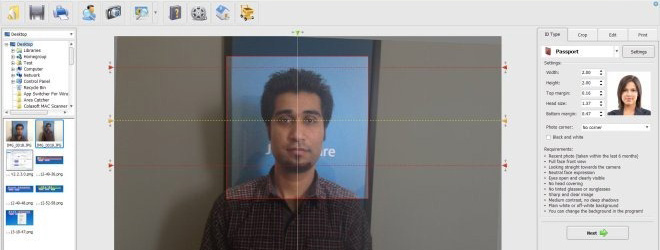
Passport photos have a lot of requirements, and having a right photo for your passport is an essential part of the application process. Professional photographers who are trained to take and develop passport photos can do it, but for an individual who is not properly trained in the art of photography, capturing a self image and then editing it according to the guidelines provided along with the passport application is not that easy a job. To get the photo right, most of the people have to take the help of a professional. It means that you will have to go out and possibly waste a lot of time for it, and in today’s world, time is a very valuable commodity. Most image editing software usually don’t have any professional options to create a perfect passport photo, and you have to set everything up manually. However, that implies a lot of chance for error, and in a passport application, everyone knows how little margin one has for errors. Today, we have application called Passport Photo Maker that allows you to create professional level images to be used for passport and ID applications, using built-in presets for different countries with different passport photo dimensions and a group of editing tools (including fast background replacement), and print them directly from within the application. Read More

AirServer: Comprehensive Mac & PC AirPlay Suite With Screen Mirroring

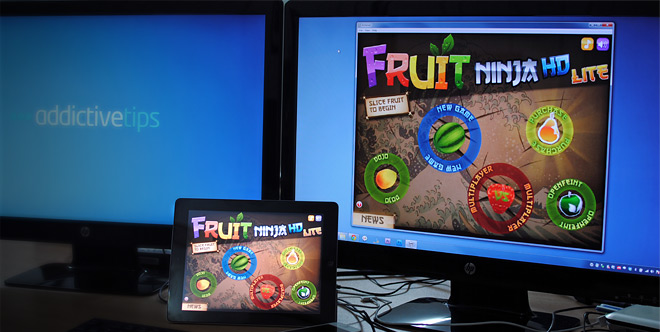
I’ve never tried to hide my preference for iOS over Android, and for multiple reasons. While both platforms have a healthy share of strengths and weaknesses, iOS offers certain features (natively) that tip the scale, at least for me, in its favor, one of them being AirPlay. The formerly-labeled-AirTunes protocol received a feature and nomenclature overhaul back in 2010, whence it included not just audio, but any kind of media to be streamed to any AirPlay compatible device. Then, with iOS 5, Apple pooled in AirPlay mirroring, allowing you to replicate your supportive iPhone, iPod touch or iPad’s entire screen on the likes of compatible HDTVs, laptops, Macs etc. Speaking of Windows PCs and Macs in this regard, there’s perhaps no shortage of AirPlay apps for both platforms, paid or free, that offer pretty reasonable functionality. That’s why I was not too enthusiastic about AirServer, an AirPlay server application for Mac and Windows that claims to be way ahead of all its peers. Turns out, my skepticism was ill-warranted, as the app clearly blows away all the competition. Read More

[Giveaway] Droppy: Easily Move Files Between Desktop Spaces & Apps On Mac [Paid]

Desktop spaces in Mac make it easy to manage multiple apps and windows. Compared to Expose in Snow Leopard, Desktop Spaces, coupled with Mission Control, let you easily distribute and organize your work without overthinking it. While this feature is mostly convenient, it does get difficult to switch files from one space to another, or between two apps that you have open in different spaces. Droppy is a Mac app worth $0.99 in the Mac App store that gives you a simplified way of transferring files between two apps on different desktop spaces. The app adds a wormhole area to the screen, visible across all spaces, where you can dock a file. You can then swipe between desktop spaces and drag the file onto the app you want to add it to. Read More

[Giveaway] Twittelator Neue: Hands Down The Most Beautiful Twitter App For iPhone, iPod touch & iPad

Twitter clients are nothing new to iOS, and the iTunes App Store is full to the brim with them, if not overflown already. The deep Twitter integration that iOS 5 users enjoy has made the microblogging network an integral part of many iPhone users’ lives. Then, coming back to Twitter clients, you get a lot of good options to choose from, including the official Twitter app, which is elegantly laid out, neat and super functional. Taking all this in account, one is hard pressed to find a Twitter client that outshines the competition, and Twittelator Neue does just that. It is, hands down, the most beautiful Twitter client ever released (yet) on any platform, mobile and desktop alike. Details past the break. Read More

[Giveaway] QuickShot For iPhone: Automatically Upload Photos & Videos To Dropbox

If you are an iPhone user running iOS 5, then you must be aware of the iCloud integration offered by this latest iOS version. One of the most used feature of iCloud is Photo Stream, which automatically uploads all your Camera Roll photos to the cloud. No one can doubt the usefulness of this capability, but if you are already using some other cloud storage service, like SkyDrive or Dropbox, then it poses a bit of a problem, as your photos are divided across different services, and it becomes relatively hard to manage them. Fortunately, for Dropbox users, now it is possible to easily share your photos and videos over the cloud storage service with the amazingly useful app QuickShot. The app will automatically upload all the photos and videos shot with its camera to Dropbox, and you can even sync older media with ease, too. Read More

New Year Giveaway: Skydur VPN Anonymous Web Surfing

I have generally never given much attention to paid VPN software before but the team over at Skydur were grateful enough to create a yearly account for me. Today it is my default VPN software, I guess playing around it for a month and half is justified before giving it a review and recommending it to the readers. Important: We are giving away 10 50 free yearly licenses, more information can be found at the end of this post. Update: Due to high demand, Skydur has provided 40 more licenses, making a total of 50 licenses to give away. Read More

Download Free Panda Internet Security 2010 On 22nd October

It seems as if October is a month for giveaways. Many software developers are giving away their products for free in anticipation of Windows 7 launch, and the latest to do so is Panda. They are giving away 1 year license of their antivirus software called Panda Internet Security 2010 on 22nd October, which is either tomorrow or today depending on when you read this post ;). Read More

Download 1000 Songs In Windows Free Music Giveaway

Microsoft Windows team in partnership with Reverbnation is giving away 1000 songs from new artists for free. You can download them in either M4A and MP3 formats. Before you download any song there is also an option to Play it live. So you must be thinking that it can’t be true, but actually is. Just head over to the link given at the bottom of this post and start grabbing the songs. Read More

AddictiveTips New Year Giveaway, Year 2009

Update: This contest has ended. Winners will receive an Email. To celebrate a Happy New Year, I am giving away 3 MozyHome Yearly licenses to my readers. If you don't know what MozyHome is, check out my praises for this product here. These 3 yearly licenses have unlimited space allowing you to backup thousands of thousands(in fact unlimited) number of files. You must be thinking what’s the use of Mozy anyway? Well, It can come handy if any of the following happens with you,
  • Your laptop gets stolen.
  • Your Computer crashes due to a virus and becomes corrupted
  • Your Important Files or Family Photos/Videos gets accidentally deleted.
And many other reasons… Read More