QuickIM For iPhone: Google Talk & Facebook Chat Client With Quick Reply

One of the biggest advantages of smartphones is connectivity on the go. Although you get that with almost any phone (that’s the whole purpose of a mobile phone, anyway), these devices allow internet access without restricting mobility, and that makes the whole idea all the more practical and useful. In today’s world, Google Apps have replaced plenty of enterprise suites for a lot of organizations, and even outside that, many users prefer using Google Chat due to its deep integration with Gmail and lightweight desktop client. Then, Facebook being the most popular social network, its chat service, too, is one of the most convenient methods of staying connected on the go. All the major smartphone platforms – iOS, Android, Windows Phone et al – have a plethora of multi-protocol chat clients that allow connection to various instant messaging services. The problem, however, is that not all solutions are equally effective; some may be resource intensive, others may lack (push) notifications, while still others may have an ugly interface. Furthermore, for iPhone and iPad, even though we have Facebook Messenger, it’s not that efficient, and on the Google chat front, neither is there any official client, nor are the third-party solutions that impressive. Perhaps that’s the reasoning behind the Cydia app, QuickIM. Currently supporting Facebook Chat and Google Talk, this app for jailbroken iPhone, iPod touch and iPad makes it super easy to stay connected with your buddies on these platforms, employing an easy interface, push notifications, and quick reply & compose features. Read More

Popular Chat App Verbs IM For iPhone & iPad Free For Limited Time

We all are familiar with the multi-service chat app Verbs IM for iOS, famous for its easy-on-the-eyes interface, file sharing (via Droplr and CloudApp) and support for Google talk, MobileMe, AIM and Facebook chat. If you haven't yet purchased the app, but were planning to do so soon, here's some good news for you: the app is currently free on the App Store for a limited time. If you aren't sure why you should be trying this app, join us after the break for a brief overview of its features.

Read More

GChat Is A Google Talk Client For Windows Phone Mango

No matter what people might say, instant messengers haven’t really gone out of fashion. Despite the advent of in-app chat services (Facebook being the biggest example) and convenient texting rates, there is still a nice slice of the market where messengers are in demand. Skype has a clear lead among such apps, but it’s a bit too much for routine, day-to-day use when all you want to do is send a few written messages back and forth. A vast majority of people (especially in offices and working environments) use GTalk for interpersonal communications. Gmail has a lot of subscribers, and this ensures the success of GTalk. Windows Phone 7 isn’t really a Google-friendly platform (being a competitor of Android) but that doesn't mean you shouldn't interact with your friends on GTalk. That’s what GChat is for. Read More

Gtalklet – Chat Using Google Talk While Surfing Any Website [Chrome]

We covered extensions that put the Google Talk window in your browser as a pop-up allowing you to chat with any one of your contacts but one major shortcoming of such extensions is that clicking anywhere outside the pop-up will close it. If you switch windows, Google Talk pop-up will close, for each window or tab you visit or switch to, you will have to open it repeatedly. Gtalklet is a Chrome extension that adds Google Talk such that it is always on top and open throughout all tabs and windows. You can switch tabs and chat windows will not close or minimize. The extension lets you search contacts, gives you desktop notifications if you get a new message and your browser window is minimized. You can use the extension to sign in to one account and sign in to your Gmail in your browser with no conflicts. The extension does not support Google Apps accounts. Read More

Install Google Talk 1.3 With Video Chat On HTC Sensation [Wi-Fi Optional]

In case you are an HTC Sensation owner and are now S – Off with root and CWM recovery, then you seriously need this! Killahurtz, XDA senior member, has released a modified GTalk 1.3 Version that comes with video chat. Another awesome thing regarding this mod is that you don’t need to be connected over a Wi-Fi connection to initiate video chats as it’s optional. The mod is basically a present to XDA community from Killahurtz in celebration of his 400th post on the forums. Read More

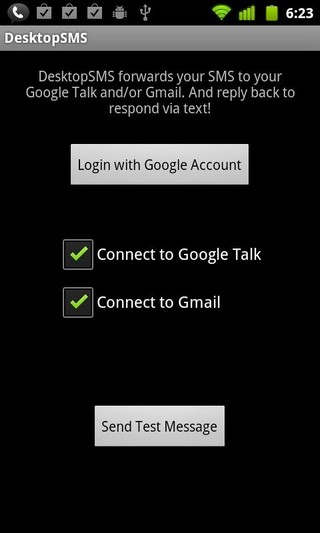
DeskSMS For Android – Send & Receive SMS To / From Gmail & Google Talk

Koush, best known for developing the famous Clockworkmod Recovery for Android, has decided to try his hand at the remote messaging app genre. The developer has conceived an app that pushes all your incoming SMS to your Google account (Gmail and/or Google Talk). DeskSMS is a handy little app that allows you to receive and reply to your text messages from your mail client. With DeskSMS, you can receive your text messages as an email or in the form of chat messages in Google Talk. The replies however are sent as text messages only and not as an email. The app comes with a home screen widget that can be used to toggle sending/receiving messages on Gmail, Google Talk or both. More after the break. Read More

Instantbird 1.0 Cross-Platform Multi Messenger Can Now Merge Contacts

It took four years but the final version is here now. Yes, Instantbird v1.0 has been released to the public. This release brings better cross-platform support, Windows 7 Jumplist support to quickly change status message, Twitter support and much more. Windows 7 users will appreciate the Aero Glass Effect and find similarities to Firefox 4 Tab styling. Instantbird can now merge contacts; if you talk with the same person across various IM platforms, you can combine a list usernames under one account. Instantbird is now a strong alternative to other multi-messengers, such as, Pidgin, Digsby and Trillian, with support for Facebook chat, Google Talk, AIM, Hotmail, Yahoo Messenger, ICQ, IRC, Jabber, etc. Read More

Install Google Talk With Video Chat On Any Android Device

Google recently released the Android 2.3.4 update for the Nexus S and one of the primary features of this update is an updated Google Talk client featuring video chat support. If you don’t want to wait for the 2.3.4 OTA update for your device, we have the extracted version of Google Talk that will bring video chat support to it, though this isn’t entirely glitch-free. Read on for details. Read More

SMS Diversion For Android Forwards Incoming SMS To Your Gmail Account

New to the Android Market, SMS Diversion for Android is a free app that, when allowed, forwards incoming SMS, complete with the name and number of the sender, to a user-specified Gmail account. SMS Diversion finds its application in instances where, say, you forget your phone at home while setting off for work or are too busy going through your daily email to attend to your phone. Moreover, the app works like a charm in conjunction with the Google Talk client, allowing you to preview incoming SMS via Gmail notifications while working on your computer, without having to touch your phone. Read More

Use Google Talk and Facebook Chat on Windows Phone 7 with Flory

Flory is a free Windows Phone 7 app that lets you chat on Google Talk as well as Facebook Chat right from your Windows Phone 7 device. The app was initially released in German but due to popularity and high demand, the latest update has brought English language support to it. If you own a Windows Phone 7 device and want to use it for Google Talk or Facebook Chat, this app is for you!

Read More

Popular iPhone Messaging App IM+ Now Comes To Desktop

Connecting to multiple messengers separately can fragment the desktop space to an unmanageable level. Many users have to login to their Skype account, Facebook chat, Windows Live, Yahoo messengers and Google Talk. IM+ is a widely used mobile application (particularly by iPhone users) which has recently launched a version desktop users. IM+ allows users to centrally login and manage multiple messenger accounts with convenience. This application uses the Adobe Air platform which makes it compatible across all platforms (Windows, Linux and Mac). Read More

imo.im – Merge Multiple Chat Accounts Online

If you're not at home or don't have access to your favorite instant messaging clients for any other reason, there's an easy way to still be able to log onto all your favorite chat accounts: the elegant online service imo.im provides a spartan interface you can use for chatting via your Facebook, Live Messenger, AIM/ICQ, MySpace, Yahoo, Skype and Google Talk account simultaneously, without any additional sign-up. Read More

Add Facebook Chat And Google Talk To Your Firefox Sidebar

Instead of using Facebook Chat and Google Talk in Facebook or Gmail respectively, you can add them to your Firefox sidebar instead, in this way you can chat and surf the web at the same time.

Facebook Chat

To add Facebook Chat to your Firefox sidebar, go to Bookmarks tab and click Organize Bookmarks(or press Ctrl+Shift+B). Now go to Organize and select New Bookmark.

Read More