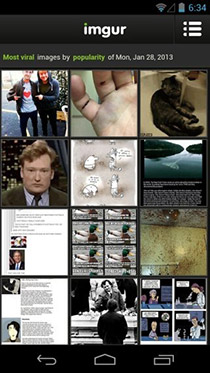
Official imgur Android App Now Available For Download In All Regions

If you’re a frequent redditor, you've most likely heard of imgur. It’s a simple and fast image hosting service that lets you easily upload and share pictures, with or without an account. imgur has been around for quite a while and has become almost as popular as Reddit (or perhaps made popular by Reddit), but it’s official Android app debuted only last month, and that too with download restrictions based on your country. The restrictions have now been lifted, and you can download the app from any part of the globe. The app is just as fast as its web interface and allows you to upload images from your camera roll without signing in. You get an email and deletion link for any and all images that you upload. You can set a number of days to browse past images from, explore images uploaded to a particular sub-reddit, or simply browse images randomly. Playback of animated GIFs is also supported. Read More

Easily Share Images & Screenshots To Imgur Via Drag & Drop With MyImgur

Imgur needs no introduction when it comes to sharing photos and pictures over the web. If you have ever used Reddit, you'd probably be as much familiar with this acclaimed service as you like viewing those cat pictures over at Reddit. MyImgur is a Windows application that lets you upload images or screenshots to Imgur right from your desktop. You don’t need to fire up your favorite browser, open Imgur’s website and then upload the images. MyImgur consolidates all these steps into one. You simply drag and drop your image over the application window and it will swiftly move to Imgur server. The application also lets you sign in to your Imgur account in order to upload images straight to your profile. Read More

ImageUP Lets You Drag & Drop To Quickly Upload Images To Imgur

If you want to use images on your webpage, or an article you are posting on the web, you may need to host it somewhere. If you have your own website, you can upload the image there, but images consume a lot more storage space than text. High storage consumption means that all the hosting space that you have bought for your website can be consumed very fast. Although you can conserve storage space by the uploading images to image sharing platforms, it becomes quite a tedious process when hundreds of images are to be uploaded and shared. Hosting websites, such as Imgur.com, Minus, and ImageShack.us allow users to upload images for free. Imgur, in particular, is an image hosting website that offers account-based, and anonymous image uploading services, but you are required to open the website before you can upload the images. Today, we have a miniscule open source tool for you called ImageUP that allows you to quickly upload images to Imgur directly from your desktop. It remembers the images you have uploaded in the past, and shows all the images in a list, so that you can easily view them and copy their public links for sharing. Read More

Hyperdesktop: Upload Images & Screenshots To Imgur From System Tray

Uploading an image is often required to prove your point, for instance, on a forum. Providing an image with your statement allows you to convey your message in a better way, and it makes it easier for the reader to understand what you are trying to say. So, it is better for both the author and the reader to communicate when there are images involved. However, including images require you to first upload them, and a lot of websites and forums don’t allow you to directly upload images on their servers. You have to upload the desired photo onto a hosting service and then provide its link along with your text. Websites such as 9Gag, Reddit and Digg don’t host the images posted by users on their own servers. That’s why most users upload images to online image hosting websites, such as Imgur.com, Minus, ImageShack.us etc. Imgur is an image hosting & sharing website that offers both account-based, as well as anonymous image uploading services. Today, we have a tool for you called Hyperdesktop that allows you to quickly upload images to Imgur and create a URL, allowing you to share it across the internet with other people. Read More

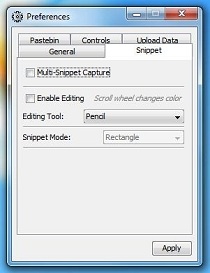
Snipping Tool++: Upload Images To Imgur & Text Snippets To Pastebin

Windows 7 comes with a Snipping Tool application that easily lets you capture different kinds of screenshots. Albeit it’s not flooded with a wide array of features, it’s a major improvement over the previous Print Screen method that would take screenshot of the whole screen, which you can then paste in the integrated Paint utility and make a few adjustments thereafter. If you still aren’t quite satisfied with Snipping Tool, then you might need to look for some alternative solutions, and Snipping Tool++ is just one of those. You may call it an evolved version of Windows default Snipping Tool that contains a few additional features that are never found on the former one. It’s an ultra-light, Java-based application that, along with simply enabling you to capture the screenshots, also lets you upload them directly to Imgur, and in addition, uploads text snippets to PasteBin. Yes! you might be wondering what PasteBin has to do with screenshots; well, an added feature never hurts anyway. Moreover, if you frequently find the need to upload various images to Imgur (a renowned image sharing web service), then the application might come in handy to upload multiple images to the site (at most 50 within an hour) without firing up your web browser. Read More

Imgur Album Downloader: Download All Images From Any Reddit User Profile

The image hosting juggernaut, Imgur, is quite popular among the internet users. It’s frequently used by millions around the web for all kinds of image hosting, specifically a trend among the Reddit users. The beauty of Imgur is that you can find any type of required image for free and there are hundreds of thousands of them. One way to grab images is one by one, via your web browser, but if you were looking for a desktop program that could let you download all Imgur images posted by a specific user on Reddit, then look no further than Imgur Album Downloader. The Java-based tool is developed to download all Imgur images from any Reddit user, in batch. All you need is to specify the URL to Reddit user profile, and it will automatically start downloading all the images posted by specified Reddit user. In addition, you can also download images from Imgur in bulk, and choose to save the download history to instantly check the number of downloaded image galleries. Details to follow after the jump. Read More

Tiny Uploader: Capture Screenshots & Upload Images To Imgur & ImageShack

Websites such as 9Gag, Reddit and Digg don’t host the images posted by users on their own servers. That's why most users upload images to online image hosting websites, such as Imgur.com, Minus, ImageShack.us etc. Imgur is an image hosting & sharing website that offers both account-based, as well as anonymous image uploading services. ImageShack is another free image hosting website that allows users to upload up to 5 megabytes of JPG, PNG, GIF, TIFF and BMP images. Previously, we have covered desktop applications for uploading images to these image hosting websites; Imgur Uploader for Imgur lets you quickly upload images by just dragging them over the specified area, whereas ImageShack Uploader is a cross-platform web application, which allows you to upload images in bulk. Today, we came across an application  for Windows called Tiny Uploader, which lets you upload images to, both Imgur, and ImageShack from a unified interface. You can upload images already available in your hard drive, or take screenshots of a region on your desktop or complete windows and upload it to Imgur.com or ImageShack.us. Keep reading to find out more about Tiny Uploader. Read More

Imgup: Upload Any Image Or Screenshot To Imgur From Menu Bar [Mac]

Imugr is a popular image sharing service and is widely preferred by Redditors. Whether you’re a Redditor or not, the service is excellent nonetheless. The best part is, for images you don’t care to protect by privacy settings, you can upload and share them without even needing an account on the site. Imgup is a free Mac app that sits in the menu bar and lets you upload any image directly to Imgur. Additionally, it integrates with the default Mac screenshot shortcuts, and by pressing the Option key in addition to the hotkeys, the app uploads the screenshot directly to Imgur and you can view thumbnails of them from the menu bar. Clicking on the thumbnail opens the direct link of the image in your browser. Read More

Download All Images From deviantART, Picasa, PhotoBucket & More

Image Collector is an application for image collection enthusiasts who may be interested in grabbing exotic images from websites such as Picasa, deviantART, imgur, PhotoBucket and 4Chan. It provides options to view, categorize, and download from famous web services. You to save images in custom categories, for example, you can create a category by the name of Wallpapers and download wallpapers from available web services to this category. Image Collector also comes with a built in image viewer which provides three different viewing modes; normal, stretched and center. Read More

Share Clipboard, Screenshots, And Code Snippets With ClipUpload

Looking for a simple and quick way to share clipboard data with friends? Try ClipUpload that offers a fast way of sharing screenshots and text files. It supports two widely used online services imgur and Pastebin for sharing uploaded images and text/code  respectively. It is developed to work from Windows system tray, allowing you to upload image and text in Windows clipboard to supported services. After the uploading process finishes, it will copy the generated link to Windows clipboard in order to share the link with others. Compared with previously covered screenshot sharing tools, such as, Ybex Clipborad, ScreenCatch, and NoCaps, it differs in a way that it allows uploading multiple images and text snippets in one go. According to the developer, on copying multiple files, it will upload all of them and generate shareable link for each file. When it comes to uploading text-based files or selected text, it offers Pastebin supported formats in system tray menu, so you can easily upload and share plain text and code written in HTML, CSS, PHP, C#, and VB.Net programming languages. Read More

Imgur Uploader Allows Easy And Fast Image Uploads From Desktop

If you’re an active user on Reddit or Digg, you are probably already using Imgur. For those who are unaware, Imgur is a quick and easy image sharing service offering both account-based image sharing, as well as free, community images visible to all. Most common usage of Imgur is to quickly upload images for sharing, and hence the software Imgur Uploader wants to make the process more easier from any desktop. Read More