Tag Results For: jumplist

Login.png

Kwerty Gmail Notifier: View Emails Using Windows 7 Thumbnail Preview & Compose From Jumplist

Gmail is one of the most widely used email service in the world. After being released in 2004 as an invite-only beta service, it quickly became popular and replaced Hotmail and Yahoo Mail as the default email service choice for most people. The most unique feature of Gmail was the number of email management features [...] (more…)

_2012-04-20_14-40-00-2

How To Add Separators In Windows 7 Explorer Jumplist [Tip]

Amongst all the useful features that Windows 7 brought to its users, Jumplist probably tops the list of most used ones. It lets you quickly access most frequently used functions and tasks of an application without cluttering your desktop with shortcuts. You might have noticed that some applications have separate sections in their jumplists. For [...] (more…)

jumplist-apps-1.png

Windows 7 App Launcher: Run Programs In One Go From Taskbar

Ever wanted to launch multiple applications for performing routine tasks in one go, without having to manually create a batch script to invoke applications’ execuatables? Although the batch script file (.BAT) can be used to run multiple commands and applications, it’s a bit tiresome to manually add new applications to batch file and edit the [...] (more…)

Plugin-Manager.jpg

NppJumpList Adds Windows 7 Jumplist Support To Notepad++

Notepad++ comes with an arsenal of useful plugins, which make it one of the most useful and versatile text editor. Today, we bring to you a plugin for Notepad++, namely NppJumpList that will add Windows 7 Jumplist support to Notepad++. Other than enabling Jump List, NppJumpList provides you with a list of available tasks that [...] (more…)

jumplist.jpg

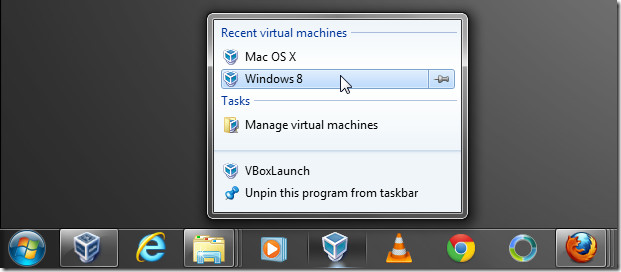
VBoxLaunch: Run VirtualBox Virtual Machines From Start Menu & Jumplist

If you’re an avid Oracle VirtualBox user, you will love VBoxLaunch. It is a small executable script for Windows 7 that you can use to launch virtual machines from Start Menu and Jumplist without having to launch VirtualBox first. The script is solely written to enhance VirtualBox’s usage experience. It doesn’t change any virtual machine related settings nor [...] (more…)

pinning-websites-3.jpg

Add Windows 7 Taskbar Jump List Features To Your Website

As many of you may already know that apart from speed and performance improvements, Internet Explorer 9 also focuses on making full use of Windows 7 Jumplist. IE 9 defines the website pinning in Windows 7 super bar in a whole different way, allowing you to gain control over every little feature related with pinned [...] (more…)

JumpListManagerbyMurGee.com_.jpg

Manage Windows 7 Jump List Items In Taskbar With Jump List Manager

Back in 2009, we featured a brilliant Jumplist tool called, Jumplist Launcher, which can tailor jump list items in the Windows 7 taskbar with ease. Today we have yet another jump list tool called, Jump List Mange. It can quickly collect items and tasks of most frequently used applications in customizable Jumplist. Compared with Jumplist Launcher, it [...] (more…)

Chiave.jpg

Chiave File Encryption With Windows 7 Jumplist And 512-Bit Rijndael Support

Need a Windows 7 encryption tool to quickly protect files and folders with staunch encryption technique? If yes, take a look at open source Chiave File Encryption. The most fascinating aspect of this application is its drop-dead UI which makes use of all the aesthetic functions of Windows 7 user interface, including, Aero Glass, Jumplist, and [...] (more…)

smart_use.jpg

Create And Categorize Jump List Items With Seven Jump

Windows 7 jump list is one great productivity enhancement feature which lets you quickly access options, associated tasks, and recently opened items of applications pinned in taskbar (also known as Superbar). Seven Jump is a nifty little addition to Windows jumplist feature that is written to extends its function and revitalizes it to offer customizability. [...] (more…)

jumlistroot.jpg

Add Jumplists To Applications That Don’t Support It [Windows 7]

There are many programs that are compatible with Windows 7 but do not support Jumplist feature. We tend to use these programs to quickly access files, programs and many of their features, so now there is an excellent tool that will allow you to add Jumplist feature to any program(s) of your choice. (more…)

JumpLaunch – Quick Launch Programs From Windows 7 Jump List

Back In June we covered a great app called JumpList Launcher that allowed users to add programs and then launch them from the taskbar jump list. Some people complained that it was quite buggy and I agree. Luckily today I came across JumpLaunch, a newly released tool that does exactly what users want. (more…)

Steam Gets Windows 7 Jumplist Support

Steam is a widely popular client that allows users to buy new games, make friends, communicate with each other, and play multiplayer games. It has more than 20 millions users worldwide. In short, it is the most popular content delivery platform developed by Valve Corporation. (more…)

Quick Launch Browsers From Windows 8 & Windows 7 JumpList – Browser Chooser

Brower Chooster has been well covered around the blogosphere. For those who don’t know, it allow users to open link in the selected browser. In the latest release, the author has finally added support for Windows 7 and Windows 8 JumpList. Now you can pin the program to the taskbar and launch the desired browser [...] (more…)

jumplistlauncherwindowscreenshot.jpg

JumpList Launcher – How To Create Custom Jump List In Windows 7 or Windows 8

The jump list feature in Windows 7 and Windows 8 superbar increases the productivity a lot, but what if you want to make your own custom jumplist full of favorite programs or simply want to merge all programs into one icon? In such a situation you are screwed, according to the developer of Jumplist Launcher. (more…)