myQuests Is A Great Gesture-Based iPhone Project Manager For Teams

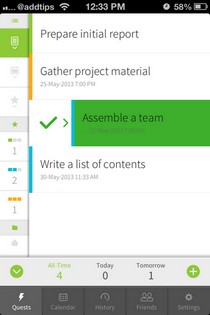
It is a common practice among developers these days to make to-do list apps that rely heavily on gestures and color-coding. Clear kicked off this trend, but more recently we have seen similar concepts implemented in apps like Listacular. Since the whole point of using gestures in a task manager is to make it uncomplicated, these apps aren't too heavy on features. The new myQuests though, clearly shows that it is possible for an app to be feature-rich without making things too tangled up. The app can prove to be a great tool for project management, specially when you have to work in a group, because it lets users share tasks with others, and has an elaborate commenting system of its own that can be used to stay up to speed with all the latest happenings regarding any to-do list or individual task. Read More

Asana Brings Its Official Mobile Project Management App To Android

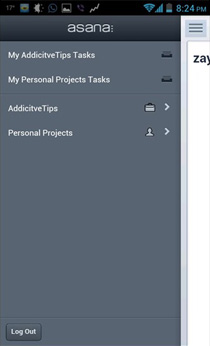
After a successful run on iOS, the official Asana Mobile app has been released for Android as well. Asana is easily one of the most sought after project management web apps, and its availability on the mobile platform gives any team of people working together, the ability to keep themselves and others updated with every development regarding a task or project. Having been just released for Android, I feel the app's UI needs to be slightly more user friendly for those who have just started with Asana. That said, the app brings almost all the Asana features you'll require for collaboration on the go. We take a look at the app and how it functions after the break. Read More

Online Project Management Service Basecamp Releases iPhone App

There might be plenty of project management services and tools around today, but Basecamp is among the pioneers of this niche. The web service has become more and more polished with the passage of time, without getting riddled with unnecessary features. Basecamp lets you keep track of all your ongoing projects, offers options for collaborating on notes or to-do lists with other team members, and can also act as a platform for sharing files related to a particular project or task. Like most of its competitors, Basecamp has been confined to the web until now. Times have changed however, and many of us want to keep track of our work using our smartphone on the go. This has prompted the Basecamp team to release an official app for the iPhone. The iOS app offers almost all the features that are available on the web version of Basecamp. In fact, some of the tasks (like conversations and image sharing) seem better-suited to the iPhone compared to the web interface. Read More

InFocus Pro: iOS Project Management Suite With A Sketch Pad For Notes

It’s always nice to see a feature-rich app, but when an app offers way too many unrelated features, people seldom like it. A successful app strikes a fine balance between being full of useful features while maintaining an acceptable level of understandability. You might be tempted to think that InFocus Pro tries to do too much, but all the features it offers are interconnected in one way or the other. Basically, InFocus Pro is a project management app incorporating task lists, notes, sketches and calendar appointments for each project. There might be other apps available for iOS that do the same things, but InFocus has the advantage of accepting handwritten entries for almost any field. It is also possible to make the app read your notes and lists out loud. Read More

xPlan Is The Ultimate Project Management Utility For iPad

Even the smallest of projects need someone to manage them if there are more than 2 people involved. Without proper project management, things are bound to get confusing and inefficient. You might run out of resources, the race against the clock might prove to be too tough in the end, or there is always the possibility of people remaining unclear about their responsibilities. Unless you were born with excellent managerial skills (and very few people are), you are sure to appreciate some help in project management. xPlan is an iPad app that promises to be that extra helping hand for you, and if you learn to use it properly, the app will take care of every aspect of your project. xPlan manages resources, displays stats for members of the project group, lets you make Gantt charts easily and works on the basis of milestones and deadlines to ensure that everything about the mission works seamlessly. Read More

Oogwave: Plan, Coordinate And Execute Collaborated Tasks & Projects

Managing teams and projects with deadlines in mind, usually compel the system managers to download and pay sizeable amounts for utilities that facilitate in achieving coordination and collaboration for the better. You may have downloaded a project management tool, a chat client coupled with online storage for effective monitoring till the rightful task completion. Oogwave is a free web application that provides you with a wide range of services in a user-friendly, integrated manner. With work and project planner, internal communication, personal tools for tasks and notes, team chat and details, you are in a much better position to increase overall work productivity. Moreover, group discussions, commenting and alerting features add life to your workspace, while the group timeline lays out tasks with time for the entire team, enabling accomplishment of collective goals. Read More

Brosix: Chat & Collaborate For Secure Project Management Across Multiple Platforms

When managing teams and projects, most of the time and energy of capable individuals is spent on coordination and collaboration for better work distribution. Instant Messengers aim to enhance cooperation between team members. Brosix is a powerful, cross-platform Instant Messenger that allows you to chat and share sensitive data with the concerned individuals in a fully protected, private channel. From the individual to large scale organizations, the importance of this application in achieving productivity is commendable. In addition, it supports all popular operating systems, whether on your Smartphone or your system PC. Workers can keep in touch by using features like swift screen and file sharing, online white-board, co-browsing, audio/video chat and conferencing to improve the collective good. Read More

Yodiz: Project Management With Collaboration Through Social Media [Web]

In the field of software application development, project management techniques like scrum (agile software development method) possess a unique role in addressing the challenges of monitoring and managing progress, virtually, with emphasis and importance on each team member’s work contribution. Using this technique, high performing individuals can be encouraged while weak performers can be addressed for the overall good of the team. Yodiz is a cloud-based project management tool that is based on the scrum method. With role-based specialized interfaces, agile management and issue tracking coupled with a smooth signup and extensive support experience, this tool is great for all efficiency enthusiasts. By collaboration on social sites, Yodiz aims to connect business professionals to the social media as a means of better time-utilization with respect to team interaction. Read More

TimeSnapper Auto-Captures Screenshots At Custom Intervals & Plays Them Back Like A Video

Time tracking has wide scale applications in project management where detailed timesheets demand a great memory. Going back in time helps workers and managers identify 0weak areas that are hindering performance and curtailing efficiency in large scale production scenarios. For strict office environments, administrators can keep a check on every click on employees' systems and eradicate all non-work activities for their betterment. However, this isn't just applicable at macro-level; an individual can analyze the time spent on his or her computer with activity details and productivity insights by rewinding and viewing their tech deeds like a movie. TimeSnapper is a sleek tool that makes doing this extremely easy. It lets you record and analyze activity on your system with the help of custom snapshot intervals. Read More

Trellizzo: Manage Projects & Share Tasks Using This WP7 Trello Client

We have already covered the web version of Trello (complete review can be read here), and in addition to that, the service has also got an iOS client. As can be expected, there is not an official Windows Phone 7 version of this popular project management service as yet, but now you can manage your boards and tasks from your Mango phone using Trello’s third-party client, Trellizzo. This app might not be as comprehensive as the official one for iOS devices, but it should prove to be enough for most Trello users. With Trellizzo, it is possible to manage your boards, create new cards (a name for tasks used by Trello) and you can even view all your notifications along with other important Trello data on your account. Read More

Manage Project Timings & Earnings With Sessions For iPhone

If you work freelance, or have to maintain financial records of your work, then things might get a bit tricky when you are working on more than one projects, and the payment for each project is different. There are many good apps available for iOS that will let you maintain financial records of your work, and there are still more which will help you log your work hours with complete ease. Sessions is an app for iPhone, iPad and iPod touch which combines both these functionalities, and lets you keep a thorough record of all your projects and working sessions. The app is really convenient to use, and will let you manage your financial records without having to control too many aspects of Sessions. Read More

Werdsmith For iPhone/ iPad: Keep Track Of Progress In Writing Projects

If you do a lot of typing on your iOS device, then most likely you are not satisfied with the stock Notes app in your iPhone or iPad. Despite being pretty usable and effective, there are a few features which are clearly missing in Apple’s note-taker. For instance, if you want to keep track of the word count in a document, you won’t be able to do that without installing a third-party app. Werdsmith is one such app, which will let you create notes with ease, and it will also manage all aspects of any writing-related project. The app is not just another note-taker. It subtly motivates you to write more, and write faster. The app has a set of really nice benchmarks of its own that keep users continuously aware of their progress in any given project. Read More

Asana For iPhone Lets You Add Tasks & Comment On Projects On The Go

Popular project-management web service Asana needs no introduction since its list of users is growing by the day owing to the simple yet productive interface it offers. For all those who had been maintaining a track of their ongoing projects on Asana and collaborating with their colleagues on it, we have some good news; the iOS client for this web service is now available. Now you can add tasks and comments pertaining to your ongoing projects in Asana from your iPhone, iPad or iPod Touch to stay on top of things on the go. Read More

Sort & Organize MS Outlook Items According To Project With yourMail

yourMail is an MS Outlook add-on which helps you reduce the time and effort involved in manual email management. It compiles emails, attachments and other tasks for a particular project, and displays them in a unified manner for easy sorting and management of MS Outlook items related to that specific project. It’s intuitive search and filing options allow emails and attachments to be stored in a structured way, which saves time, and easily allows to located project specific items, when needed. Read More

Do For iPhone: Manage Your Projects & Collaborate With Team Members

If you have ever been to a job interview, you must know how much emphasis most organizations put on teamwork and the capability to manage a group of people working on a particular project. They do so for good reason. Project management isn't an easy task, after all. To keep track of who is supposed to do what at a given time can get you in a spot of bother, and that’s why a little assistance in that regard is always welcome. Do is a web service meant to assist you in managing projects and collaborating effectively and without hassle with all your team members. The service has been around for quite a while, but now you can use it on the go with the official Do client for iPhone, iPad and iPod Touch. Read More

Hi Task Is A Task, Project & Event Manager That Generates Reports

There is no one size fits all solution to project and task management which is why new methods and techniques continue to evolve, and why you will always find a new task and project management service to help get your work on track. Hi Task is a web service that is a task manager at the core but has features that make it a viable project management tool. It lets you create projects, add tasks and generate reports based on time or productivity. Read More

Grafire – Project Management, Time Tracking & Invoicing With 1GB Space

If you’ve ever fallen in love with a project management tool only to find that the free version doesn’t exactly fulfill all your wild dreams or that upgrading to the paid version just to get that one feature wasn’t as great an idea as you thought then Grafire might interest you. This free web service is…free. Other than just being free, it manages time spent on tasks, multiple projects, clients and lets you create and send out invoices. The interface is extremely easy to use and the service itself is rich in features that could easily satisfy small scale project, client and time management needs. Read More

Panmind – Manage, Share & Collaborate On Files & Projects

Project management and mind mapping are different things but if the two were to come together, what you’d get is something that would look roughly like Panmind. This web service serves as a means of project management by keeping everyone involved in a particular project updated about any changes. It’s also a great way to share files and keep everyone posted on when a new file has been added or a file has been modified. The service has an additional features that allows all members to post comments on projects, thus facilitating consistent feedback.

Read More

Collaborate And Manage Small Projects Online With CoHuman

CoHuman is a simple project management web service for small teams. It lets you and your team members monitor and track all tasks for a project. The free version of the service lets you enter an unlimited number of projects, gives you 1GB storage space for your files, allows all members to collectively track tasks, automatically sets priority of all tasks entered for a particular project and gives members real time notifications of any changes in tasks. Read More

Create & View MS Project Files Online Without Having It Installed On PC

AmiProject is a web application that brings MS Project online, eliminating the need for installing Microsoft Project on your computer and hence, providing a free online alternative. With AmiProject, you can view files of Microsoft Project 2010, 2007, 2003 and 2002.  It contains easy viewing and sharing options of MS Project files, including task information window, movable table/chart splitter, Gantt chart view and zoom. AmiProject supports all commonly used browsers including Firefox, Chrome, Safari, Opera, and Internet Explorer. To manage your projects online, you can use a Google, Yahoo, AOL or OpenID account. Read More