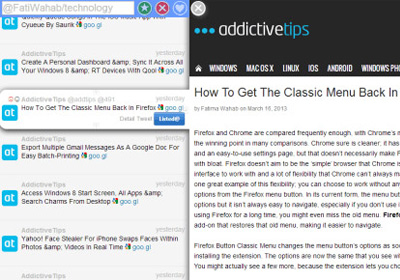
Tweewer: News App & Google Reader Alternative Based On Twitter Lists

With the imminent demise of Google Reader just a few months away, the inevitable is happening: people have started to come up with unique ways to replace it. Not surprisingly, Twitter has formed the basis of one such solution provided by Tweewer, a web service that lets you view tweets by accounts in a Twitter list as if they were news items. Tweewer lets you view a tweeted link as it would appear on the website, or open the link in a new tab. You can retweet a news item, which is somewhat akin to the share function in Google Reader, and easily add a list of your choice. Read More

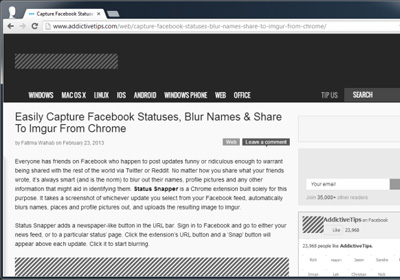
Add A Text-Only Grayscale Reading Mode To Google Chrome

Reading online can either be enjoyable or distracting, depending on what you’re reading and how you’re reading it. At times, just the links or images on a website are interesting enough that you compulsively end up exploring more content than you originally intended to. Text Mode is a Chrome extension that can help make websites less interesting and keep you focused on what it you visited the website to do, by hiding distracting content such as images, videos, and additional frames for content like flash, leaving behind nothing but text on a page. In addition, it also removes all colors from the website. The extension doesn’t just work on one page; once enabled, it will open everything in your browser in what can best be termed as a minimal, grayscale mode. Read More

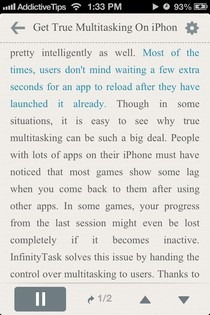
NaturalReader Converts Documents & Web Page Text To Natural-Sounding Speech On iPhone

There have always been some pretty decent text-to-speech apps around for iOS, but the niche has never taken the market by storm. The main reason for this is the fact that no one appreciates listening to the contents of documents or websites in a mechanical and monotonous voice. However, there's a new app on the App Store by the name of NaturalReader Text to Speech that aims to tackle exactly this issue. It comes with a lot of different voices and accents that you can listen content from any document or web page in. You can transfer documents to the file using iTunes, open email attachments from it, use its Dropbox integration to load documents from your cloud storage, or use the built-in web browser that can read contents from out any webpage on the go. Read More

Listen To News Articles Read By Real People With Umano For Android & iOS

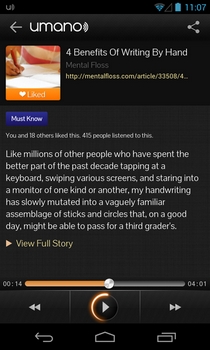
There is no shortage of feature-rich and great-looking news and RSS feed readers for Android, but how many of them actually let you listen to your favorite stories, thereby allowing you to multitask? Even the select few alternatives that do support the Text-To-Speech (TTS) feature to read out content loud to you mostly have nothing but a plain robotic tone to offer, with the option to select between just a male and female voice at best. Umano is a simple news app that offers both sleek looks and the option to listen to news stories in real people's voices instead of some monotonous robotic one. Initially rolled out as an iOS-exclusive app, Umano has just been released in Google Play Store to let Android users listen to news articles while commuting, relaxing on their couch or playing around with other apps on their devices. Read More

Official Pocket App For Mac Released; Allows Clutter-Free Offline Reading Of Bookmarked Articles

Pocket, formerly known as Read It Later, is an immensely successful web service that allows you to mark online content for reading later. In addition to its web service, it also has web browser extensions and apps for Android, iOS and Kindle, and now, for OS X as well. The Pocket app for Mac is basically a desktop reader for articles you bookmark while surfing the web on any of the mentioned platforms. It allows you to download items in your list for offline reading, and can also be used to save items directly to your Pocket account from the clipboard. The app shows you the number of unread items in the Dock and lets you sort the content by type, same as it does on its web interface. It syncs automatically and has full screen support for clutter-free reading. Bookmarked items can be emailed and/or shared via Facebook, Twitter, Evernote or Buffer. Read More

Firefox 16 For Android Brings Reader Mode & Sharing Of Individual Tabs Across Devices

Mozilla Firefox, one of the crowd-favorite  desktop web browsers, has progressed to version 16, bringing along with it a plethora of new features for both platforms. While the desktop variant of the popular browser seems to have benefited the most from the latest update, the Android equivalent has brought a couple of noteworthy features along with it, too. To begin with, the latest iteration of Firefox for Android now supports a Safari-like Reader Mode, which undoubtedly is a great step ahead in enhancing your reading experience. Not only the reader mode strip away ads and bloat content, it is actually laced with several neat tools, such as day/night reading modes, font and margin adjustment options, easier bookmarking and sharing, and more. Read More

SoundGecko Comes To Windows Phone; Converts RSS Feeds & Articles To MP3 Audio

Ever since podcasts made it into mainstream, they have become a part of the daily routine of many smartphone users. The idea of being able to stay apprised of the latest happenings in the areas of your interest, without having to sit still in front of a TV or reading a book, is certainly appealing to most people. Having said that, no matter how good a podcast is, not all of it can be to your liking, and there are bound to be some boring its and bits in there. Won’t it be just heavenly if there was some way of creating your own, personalized podcast? Thanks to SoundGecko, that is exactly what users can do. The service is not new, by any means, and has been around for iOS and web for quite a while. With SoundGecko, you just have to email any article’s link to the service, and all its text content is converted to audio (in MP3 form) and sent back to you. While this sort of functionality is useful on a computer, too, it becomes absolutely awesome if you can listen to all the MP3s on your smartphone (and hence, the iOS app). The big news regarding SoundGecko is that the service has released its official Windows Phone client, and is sure to earn the admiration of everyone who wants to listen to their RSS feed or other web content on the go. Read More

Improve Your Reading Speed With QuickReader For iPhone & iPad

Book-reading fans are sure to know that if you stay away from books for a while, your reading speed is bound to go down quite drastically. While some people are okay with reading slow, most are always trying to improve their reading pace. There are a lot of online tools available that claim to enhance reading skills, but when you get down to it, nothing improves reading speed like simply enjoying some good books. That is the theory upon which QuickReader is based. This iOS app comes with a nice collection of classical books, and you can read them in the app’s reader, which is designed specifically for speed improvement. It is also possible to add eBooks from external sources to the app, while the speed test offered by QuickReader can be used to gauge your performance improvements. Read More

Trapit Is An Intelligent Browser & Flipboard Alternative For Your iPad

Flipboard rules the news reader category in iOS, while no web browser is as cool as the newly released Chrome app. Both these apps look particularly good on the iPad’s larger screen, and you would think that no new app can give them a run for their money. Well, Trapit is a new iPad app that combines the goodness of both these apps, and the end results are pretty awesome. Although the app does have a stunningly beautiful interface, it is not just all glitz and glamor. Trapit can prove to be a really time-saving and useful app that has the ability to learn your preferences with time, and will provide you with all the best and relevant results each day. Not only does the app let you create a personalized news feed, you can also use it to search for any particular keyword, and it will come up with elaborate articles from a vast variety of sources. Read More

Wiki Reader: Wikipedia Browser With A Filmstrip-Like Image Viewer [Mac]

Wikipedia may be cited as the number one resource for students who need to get an assignment done overnight, but unsurprisingly, it has a much larger reader base. No matter how you look at it, Wikipedia is a go-to website for most people looking for quick information. For people who need to use Wikipedia more often than others, a desktop client might be a better way to access it instead of a web browser. Wiki Reader is a free Mac app available in the Mac App Store, and is a fairly good browser for Wikipedia. It isn’t likely to help you out with research, since there are no note-taking or bookmarking features, however, it’s a good site-specific browser. Wiki Reader lets you choose which language you view the website in, i.e. which language repository, and has an excellent image viewer that allows you to view all images associated with an article in a slideshow or filmstrip of sorts. Wiki Reader supports full screen mode and maintains a compete history of the articles you’ve opened. Read More

Movellas For Android: Discover, Read & Share New Stories On The Go

Whether you’re fond of storytelling or into digesting long, epic tales, you must have, at least once, come across Movellas. Featuring hundreds of stories from almost all popular genres, and collected from avid storytellers from all around the world, Movellas is a social network that lets you fulfill your craving for discovering, writing and sharing interesting tales. The service released its official iOS app in the App Store a while ago, whereas the Android variant has just been rolled out into the Google Play Store. Sporting a slightly Holo-themed interface, featuring an extensive list of categories and underlying stories, and granting you access to its various social activities, the Movellas for Android certainly deserves a look, especially if you have the fervor for storytelling. Read More

Popular Article Bookmarking App Instapaper Comes To Android

After receiving umpteen number of unofficial Instapaper clients, Google Play Store finally welcomes the official one! The simple yet immensely popular iOS app that lets you bookmark favorite webpages – online articles, journals and blog posts – download included content, and then read all the bookmarked stuff later in offline mode, has eventually made its way to the Google Play Store for Android users. However, offline reading is not all what Instapaper has on offer; it comes across as a universal app that has been optimized to run equally effectively on smartphones as well as tablets (Nook, Kindle Fire et al). In addition, the app offers several handy tools, such as customizable font size and types, spacing, indentation, in-app sharing, custom folders, and day/night reading modes, that help you easily bookmark, organize and read your favorite articles on the fly. Read More

WikiView For iPad: Elegant Wikipedia Reader With Map View & Real-Time Search

You’ve all probably heard about Wikipedia, the online encyclopedia for readers by readers. Seriously, who hasn’t? If you often find yourself on the website, looking through its massive database of articles, you should know you can do the same on the go with WikiView for iPad. It incorporates most Wikipedia features and even provides additional features like saving an article for offline reading, removing those pesky references at the bottom of the page, searching articles by location via a world map and much more.

Read More

Blio Is An eBook Reader & Manager That Lets You View eBooks In Their Original Formatting

Reading a publication on an electronic device rather than a paper book has been termed both better and worse by different groups of book lovers. Paper book readers argue that reading a book using an electronic device, such as Amazon’s Kindle or Barnes & Noble’s Nook, does not 'feel' as right as reading a paper book. Whereas, a very strong argument against paper books is their effect on the environment, as massive amounts of trees are needed to produce that amount of paper. Nevertheless, the fact remains that eBook software they do not reproduce content exactly as intended by the author. Blio is an eBook reader that lets you read the books just as their authors formatted and designed them. Other than reading books, the application allows you to manage your eBook library, bookmark favorite books, look up the meaning of words and phrases within books on the internet, highlight selected content, add notes and more. You can also use the built-in text-to-speech feature to let the application read books aloud. More on Blio after the break. Read More

Flipboard For Android Now Available For All Devices [Review]

Once the official Instagram Android app finally hit the Google Play Store last moth, most users (including me) set their sights on another popular iOS-exclusive app, Flipboard – an elegant, customizable magazine style news and social feed reader. Just last week, along with the announcement of the much-anticipated Samsung Galaxy S III, came the news that Flipboard will be debuting on Android as an SGS III-exclusive app. Now, unless you’re one of the lucky few to-be owners of said device, chances are bleak that you’ll be getting a taste of Flipboard on your Android any time soon. That said, XDA member, Valcho, seems to have completely different plans, as he has managed to pull the APK of the much sought-after news reader from his Galaxy S III (a test unit, presumably). So, albeit not officially, Flipboard for Android is now available for download, and is ready to give Google Currents a good run for its money in the race of the best news reading Android apps. Update: A fully tablet-optimized version of Filpboard for Android is now officially available on the Google Play Store. We've added a link to its Play Store page at the end. Read More

CSV Reader: Portable Application For Reading & Sorting CSV Files

The CSV or Comma Separate Value file extension are files containing numbers and text in plain-text form. A CSV file is used to store any number of records in the form of lists, separated by lines in a form of table with each line consisting of several fields. Usually, every record includes the same sequence of fields. Most of the applications used to create records, such as Microsoft Excel, allow you to save the document as a CSV file as well, which allows users to open the same file in multiple programs without having to change the format. However, an application like Microsoft Excel is pretty heavy on system resources, not to mention costly, and using it just to view a simple table would consume a lot of memory. If you’re looking for a simple application to just view CSV files, give CSV Reader, a portable application for Windows, a try. Read on to find out more about CSV Reader after the jump. Read More

Flip Pages Of PDFs With Facial Gestures Using MagicReader For iPad

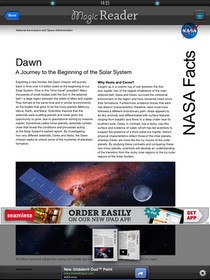
Tablets are often associated with eBooks, and there is a considerable number of users who use their tablets for reading books. An iPad might not be used for reading as much as Kindle Fire or Nook Tablet, but the presence of iBooks and a sizeable collection of other literary apps make the iOS tablet a pretty good device to have for book-lovers. The best thing about eBooks is that you can read them almost any time, and with complete ease. We say almost because there times when you just have to leave your iPad alone, like when you are eating your dinner and your hands are messy, you won’t be too quick to touch your tablet’s screen to turn the book’s page. Won’t it be awesome if there was some way of turning the pages of the book you are currently reading without touching the screen? Now, there is an app for that! Meet MagicReader, an app for the iPad which uses the front-facing camera to let you navigate through documents with a nod of your head! Amazed? Read on to learn more. Read More

Mixtab: View, Create & Share RSS Reading Lists On Any Topic [Mac]

We’ve covered quite a few RSS readers in the past, noteworthy of them being Cappuccino and Reeder, both of which are free, and allow you to add any feed that you like. Mixtab is yet another RSS reader app for Mac, but what sets it apart from other readers is that it allows you to visualize your feed items as thumbnails. You can create tabs, name them and add as many feeds as you like. The app isn’t just a great way to visually browse your feeds, but also to keep them organized. When creating a tab, you can add as many feeds to it as you like and group similar feeds like technology sites or different feeds of the same site together. You will have to create an account on Mixtab, but it requires nothing more than entering an email address and a password. Read More

FeedWizard: Simple RSS Reader That Regularly Deletes Old Items [Mac]

We covered quite a few RSS readers in the past, NewsBar is one such app that displays your feed on your desktop but costs $4.99. Cappuccino is another excellent RSS reader; it is free and lets you import feeds from Google Reader. FeedWizard is yet another free RSS reader for Mac that lets you manage your feeds. It is minimalistic and can be used to manage feeds without needing a Google account. The app comes with its built-in viewer that allows you to view a complete news item without opening your browser. No ads are displayed, and you simply view the text and the images in a news item with more article suggestions from the same site. Read More

bcTester Lets You Read Barcodes & QR Codes In Windows

QR codes are barcodes readable by scanners, and smartphones that can contain different pieces of information. You can view QR codes mostly on websites containing reviews of Android Apps. Scanning the QR code with your Android device takes you directly to its Google Play page in your phone allowing you to easily download the application. A QR code, basically removes the requirement to manually type the name and search for the app in your smartphone. Previously, we have covered a lot of applications that allow you to generate linear and two dimensional barcodes and QR codes and let you export them as image files, such as QR Gen and BarCode Generator. Barcodes can contain any type of information from a URL to a text message. You can even even share Wi-Fi through barcodes and QR codes as explained here. Even though there is a lot of material for Windows regarding creation of barcodes and QR codes, there are a lot less tools for reading one. Today, we have found an application named bcTester that reads barcodes from images or PDF Files. It allows you to read both linear barcodes and the modern two dimensional QR codes. Read More