Check5 Is A Folder Monitor, Batch File Renamer & Attribute Changer All In One

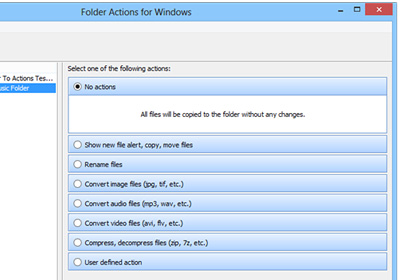
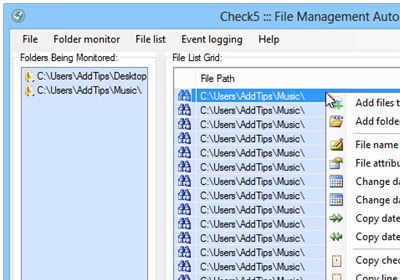
At times, we come across applications that offer a bunch of features in one small package that otherwise require installing multiple applications. Check5 is one such app for Windows that puts several related options on the table. It can monitor user-specified folders in real time and automatically notify you when any changes are made to the files in those folders, or to those folders themselves, by using event logs. It also houses a built-in batch file renamer and a file attributes changer, both of which work like a charm. The application enables you to monitor multiple folders at the same time. Read More

Edit Image File Timestamps And Add Date & Time To Their Names With EXIF Date Changer

Most users sort their files according to date and time information in order to easily differentiate between different versions without much hassle. Timestamps found in the properties of files contain information regarding when the file was created, when was it modified the last time and the most recent date and time it was accessed by someone. This allows you to quickly search a certain cluster of files that were created, modified, or accessed at a particular date, as well as group them together. By default, Windows only permit removing the metadata items one by one using the File Properties dialog, and you have to use third-party applications for updating file access, creation, and modification date and timestamp information in a batch. EXIF Date Changer is one such application for Windows that allows you to easily change the date and time stamp of images. You can adjust the time to a value of your choice, or increment the current date and time with a specified amount, down to a specific date, hour, minute and second. Read More

Freename Lets You Batch-Rename Files Using A Text Editor Of Choice

Renaming a large number of files can be quite a tedious task if performed manually. When we download files from different websites, their names usually consist of a lot of random alphanumeric characters. For instance, if you download pictures from Facebook, the files do not have the same names as they had when they were uploaded to the website. If you want to be able to easily find or browse through downloaded files on your computer, it is important that you give them appropriate names. However, the process of manual renaming seems alright when you have just a couple of files to rename. For a large number of files, batch-renaming applications can be of help, but mostly, they just add numbers, suffixes or prefixes to file names. Introducing Freename, a tool that combines the features of batch-renaming applications with the ability to edit the names manually. You can add multiple files at a time from different folders, and edit all the file names using any text editor installed on your computer. This allows you to use Find and Replace functions in common text editors for quick manual renaming of files. Read More

FileBot Automatically Renames TV Show Episodes Using Correct Titles

A massive collection of songs, TV series and movies may give you bragging rights, but as collections grow, it gets harder and harder to keep them organized. You may move your files around to make room for new ones and store older ones unorganized for ages. FileBot is a Windows application that helps you organize your movies and TV series. It allows you to search for episode names for any series and rename the corresponding files using the downloaded list. Alternatively, it will also let you specify the pattern for renaming the files, though the syntax is limited to just appending serial numbers to the end of the file name. FileBot even lets you analyze entire media folders and view which subfolders and what file types have been saved to it. Lastly, you have the option to search for and download subtitles for movies. Read More

Batch-Rename Files By Custom Rules & Add Media Metadata To Names With FiRE

When trying to rename files in Windows, we only have two options - we can either rename files one by one, or select all required files and rename them at once. Howwever, renaming in bulk will give all the files the same name with serial numbers at the end, which is why most users take help from third-party tools for batch-renaming purposes. FiRE is a portable file renaming Windows application that allows users to set file renaming rules and patterns to rename groups of files in one go. Like other renaming tools, it offers modes that append a specific keyword to existing file names, change its position in the file name and insert blank spaces. Additionally, you can use the metadata file rename mode to append metadata such as artist, year of release and album name to the names of multimedia files. Read More

Solid Renamer Lets You Use Multiple Rules At A Time To Rename Groups Of Files

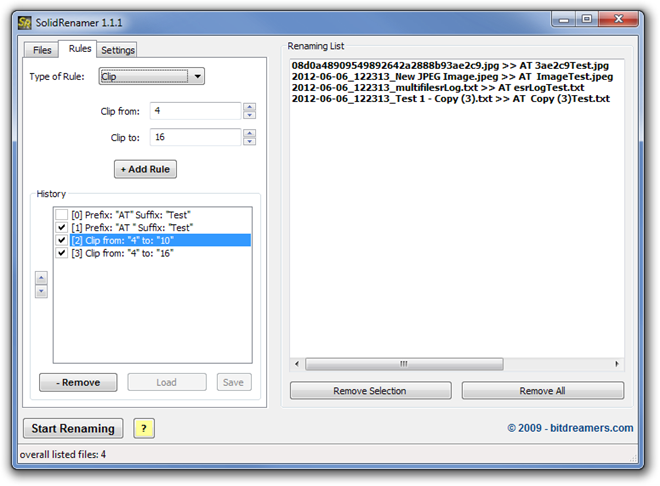
When downloading files of different types from the internet, such as documents, images, audio and video, there is one thing that everyone has to deal with at one point or another: incorrect file names. This happens especially in image files that the name is either not correct, or just a long string of random alphanumeric characters that prove to be of no help in identifying the contents of the file. There is always the option of renaming the file, but it can turn out to be quite a tedious task if there are a large number of items that need to be rectified. Previously, we have covered multiple renaming tools, such as PDFN Batch File Rename Utility, a tool with pre-includedbuilt-n renaming presets, and Siren, an open source batch file renaming tool that uses Regular Expressions. Today, we have another similar tool called Solid Renamer that allows you to add multiple rules for renaming selected files. The program includes different types of rules, such as Insert, Replace, Clip, Prefix/Suffix, Upper/Lower Case and Enumerate. The good thing about Solid Renamer is that you can use more than one rule at a time, and each can be easily enabled or disabled for a particular set of files. Read More

Rename: Edit File Names & Add Spotlight Comments In Bulk [Mac]

Batch file renaming is often needed when you have to organize a large number of files, and their names make little or no sense. Image files from your camera are the first thing that come to mind, but the need to clean up file names can occur for just about any file type. Rename is a batch file renaming app for Mac, which, unlike many file renaming apps that we covered earlier, has multiple ways of changing the file names; with Rename, you can simply select an entire folder that contains the files you want rename, enter a word that is found in the file name, and the app will find and rename it. It saves you the trouble of having to select a file that is to be renamed, or finding it from a large folder. Other features of this app include adding a serial number to all files and folders within any folder, appending a suffix or prefix to a file name, adding spotlight tags in bulk, and removing a given number of characters from the start or end of a file name. Read More

Siren: One Of The Best File Renaming Tools Out There; Supports Custom & Pre-Defined RegEx

In the past, we have covered a number of batch file-renaming tools for both Windows and Mac OS X, including NameChanger (reviewed here),  File Grinder (reviewed here) and the Metamorphose (reviewed here). Siren is yet another, open source batch file-renaming tool for Windows and Linux operating systems that aims to help you rename multiple files in one go. What makes it different from conventional renaming tools is that, it allows to use Regular Expressions, simply referred to as RegEx, to rename the files. It provides a plethora of predefined regular expressions, and lets you create a custom one to customize the pattern of renaming files. The application is not easy-to-use, and actually targeted towards advanced users, however, once you get the hang of its features, it will become fairly easy to use. You can use it to extract the meta information of the files such as author name, EXIF data, release year, created, modified & lass accessed date & time etc., and add them to file name as prefixes and suffixes. The regex support enables you to create countless file renaming patterns and rules to search as well as rename the files. More details after the jump. Read More

PDFN Batch File Rename Utility Provides 8 Different Presets For Renaming Of Files

Renaming a single file is easy but the real caveat is, what to do when you've got to rename multiple files? That's where file renamers jump in, facilitating the users to rename multiple files at once. In the past, we have covered a number of third-party file renaming tools, such as DnD Renamer (reviewed here), Renamed Master (reviewed here) and FAR – Find And Replace (reviewed here) that let you easily rename multiple files in one go. Today, we discovered PDFN Batch File Rename Utility, which is designed to do exactly the very same thing but comes with a twist. The application actually contains different file renaming patterns (called as Presets), supporting a total of eight presets, like prefix, suffix, file count, last modified, web friendly etc., to quickly rename files according to a user's requirements. Moreover, you can restore the original file names without having to specify the original source folders. Not only does it detect hidden files from the specified folder(s), it also lets you rename files from all sub-directories. More details after the break. Read More

ALmoviesRenamer: Automatically Rename Movie Files, Adding Relevant Info By Predefined Rules

One thing’s common among movie buffs, they want their movie collection to look sleek – containing every little detail about their favorite films, for instance, its original title, year of release, director name etc. ALmoviesRenamer is an open-source tool that helps in this regard by adding user-specified, movie-related information to the movies' filenames. This helps users in removing unwanted characters from the name, and improving search efficiency in your movie collection folder. Read More

FAR: Find & Replace A Portion Of Similar Filenames Or Completely Rename Multiple Files At Once

If you’re an avid AddictiveTips reader, you might have noticed that we have covered numerous Find & Replace utilities in the past. These programs easily let you rename multiple files on your computer at once. Well, today we will take a closer look into another such application, named as FAR – Find And Replace. This open source tool, written in Java, is designed to allow replacing either a recurring part of a group of file names with text of your choice or batch-rename files entirely. In case you have any fear of damaging your files during the replacement process, it also lets you create automatic backups to a safe location. More after the break. Read More

Batch File Renamer Provides 5 Different Ways To Rename Files In Bulk On Android

Android file explorers are abound in the Google Play Store, but not all allow you to rename files in batch. Batch File Renamer is a free Android app that supports as many as five different modes for achieving said purpose. Using the app’s native file explorer, all you need to do is select a folder that contains all the files that you wish to rename. For your file renaming needs, the app presents you with the option to add a custom number/text at the beginning or end of the files’ existing titles, replace a string of letters within a file name with another, remove specified number of characters from the start, end or middle of a filename, and/or add the current time and date at the beginning or end of a filename. The app is an ideal solution for all such situations where you are required to quickly rename a large number of files residing within the same folder. You can utilize any or all of the five supported modes to rename your files. Another good thing about the app is that it lets you preview all changes that you make to the selected folder's contents, so that you can make necessary adjustments prior to saving the changes. Read More

Rename Master Provides Powerful, Customizable Script To Rename Files

The file renaming tools are built to let users create a custom rule to perform file rename operations, append specified prefixes and post fixes to file names, replace the file name characters with defined text string, but what if you want to extract file properties (meta tag information), and the use the information for changing file names. Rename Master provides you with just that. It is a powerful application that is developed for both novice and advanced users. While it includes all the conventional options to rename files in bulk, like add characters at the start and end of file name, replace text etc., it also lets you use file properties and meta information such as MP3, JPG, JPEG, and TIFF files’ tags to change file names. Other noteworthy features are: intelligent number sorting, support for a wide range of file types, auto-preview (file rename simulation), save file renaming scripts, wildcard entry support, undo file renaming operation and more. Details to follow after the jump. Read More

PSRenamer: Rename Files According To User-Defined Rules [Mac]

File renaming utilities come particularly useful in situations where one needs to replace one specific sequence of text string in file title with another or append characters at the start/end of the file name. PSRenamer is a powerful, java-based application to rename files in bulk. What makes it unique from previously covered applications for Mac OS X including NameChanger and PowerRenamer, is its ability to rename file extensions with more options and assign a series of sequentially numbered file names. You can perform file rename-related actions such as Replace, Replace Chars, Insert Before/After based on Begins With, Contains. Ends With and Equals conditions. Read More

NameChanger Is All-in-One File Name Renamer For Mac

There is no easy way to batch rename files in Mac unless you create a custom script and keep it handy at desktop to quickly change the titles of files in some folder according to defined parameters. A while back we reviewed PowerRenamer for Mac which brings 4 pre-defined conditions with an option to use regular expressions for changing file names in bulk. NameChanger is a similar tool but includes a lot more options and conditions to perform the file renaming task. Read More

Win7 X Folder – Manage, Search And Rename Files & Folders In Windows 7

File management utilities are developed to prevent users from taking monotonous steps for organizing file listing, renaming files in bulk, adding or removing prefixes/suffixes and so on. If you need an easy-to-use folder management solution which doesn’t require configuring lengthy procedures, try out Win7 X Folder. The application has been designed to save you time that you’d have spent doing various file and folder related tasks the default way. Read More

PowerRenamer – Rename Files In Mac By Searching And Replacing Strings

Bulk file renaming is not achievable in Mac unlike Windows, where you can select all files and rename them. Mac users will require a file renaming automator that can rename all the specified files in folder according to defined pre and post fixes. However, if you want to define rules to quickly streamline the file names in any way, PowerRenamer is the probably the best free tool you can pick up. It’s a tiny application for Mac, offering a quick way to rename files according to specified conditions. It also lets you save conditions as presets, so you can use them later upon other file sets without having to specify the criteria of renaming files. Read More

Renames Files Using Any Pattern With Drag & Drop Renamer

DnD Renamer enables user to rename files in bulk using a specified pattern. It offers a list of parameters which can be applied to rename or to perform other batch operations via simple drag & drop. The application can be used for replacing a file with the original file name, replacing file(s) with the auto-generated serial number, by a user-defined filter and according to day, month, year, hour, minutes, seconds respectively. Read More