Have Your PC Automatically Restore To A Defined State After Reboot

People usually treat public PCs quite recklessly. Apart from use them for exchanging emails, transferring files, browsing websites, ogling at their social media profiles and streaming YouTube content, many also carelessly install crapware over them and mess up many settings. This not only leaves various traces of their activities and unknown software on the that PC that eventually bogs down its performance, but can also cause issues for other users of the machines. Since the usage of computers placed at public locations is high, it can be quite tedious to maintain them on regular basis. When it comes to such situations, Reboot Restore Rx can be a terrific solution. What this application does is automatically restoring the computer to a custom predefined baseline so that whenever a PC is rebooted, it reverts any changes made to the system during the previous session. This gives users complete control over PCs located at schools, internet cafes, hotels, kiosks etc., while making the task of maintaining them much easier for their administrators. Read More

Photo Aggregating & Sharing Service OpenPhoto Launches Android App

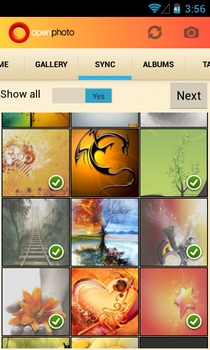
Created by a former Yahoo engineer, OpenPhoto is an open-source photo hosting, sharing and aggregation service that supports photo backups both locally and on various renowned cloud storage services like Dropbox, Box, CX and Amazon S3, etc. When we reviewed it earlier in April, OpenPhoto was only available as a web and iOS app. However, the company recently decided to expand its user base by releasing a companion app for Android in the Play Store. Sporting a clean UI, the official Android app is capable of displaying your OpenPhoto images aggregated from various affiliated services in an elegantly laid out gallery. Using the app, you can filter your uploaded images by albums and tags, sync images between your OpenPhoto cloud and device, share public photos with your social or mail contacts, and upload fresh or existing photos to your OpenPhoto account after applying custom tags and effects. In addition, the Android app supports Facebook, Google+ and Dropbox-style instant, automatic photo uploads, as well as the option to limit uploading to Wi-Fi only. Read More

Transfer Contacts & Media From iPhone Or Android To Windows Phone With Perlego’s SaveIt!

While it is easy to backup your phone data if you plan to stay on your current platform for a long time, things can get a bit messy when switching to another OS. Windows Phone 8 is the latest smartphone platform to be released, and we are sure that a lot of people have been avoiding the allures of modern UI, Xbox integration and MS Office just because they have become too comfortable with their Android or iOS device, and don’t want to risk losing their data. SaveIt! is an app that takes this love for personal data out of the equation when you consider switching to another platform. It backs up all your important data to the cloud, and you can import everything to any other device, be it on iOS, Android or Windows Phone (BlackBerry and Symbian are supported as well). Read More

Jottacloud Releases Android Cloud Backup App With 15GB Of Free Storage

Besides being an exceptional cross-platform cloud storage service, Jottacloud specializes in the way it keeps your personal data organized by type and the device that it has been synced from. Be it from your Windows, Mac, Android or iOS device, Jottacloud takes care of all your online data backup and restoration needs, and lets you remotely access contents of one device from the other. Not only that; it also lets you retrieve accidentally deleted files from cloud.Same goes for its official Android client that has just been released to the Google Play Store. In addition to the initial 5GB of cloud storage that each user gets upon registering, the service is offering an additional 10GB to the early adopters of the Android client, making it a grand total of 15GB of free online storage space. All that, combined with the prospect of having your valued mobile data automatically synced with the cloud makes Jottacloud a contender worthy of a try. Read More

Downgrade From iOS 6 To iOS 5.1.1 On iPhone 4, iPad 2 & iPod touch 4G Using Redsn0w 0.9.15b2

A lot of users have refrained from updating to iOS 6 due to the lack of a proper, untethered jailbreak. Another thing that has kept jailbreak users away from the new version of the OS up until now, is the fact that once you had updated, the way back to a firmware that Apple had stopped signing was riddled with confusion. Luckily, redsn0w has come to the rescue with its latest version, 0.9.15b2. The tool now makes it much easier for users to restore their iDevices after an iOS 6 update (devices with A4 or older processors in particular). If you updated to iOS 6, and are now planning to go back to 5.x, read on past the break to know whether you can, and for a step-by-step guide if restoring is possible on your device. Read More

RecImg Manager: Backup And Restore System Snapshots In Windows 8

One of the very handy features Windows 8 comes with, is Refresh, which is quite useful should something go wrong and you need to restore Windows 8 to its default state without erasing your personal data (well, to some extent). Back in March, we featured an article detailing how the Refresh feature works, and how you can create a custom snapshot via integrated Windows 8 RecImg command-line tool. However, using RecImg is mainly targeted at power users, and folks who are looking for a rather simple and easy way to backup and restore system snapshots can give RecImg Manager a try. The Metro-interfaced app is developed by Slimware Utilities, and holds a minimalistic design. What makes it stand out from Refresh (or Reset, for that matter), is its ability to backup and restore user applications as well, along with system settings. However, all your personal files, like music, videos, photos and documents etc, remain intact. What’s more, the application also allows you to create backup schedules, which, in turn, automatically create snapshots according to the defined settings. Read on for more details. Read More

Clickfree Comes To Android; Lets You Backup Media, Apps, Contacts & More To SD Card Or Dropbox

Clickfree is a trusted data backup/restore solution provider for Windows and Mac devices. Not only is the company known for its user-friendly applications, but also features several rugged, plug-and-play USB drives that come with the capability of automatically backing up their entire data or just specified content stored on your computer’s hard drive. In an attempt to target the fast-flourishing mobile market, the company has decided to provide Android users with a nifty local and online data backup solution in the form of Clickfree Backup. This neatly-built app presents you with arguably one of the best methods to instantly backup your crucial Android data – photos, music, videos, documents, apps, bookmarks, contacts and calendar events – to your device’s local storage (SD card), as well as Dropbox. In addition, the app sports a built-in content viewer that lets you natively preview photos, music, documents, bookmarks and videos from your backup instances. That’s not all; it also lets you reinstall your favorite apps on your Android device right from within the local backup, or from the cloud. Read More

Backup & Restore Emails From One Gmail Account To Another With Gmvault

When it comes to backing up Gmail email archive, most users opt-in for desktop email clients like Mozilla Thunderbird, Microsoft Outlook etc., to quickly backup not only emails, but also Google calendar and contacts. In order to backup emails from Google Mail account, one just needs to correctly configure email client for required account to save all the emails for offline viewing. Nevertheless, email clients do not support restoring backed up emails from one account to another, and often fail to retrieve the emails in original format. Gmvault is a freshly baked console-based application for Windows, Mac OS X and Linux OS that has been developed to change the way you backup and restore emails from multiple Gmail accounts. Even though it doesn’t offer you a GUI (Graphical User Interface) to perform the backup operation, the console application comes with a simple sync and restore commands support to quickly save emails on your hard drive and restore them to specified Gmail account. Details to follow after the jump. Read More

IconRestorer: Backup & Restore Desktop Icon Layouts For Different Resolutions

Although Windows 7 provides users with an option to quickly arrange desktop icons and get rid of clutter like unwanted gadgets, third-party apps' widgets etc., it doesn't offer a convenient way to quickly organize desktop icons and save the entire desktop layout. For this reason, most users opt-in for third-party solutions, like Fences, to keep their desktop icons organized. Many of us like to keep important files and shortcuts to applications on the desktop to instantly access them, but this often leads to a cluttered desktop. If you don't like the way Fences organizes desktop items, then give IconRestorer a shot. This miniscule application lets you back up the desktop layout i.e., icon positions on the desktop, so that you can restore older arrangements of desktop icons with a click. Additionally, it enables you to save up to two layouts for each resolution; quite a handy option if you frequently switch between different screen resolutions or displays. Details to follow after the jump. Read More

Hekasoft Backup & Restore: One Place To Keep All Your Browser Profiles Saved

Internet browsers are perhaps the most used programs on any computer these days. Opening the browser is the first thing that almost all of us do after turning on the computer. Initially, since there was no concept of a browser profile, there wasn’t a need for any type of browser backup. As technology advanced, our requirements and the dependencies on the internet increased. New browsers the likes of Mozilla Firefox, Google Chrome and Opera came out brandishing several features, which were not available in Internet Explorer at the time. More options meant a greater possibility to customize the browser according to your personal requirements. However, in the event of a system wipe, all customizations used to get lost or could not be transferred. That’s where browser backup programs and extensions came in. They allowed users to keep a copy of their profiles backed up, and restore them when needed. Today, we have an application called Hekasoft Backup & Restore, which not only lets you back up and restore profiles of multiple browsers from a unified interface, but those of software like Thunderbird, FileZilla, Mozilla Calender/Sunbird and Pale Moon as well (Internet Explorer not supported). Read More

FileFort Backup: Backup All Documents, Photos & Music Folders To FTP Server/Optical Drives

FileFort Backup is a simple, yet powerful data backup utility that lets you automatically back up your critical folders and data to a number of different places such as; Internal storage, CD/DVD/Blu-rays, USB Flash drives and Remote FTP servers. The application provides you with a quick solution for backing up all of your emails, documents, photos, music and other types of files. Being a lightweight application, it doesn't take too much of your system resources while performing the backup operations. It offers a simple backup wizard to quickly set the backup options and configurations. All the currently running and scheduled backup jobs can be handled from a dashboard. You can either choose to run any scheduled backup task or change the tasks scheduled time and date according to your requirements. Details to follow after the jump. Read More

Trend Micro Backup and Restore: 1GB Free Cloud Storage For Contacts, Photos, Music & More [Android]

With the recent surge of so many quality online data backup/restore Android apps that have arrived in the Google Play Store, and with Google itself working on its very own cloud storage service, Google Drive, it has become evident that the technology world has begun to realize the significance of having valuable computer and mobile content backed up on a secondary storage. The latest to join the likes of Dropbox, Box, Comodo, Bitdefender, CX, YuuWaa and several other big names is Trend Micro, that has just announced its own cloud storage solution for Android users. Like all other aforementioned services, Backup and Restore by Trend Micro provides users with free online storage space (1GB, in this case), an attractive and user-friendly interface, and most importantly, a firm promise to maintain an uncompromised approach towards protecting the private data of users. The app is currently in beta, but already looks to be a valuable tool to have on your Android. Read More

Revert To Stock & Fix Soft Brick On Samsung Galaxy S Blaze 4G

The Blaze 4G from T-Mobile sure packs a punch and with eager users out there who were able to get thier hands on the rooting and ClockworkMod installation guides for the the device as soon as they came out, it is inevitable that a few of us were a little too excited, and in the process of rooting or installing ClockworkMod recovery, messed up somewhere to end up with a soft bricked phone. However, users need not be dismayed over this fact, as the device is still recoverable and you can get back to your stock factory settings in no time thanks to k0nane, the guy who is responsible for bringing us the root procedure in the first place. As long as you can access download mode on the Blaze 4G, this guide should just be what you were looking for. So for those of  you with a Blaze 4G hanging in limbo, read on after the break to learn and attempt to bring your phone back to life. Read More

How To Backup & Restore One Or All Dashboard Widgets In Mac [Tip]

We recently made a list of 12 must have widgets for your Mac Dashboard, and if you fell in love with any one of them, you might at some point be interested in knowing how you can back them up. There is no simple command or action that will allow you to backup your widgets, but it is still possible. Widgets, when installed, create files in the Library folder (which is hidden by default). Backing up widgets is really as easy as copying a bunch of files. The trick is to know which ones to copy. Read More

GO Backup: Android Apps, Data, Contacts & SMS Backup/Restore App By GO Dev Team

Yet another rich data backup/restore solution for Android hits the Google Play Store; this time, courtesy of the GO Dev Team – the team behind the increasingly popular GO Launcher EX, GO SMS Pro and many other Android apps. GO Backup vows to become your new default Android data backup/ restore solution. Using the app, you can create multiple local backup instances of all your contacts, text messages, apps and app data. That’s not all; the app supports ‘silent installation’ to restore your apps in the background (that is, without requiring you to manually go through the installation process of every individual` app). The option to log in to the app using a GO account allows you to create multiple profiles, each with its own set of backup content, and as it seems, will soon allow cloud backups as well, much like MIUI's native backup application or Apple's iCloud does. Unlike most other backup and restore apps on the Play Store, GO Backup's interface is, as should be expected, very neatly designed. Read More

AirCover: All-In-1 Mobile Security & Optimization Tool [Android, iOS]

AirCover is one of the most comprehensive and multipurpose system protection and optimization Android and iOS apps that sport some very handy features that would otherwise be availed using, at least, a couple of different apps and services. Features offered by AirCover include an extremely effective mobile antivirus that guards your device against all sorts of malice, a device tracking tool supplemented by real-time notification alerts, a remote alarm trigger to instantly find your lost device, remote data wiping to protect your precious mobile data from falling into wrong hands, advanced system access and authorization control for individual apps, efficient and convenient cloud storage option to back up your precious mobile content, several system optimization tools including task killer, cache cleaner, 1-click memory optimizer et al, built-in battery-life enhancement tool, and plenty more. In addition, the app also lets you check-in to locations of interest, specify various commonly visited (and/or safe) places/locations on map, send emergency mail and text message to your loved ones, check geographical coordinates of friends and family members, specify time frequency at which your mobile data would be automatically uploaded to cloud, set the time interval/action after which all the opened apps would be automatically shut down, check extended battery stats and status, get useful battery saving tips/suggestions and lots more. Read More

App2zip: Create Flash-able Zip Files Of Your Favorite Android Apps

If you’re an avid Android fan boy, and frequently keep flashing new ROMs to your Android device, then you must be well-aware of the hassle involved in downloading and reinstalling your favorite apps one-by-one upon each flash instance. How about an app that alleviates the problem by allowing you to restore all the required apps right from the custom recovery of your choice immediately after flashing your favorite ROM? Enter App2zip – an extremely handy Android app that lets you achieve said purpose with utmost ease. Using App2zip, you can create a flash-able zip file containing as many individual system and third-party apps. The zip file/package thus created can be used through a custom recovery tool to restore all the included apps at once after flashing the required ROM. In this way, you can restore all your favorite apps at once immediately after flashing your favorite custom ROM. No need to download and install each and every single app individually, or resorting to any alternative data backup/restore methods. Instead, with App2zip, you have your favorite custom ROM readily available for use with all your favorite apps preinstalled on it.  The app currently works only on rooted Android devices, and as the developer himself suggests, try experimenting with a rather less important/used app before tinkering with your favorite apps in order to prevent any unforeseen data losses. It must also be noted that the app, as of now, is not compatible with the stock recovery. So, you must use a custom recovery tool, such as ClockworkMod recovery in order to restore apps from a zip file created via App2zip. Read More

Z-DBackup: Modular File Backup Solution With Advance Directory Sync Options

Looking for a data backup utility that can do a lot more than just copying all the files or just newly created files from source to target locations? An application that supports numerous types of target mediums, while allowing you to create and configure file backup schemes, design synchronization jobs, set automated backup tasks, perform post-backup operations, burn files to optical discs, and compress backed up data? Z-DBackup is a modular backup system that offers a comprehensive set of features that may help you customize backup jobs as per your data backup and synchronization needs. Although it comes packed with an exhaustive list of backup features and tools, it doesn’t make it difficult for users to select the required tools that they want to use while backing up their files. Some of the noteworthy tools included in the application are backup data at network location, burn CD/DVD with backed up data, auto-shutdown after specified job finishes, create ZIP archive containers, virus self test,  run pre and post backup operations, and backup active and locked files. Read past the jump for details. Read More

Schedule Android Data Backup To Cloud With inDefend Mobile Backup

Data backup & restore solutions are present in the Google Play Store in large numbers, but how many of them actually support encrypting, scheduling and uploading backups of your personal Android content to the cloud? Developed by Dataresolve Technologies, inDefend Mobile Backup is an Android app that serves said purpose in fine style. Using inDefend Mobile Backup, you have the choice to select whatever personal Android content you wish to backup to the cloud. This may include your text messages, call logs, calendar events, contacts, browsing history and/or your personalized system settings. inDefend Mobile Backup comes with the capability to store as many as 10 different uploaded backup instances per each individual account, so that you can always decide the exact package that you wish to restore from cloud upon requirement. Read More

APK Batch Installer: Backup/ Restore Multiple Android Apps To/ From PC

Looking for a simple solution to backup & restore Android apps to & from your PC? Look no further, because XDA member hamsteyr, has introduced APK Batch Installer Tool, a Windows-based application that makes backing up and restoring third-party Android apps a breeze. Just as its name suggests, APK Batch Installer lets you create backup of all your Android apps in the form of individual APK files. In addition, it has the capacity to restore APKs of your favorite/required Android apps from computer in batch. No need to resort to any complex ways that only allow you to restore required apps just one-by-one. Instead, with APK Bath Installer, all you need to do is connect your Android device to the computer via USB cable, and backup/restore apps without any hassle whatsoever. Using this tool, you can pull APKs of all the required apps from various devices, and then batch install all of them to your Android in one go. Please note that APK Batch Install only pulls the APKs of the required apps, and not their customized settings (cached content). This means that upon restore, you only get back an installed and readily available app that needs to be reconfigured/set up right from the scratch. Read More