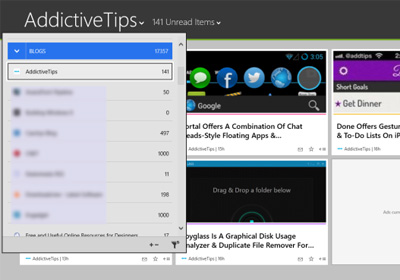
MultiPLX Is An Elegant, Pinterest-Like Web Based RSS Reader

Feedly is emerging as the number one contender in the list of online RSS services that will likely replace Google Reader. Though with a few months still left until users have to make the final switch, there is time enough for it to be anyone’s game. MultiPLX is yet another RSS web app that works independently of Google. It will import your feeds from an XML/OPML file while retaining their folder structure. You can share an item across multiple social networks, star them, email a story, discover new feeds to follow, and easily organize your feeds. Of the many RSS services we reviewed in out list of Google Reader Alternatives, none allowed you to export your starred or shared items to a JSON file like Google does in Google Takeout. MultiPLX, however, provides the option to do so. It still lacks the ability to import the JSON file that you’ve exported from Google Reader. Read More

Auto-Detect & Add RSS Feeds From Websites To Protopage In Chrome

Google Reader wasn’t just a feed aggregator; it was a service that apps and feed burners integrated into their own products. You could add a feed to Reader in just two clicks and there was rarely a need to manually subscribe to links. There are now quite a few emerging services that can be viable Google Reader alternatives but it will take time for app developers to decide which one they want to favor. Till then, we might no longer be adding feeds with just two clicks. Protopage RSS Reader is a Chrome extension for the Protopage service that automatically detects and adds feeds to your Protopage account. The service provides you with feed widgets that can you can manage and read on your profile page on the service. Read More

How To Import RSS Feeds Into Microsoft Outlook For Windows

As most of you must have heard by now, Google Reader is retiring this summer and we've guided you through the process of backing up your Google Reader RSS feeds as well as given you a healthy list of alternatives for Google Reader to switch to, once it's gone. Though our list focused on apps that were always meant to be RSS feed readers, and we purposely left out the ones that offered RSS subscriptions as a side feature. Outlook - one of the most popular desktop email clients out there that's known mostly for helping you organize your contacts, remembering appointments, and sending emails - actually supports RSS feeds natively. The feature has been ignored by most so far, but the death of Google Reader has finally brought it much attention. If you use Outlook for your email, contacts and calendar already, there's no reason why it can't take care of your RSS subscriptions. So let's take a look at how you can import your feeds from Reader to Outlook, and switch to it as your RSS app. Read More

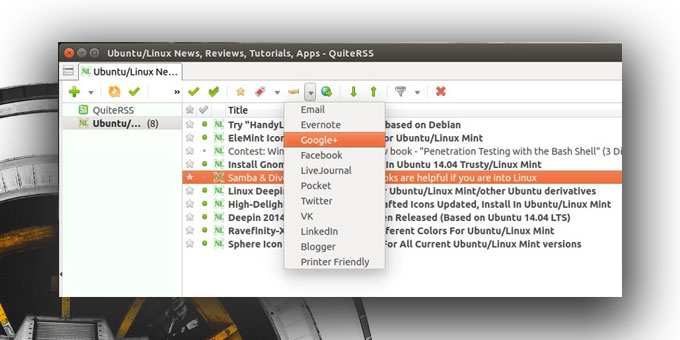
QuiteRSS Is A Powerful, Multi-Tabbed RSS Reader For Windows & Linux

Google Reader’s inevitable demise that’s only a couple of months away now has sent many on a wild goose chase to seek an equally good service that matches the quality and simplicity of this leading RSS platform. Feedly, for instance, is being considered as the top contender right now that goes neck to neck with Google Reader, but that doesn't mean we don’t have any other option. Just a couple of weeks ago, Fatima compiled a list of some of the best Google Reader alternatives for Windows, Mac and Web around. And today, I’m adding another one to list called QuiteRSS. Let’s take a closer look. Read More

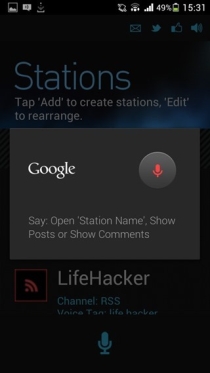
How To Add Your Facebook Notifications Feed To Any RSS Reader

Facebook gives you lots of ways to keep up with your feed; you can rely on Push notifications from the Facebook app on your iPhone, Android or Windows Phone device, or get SMS alerts if you don’t own a smartphone. One of the lesser-known ways to keep up with your notifications is via RSS feed. It is common knowledge that if you have subscribed to someone on Facebook, you can get RSS updates from them. Though not many know that you can also get your own notifications in your RSS reader. This post details the very simple way of doing just that. Read More

Get RSS Feed Alerts In Mountain Lion Notification Center With News Notifications

OS X Mountain Lion's Notification Center is largely dependent on other apps supporting it, and since not many do, we’ve seen an influx of apps that redirect Growl notifications to Notification Center. The Notification Center presents a lot of opportunity for app development and for users it is an excellent feature that they would likely want to put more creative uses. Since there is nothing wrong with Growl and a new version of the app for Mountain Lion has recently been submitted to the Mac App Store, you can rest assured it isn’t going anywhere. That leaves you with Notification Center and a world of possibilities. Demonstrating just one of the many uses you can put Notification Center to is News Notifications, a Mac app worth $0.99 in the Mac App Store that lets you put RSS feeds in the Notification Center. Read More

Highlightr Ranks RSS Items Based On Their Social Buzz In Google Reader [Chrome]

For anyone who uses Google Reader as their primary RSS reader, finding new items in the aggregator is nothing new. The number of items, however, would depend on the number of feeds that you've subscribed, and if that is a lot, daily unread items might touch staggering numbers. As Google Reader, by default, does not offer an extensive set of filtering options, it might be hard to locate what really interests you. This is where Highlightr comes in useful. This is a simple Chrome extension that basically highlights popular feed items using rank calculations based on the popularity of the article across multiple social networks, like Twitter, Facebook, Google+ etc, and adds a rank at the end of each post title. The higher the rank, the more popular the article is. Details past the jump. Read More

LiveClick: Enhance Firefox Live Bookmarks With Unread Count, Icons & More

If you subscribe to your favorite RSS feeds using Firefox’s Live Bookmarks feature and want to improve the way it works, then LiveClick, a Firefox add-on, can be quite useful for you. This neat tool adds various enhancements to the Live Bookmarks, such as feed reading, notifications, alerts and more. With it, you can easily see which bookmarks have new or unread items, and control how often Live Bookmarks checks for new ones. You can also mark live bookmark items as read, and hover over a live bookmark item to preview its contents. Moreover, you can click a Live Bookmarks folder to quickly access its homepage and use website icons instead of the default RSS icon. Read More

Add Your Favorite RSS Feed As Animated Wallpaper On Mac [Tip]

We’ve covered apps that conveniently put your entire RSS feed on your desktop, thus saving you the trouble of visiting a browser window whenever you need to check for or read new stories. For those that only go through their feeds once a day, either at the start or end of it, having an app that monitors live feed and promptly displays it or notifies you of it seems like too much. There is, of course, the rare time when you do need to actively follow a feed and there isn’t time to find the right app for it, you can put the feed on your Mac desktop with this little trick. Read More

Auto-Detect, Subscribe & Launch RSS Feeds In Google Reader/ Feedly [Chrome]

TPGoogleReader is a Chrome extension that automatically opens unread items from Google Reader in new tabs and marks them read. The articles are opened in full-version and the number of unread feeds is also displayed on the extension’s icon. This Chrome extension makes reading and subscribing to feeds an easy and pleasant experience. TPGoogleReader lets you specify the number of unread items it should open in tabs which prevents an explosion of tabs in a single window should you have something close to 50 unread items in your feed. The extension also offers users with icon click functionality, which allows you to open the pop-up on a single click, open Google Reader on a double-click and open unread items on a triple-click. The icon-click actions are fully customizable and can be changed from the extension’s Options. Moreover, you can toggle between the automatic or manual mode, and open one, five, ten, twenty, fifty or all unread items at once. As the tabs are opened for the unread items, the unread item count on the icon is automatically decremented in the toolbar. Read More

FeedWizard: Simple RSS Reader That Regularly Deletes Old Items [Mac]

We covered quite a few RSS readers in the past, NewsBar is one such app that displays your feed on your desktop but costs $4.99. Cappuccino is another excellent RSS reader; it is free and lets you import feeds from Google Reader. FeedWizard is yet another free RSS reader for Mac that lets you manage your feeds. It is minimalistic and can be used to manage feeds without needing a Google account. The app comes with its built-in viewer that allows you to view a complete news item without opening your browser. No ads are displayed, and you simply view the text and the images in a news item with more article suggestions from the same site. Read More

Read New Google Reader Feeds When Offline [Chrome]

MagicCube FeedStore is a useful Chrome extension that allows you to read Google Reader feeds even when you're offline. After you’ve installed the extension, you can access Google Reader feeds through a button in the toolbar. MagicCube FeedStore works by checking new unread feeds and downloads them to the local storage automatically. The button in the toolbar comes with a count for the number of unread feeds. Feed Store is a powerful offline RSS reader that provides users with an iTunes-like user interface, and almost the same hotkeys as Google Reader. Users can easily customize the layout and style of the feeds according to their preference.  The style, fonts and layout of the feeds can be changed from the Preferences. Read More

Reader Filter: Get Rid Of Unwanted Items In Google Reader [Chrome]

A lot of us use Google Reader to read Atom and RSS feeds online, but sometimes, reading about the same topic over and over again can become quite boring. Reader Filter For Google Chrome is an extension that filters unwanted feed items in Google Reader. With it, you can filter and hide RSS news items in Google Reader by keywords or regular expressions (RegEx). Simply enter a name or word, and all items containing that word will be reduced to a colored bar or will be completely hidden. Moreover, filters can be applied to the subject line and the body, or only to the subject line. The extension also comes with a pop-up menu that can be used to add filters, and toggle them on and off. Read More

retickr RSS Feed Ticker Gets Interface Overhaul & Day Filter [Mac]

Last year in August, we reviewed retickr, a free Mac app that lets you keep up with your RSS and Social media feed. Less than a year later, a new version of the app is out with an excellent, redesigned interface, complete its very own feed viewer and a day filter to limit the news items that you see. While previously reticker supported viewing an item when you hovered over it, now the app opens a news piece in its own browser. It has retained all of its previous features; connecting Facebook and Twitter accounts, sharing on social media and importing your feed from Google Reader. Read More

NewsBar: View RSS Feeds & Classify Them By Color On Your Mac [Paid]

Earlier last month, we reviewed two Mac apps, Blotter and Mindful, that put the current day’s iCal events in a translucent display on your desktop. Both apps present a convenient way to always have your daily events on your desktop. NewsBar is a Mac app available for $4.99 on the Mac app store that does the same to your RSS feed. It is feature rich app that allows you to dock your feed to any side of the display, or view it as a floating window. The app supports feed search, marking items as favorites, setting keyword alerts and choosing a unique color for each feed. It lets you add just about any RSS feed, or import your items from Google Reader. Read More

Read Google Reader Feeds In Full Form [Chrome]

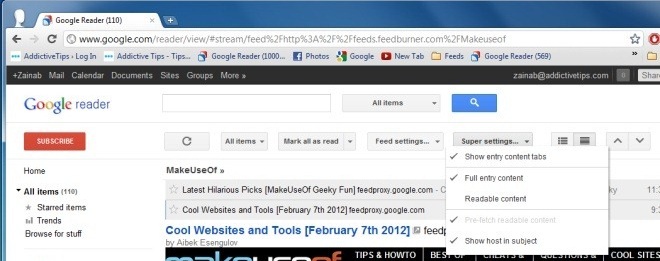
Google Reader is a popular web-based RSS and atom feed reader that displays partial content for certain feeds. To view full content, you have to click the links, which are opened in new tabs. Not only is this process a bit complicated, but it also opens a large number of tabs  in your browser. Super Full Feeds for Google Reader, a Chrome extension, solves this problem and allows you to read full content feeds in Google Reader. Once the extension is installed, a Super Settings button is added to Google Reader. Settings can be changed for individual feeds, and you can convert truncated feeds into full feeds. Moreover, you can view feeds in three different modes; directly from the source feed, an entry link in an iframe, or the Original Feed. You can even pre-fetch content for unread items, so that they load in the background while you are reading other entries. Super Full Feeds For Google Reader picks the actual page and embeds it inside Google Reader. The extension also provides users with a few keyboard shortcuts, such as 8 for readable content, 9 for iFrame content and 0 for original feed content. Read More

Foxish Live RSS: Get Firefox Live Bookmarks Feature In Chrome

Foxish Live RSS is a Chrome extension that mimics Firefox's live bookmarks feature by syncing RSS feeds with bookmark folders, and updates them automatically at regular intervals. It does this by syncing feed items every five minutes, with folders on the bookmark bar. It shows an icon in the address bar, indicating the web page has RSS/atom feeds. Foxish Live RSS also lets you export RSS feed list, and import RSS in OPML format from other RSS readers. Read More

Monitor Multiple Log Sources For Output & Events With Logview4net

Logview4net is an open source log analyzing application that can monitor multiple different sources for output or events. It serves as a simple log monitor for text based log files, and also for more advanced features such as monitoring incoming UDP/TCP traffic, Event Log entries, STD Out/STD Err, RSS feeds, as well as MS SQL and MySQL database tables. In addition to viewing log files, the program can also perform certain actions when defined keyword is identified, including highlighting, ignoring (text) and playing a sound. Read More

Q-Sensei FeedBooster: Stylize And Enhance RSS Feeds With Filters [Web]

RSS feeds let us stay up-to-date with our favorite web content, but most of the free feed readers out there come with too much clutter, such as ads, videos, banners etc., that can make reading difficult. Q-Sensei FeedBooster, a web application, changes the way you read and access feeds. With Q-Sensei FeedBooster, you can add custom filters pertaining date, author, tag and folder etc. It comes with an interactive dashboard, which you can fully customize according to your preferences and needs. The service supports login via Facebook, Google, and Yahoo!, or you may simply sign up, after which you can start adding RSS feeds by simply pasting website URLs, or by importing them from your Google Reader account. FeedBooster lets you filters feeds by Source, Date, Author, Tag, Folder and more. In addition to that, you can also subscribe to various categories of feed-sets. Read More

Bamboo Feed Reader For Firefox Conveniently Allows You To Manage Feeds

Bamboo Feed Reader is a Firefox add-on that enables you to monitor and manage your RSS feeds,  supporting Atom and RSS formats. You can easily add feeds by copy-pasting URLs. Furthermore, it allows you to block ads for HTML content, and provides automatic updates. The add-on features two different views for feeds; they can either be displayed as a List or Content. You can filter your feeds by selecting the All or Unread options. Read More