Easily Find Words Or Snippets In Text Files On Your PC With Infile Seeker

Have you ever jotted down someone’s contact details on a text file, only to forget that file's name or the location where you saved when you later needed that information? Or perhaps you want to locate a particular phrase or word that's a part of a file's content, and you don’t remember which file it exactly was? Windows comes with a built-in search feature that takes care of it for files in indexed locations, but what if you want something with more flexibility and control over your search? A handy little app called Infile Seeker aims to take care of just that. This tiny Windows tool does a lot more than its size, and can easily help you pinpoint the file containing your required phrase, sentence, number, or pretty much any string of text no matter where it’s stored on your computer. The application can find the text in a multitude of file types, including but not limited to TXT, PHP, HTML, HTML, XML. JS, CSS, ASP, ASPX, CPP and more. Read More

Check5 Is A Folder Monitor, Batch File Renamer & Attribute Changer All In One

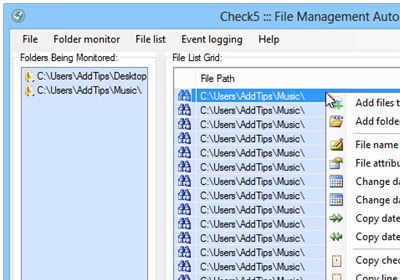
At times, we come across applications that offer a bunch of features in one small package that otherwise require installing multiple applications. Check5 is one such app for Windows that puts several related options on the table. It can monitor user-specified folders in real time and automatically notify you when any changes are made to the files in those folders, or to those folders themselves, by using event logs. It also houses a built-in batch file renamer and a file attributes changer, both of which work like a charm. The application enables you to monitor multiple folders at the same time. Read More

[Giveaway] MacKeeper Is An All-In-One System Maintenance & Security Tool For OS X

We’ve covered a lot of small tools that help you clean up your Mac, make it run smoother, securely delete files, recover deleted file, or search for them. Though OS X does most - if not all - of these things natively, it doesn't offer as many customization options, or work as well as several third-party offerings. You can always look for apps that are meant to solve individual problems, or you could invest in an app that does everything for the right price. MacKeeper is a very famous app that acts as an antivirus and anti-theft app for your Mac. It also lets you encrypt data, recover deleted files, securely shred files, create backups, remove junk files, find duplicates, estimate the disk usage and break it down for you, uninstall apps and the many files they can sometimes leave behind, help you optimize start-up apps, and edit the default apps for different file extensions. Read More

Search PC Files By Several Filters; Get Keyword & Phrase Highlighting

Nowadays, it is now common to see hard disks with over 1 terabyte of storage available, allowing us to store a huge amount of files on them. Though looking for a single file inside such a big pile can be quite tedious, if you have to do it manually. The search feature provided in Windows as well as third-party search tools allow us to look for files without having to go through each folder manually. More advanced search tools let you specify your search criteria and set different filters such for time and date (how old is the required file), size (how big is the file), extension (when looking for a particular file extension) and other similar parameters to narrow down the results and quickly locate the required file. However, whenever you search for a file, the system goes through all your files looking for your query, which can take quite a long time if your hard disk is loaded with a lot of data. Instant Document Search is a search tool focused entirely on local documents with keyword and phrase support, and it creates an index of only your file types and locations, allowing you to quickly get to whatever you are looking for. More on Instant Document Search after the jump. Read More

Easily Search For Files Or Folders On The Network With LanHunt

Local networks allow easy sharing of files between multiple computers but if there is a large number of files and folders shared on a network, managing all of them can be a bit difficult. If you are looking for a particular file or folder and don’t remember the computer it was on or its path on that computer, things can get a little frustrating. The Windows search option works great to look for files onyour local storage, but not quite so for network files. Today, we have an open source application for you called LanHunt that allows you to search for shared files and folders on the network. You can quickly search for network content and narrow down the results using file-type filters. In addition, the Open Location feature allows you to directly access the parent folder of a required file. Read More

FARR Is A Highly Customizable Search Tool For Locating Files & Folders

Find and Run Robot aka FARR is an a lightening fast file search utility, which locates any kind of file, application and folder by matching initials of a typed keyword. Find and Run Robot arguably locates items quicker than Windows Search, and provides the option to customize search paths, comes with fast incremental searches, and memorized search history to help users quickly find files. FARR can be accessed via a simple keyboard shortcut to quickly look up files and folders. Other than being a highly customizable application, FARR can also be extended with the help of plugins. There are many extensions available for FARR that can be used to add a range options to it, including browser support. Read More

FileSearchEX – Classic Windows XP Style Fast Search Tool For Windows 7

Although Windows 7 offers a great way for searching files and folders from any given location, it often takes relatively too much time to produce search results against the specified keywords. This may happen because of allocating low priority to Windows 7 search indexing processes or by turning it off. Moreover, low-end systems may not be able to index all locations of system even if indexing service is not disabled. If you’re looking for a system search utility that follows Windows XP model to search files fast, try out FileSearchEX. It is a standalone quick system search utility, allowing you to search files from Windows XP native search like user interface. Read More

Search, Create Macros And Automate Actions With KeyBreeze App Launcher

Application launchers are used to quickly perform lengthy and monotonous computer tasks quickly without having to manually launch applications, open folders, run commands and so on. If you’re looking for an application launcher which can quickly index most frequently visited locations, applications data, recently used commands, whilst offering a facility to index user-defined locations, KeyBreeze is one such tool which not only lets you index frequently used applications, commands, locations, but allows performing other computer tasks as well. KeyBreeze offers a long list of computer tasks and commands to help users enhance their overall work productivity. Being an efficient app launcher, it takes nothing more then a few minutes to index Windows special folders along with defined locations to compile file, folders, shortcuts, and app data list. The Commands section contains a slew of commands for opening Windows Explorer, performing web search , including Google, YouTube, Dictionary, Google Images, eBay search, and to launch installed applications. Read More

Quick Search Instantly Finds The Files You Are Looking For In Windows

Quick Search is a fast alternative to Windows Search for quickly locating files and folders by entering a complete or partial name of the required content. It creates an index in the corresponding folders using relative paths, making data search more efficient. Unlike Windows Search, it offers a filter to restrict the searched items for better efficiency. It provides easy sorting options for viewing files in the search result by path, size and modification date. You can either view the searched items in a minimalist size or in the full mode which displays a complete window containing the searched files and folders. Quick Search can be used to search music, photos, web pages, generic files, folders, application setups or shortcuts and much more. Another good feature is that it supports file indexing of portable devices like USB drives and external disks, which makes it quicker to locate data on such storage devices. This intuitive tool has been developed by Glarysoft, which is famous for some of its efficient applications such as Glary Utilities and Disk Speedup. Read More

UltraSearch Is A Portable Utility Offers Real-Time Searching

UltraSearch is a portable searching utility which is designed to show search results in real-time instantly. Being a portable application it doesn’t require any indexing or any sort of folder/file list saving. The mechanism it uses is MFT (Master File Table for NTFS ) which is quite remarkable in terms of providing instant search results without any supportive threads being run in the background. As filtering files/folders is necessary while searching through enormous sized data, it offers traditional search filters to quickly show all the relevant results. Read More

How To Search Any Content Or File Type In Multiple Locations Easily

The default search that comes with Windows is full of crap, yes you heard it right. It never shows what you are looking for and the results are not reliable. This is where 3rd party search engines comes in, one such engine is File Searcher. What makes it unique is it’s ability to search in multiple locations for any file type, content, or date created and is both quick and easy to use. Read More