Monitor Temperature Of System Components In Ubuntu With Psensor
A number of problems can be caused due to system heat up which can lead to damage to computer components. Overheating can be caused due to several reasons, including a faulty or non-functional fan (system supply), wiring issues and blockage of system ventilation ducts. We have covered some system temperature monitoring tools for Windows like HDD Guardian and Speccy.
Psensor is a graphical system temperature monitor for Ubuntu which displays the temperature of the motherboard, CPU sensors, hard drive and the speed of the fan.
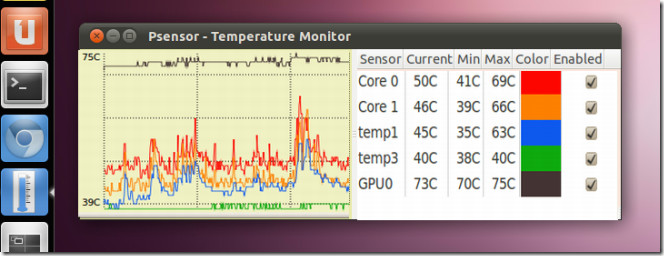
To install Psesnor, open a Terminal and enter the following commands:
sudo apt-get install lm-sensors
Then, start the detection of hardware sensors:
sudo sensors-detect
Now install Psensor from PPA by entering the following Terminal commands:
sudo apt-add-repository ppa:jfi/ppa
  sudo apt-get update

sudo apt-get install psensor
A GUI based setup will pop-up. You may not be able to use the mouse to choose the desired options. Use the keyboard arrow keys to select Yes to continue.
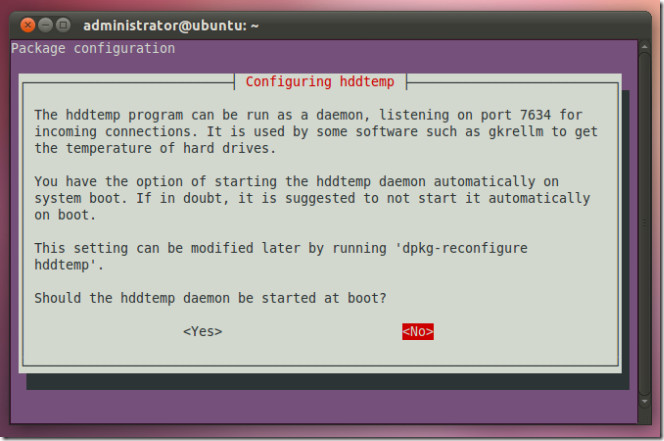
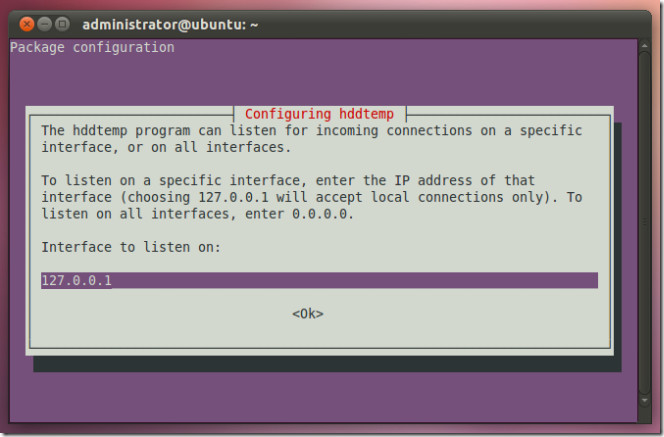
In the next step, leave the IP to the default loop back IP (127.0.0.1) and click OK. After that you will be asked to optionally change the port, leave it to the default value and click OK. Launch Psensor from application menu and easily monitor the temperature of your system’s components.

I don’t believe this sensor. Psensor, lm-sensors shows cpu temp 30′ while 100% load 4.8 x8 core i7, z68 chipset, in windows coretemp show about 70′.
Any suggestion?
I like Linux. I use Linux. But there are some things Windows does SO much more simply and elegantly.
This is a great example. In Windows, you don’t have to jump through all these kings of hoops just to see your system temperatures. You just download and install the free HWMonitor app and run it.
Sheesh.
But you have to do a load of Googling to find that app for Windows
I see it 100 percent otherwise. Windows lacks in this respect. I have not found a program in Windows, which monitors temperatures, CPUs, processes,NETtraffic, Discs, etc all-in-one.
But in Linux you can use only one program (GKRELLM in Ubuntu) to do all this. Instead of filling your screen with numerous widgets(as in Windows) you can use one combined adjustable window showing all. It uses less than 1% of your CPU-power( refresh 1 time per second) and tells you even if you have new mail!
But the global temperature mainly depends on how much energy the planet receives from the Sun and how much it radiates back into space—quantities that change very little. The amount of energy radiated by the Earth depends significantly on the chemical composition of the atmosphere, particularly the amount of heat-trapping greenhouse gases.