Command Line Utility MpCmdRun.exe – Microsoft Security Essentials
Microsoft Security Essential is the latest anti-virus and anti-spyware application from Microsoft. It has a very user friendly basic interface but you can also use a command line utility called MpCmdRun.exe to handle it.
This utility is included within Microsoft Security Essentials and the core benefit of using it is that you can have more control over the scanning task, which is useful if you also need Antimalware CPU control. This utility lets you perform all of the operations of Microsoft Security Essentials from command line, but it comes handy if you want to update MSE using some Script or build-in Task Scheduler.
Go to %ProgramFiles%\Microsoft Security Essentials path and locate this utility there. Open the command prompt, go inside the Security essential folder, run the MpCmdRun.exe command, and it will display all options.
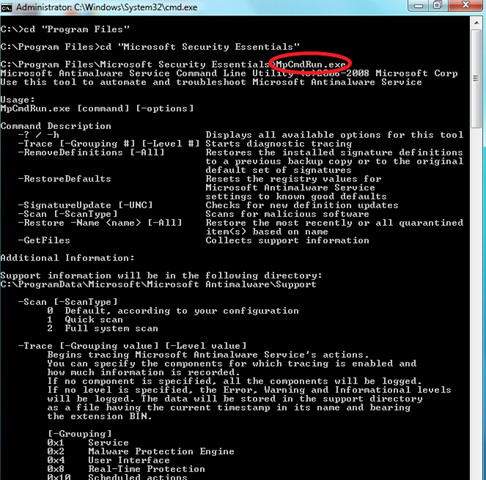
You can use Scan 0 switch (option) with MpCmdRun command to start the default scanning process, Scan 1 initiate quick scan and Scan 2 performs the Full system scan. In order to update MSE from the command line, use SignatureUpdate option with it. Enjoy!

I was a little “put off” by the syntax too. A proper example to get the command working (for a custom scan) would be:
Mpcmdrun.exe -scan -3 -file “C:ExampleFolder Locationscanme.exe”
It’s the two different hyphens in “-scan -#” that’s unusual. That’s not a typical Microsoft syntax requirement.. but there you go..
Doesn’t work. In fact, another website says that the info you get from retrieving the help file is actually wrong. They recommend using “-Scan -ScanType 0” (or 1 or 2) but that doesn’t work on my machine either! It will update the signatures but it will NOT SCAN.. at least, there is no scanning from what I can see. Win 7 64-bit
You aren’t supposed to type out the word ScanType. Just “-1” without quotes obviously…. You can use -0 -1 -2 or -3