FolderSize – Check Windows Folder Size
FolderSize is small portable tool developed to check the size of the folders and the space they take up in your hard disk. It presents the result in graphical format. With this tool you can determine which folders are present in a specific destination and how much space they are taking.
Update: Disk Space Fan is a new tool which is more advanced and stable than FolderSize, check it out here.
You can see the complete folders and their sub-folders in a clear format. To use it, enter the path and hit Go. If you look at the screenshot below you will notice that some folders and their sizes are not appearing properly, this is because of the standard view. To view folder information in complete details scroll your mouse wheel to zoom inside.
Once you zoom in, the structure will be more clearly available. To return back to the standard view hit the right mouse button.
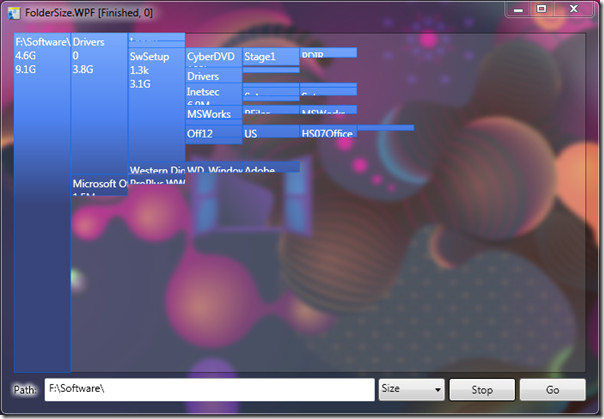
It is a simple app developed on Windows Presentation Foundation. WPF can be found in Windows XP SP2, Windows Vista, Windows Server 2008, and Windows 7.
Enjoy!

Try this freeware Folder Size it is really good and contains no adware or spam!
These are okay programs, but overkill when you want constant quick access to a folder's size. I've searched and searched to find an app for Windows 7 that compares to FolderSize – http://foldersize.sourceforge.net/ – but nothing exists as of yet.The best alternative I've found so far is Explorer++ – http://www.explorerplusplus.com/ – It's a nifty replacement for the stock Windows Explorer. I've not used it a ton, it's not my default explorer app, but so far it's been pretty stable in Win7.
it is bit slow. but working correctly. best tool as on date.
Maybe the Disk Space Fan is better.http://www.diskspacefan.com
Hi.I just want to inform you all that I'm currently working on version of foldersize with less system requirements and shorter startup time. This has been one of the major feedbacks I got. It should now work fine on Windows XP and up out of the box. If there's an demand I can get it to work on W2k as well.In case you are interested to try out the “prerelease” head over to:http://foldersize.codeplex.com/releases/view/40440The functionality is pretty bare at the moment so I accept any ideas on useful functionality for the real release. I do want to keep the program small and quick on the startup though.Regards,Mårten Rånge