How To Connect 5.1 Speakers To Your Computer
If you want to enjoy movies and games these days you must have 6 channel sound system because all latest games and DVD movies are optimized and programmed to give a natural surround sound experience. If you have 5.1 speakers and don’t know how to connect it to your computer we’ll show you some easy steps on how to connect your speakers to computer the right way.
What Is A 5.1 Sound System ?
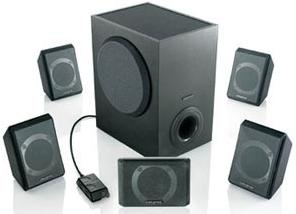
The number 5.1 means that you have six speakers arranged in a way that two are on the front, two are on the rear, one on the front center which is known as voice channel and one subwoofer to provide bass. So you have five speakers and one subwoofer, this makes 6 channel sound system 5.1.
Difference Between Digital And Analogue Sound System
There are two kinds of 6-channel surround speakers: analog and digital. Analog speakers are cheaper compared to digital and can be installed on any PC while digital speakers require that you have a SPDIF output on your PC. If your PC has SPDIF output than you might want to use a digital system. The steps described here will be just the same, but instead of connecting your PC to a home theater receiver you will be connecting it to a digital 6-channel speakers system.
Know Your Speaker System
Generally in systems all the cables from the speakers are connected to the subwoofer which comes with a set of wires to connect, that includes : a power cord to connect the system to the AC outlet, a power connector to feed the subwoofer and the subwoofer wires. Your system should come with at least three set of cables for connecting your speaker system to your PC. These cables are usually colored to help with the installation.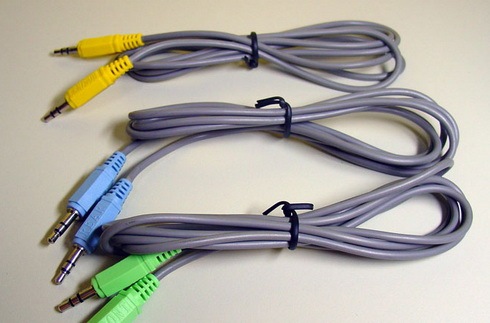
Start Connecting
You should connect the cables matching the colors on the jacks located on the subwoofer. After connecting all these cable, its time to connect the rest of the cables like power, subwoofer and speakers. This is very easy if you pay attention to the subwoofer connection then you’d be able to follow the polarity that is written on the connectors. In the end, all your cables would be connected perfectly.
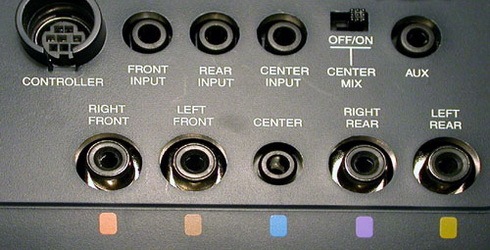
The above pic shows you all the ports to connect the wires to with all the color coded mannerism.
Knowing Your Computer
All computers have atleast three connectors
- Line-In.
- Line-out.
- Mic.
Computers with six channel audio systems have two more connectors, i.e
- rear out.
- center/subwoofer out.
You’ll need to make sure if you have these extra connecters by checking the back side of your computer.
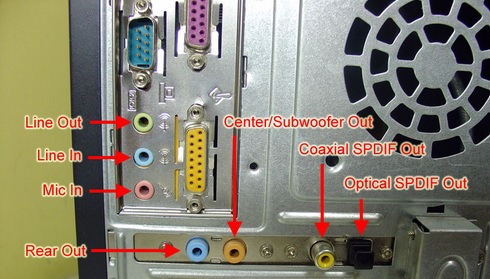
If your computer doesn’t have these two extra outputs: rear out and center/subwoofer out, it’s a disadvantage, you’d be able to connect your 5.1 anyway but you would require to use the line in and mic-in plugs as an alternative. Of course there is a really big disadvantage in using this configuration: you cannot use your microphone or line in inputs and your 5.1 speaker system at the same time. This is the reason that you should buy a motherboard with 5.1 system built in.
Configuration Of Computers With 5.1 Supporting Motherboards
- Front cable: To Line out.
- Rear cable: To the Rear-Out
- Center/Subwoofer cable : To Center/Subwoofer Out.
Configuration Of Computers Without 5.1 Supporting Motherboards
- Front cable: To Line-out.
- Rear cable: To Line in.
- Center/Subwoofer cable: To Mic-in.
Software Configuration
After every single connection has been made, its time to setup audio configuration in operating system. Since we had Realtec drivers on our PC, Double clicking it opened up Speaker Configuration tab. In various options you should select 6 channel mode for 5.1 speaker output and check Only surround-kit if your PC has the separated rear and center/subwoofer outputs and leave it if you don’t.
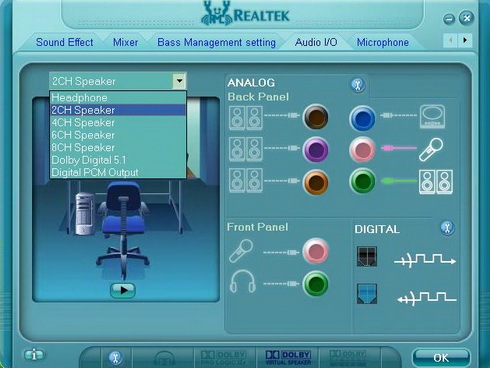
Now everything is done, you are completely ready to enjoy surround sound experience and don’t forget to leave comments if you find this post useful.

This is completely useless you skipped over the speaker connections and how to amplify the sound, you cannot just plug a cord into a hi-fi system and go as those don’t have built in amps. I am looking for a site which I could refer folks too so I don’t have to repeat myself to everyone who asks. A real disappointment to me.
How do I connect my turntable (with built-in amp) to a 5.1 pc surround system?
Awesome, I did not know i could change the rear mic into my sub out. I can plug mic into the front and it still works.
Hi I have connected Philips 5.1 speakers to my desktop, i have connected speakers to PC as per mentioned in “Configuration Of Computers Without 5.1 Supporting Motherboards”….In realtek Audio manager (windows 10), i have selected 5.1 speakers, later i tested, but i m listening sound only from front speakers but not all speakers PLEASE HELP
look at it this way this is how the computer comes with Stereo settings blue input green output and pink microphone , when u set to 5.1 it sets them accordingly to blue rear , pink is center OR sub. Green as front. Now if u have a rear and center i believe u just buy a merge so u can have 2 plugs on the pink connection
In my realtek there is only headphone and 2ch speaker option.There was noting as you shown on picture Iam using acer travelmate laptop
I have the Gigabyte Z97M-DS3H Intel Z97 motherboard with 3 audio ports only and Windows 10 Pro. Will I be able to do this and if I connect my headphones to the front Mic port (separate from the 3 audio ports at rear) will this mute the speaker system when plugged in?
Sir,
Who is the best Phillips of Creative for 5.1 Home Theater System.
Thanks man…
Yes this is tips what i want thank you
hi i have lenovo mother board and i recenty bought 5.1 speakers in that only 2 chanels are woking plse give suggestion
ok guy here is the one problem which i cant get solution.
( with my 5.1 in-built sound card on my motherboard )
i cant get 5.1 effects from my speakers .
my setup goes like this.
I have
Sony DVD player cant remember which model but have all connectivity on it ..
back side of the dvd normal speaker connection & one HDMI connector & one red withe out.
40″ sony bravie t.v
My T.v is connected to my pc with HDMI cable which i get audio video both from it .
an Aux port on tv is connected to my dvd. red withe cabel which is connected to my DVD player. from that i can listen all my speaker if turn to tv mode on dvd player. when i listen music or watch 5.1 format movies on my pc. but the thing is that sound is equally distributed to all speaker. cant have 5.1 experiences while watching movies.
so any one out there with this kind of problem . or any solutions for it ….
basically i want my pc to give 5.1 Dolby digital surround sound out while watching movies. from my dvd player
is there any cable or convector or anything els.
how can i do it any help………
Answer: Ok Please Note Couple of things very clear.
You need to have internal 5.1 channel card for desktop.
Always buy same company sound card and speakers.
For laptops you need to have external usb 5.1 sound card but again of same company.
Once you install sound card software it gives you configuring options use them
ok guy here is the one problem which i cant get solution.
( with my 5.1 in-built sound card on my motherboard )
i cant get 5.1 effects from my speakers .
my setup goes like this.
I have
Sony DVD player cant remember which model but have all connectivity on it ..
back side of the dvd normal speaker connection & one HDMI connector & one red withe out.
40″ sony bravie t.v
My T.v is connected to my pc with HDMI cable which i get audio video both from it .
an Aux port on tv is connected to my dvd. red withe cabel which is connected to my DVD player. from that i can listen all my speaker if turn to tv mode on dvd player. when i listen music or watch 5.1 format movies on my pc. but the thing is that sound is equally distributed to all speaker. cant have 5.1 experiences while watching movies.
so any one out there with this kind of problem . or any solutions for it ….
basically i want my pc to give 5.1 Dolby digital surround sound out while watching movies. from my dvd player
is there any cable or convector or anything els.
how can i do it any help………
How do I connect my mobile with 5.1 home spreaker system?
hi i have a problem. i have a assembled pc i followed these steps correctly but whenever i turn off and restart only one set speakers are working.what could be the reason? any solution for it?
Whats the program name for the picture at the system configuration?
hi boss, its very use full and well explained by you.:)
excellent demonstration. keep up the good work.
Tis is really really very Helpul …
thankx for the Awesome info
Wow this was really helpfull, thanks! It is verry clear with the pictures. Thanks a lot!
thank u soo much ….
very good
thanks very much
thanku
Excellent. Very Useful. Keep teach others who doesn’t know these kind of informations. Congrats.
Maris Ramiah
Exactly what i was looking for. But I have a query, this article is regarding a computer and realtek audio, but my laptop envy 15 has beats audio and there is no setting other than stereo. Is this laptop not capable of multi channel audio or i have to do some work around to make it play 5.1 audio for my 5.1 philips speaker?
P.S. my laptop has three ports, two for headphones and one for mic.
For the people asking about the 5.1 computer speakers that they want connected to their laptop. I believe the cheapest way to get the actual (not faked) 5.1 is to use a PCI slot for HDMI (with audio) out with a HDMI to (probably your 3 color jacks) or whatever needs to go in your speakers. Or if you have an HDMI out you have 5.1 right there. You just need a cable from HDMI to the jacks you need.
If this helps you. Be thankful to the website that i could post here without having to sign up or become a member or something. Because i would have been too lazy to post an answer.
Thanks so much its working really well and i will get a Motherboard with surround sound in the future
Ross Tauranga
Thanks so much its working really well and i will get a Motherboard with surround sound in the future
Ross Tauranga
its superb post thanks a lott….
My question was, how to connect 2 extra speakers to a 5.1 Home Theater system.
Many thanks.
Nel.
please some one help me, i am antony from chennai bought sony ID7000 5.1 speaker after seeing this page to connect it to my desktop computer, my system config : intel 55tc motherboard, I3 intel processor, when i connect my speakers into desktop as they given above, bought three pair of 3.5 mm male to stereo RCA cable, i connect into my system line out and line in and mic in, to front, rear, center & subwoofer in dvd option, but front left and right only working, when i enquired this into sony they said u can connect only inthe option of AUX mode and u ll get only 2.1 channel effect, its not possible to connect spealers into system line IN and mic in as u given above….
please assist me all the person who are in ths page please please
Thank you to whoever it is ,i m really happy with the above information.
Helpful
i really enjoyed this thanx
i really enjoyed this thanx
I really appreciate…the information in this article!!!!
its been of soo much help to me!!!
i almost searched the entire internet…and no where could i find such an informative and easy with pictures, solution!!!
thank you!!!
Fantastic post, thanks for making it simple to us dummies.
Excelent !!!… just what i needed, pristine explanation, accurate and usefull
how to connect (Creative SBS A520 Multimedia 5.1 Speakers System Sub Woofer)to LCD with single pin. pls. give me name of the pin so i can Purchase in market.
Now everything is clear! Thanks
i have 5 spekers & subwoofers of sony with me…..can i connect this to my pc in 5.1 configuration??????……the home theater system doeasnt have any 5.1 input to it…..so i want to connnect the speakers independently…..how can i do this….
can the external sound card can be got pls rpl i really need ur help
is sound card is needed for laptop support for creative inspire t6160 5.1 sound system
is it supporttable to laptops.pls rpl.my id is skundu012@gmail.com.
eu tenho um nootebok como eu faço pra
conectar um sub wooferr nele vc pode
me ajuda?
I have Creative SBS 500 5.1 Channel Home Theater Speakers System.It has 3 inputs for Front + Sub-woofer, Center + Sub-woofer & Rear + Sub-woofer(as normal).Whenever I connect all these three cables at appropriate jacks to my PC, I could get sound output only from the 2 Front Speakers & Sub-woofer.This means that the other two inputs do not work.I also had changed the settings to 5.1 channels output option in the Audio Configuration Manager but still it doesn’t work.Please help me to find the solution for my this problem.
Thanking You in Anticipation !!!
I have Philips dvd player(dvp3588) with dts option & Philips Multimedia speakers(dsp6500) with 6500 PMPO watt. When I am trying to change the audio option from DOLBY to DTS, the speakers are not showing any difference in the audio even the disc has DTS option. Inorder to show difference in the audio, what i have to do? Kindly suggest. Do I need to change my system to HTS model in Philips itself.
I purchased SBS A520 5.1 but my computer is 2.1 which has one output and one mice slot. Kindly tell me how to make subwoofer + speakers work together.
Thanks for your help!! 🙂
Hi sir
how to assemble the 5.1subwoofer?
Using component list &board name
I purchesed new PC but problem with home theatre there is a only one pin for home theatre as green my Laptop plays a home theatre but PC with win7 wont work there are three port for CPU at back and two at front I connected to all but it not working but PC shows as working a DIGITAL AUDIO DEVICE please help me ////I really in problem………..
i m nt hvng 5.1 sound card on my pc……if i would buy it how much it will cost and what i will do with that old 2.1 sound card……it will remain there or it will be removed….?????? Is there any 5.1 external sound card like ext hard drives…….PLZ reply///i really need help///
i don’t know motherboard suported 5.1 sound card ya not.
how can i check?????
Can you anyone help me on this?
I have a problem with my creative speakers; that power controler is not working; so the speakers not getting power supply. Can i work the speakers with out power controler? is there any option to connect the speakers directly?
Thanks in advance
Shankar
i just bought myself a sound card for my pc and it make the quality of you system so much better that without the card, i never thought it would make such a big difference.
thank u BOSS
Excellent and very simple way
Even i am having a same problem that in window 7, 5.1 speaker is not working, only two speaker is working that also in rear right and rear left, but not in other hole. And also Speaker Configuration tab i am not getting in window 7 like in xp Speaker Configuration tab is automatically install when i install audio driver so please kindly help me with the images or diagram
Thank you
but how can you tell me pls
I do not have a 5.1 supporting motherboard, I do however have a 5.1 system, I did not know you could plug the different cables into ports such as Line-in and Mic-in, surely that wouldn’t work? Hmm, I will try this tomoro and let you guys know.
It was very useful. Thanks for your post
WHat is that aux means?
that z ……………………………
Let Me check this configuration wheather this will work out … I ll check and live a good comment!!! ONthis
I purchased intex 4650 elegant 5.1 but my laptop is 2.1 which has one output and one mice slot. Kindly tell me how to make subwoofer + speakers work together.
dear u need to put a 5.1 sound card to ur pc for better sound quality
hi i have lcd tv with optical pin but i have normal 5.1 home theater so how can i connect optical to home theater is there any option for optical to 5.1 channel output
Solved! As always the instructions on the speaker pamphlet were next to useless – your explanation and photos sorted it out quickly. Thanks.
Hey, the idea that u gave helped me very much & with the idea i connected my 5.1 with the computer.
Thank’s a lot
<>
By making this connection , does all speakers work of creative Home Theater.
I read the complete artical , Q n A . I learnt , if I buy creative t6100 which has 3 cables , it will work with my dell N5010. This laptop has only two 3.5 ports . One for mic as i/p and other for headfones as o/p.
So if I connect two cables on these two ports , will the creative t6100 home theater work? And if I plug in only green cable into headphone out , will all the speakers (six) work?
hi i am having one lenovo laptop.it is having only two out puts. that is one haed phone out. and one microphone out. unfortunately i purchased one creative 5.1 home theatre system.it is having three cables. then how i connected this home theatre system to my laptop
hi i am having one lenovo laptop.it is having only two out puts. that is one haed phone out. and one microphone out. unfortunately i purchased one creative 5.1 home theatre system.it is having three cables. then how i connected this home theatre system to my laptop,,,,,,,,,,plz help me very soon
thanks
Hi to hook your laptop up to your 5.1 system take the three cables from the speakers, place the green one in your headphone socket, the black one in line out and the orange cable into the mic in socket. This should work but i’m not sure if this gives Digital Output, does anybody know if it does?
You can’t get the best 5.1 channel sound experiences except your computer have proper sound card on your CPU that support for 5.1 or 7.1 channel output.
Find out the best surround sound headset on http://www.surroundsoundheadset.net
tttttttttttttttttttthhhhhhhhhhhhhhhhhhhhhhhhhhhaaaaaaaaaaaaaaaaaaaaaaannnnnnnnnnnnnnn u
my inspire T6060 model nt working,my MB is gigabyte 41 series
plzzzzzzzzzzzz help me
not working! help please!
Same Problem……………………
hi i am having one lenovo laptop.it is having only two out puts. that is one haed phone out. and one microphone out. unfortunately i purchased one creative 5.1 home theatre system.it is having three cables. then how i connected this home theatre system to my laptop. somebody told me purchase one usb sound card,
and some body told me you can t able to connect. and somebody told me that you can connect easily with the help of connector. but you may get only 2.1 out put. due to theese reasons i am totally confused. weather we can able to connect or not? can you help me plasae……
how to connection cable in 5.1 sound card. I have software 3 types. which is software use in my computer.
how to connection in 5.1 sound. please tell me in careful.
Thank you so much!!!
thank uuuuuuuu sooooooooo muchhhhhhhhhh……………………..i thought to buy sound card..but u made it very simple……….great work carry on…………..
1st of all , thank u for the information but my problem is, my 4.1 speakers were working while I had installed windows XP but when I installed windows7, two speakers are working and rest are not and I tried a lot to fix this problem but dint succeed. So can you please suggest how to fix this problem?
thankyou……. so,,,….. much for thih information
Hi
I have 5.1 speakers that I’m trying to connect to my pc, but the only input sockets are “Left” and “Right” – no Front In, Rear In or Center/Sub In. How would I connect this to a Realtek sound card with only the three Pink, Green and Blue sockets?
hai
how i connect to creative 5.1 speaker in intel 41rq mother board, because creative speaker inspiron 6160 model is 3 connectors but i connected woofer is not working please give me a tips
thank u
Hi,
i tried all the possible guidelines provided above , however was unsuccessful.
i have Philips DSP 2500, 5.1 Channel speaker system and the PC has 3 outputs on the back side. i purchased the cables mentioned above 1-1 but no luck. please guide to a resolution.
how many ports do you have at the back of philips dsp 2500 ?
dsp 2500 has 3 ports….green blue and yellow….named as 2.1 ch input, 5.1 ch input and cnt/sub respectively……….
where can download this realtek https://www.addictivetips.com/app/uploads/2008/09/realtekscreenshot.jpg please!!!
thnx thnx thnx a lot 🙂
searching for a long time how to connect the speakers 😀 thnx a lot.
Read all this but i haven’t found an answer to this question:
I have an Acer 5738g laptop that has HDMI and SP/DIF outputs. I want to connect to my Sony STR-DE875 AV Amplifier which is old but does decode DTS and Dolby Digital Sound. It has digital coaxial and optical digital toslink connections (along with the regular phonos of course).
I have some Mission 5.1 surround speakers connected to the speaker terminals on the amp.
These are not PC speakers, just regular Hi-Fi speakers.
Now, what cable can I use to connect the laptop to the amp and get DIGITAL 5.1/DTS sound?
The SP/DIF sockets on the laptop are 3.5″ headphone types coloured blue, pink and black.
I can get analogue sound via just the headphone jack which comes thru all 5 speakers but this is not Digital.
I wanna get the DTS processor in the amp to decode the sound from the laptop but i need the right cable. I think i can figure out the software settings once I have that.
Any ideas greatly appreciated!!
right now, there is mainboard with 5.1 dedicated sound card, so its getting easier to get hi def multimedia from your pc
I connected my 5.1 hometheater to my Mac desktop using this idea.
Thanks
Hey, I have a new Dell Studio 15 laptop, with 3 audio outputs (one for mic). But when I plug in my Creative 5.1 speakers’ 3 jacks onto this all the speakers do not work. I presume this is because one of them is mic port. How to rectify this?
@arun : select 6chspeaker under the Audio I/O tab in realtek. Then u wil find all 5 speakers working ..:-)
Now that the 5.1 speakers are attached to my computer, I would like to run the audio out from my TV and from my Blu-ray player into the computer to play over the 5.1 speakers.
What methods can transport all of the channels from the player and/or TV to the PC? I only have a 3.5mm line in on my old Creative Audigy 2ZS card, but maybe I can repurpose some of the other inputs (e.g. mic) as was done here?
The TV has outs for optical and for RCA (the standard red/white 2-plug RCA) while the Blu-Ray has optical, 2-plug RCA, and 6-plug RCA for 7.1, and HDMI outputs.
I have some 2-plug RCA to 3.5 mm cables–if I run sound out from the Blu-ray into the TV via HDMI, that should get all the channels from the Blu-Ray to the TV, but then can I just use a 2-plug RCA connection from the TV into the single 3.5mm line-in on my sound card and get all of the channel data?
Any advice appreciated.
hi i am having one lenovo laptop.it is having only two out puts. that is one haed phone out. and one microphone out. unfortunately i purchased one creative 5.1 home theatre system.it is having three cables. then how i connected this home theatre system to my laptop. somebody told me purchase one usb sound card,
and some body told me you can t able to connect. and somebody told me that you can connect easily with the help of connector. but you may get only 2.1 out put. due to theese reasons i am totally confused. weather we can able to connect or not? can you help me plasae……
Connecting the headphone OUT of laptop to AUX input on creative WOOFER with single cable is the easiest solution to connect home theatre to a LA
This advice was helpful, but there is a but :s.. I have a HP Pavilion dv7 notebook Laptop. And there are three 3.5mm inputs on my computer. Mic in, headphones, and another I don’t know what is for. And the computer has an IDT Audio Driver.
My problem is that I’ve tried every single combinations of inputs, plug ins and driver options, but still my Logitech X-540 5.1 speaker won’t work. Ive checked for driver updates etc , but It says that all drivers are up to date. what am I going to do to get them work ?
Thank you.
I’ve been looking for the answer to the question: how do I assign the Line in and Mic in ports? You partially answered the question with your Realtek Picture, but the Realtek i have doesn’t have that part which assigns the Mic and Line in to speakers. I have an Acer aspire 5920G notebook and i had Vista originally and then wiped my computer and installed 7 because something was wrong with it. Do you know how i can get any program that will assign those two ports to be speakers? Thanks.
Question: I have an antique laptop with (4) USB Ports and only a blue (computer component) and round (also computer component) jacks on the back. I see that connecting a subwoofter to the phone jack is not ideal as the subwooffer is used primarily to boost the base. However, in the interim, will this work to get more powerful sound out of my laptop for now until I win the lottery or something? Is there any other option that I am missing? I would like to use the music on my laptop (or MP3) for dancing at parties.
hey… i formated my pc… but i dont have my driver disk… i downloaded most of them and its working perfectly except for my 5.1… which driver should i install..??.. right now the realtek i hav shows only upto 2 speaker configuration… and as a result only 2 of my 5 speakers r working… pls do reply soon..
guys this portal is helpful, i connected my 5.1 hometheater to my Mac desktop using this idea. Thanks a lot
hi i was wondering if anyone knows the wiring diagram for a 3 plug 5.1 surround sound card so i can make my own cables as long as i need so i can plug my desktop into my 5.1 surround sound system. my computer has the 3 plugs blue green and pink and i read the manuel and found out that the sound cards is a 6 channel sound card but i need to find out the wiring for each one one plug is front the other is rear and the last plugin is for center/sub. please help
hi i was wondering if anyone knows the wiring diagram for a 3 plug 5.1 surround sound card so i can make my own cables as long as i need so i can plug my desktop into my 5.1 surround sound system. my computer has the 3 plugs blue green and pink and i read the manuel and found out that the sound cards is a 6 channel sound card but i need to find out the wiring for each one one plug is front the other is rear and the last plugin is for center/sub. please help and msg me back r_n_r at live dot ca
Excellent advice re laptop connectionMany Thanks
very helpful………thanks a lot
Thanks! Had no idea how to do this, and your instructions make it quite simple.
This board is kinda old, I know but… I got one question… Should subwoofer have sound in 5.1 configuration ? As I don't hear any sound from it, just enormous bass. I guess it's fine though, I'd like to fix it so that subwoofer would have sound with bass.
Terrano, a subwoofer IS a bass speaker. it's not intended to play all audio ranges. just bass. it's meant to make that bass audio really thump out and be loud enough to be felt.
Connecting the headphone OUT of laptop to AUX input on creative WOOFER with single cable is the easiest solution to connect home theatre to a LAPTOP.
Connecting the headphone OUT of laptop to AUX input on creative WOOFER with single cable is the easiest solution to connect home theatre to a LAPTOP.
Connecting the headphone OUT of laptop to AUX input on creative WOOFER with single cable is the easiest solution to connect home theatre to a LAPTOP.
I have a lenovo G550 laptop. I already own an INTEX IT-4800 5.1 home theatre. The laptop has only one output for headphone, one input for mic.The 5.1 has two modes, a single wire input or a 3-wire input. In both modes we can have SONGS ON ALL SPEAKERS.Surprisingly, the jacks are same 3.5 mm like the headphone.Yes, It is possible to connect directly, but The question is, is there any damage to my laptop if I DIRECTLY CONNECT my LAPTOP to the home theatre ?
no
THere is no return signal. you can hook the wire from your laptop to any input on any piece of equipment and have no problems.
Thank u bro……
“Since we had Realtec drivers on our PC, Double clicking it opened up Speaker Configuration tab. ”
What version of Realtek drivers was this demonstration done with?
I have search the internet for soooooo long and this by far is the best / ultimate answer for the BIG QUESTION……HOW TO CONNECT 5.1 SPEAKER TO A LAPTOP ? ….. some suggested to buy USB Sound Card others say not possible due to only one output (headphone) is available in the laptop. The confusion arises on how to connect the three cables ( Front, Rear, Center/Subwoofer) from the 5.1 speakers to only one available output ( Headphone output )while the other 2 are input ( Mic input and Line In) in the laptop. Your solution was when you mentioned that the other2 inputs of the laptops can be configured as 2 outputs also….EUREKA ! ! !…., so the result is after configuring, there will be 3 outputs available instead of the original 1 output only. After the speaker config (REALTEK) the three outputs will now be FRONT, REAR, and CENTER/SUBWOOFER….problem solve. Thanks a lot…..no more buying additional gadgets/USB whatever. From the lonely deserts of KUWAIT CITY…Desert Rat Patrol over and out.
Can you tell me how you configured your two laptop input as output.
Thanks
Karthik
hi i am having one lenovo laptop.it is having only two out puts. that is one haed phone out. and one microphone out. unfortunately i purchased one creative 5.1 home theatre system.it is having three cables. then how i connected this home theatre system to my laptop. somebody told me purchase one usb sound card,
and some body told me you can t able to connect. and somebody told me that you can connect easily with the help of connector. but you may get only 2.1 out put. due to theese reasons i am totally confused. weather we can able to connect or not? can you help me plasae……..
Did you find the solution?I'm facing the same issue, can you help in resolving it
Did you get an answer? Thanks!
i also want solution on dis same please help
Hi, i am having laptop and OS is Vista Basic, it is having only one mic input and one audio output. . unfortunately i purchased one creative 5.1 home theatre system with three cables. My question is how to connect this to laptop. Can it be able to connect or not? Please help.
Thanks
buy a 5.1 sound card and install its drivers on sytem then it works dude
i bought creative sound blaster 5.1 for my 5.1 creative speaker system. i installed the sound blaster software in the laptop. i checked through the app channel, all speakers responding correctly. but whenever i play any audio in the laptop, only 2.1 sound only coming. can you please help me
kabayan talagang OK ba ang 5.1 sorround mo kahit laptop ang gamit, paano mo na connect sa laptop dalawa lang ang jack 1 for headphone 1 is for mic, kasi tatlo yong jack ng 5.1 green yelow at saka black yong isa e disable mo saan po ang hindi e connect?
If you dont want to have the highest quality you can at least make 4 speakers and sub work by simply connecting cables from sub to the easy switch that people use for phones to listen to music with two pairs of headphones. Don’t know but it should work fine with all 3 cables if you find that kind of switch that has 3 inputs 🙂
how to configure . i just ccant do this?