How To Disable Backup Data Files In Windows 7
Like previous versions of Windows, Windows 7 lets you tweak with core system utilities and change their functions according to your requirements. It includes Microsoft Management Console snap-in called Local Group Policy Editor, which enables you to change System and User Configurations. Apart from Windows core utilities, it allows you to enable/disable Windows features. For example, you can restrict users from accessing Windows Control Panel applets, disable Personalization options etc. You may know that Windows has the ability to backup user and system data files. This setting is enabled by default in Windows 7, but if you don’t need the backup and restore function, then go through the following simple steps to disable automatic backup feature.
Click Start, type gpedit.msc and press Enter, it will be loaded.
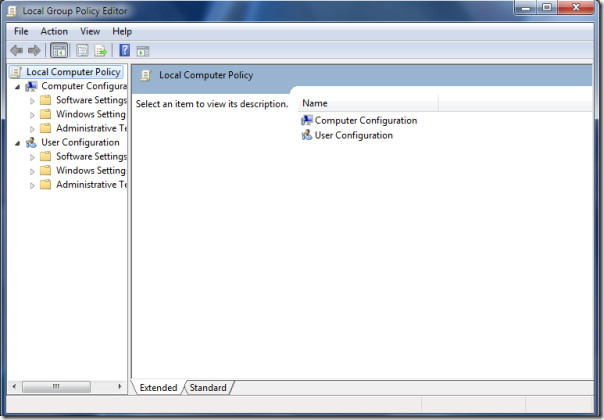
Now in the left side pane, navigate to User Configuration > Administrative Templates > Windows Components > Backup > Client.
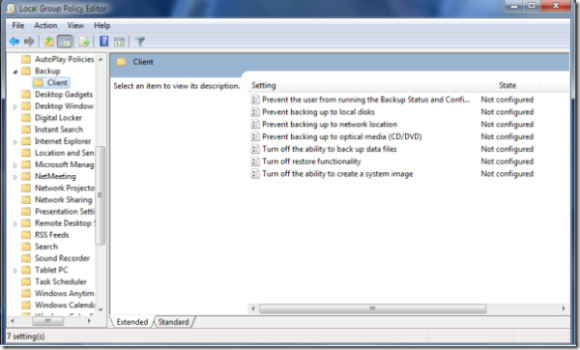
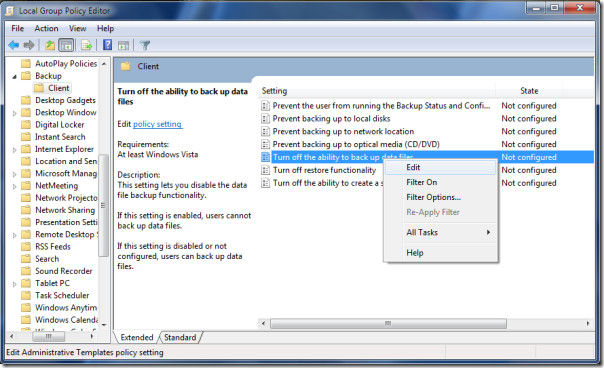
Locate the Turn off the ability to back up data files option in the right side main window, right-click it and choose the Edit option.
Here Choose the Enable option and click the Apply button.
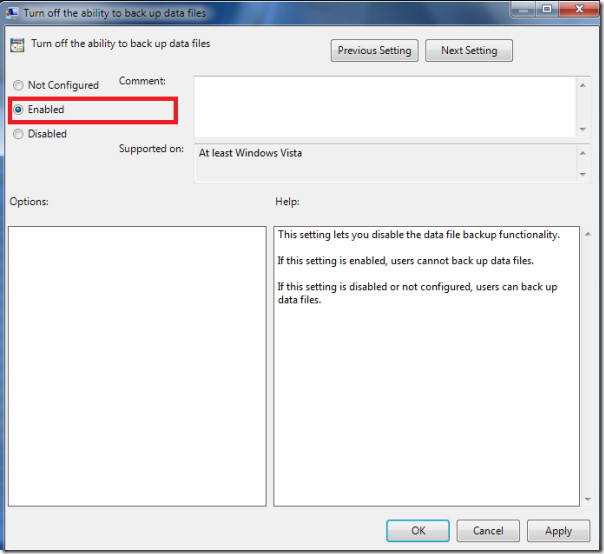
Now users will not be able to backup any data. Enjoy!

Maybe a fuching delete button would be easier.
i have windows 8 , thanx mann
many thanks m8!
any way to do this in home premium