Stop/Prevent Windows 7 From Deleting Thumbnail Cache
We discussed in our last post how it is annoying that Windows 7 will delete and recreate the thumbnail cache every time, thus, making it one of the greatest problem in the latest OS from Microsoft. We have a quick fix to this problem but still Microsoft should take serious notice of this problem and release an update in the next service pack.
By preventing Windows 7 from deleting the thumbnail cache, the photos, videos, music, and documents will preview faster since Windows will not need to delete and recreate the cache.
The trick is to deny access for all users to delete the thumbnail cache. Let me elaborate, head over to the Thumbnail Cache folder which is located at,
C:\Users\{username}\AppData\Local\Microsoft\Windows\
where {username} is the name of any user, such as, in my case it is Nakodari.
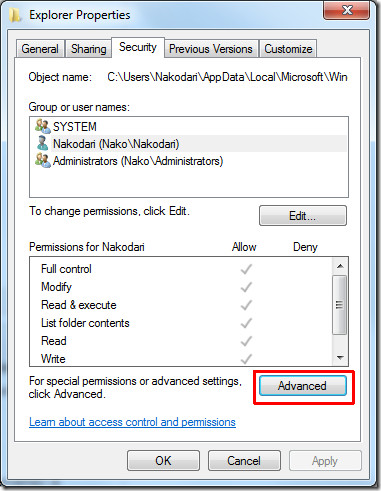
Now right-click the thumbnail cache folder which is “Explorer” and click Properties. Head over to the security tab and then click Advanced.
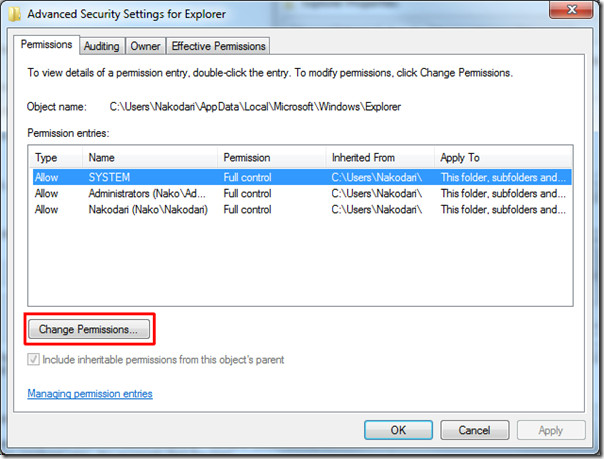
Click Change Permissions and you will find all users who have access this this folder listed.
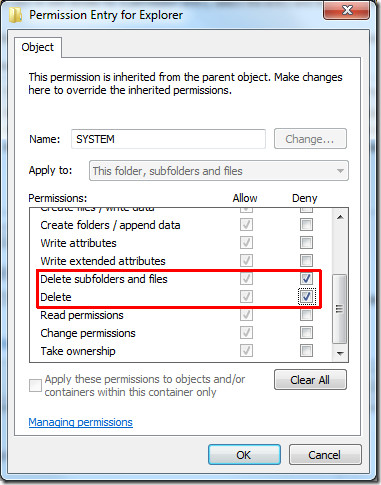
For each user, click Edit and check the box under Deny for: ‘Delete subfolder and files’ and ‘Delete’ as shown in the screenshot below.
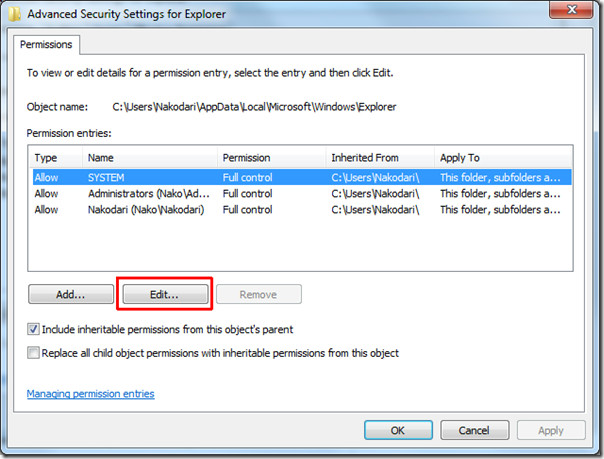
Doing this will create three new special permission entries as shown in the screenshot below. It is perfectly fine since you can always remove them later.
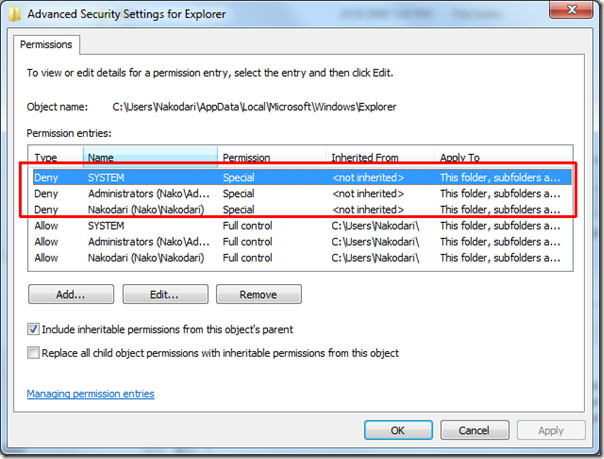
This procedure will deny the users(including System) from deleting any files inside this folder, thus, the cache will remain preserved and also speed up the loading of the folders that contain videos, music, photos, and documents.
Please note that once you prevent the delete operation of the files inside this folder, thumbnails will not be deleted if you run Disk Cleanup or any 3rd party cleanup tool.

Wow I found it
thanks a lot
This does not work at all in the latest W7. Folder still runs it’s caching routine.
Any way to do this by command line ? Thank you
As I’m usually uploading pictures to Facebook and all, this is pretty useful. It’s been taking forever for my pictures to load each time I try to open up folders. At least, now, I know what’s been causing it, the thumbnails always loading each time the folder is changed. That’s a pretty stupid feature, if you ask me. :/
Громадное спасибо дружище, а то я уже думал переходить на Win 8 или XP. 100 вариантов перепробовал – ничего не помогло.
Thank you!!!!
didnt work
So, just a newbie question. In the last step where you create the three new permissions and you say it’s fine as you can delete the old ones later – DO you actually delete the old ones? You don’t say.
thank you, and how about
Stop/Prevent Windows 8 From Deleting Thumbnail Cache
please
Thank you! One of those things that should be totally obvious, but sometimes even experienced users don’t think to do it. *head-desk*. Thanks 🙂
Cheers
OH MY GOD, Allah, Buddha, Yahweh and the Flying Spaghetti Monster – THANK YOU! This has saved my sanity. I’m a graphic designer with my own business and I’m whipping in and out of folders hundreds of times a day. This has almost turned me gray. You’ve saved me.
sp1 came and went and not to mention countless stability updates installed already and still no fix… in fact its now worse than ever for me if i don’t apply this workaround.. deleted all my thumbnails sometimes 2 times on the same day itself 🙁
makes me wanna dump 7 for ubuntu but it just doesn’t cut it for me sadly.
was thinking of getting a mac but find it hugely overpriced for the hardware they give.
so i’m just stuck…like many others.
This fix works for about a month. After that, Windows 7 deletes the thumbnail cache, seemingly oblivious to the permission rules!
You only have to deny permission to the system (not users) for this to work.
I’ve been applying this solution for some months now. Even though the problem has improved dramatically, it can still happen sometimes (I suspect it happens just after some Windows 7 automatic updates). Considering that I have a PDF library with 6,000 books, when the problem happens it is still deeply annoying. I spend more than 1 hour to generate all my PDF thumbs again. Any thoughts on how to permanently solve this problem?
p.s. I wouldn’t want to disable Win 7 automatic updates
Stop/Prevent Windows 7 From Deleting Thumbnail Cache
This is a great help my question is if I only Deney the system will it stop the automatic deleating of the thumbnail cache
I don’t have a problem with deleting them through Disk cleanup I just hate them deleting themselves.
Please let me know
Steve
RE:”MS seems to be doing their best to ignore the problem:”As usual.. Same as this dreadful annoyance..http://social.answers.microsoft.com/Forums/en-U…”Why has the ability to deactivate Auto Arrange been removed in Windows 7?”I really thought W7 was going to be so much better than Vista..but I have had to apply so many “Fixes” to W7, i have lost count . I never had to do this with Vista.
How does this relate to the article?Why can't you right-click the desktop > View > and un-check Auto arrange icons?Wow
Only works on Desktop, nowhere else, read the Blog..
I was agreeing with Jay that some obvious Flaws with W7 are being ignore by MS
The whole file sorting system in Windows 7 seems poorly thought out- do we really need arrange by, sort by AND group by?
Thanks for bringing this problem to the attention of the world! Interestingly, the fix does not seem to completely prevent deletion of thumbnails for me, but it does seem to prevent them being deleted all at once as they were previously were. They now seem to be deleted and recreated in rotation i.e. when some new are created others are deleted indicating a limit is being reached? It seems to have caused whatever process is trying to refresh the thumbcache to malfunction; previously when the thumbcachetodelete folder was created, it stored duplicates of the thumbcache.db files as .tmp files, now I have 20 of these and counting.MS seems to be doing their best to ignore the problem:http://social.technet.microsoft.com/Forums/en-U…
Little update, the tmp files in the Thumbcachetodelete folder eventually got to 26 and would presumably have kept on growing as the process made repeated (failed) attempts to completely carry out the thumbnail refreshing procedure. I then removed all the special permissions, and as soon as I did that the process moved the db files into the Thumbcachetodeletefolder, and the folder along with the transferred tmp files disappeared in a few minutes (as it usually does without the fix). So I then tried creating new special permissions, adding a deny to “Create folders/append data” as well as the “Delete Subfolders and Files” and “Delete” denial. Unfortunately this led to a worse effect, in that it would not remember any thumbnails after navigating away from a folder, presumably because no data can be appended to the files. So the big question here seems to be what is the process that is carrying out this procedure? As it seems that the process must run immediately after you remove the special permissions is there perhaps any way to capture all the services/procesess that are then active to spot which one is the culprit?
Hi Jay, try Process Monitor by Sysinternals. You will need to apply some heavy filtering to find the info you need.http://technet.microsoft.com/en-us/sysinternals…
Thanks, I'll take a look.
I had a go at using Process Monitor, TBH it goes pretty much over my head, but I was able to see entries for the Thumbcachetodelete folder and thumbcache files made by Explorer process. I noticed this registry entry mentioned:HKCUSOFTWAREMicrosoftWindowsCurrentVersionThumbnailCachestrangely when I navigate to that entry in regedit, it doesn't exist- could that be indicative of what the problem is? Maybe someone else with more tech knowledge could have a go with Process Monitor as it seems it needs more of a programmer level of knowledge to be able to properly interpret the data?
Brillant Fix. Has sped up my computer dramatically.Oddly , Windows 7 deletes the Thumbnail Cache and rebuilds it from scratch every time a user changes the content of that folder. Why did they do this?I am just bemused that W7 would have a feature that actually SLOWS things down quite a bit.. I really miss Vista at times.. W7 is good, but it has some odd misgivings.
I suppose this is a good tip for folders that you do not delete, Pictures, Videos, etc. However, I was having the exact opposite problem where thumbs.db was constantly being created in my downloads folder and I wasn't able to delete and cleanup folders until sometime later or after I closed explorer and went back in. I had to modify my Local Policy to enable “Turn off caching of thumbnail pictures”. Now my HDD and CPU are fast enough for this not to bother me. If you have a slower system it would take much longer for the thumbnails to be created every time you open the folder and this wouldn't be a desirable setting.gpedit.msc > User Configuration > Administrative Templates > Windows Components > Windows Explorer > Turn off caching of thumbnail pictures”This settings controls whether the thumbnail views are cached.If you enable this setting, thumbnail views are not cached.If you disable or do not configure this setting, thumbnail views are cached.Note: For shared corporate workstations or computers where security is a top concern, you should enable this setting to turn off the thumbnail view cache, because the thumbnail cache can be read by everyone.”
Interesting… it'll be very useful for me… I have to create with Acrobat (32 bits) the thumbnails for pdf files (as i'm using a 64 bits OS)… but after some time windows deletes them ¬¬
Use PDF-Xchange viewer, it makes thumbnails work in Windows 7 64
Great post. Love it.