What Is Msseces.exe & MsMpEng.exe Process? And Why They Are Running?
If you are wondering what Msseces.exe or MsMpEng.exe process are running in your system, then you have come to the right place. We have provided brief details about them below.
Msseces.exe
Msseces.exe is the front-end GUI of MSE(Microsoft Security Essentials). If you have installed the latest antivirus from Microsoft, then this process keeps the program’s graphical interface running.

Even if you end this process, MSE(Microsoft Security Essentials) will keep running in Windows background and will not actually shutdown. The downside would be that it will not be able to alert you of any new threat. If you are running MSE, then you should not worry about this process since it is not some sort of threat to your system.
MsMpEng.exe
MsMpEng.exe is the back-end of MSE(Microsoft Security Essentials). It is important to remember that this process is actually used by both Windows Defender and MSE. When you install MSE, then Windows Defender is automatically turned off and MSE uses this process.
If you uninstall MSE, then Windows Defender will be enabled and will start using this process. So in a way both Windows Defender and MSE use this single process.

This is the main process that runs the program and takes quite some system memory. If you are troubleshooting MsMpEng high CPU, ending this process will disable MSE and an alert will be shown asking to start the process again.
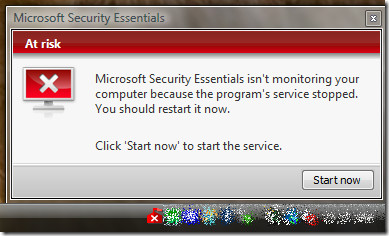
If you ignore this message it will start the process automatically, since it makes no sense to run front-end GUI of MSE without the actual backend program.
I hope the above explanation has made it clear what both processes do in Windows. If you still have any questions or doubt, feel free to leave a comment. Enjoy!
Editor’s Notes: At AddictiveTips we will be regularly covering various important processes in Windows. We believe that educating the readers about different processes will give them more insight as to how Windows and Software work.

Hi, If I put msmpeng.exe on the exclude list Microsoft Security Essentials still work ok?
Thanks for the info. I’m trying to clean up my wife’s computer. It had both MS Security and Zone Alarm. Deleted MS because Zone Alarm Virus check found 2 viruses on it and MS Security did not see them.
duh! i can’t believe i couldn’t figure that out. thanks.
about windows defender,yeah,this anti malware sucks compared to malware bytes.
most of ms software is marginal at best.i understand they’re improving,only because
other companies were making them lose money.vlc player vs. media player? no competition!
windows media player sucks! disk clean up vs ccleaner? also no competition. etc..
Appreciated your clear explanation. Thank you.
compaq presario c500 with vista ultimate 32 bit, is rebooting itself always anytime i want to get to the desktop.memory, hard disk,has been change many times, and a lot of checking made but still it is rebooting itself. it is ver disturbing! i need help! thank you!
Obrigado pela explcação,parei o processo sem noção nenhuma, estou usando o anti vírus da Microsoft ok?
TWO QUESTIONS:
1) What if we let MsMpEng.exe run but disable Msseces.exe ? What’s the downside?
2) BTW, I added Microsoft Security Essentials just recently and have long been running (and continue to run) Avast Home Free AV and AdAware, and also do manual scans and updates with MalwareBytes, Spybot Search & Destroy and SpywareBlaster. So far I don’t see any conflicts, but could conflicts be occurring I don’t know about?
WinXPPro SP3, 2GB RAM, Dell Optiplex 755 BIOS A16.
Bump – would like comments on the above.
An excellent, clear, concise, informative and (I’m betting) knowledgeable explanation. Thank you much for outstanding work.
I'm having an odd problem with Msseces.exe, when it runs it uses about 22% cpu and makes explorer use 30%, when I end Msseces.exe, explorer usage drops back down to 0-3%. Is there a way to keep those from using so many cycles because I'm already at an average 50%-80% between F@H using 50% on constantly and WMP using 10%-30% and is on almost as long as the computer is on.
Great explanation. Thank you
So long as they all “play nice” in the sandbox together and you can tolerate the performance hit of so many concurrent applications running BEFORE you start actually doing anything… no big deal. Do not have 2 antivirus programs installed/running at the same time but because adware scanners are somewhat different and many (primarily the free ones) do not have a “live” component running. They rely on you to start and run the scan manually. AdAware and now MSE are different in that respect- they do have the “live” component and may, at times, conflict. Knowing that, if you do have a conflict, you know to turn off one or the others “live” component and see if your conflict goes away. Over the years, my “favorite” mal-ware solutions change as the programs and the environment they run in change. Today's free favorites are AVG for an antivirus, MalWareBytes for an antimalware scanner, and SuperAntiSpyware for a spyware scanner. New stuff comes out often and as I hear about them, I will sometimes put them up against real life infected systems and see how they do vs the ones that I am then currently using (tangled grammar… but you get the meaning…). I haven't been a fan of registry cleaners- the ones I've used tell me they're doing all sorts of wonderful stuff… but I see little or no performance improvement, as a general statement. Occasionally, they seem to help a little but no more than the margin of error generated by hopeful thinking. Hope that gives you some direction or at least some perspective on your question. Take care!
So long as they all “play nice” in the sandbox together and you can tolerate the performance hit of so many concurrent applications running BEFORE you start actually doing anything… no big deal. Do not have 2 antivirus programs installed/running at the same time but because adware scanners are somewhat different and many (primarily the free ones) do not have a “live” component running. They rely on you to start and run the scan manually. AdAware and now MSE are different in that respect- they do have the “live” component and may, at times, conflict. Knowing that, if you do have a conflict, you know to turn off one or the others “live” component and see if your conflict goes away. Over the years, my “favorite” mal-ware solutions change as the programs and the environment they run in change. Today's free favorites are AVG for an antivirus, MalWareBytes for an antimalware scanner, and SuperAntiSpyware for a spyware scanner. New stuff comes out often and as I hear about them, I will sometimes put them up against real life infected systems and see how they do vs the ones that I am then currently using (tangled grammar… but you get the meaning…). I haven't been a fan of registry cleaners- the ones I've used tell me they're doing all sorts of wonderful stuff… but I see little or no performance improvement, as a general statement. Occasionally, they seem to help a little but no more than the margin of error generated by hopeful thinking. Hope that gives you some direction or at least some perspective on your question. Take care!
My computer has Adaware, AVG, Regcure, and now Microsoft Security Essentials all apparently running together. What are the ramifications by having so many security type software all running at the same time?
thank you for the great explanation, please i want know what this process do “svchost.exe”i have 5 scchoost.exe processes running.
Svchost.exe is merely a generic that Microsoft uses for certain types of processes that various (but not all) types of programs use to accomplish their tasks. Five svchost.exe processes are not an unusual number. Don't worry about them unless one is using a huge amount of processor time, indicating either a problem with a legitimate program that uses the service or a malware program of some type that has co-opted an instance of the service for its own devious uses. At that point, it can take a little detective work to discover who the bad actor is…