Context Menu Editor For Windows 7 & Vista
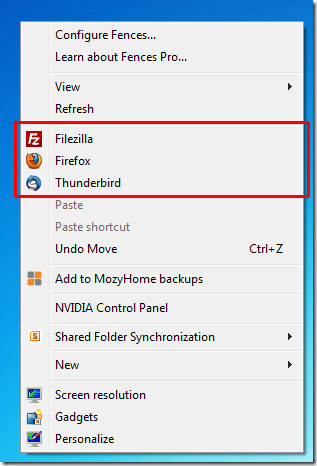
There are countless guides explaining users to tweak their registry to add a certain program in the Windows Explorer context menu. Editing the registry is never recommended and should be only touched at the last resort. If you want to add some programs to the context menu quickly, give Context Menu Editor a shot.
One reason we love this tool is it’s ability to automatically add the icon when a program is added (this is because it supports extraction of icons from .exe format). Another reason is the support for adding programs to Extended context menu (which can be activated by holding Shift + Right-click).
To add the programs in the extended context menu, make sure the Extended checkbox is checked. You can also add Website URLs quickly but keep in mind that uncluttered context menu is always the best.
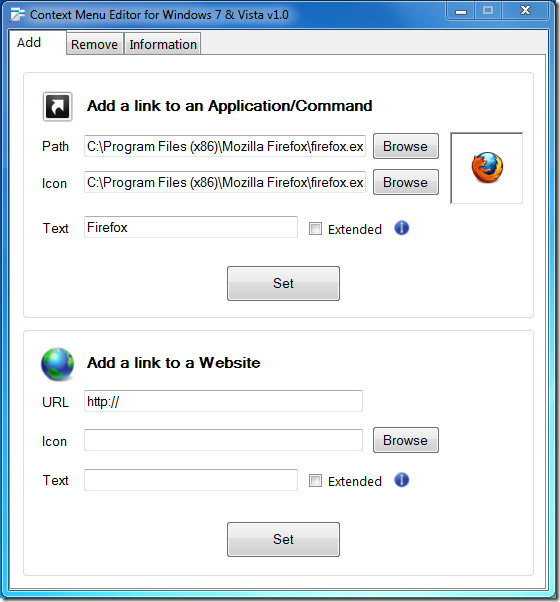
Once you hit Set, the program is added to the context menu immediately, eliminating the need of having to restart the system or logging off.
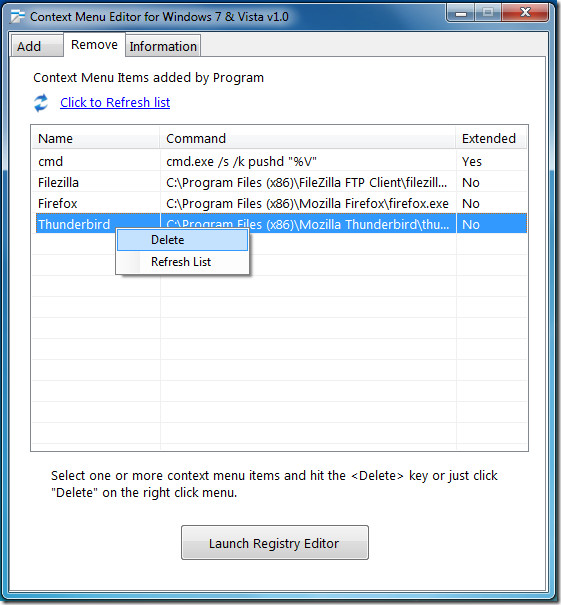
To remove a program, head over to the Remove tab, right-click a program and select Delete. Hit Launch Registry Editor button to open up the Windows Registry.
It is developed for Windows Vista and Windows 7 only. For more, also check out Your Menu.

This won’t work on 64 bit Windows. Even if you edit menu, it is the menu for 32 explorer shell, which will not show up on 64-bit
It flames out on me with message “you are no+t an administrator.”
My username is an administrator. But even if I use the “run as administrator” option (which shouldn’t be needed) it still tells me I’m a limited user. Okay, so I’m old – that doesn’t mean the program should mock me for it. 😉
Before the “gotta be an administrator” barrier, when I tried to add an option to invoke Ultraedit, a 32-bit text editor, it told me an empty source file was illegal. Tried adding %1 to the command just in case, no joy. Added quote marks, no joy.
I’m running 64-bit Windows 7 on a small home network. I turned off user accounts because it was causing unnecessary hassles. Could that be related to the program’s flame-out?
Old Coot
Member, Americans Past Their Sell-by Date