Windows 7 Robocopy – Multithreaded File Copy
The Robocopy (Robust File Copy For Windows) is an old feature in Windows, for those not familiar with it, it is a powerful file copy method from the command line interface. Like previous versions, Windows 7 also includes this feature but with some major enhancements.
The general syntax for Robocopy is as follows:
ROBOCOPY <Directory that will be copied> <New Directory>
For the multithreaded copy, only add the /MT switch at the end of the above command and then specify the threads as an integer value, which you wish to start for this copy process, i.e
“ROBOCOPY <Directory that will be copied> <New Directory> /MT:<Integer number of threads to use>”
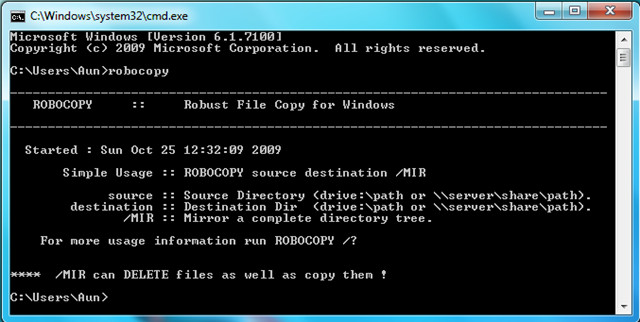
You can use a maximum of 120 threads. For further help, you can open the command line and type robocopy, it will display its help.
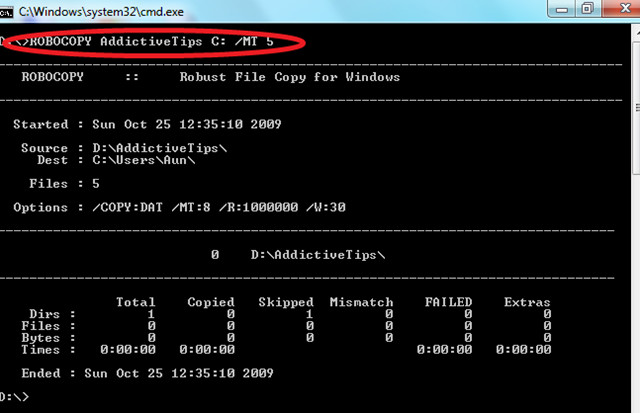
I copied a directory with the name AddictiveTips from D drive to C with 5 threads by running the following command( Please note that when I ran this command I was already present in the D drive, otherwise I would have had to explicitly define the source directory).
ROBOCOPY AddictiveTips C: /MT 5
It’s that simple. Also check out RichCopy, it is a Graphical User Interface(GUI) of Robocopy. Enjoy!

Robocopy looks like a very complex task and feels like it requires very much technical knowledge so I was looking for a simple yet effective software. My friend suggested me a software called GS Richcopy, its a paid software but it it affordable and provides overwhelming features like pre scheduled file transfer, email notification when task is done. This software is much better than any other software that I have used till date. Try it hope it helps!
It is a nice software with brilliant options but it dont work for long path files, for long path files the most efficient tool is available at http://www.longpathtool.com it is quick,smart and easy to use tool by which you can deal with all long path files most efficiently.
What would be really helpful is an option to achieve a traditional full-backup. ie. In a traditional full-backup you copy the files and clear the source archive attribute. /M only copies files with the attribute set so can’t be used for a full-backup. /A-:A only resets Archive in the destination (and here’s a fun one for you, run robocopy twice with this option and watch all your archive attributes get turned back on for all the skipped files). The oft cited attrib command is not a good solution to the full-backup problem until we can have it look at the same files as robocopy (read the same filter options etc).
is great thanks for the info…..
is great thanks for the info…..
is great thanks for the info…..