Get System Toggles Under iPhone Lock Screen Slider With LockBar Settings

More and more Cydia developers have recently started adopting the policy of releasing a beta version of their upcoming tweak in the form of DEB files before making it available as a release on the Cydia store. A few days back, MessageBox took that route, and now, LockBar Settings is available for manual download as well. We have to admit that LockBar isn't as highly anticipated as MessageBox was, but the features it offers can really become an essential part of your daily routine. With LockBar Settings, iOS users get to place four of their most frequently needed system toggles on their device’s lock screen. Much like LockscreenToggles, the new controls added to the lock screen by LockBar only become visible when you invoke them. In fact, it is even possible to require an extra tap for their actions to ensure that a toggle is never hit accidentally. Read More

Onavo Protect Takes The VPN Route To Make Browsing Safe On iPhone

For quite a long time, tools like WOT have been providing a safety net for users surfing the web from their computers, but when you are on your iPhone, common sense is usually the sole protection you have against phishing scams and unsafe websites. Nowadays, your mobile devices often hold much more of your sensitive personal data than desktops, so the potential for disaster in case of a security breach is greater. Android has long been notorious for malware and lax security, but iOS has had its fair share of issues as well. The Google Play Store has apps like Avira Android Security and Advanced Mobile Care that are pretty decent antivirus tools, but iOS doesn't have much to offer in that genre, with apps like AirCover being rare exceptions. Onavo Protect is a brand new security app from a trusted name in the industry, and it aims to make sure that you never have to worry about inadvertently giving away your private information to scammers while surfing the web from your iPhone. The app also monitors your browsing sessions to ensure that you are alerted whenever a website is not safe. Read More

Set Google Search App To Open Directly To Google Now On iPhone

Soon after its release, the Google Now feature of the Search app met a bump along its otherwise smooth road on iOS. Since Google Now requires constant access to your current location in order to function properly, speculations were rife that the feature is a real battery-killer. Though Google was quick to quash these rumors, refuting all such claims in a statement released just a few hours ago. So now that they don’t have to worry too much about their precious battery life, a lot of people are sure to start using Google Now quite heavily. However, you have to remember that Google Now is only a part of the Search app in iOS, and doesn't enjoy the level of system integration that it has in Android. StartToNow is a Cydia tweak that might be considered the first step towards ingraining Google Now in iOS. Admittedly, it only makes sure that Google Now becomes the default view for the Search app, but this means you have to perform less taps to get to everybody’s favorite and immensely useful new virtual assistant by Google. Read More

On-Demand Movie Streaming Service Blockbuster Comes To iPhone & iPad

Netflix has been pretty active in the App Store lately, and the service’s iOS client got some decent new features in an update a few days back. On Android, Google Videos is pretty good for watching entire movies on your handheld devices. For the competitors of these giants wish to keep up, having a mobile presence has become essential. Blockbuster On Demand started out as a chain of rental stores for DVDs, but has since evolved to offer a great streaming service, making it more like a mixture of MAX GO and Trulia. The only thing missing from the Blockbuster repertoire was an iOS app, but the company has just rectified this issue by releasing a brand new universal app that lets you rent any movie you want to watch on your iDevice via streaming. It is also possible to use Blockbuster On Demand to manage your account on the service, view free movie trailers and bookmark movies you intend to watch later. Read More

Open Yahoo! Weather From Stock iOS Weather App Icon Or NC Widget

Whenever a Cydia tweak lets you replace a stock iOS app with a third-party one, it is usually a sign that the third-party app has got things right. We saw this happen after Google Chrome was released in the App Store, and now a similar option is available for the new Yahoo! Weather app as well. As we pointed out in our review of the new app a few days back, the Yahoo! app offers a lot more than the stock Weather app in iOS. It has beauty, shows you some amazing details regarding current weather conditions, and even lets you see the latest satellite maps to get an even better idea of the weather conditions for any region. Despite all this awesomeness, there are a few things that might have stopped some users from completely switching to Yahoo! Weather. The biggest problem is that the Notification Center widget still directs users to the stock iOS app, but if you have a jailbroken iDevice, this issue can now be resolved thanks to the Yahoo! Weather Is Better Cydia tweak. Read More

Capture Screenshots Of Scrollable iOS Screens & Individual UI Elements

Taking screenshots on iOS is no big deal; you just push the Home and power buttons simultaneously, and the current view is captured with an on-screen flash. Since this is such a straightforward feature of the platform, not many developers over at the Cydia store have felt the need to tinker with it much. We have seen tweaks like Screenshot Dam, IsMyFlash and SSCapture in the past, but they leave the basic characteristics of iOS screenshot feature untouched, or just stop at giving the feature a makeover. Capture View is different though, as it adds a whole new dimension to screenshots capabilities of the iPhone. With this tweak, users can capture a single element of a long list of options, or even capture a complete scrollable list in one shot. Read More

Switch to Windows Phone Finds WP8 Alternatives For Your Android Apps

Windows Phone has slowly started to establish its position as the ‘other’ smartphone platform, for people who have had enough of Android and iOS and want something different. You have to admit that Microsoft’s mobile OS is pretty unique and comes with a neat interface. Furthermore, it got a slew of new features with the release of WP8. A fair amount of users are willing to make WP8 devices their first smartphones but in order for the platform to grow rapidly, there's still a great need for more users to switch from competing platforms like iOS and Android. The biggest hurdle faced by Microsoft in getting these smartphone users to give WP8 a chance is the perception that WP Store lacks quality apps. This was true till a few months back, but Microsoft has lately been actively trying to dispel the notion. There are some pretty decent apps available for WP8 now, and you are likely to find an alternative for most iOS/Android apps if you are not too picky. To prove the point, Switch to Windows Phone has been released in the Google Play Store and WP Store. The app suggests Windows Phone alternatives to Android apps for people who are thinking about switching platforms. Read More

Hands-On With The Revamped Facebook Beta App For Windows Phone 8

In the days of Mango, Windows Phone was the best platform for fans of Facebook. WP8 improved upon WP7’s integration with the social network, but with the release of Facebook Home for Android and Facebook 6.0 for iOS, the WP8 app started to look pretty primitive. Fortunately, Microsoft has taken note of the issue, and has decided to release a revamped version of the official Facebook app for WP8 soon. However, to make sure the new app is absolutely perfect, the MS guys have decided to employ Windows Phone users as the app’s beta testers. Facebook Beta won’t show up in the WP Store search results for now to avoid confusion, but anyone can download the app for free and check out the future of Facebook on WP8. Read More

biteSMS For iPhone Updated With A New Quick Compose NC Widget & More

Whenever I jailbreak an iPhone, biteSMS is among the first Cydia apps I download. It offers so much in terms of convenience that once you get used to biteSMS, it becomes nearly impossible to go back to the stock Messages app in iOS. Having said that, some other tweaks in the jailbreak store have recently starting coming up with decent alternatives to the features available in biteSMS. Fortunately, the team behind biteSMS isn’t resting on its laurels, and are always looking to make the famous app even better than it already is. Quick Compose is the feature of biteSMS that has managed to attract most fans to the app, and with the app’s latest update, it has become even better! In addition to a plethora of performance improvements and bug fixes, the beta version of biteSMS 7.6 also comes with a brand new Notification Center widget. This widget provides shortcuts that can be used to quickly get in touch with your favorite contacts. Read More

Fidelity Investments Just Might Be The Best Stock Market App For WP8

Fidelity Investments is among the biggest names in the market when it comes to financial services. A lot of big players in the stock exchange rely on data acquired from Fidelity to conduct their businesses and make investments. You can stay in touch with your Fidelity Investments account using its web version of course, but it is always nice to get on-the-go access for any service in form of dedicated mobile apps. If you work in the finance indistry and own a Windows Phone, the service’s WP8 app can prove to be an asset. It supports account login but even if you are not a registered Fidelity Investments user, you can use the app to keep an eye on the stock market, read latest news stories related to companies of your interest, and get detailed exchange stats for any particular stock. Read More

Contribute To Wikimedia Commons On The Go From Android & iPhone

In today's world, it's considered almost impossible to go through college or professional education without a little help from Wikipedia. As you might already know, Wikipedia is a non-profit project, and has been running successfully for a long time because a lot of its users are also among the website’s major contributors of data. If you have ever submitted anything to Wikipedia, specially an article containing a media file, then you are probably familiar with Wikimedia Commons. The service allows users to upload photos to a platform from where anyone can access and use them without having to pay anything. The images that appear in Wikipedia articles are generally from Wikimedia Commons as well. Since the world is shifting to smartphones and tablets from computers, it seems like a perfect idea to have a Wikimedia client for major mobile platforms. It has taken some time for the organization to realize that, but the Wikimedia Commons app is finally here. The app has been released simultaneously for iOS and Android, letting users of both platforms upload images to their Wikimedia accounts on the ago. Read More

PullAll Adds Custom-Colored Pull-To-Refresh To Any iPhone WebView App

The ‘Pull to refresh’ gesture has been around in iOS for a long time, but its inclusion in the stock Mail app with the release of iOS 6 showed that Apple knows how much convenience this little gesture can bring to the life of users. Apart from the Mail app, the little arrow icon is also present in various shapes and forms in different third-party apps. Twitter and Facebook are the two most popular apps to support ‘pull to refresh’ on their main pages, while a lot of smaller players in the App Store implement it pretty neatly as well. If you really like the gesture, you must have noticed that it could have come in handy in a lot of other apps as well. With PullAll, users of jailbroken iOS devices get to add a customizable ‘pull to refresh’ icon to apps. The tweak doesn't work with every app you might be using on your iPhone, just any stock or third-party apps built-in WebView, including the likes of Safari, App Store, as well as different sections of Facebook and Twitter (in addition to the default main screen). Read More

Get Easy Access To System Toggles On iPhone Lock Screen

If Infinity Blade (or any other game, for that matter) has taught us one thing, it is that you cannot stay on top without being occasionally challenged. SBSettings has been the king of Cydia tweaks for a long time, and not many alternatives have come even close to garnering the same following as it enjoys. The only criticism that you can direct at SBSettings is that it offers too many options, including some you are never likely to need. Also, the lock screen integration of the tweak isn’t too good, and the screen turns off even if you are going through the toggles listed in the dropdown window. Flusterless and similar tweaks cannot be considered alternatives of SBSettings by any stretch of imagination, since they are too limited in terms of features. LockscreenToggles, however, might be the first Cydia tweak in a long time that can make you leave SBSettings. The tweak doesn’t have as much toggles and customization options as SBSettings, but that also means you don’t have to go through endless manual configuration to get started. Read More

Add Seek Bar To iPhone Lock Screen Music Controls With LSScrubbing

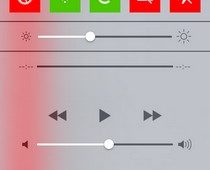
As tweaks like Tempus and LSMusicGestures have shown in the past, the iOS lock screen has a lot of potential when it comes to controlling your phone’s music library on the go. An average iPhone user doesn't need access to their entire song collection from the lock screen, while gestures are only useful to a certain extent and might even become annoying if you have to remember too many of them. Personally, the only thing that has ever bothered me about the default lock screen controls for the stock Music app in iOS is the lack of a scrubber (seek bar). The lock screen controls do include a slider to control the volume of the playback, and you can forward/rewind the song to some extent using the two arrow icons presented there, but it’s not the same as having a proper seek bar, which forces a lot of users to launch the Music app whenever they want to skip to the favorite part of a song, thereby killing the whole purpose of lock screen controls for them. LSScrubbing is a new Cydia tweak that solves this problem by adding a seek bar to the lock screen music controls in iOS. Read More

BatteryDoctorPro Is The Ultimate Power Saving & Monitoring App For iOS

A lot of apps are often labeled as the most comprehensive in their genre, but rarely does one justify the tag more than BatteryDoctorPro. Battery Doctor has been around for Android and iOS for a long time, and BatteryDoctorPro comes from the same developer. There is one main distinction between the two apps though. Unlike Battery Doctor, BatteryDoctorPro has only been released for jailbroken devices. There are some pretty clear reasons for that, since the app incorporates widgets for both NC and SpringBoard. You also get a bunch of toggles to control system actions, just like SBSettings, and there are other similar features that you aren't likely to ever see in an Apple-approved app. Read More

Change UI Accent Color Of iPhone Apps With Emphasize

I know a lot of people who aren’t really into Winterboard themes despite having a jailbroken iDevice. While theming can give your device a completely new look, it does come with a few drawbacks. For one thing, your device’s battery life might be negatively affected if the theme is a bit too flashy, and you also end up losing all the finesse that defines iOS. So, if you don’t have any serious issues with the way things appear in iOS by default, Emphasize might still manage to win you over. The tweak lets you change the color of basic UI elements in iOS. In iOS 6, the status bar changes color to match the current app’s theme. There have also been tweaks like WeatherBar in the past, which are aimed at making your iPhone’s screen appear more interesting and colorful. Emphasize goes one step further, and lets you choose the basic UI color of a third-party or system app. Read More

How To Individually Delete iTunes-Synced Photos From Within iPhone

Even if you are a die-hard fan of iOS, there's no denying that the stock Photos app in iPhone is not one of Apple’s best creations. For one thing, the app is not very feature rich, and has received only a few basic editing options pretty recently. Apart from that, managing your albums and the images within them can get a bit messy at times. Deletion capabilities for iCloud photos were added a long time ago, and the Camera Roll is quite neat, but if you have albums imported using iTunes, good luck trying to do anything with them! For some reason, iOS does not allow users to delete albums or the photos in them if they are synced with iTunes. Not everyone wants to connect their iPhone to a computer merely to get rid of a few annoying pictures, and it seems a bit counter-intuitive to do that as well. While we can only hope that Apple decides to change this in iOS 7, jailbreak users can address the issue right now, thanks to new Cydia tweak, iMageSynced Remover. Read More

MessageBox Lets Chat Heads Float Around Outside Facebook For iOS

People can’t seem to stop talking about the new Facebook update for iOS, despite the fact that it has been around for a couple of weeks now. The newly introduced stickers are pretty nice, but there can be no doubting the fact that the real show-stoppers are Chat Heads. The Cydia store has already received a few tweaks aimed at the Facebook app’s new features, but ever since it was announced that there will soon be a tweak to let you use Chat Heads outside of the Facebook app, many have been waiting just for that. After all, Android already has the same capability thanks to Facebook Home, and iOS users want a piece of that as well. According to the word that was out there, the Chat Heads-liberating Cydia tweak, MessageBox, was supposed to be released last week, but got delayed for some reason. A few hours ago, the developer made the DEB file of the tweak available for the public, and now the tweak has finally been released in the Cydia store! Read More

Add A Feature-Rich File Downloader To Google Chrome For iOS

When the Chrome Download Manager tweak was released last year, a lot of people thought that a better alternative will soon make its way to the Cydia store, but even after all that time, we are still looking for the perfect downloader that works with Google Chrome for iOS. As it has been around for longer, Safari has some pretty decent download managers, like Safari Download Enabler. Chrome Downloader is the latest download manager to come out for Google’s iOS web browser. It has seamlessly integrates with the web browser much like the aforementioned Safari DE and supports just about any file format that you have ever heard of. Even if you find a file that isn't compatible with the tweak, you can remedy that by manually configuring Chrome Downloader to always start a download session when a particular type of link is tapped within Chrome. Read More

Prime Adds Color-Coding To Incoming & Outgoing Entries In iPhone Call Log

Apple’s penchant for perfection fully manifests itself in the company’s choice of UI elements for iOS, but there are still a few idiosyncrasies that make the overall experience of using an iPhone slightly annoying. While the OS gets big things like cloud syncing, app environment and gesture control spot-on, there are some little aspects of it that could have made your life a little easier if improved. Take the stock Phone app for example - while it doesn't lack much in terms of features, there is a slight inconsistency in the ‘Recents’ tab that might have annoyed you on several occasions. By default, the iPhone call log displays missed calls in red color, but there is no easy way of distinguishing between incoming and outgoing calls, since they are both shown in the same font. There is a tiny differentiating icon next to each entry, but you can’t analyze the list at a single glance just using that. Jailbreak users can finally address this issue, thanks to the newly released Prime Cydia tweak that brings full color-coding support to the iPhone call log. Read More