BatteryDoctorPro Is The Ultimate Power Saving & Monitoring App For iOS

A lot of apps are often labeled as the most comprehensive in their genre, but rarely does one justify the tag more than BatteryDoctorPro. Battery Doctor has been around for Android and iOS for a long time, and BatteryDoctorPro comes from the same developer. There is one main distinction between the two apps though. Unlike Battery Doctor, BatteryDoctorPro has only been released for jailbroken devices. There are some pretty clear reasons for that, since the app incorporates widgets for both NC and SpringBoard. You also get a bunch of toggles to control system actions, just like SBSettings, and there are other similar features that you aren't likely to ever see in an Apple-approved app. Read More

Auto-Change Mac Screen Resolution When Switching Power Sources

OS X changes the screen brightness when your MacBook is running on battery power but sadly, there isn’t much else you can trigger when the system detects it is no longer plugged into a power outlet. While the aforementioned feature is useful, an ordinary user can’t do anything with it. Now imagine you’re using a Retina MacBook and would like to reduce your screen’s resolution when it’s running on battery power. One way to do it is manually changing it. Though if you would prefer to automate the process, you will need to make a little effort and be prepared for a little setup procedure. We’re going to show you how to change your screen’s resolution using an AppleScript and ControlPlane - a free Mac App that allows you to create contexts for running apps or scripts. This method works in Mountain Lion but may or may not work on older OS X versions. Read More

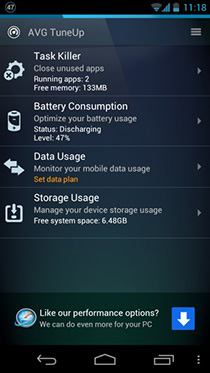
AVG TuneUp: Easy Task, Battery, Storage & Data Management In One Android App

Ever since I switched from the iPhone to an Android Phone (Galaxy Nexus), there have been several changes in my smartphone usage habits, the most important ones being managing storage, ensuring that I don’t run too many apps at once (gets me confused, and slows down the phone), close apps every once in a while, and most importantly, save battery. There's no dispute that the Galaxy Nexus isn't as good as the iPhone when it comes to battery life , but I somehow manage to keep it alive till the end of the day. There are some key settings that determine the battery life of your smartphone, and case of Android, these settings are quite scattered. In addition, there are also other maintenance tools like tasks, data use and installed apps management that are scattered across Android Settings.  A common user doesn't really know if changing such settings can affect their device performance. Fortunately though, the user doesn't need to be worried much, since there are apps for this purpose. Unlike many such complex-looking apps (some of which we have covered earlier), AVG TuneUp is really user-friendly, not requiring the user to be tech-savvy to understand and interact with it. Read More

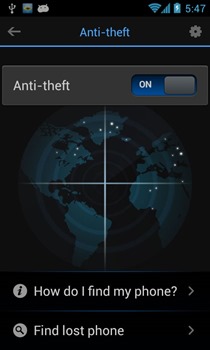
Advanced Mobile Care For Android Gets Anti-Theft, Call Blocking & More

Some time back, we covered an Android optimization app named Advanced Mobile Care that houses a plethora of mobile maintenance features wrapped in a fancy and intuitive UI. Originally sporting features such as 1-tap performance boost, virus protection, privacy protector and more, the app later received an update bringing in support for cloud backup, a very slick privacy adviser, and a revamped App manager. The app's development team seems to be a serious believer in there always being room for improvement, as  Advanced Mobile Care has just received another major update, bringing in newer features and some improvements to existing ones. The app now houses a new Anti-theft system, call blocker, and improved battery saver, and adds supports for Android tablets including the Nexus 7. Let's take a look at all that's new in Advanced Mobile Care after the break! Read More

Send Your Laptop Into Hibernate Mode On Power Failure

Laptops are a great way to make sure that your system keeps running even when there is a power failure. Most modern laptops give you a battery backup of around 3 to 5 hours, depending on the activity you are doing. Processes that require lesser power, such as browsing or reading a document, does not consume a lot of battery compared to processing intensive activities. For instance, if you start playing a game, which has heavy graphic requirements, on your laptop while on battery power, the battery is going to run out very fast. As time goes on, the backup time of the battery reduces even further. When the battery gets old, it is not able to hold as much charge and runs out of power much more quickly. If you have an old battery, sometimes when the laptop is not connected to AC power, the battery charge gets depleted very quickly and notice it only when the laptop suddenly shuts down, erasing all the unsaved information. This can be quite frustrating if it happens a lot, and you have to start your work again from scratch every time. HibernateOnPowerFail is a lightweight application for Windows that automatically sends your computer into hibernate mode as soon as the power goes out. Read More

Improve Your Windows Phone’s Battery Life With Eco

Although Windows Phone features a battery saver mode in the Settings menu, most users aren’t really satisfied with it, and claim that it is not very useful in prolonging battery life. You can take matters in your own hands as well, and kill background tasks linked to several apps, but shouldn’t there be some way of automatically entering an effective power-saver mode? Thankfully, you can now use Eco, a new Homebrew app that aims to increase your phone’s battery life considerably, without any help from the user. You will need an interop unlocked device in order to use Eco, but once you have flashed it to your phone, you will not have to do anything else except launching the app once to make it optimize your device’s battery usage. The app lets you manually kill background tasks, or temporarily disable your Windows Phone's sensors while it is not in use. Read More

Cosmos Is Support.com’s 3-In-1 System Optimization App For Android

Although Google Play Store is filled with plenty of Android system optimization and performance enhancement apps, few live up to their claims of boosting your device’s performance considerably. As always, we’ve been trying our best to bring some of the best (and mostly free) quality options in this regard, with AirCover, Bitdefender Power Tune-Up, Android Speed Booster and MP Task Manager being some of the noteworthy few. Adding to the long list is Support.com’s Cosmos – a 3-in-1 system optimization tool for your Android that supports a built-in battery saver, junk cleaner and privacy scanner. Making a mark among users amidst such fierce competition is not possible unless you bring something relatively fresh to the table, and this is exactly what Cosmos thrives on. Sporting a neat, uncluttered interface, the app helps you analyze and get rid of all the problematic facets of your Android device, and in doing so, lets you resolve most of the issues with a mere tap. Read More

Give Your Android’s Battery Life A Boost With Trend Micro’s Longevity

Battery life is one such issue that most mobile (smartphone and tablet) users always seem to be complaining about, regardless of how limited their usage is, and Android owners are no exception in this regards. In spite of numerous battery calibration/optimization tools that are already available in the Android Market, users are mostly found yearning for a better, simpler and more comprehensive solution. If you’re also among such users (which, I believe, most of us are), then may be Trend Micro’s Longevity Battery Saver (beta) could well be an answer to your woes. Read More

PwrDrain Shows Laptop Battery Power Drainage In Real Time

PwrDrain is a windows gadget which is quite different from common power meters. Unlike normal power meters, it displays the current power drainage in real time. This allows identifying those applications which may drain more batter power from your laptop. When you start using a power intensive application or process, you are alerted when an increase in power consumption is detected. Read More

Schedule Display Brightness And Wi-Fi/Data/Bluetooth Toggling On Android

There aren’t a lot of applications on the Market that provide you with comprehensive aid in conserving the battery life of your Android device. JuiceDefender, which has been around for quite a while now, is probably the best application of said kind, with more features and customizability than any other similar app on the Market. However, not all said features are available in the free version. Moreover, for certain novice users, the high level of customizability may sometimes become a tad confusing. A recent addition to the Android Market, Power Scheduler is a simple-to-use alternative to the aforementioned app. In addition to having a minimalistic interface that is extremely easy to understand and get used to, the application sports a few extra features that JuiceDefender doesn’t. That is, apart from allowing users to set schedules for the level of screen brightness and switching Wi-Fi/network data on or off, the application allows the same for Bluetooth and Airplane Mode. Read More