FluffyApp Updated With New UI, Option To Quickly Create & Upload Notes To CloudApp

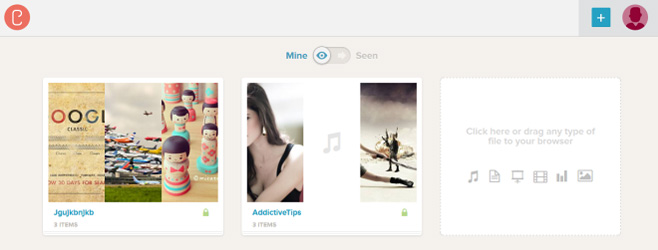
Cloud is the latest and greatest talks of the internet these days. No longer do we need to keep everything within a device, with Cloud, we can access any file anywhere, provided there is an active internet connection. Taking advantage of the features provided by cloud computing, various companies have made its use, in one way or the other. One of those is CloudApp. CloudApp is a small application for Mac that is a very famous tool for uploading files to the cloud. There wasn't any Windows alternative to it until back in 2010, when we covered FluffyApp, an application that allows Windows users to upload files to CloudApp. Users are allowed to upload files by dragging it over the system tray icon or by simply navigating to the file. Moreover, it enables users to instantly capture and upload screenshots to the cloud. It basically provides everything of CloudApp from Windows perspective. FluffyApp has come a long way since its first release, and a recent update by the developers has brought version 2 of the application to the market. So, we thought of checking out all the changes that have been included in the application since the first release. Keep reading to find more. Read More

BuddyBackup: Backup Important Data To Your Friends’ & Family’s Computers

Backing up your files and folders is very important. You never know when your hard drive might crash or a virus might corrupt your files and folders. Moreover, anyone with malicious intentions can also delete your files if they get access to your computer. Whatever the case, if you have a backup of your files saved somewhere, it proves to be a life saver in such situations. Previously, we have covered some great applications to backup your data locally, remotely or on a cloud. Back in February, Usman covered Simple Data Backup, which offers an on-demand backup option to quickly perform backup operations, as well as scheduled backup tasks and post-backup options, while some days ago Waqas covered AngryFile, a Dropbox-like file sharing and backup utility that lets you store important files on the cloud. Today, we have another backup application called BuddyBackup that enables you to back up your data on your friends' and family's computers for free. This lets you avoid paying huge sums of money to third party companies for backing up your data. More on BuddyBackup after the jump. Read More

FILLIB: Create Movies Wish List & Collection Log, Sync With Cloud [WP7]

If you are a fan of movies and own a Windows Phone 7 device, then there are many apps which you might like in the Marketplace. We have covered quite a few of them already, like RemembeReel and DVD Collector. These apps are for avid movie collectors, and if you own a lot of film titles, then they can really come in handy. FILLIB is another Mango app which belongs to this genre. The app lets you create a database for movies you have watched at any time, and even those you wish to watch in the future. Once you have done that, it becomes possible to search through your collection via a number of extremely comprehensive filters. Read on to know more about Film Library (FILLIB). Read More

AngryFile: Backup Files To Cloud & Restore Them To The Same Directories

The advent of cloud computing has made a big leap forward towards content sharing. Services like Dropbox has made a tremendous impact on the way we save and share our files, and many companies have started creating content sharing tools and online services to let users easily share files with others. Angryfile is a Dropbox-like file sharing and file back up utility that can help you store important files on the cloud. What it does is, allows you to make backup of your files and folder, and restore them at any time you want. The thing that makes it unique from Dropbox and other data sync & backup utilities, is its ability to restore data to the same location where it was backed up from. In addition, it performs incremental backup operation over selected folders, which means that only newly added files and updated file fragments will be copied to cloud. The total available free cloud storage is 1GB, but you can get additional space (25GB) by subscribing to the premium service for $5 USD. Read on to find more. Read More

AirCover: All-In-1 Mobile Security & Optimization Tool [Android, iOS]

AirCover is one of the most comprehensive and multipurpose system protection and optimization Android and iOS apps that sport some very handy features that would otherwise be availed using, at least, a couple of different apps and services. Features offered by AirCover include an extremely effective mobile antivirus that guards your device against all sorts of malice, a device tracking tool supplemented by real-time notification alerts, a remote alarm trigger to instantly find your lost device, remote data wiping to protect your precious mobile data from falling into wrong hands, advanced system access and authorization control for individual apps, efficient and convenient cloud storage option to back up your precious mobile content, several system optimization tools including task killer, cache cleaner, 1-click memory optimizer et al, built-in battery-life enhancement tool, and plenty more. In addition, the app also lets you check-in to locations of interest, specify various commonly visited (and/or safe) places/locations on map, send emergency mail and text message to your loved ones, check geographical coordinates of friends and family members, specify time frequency at which your mobile data would be automatically uploaded to cloud, set the time interval/action after which all the opened apps would be automatically shut down, check extended battery stats and status, get useful battery saving tips/suggestions and lots more. Read More

Schedule Android Data Backup To Cloud With inDefend Mobile Backup

Data backup & restore solutions are present in the Google Play Store in large numbers, but how many of them actually support encrypting, scheduling and uploading backups of your personal Android content to the cloud? Developed by Dataresolve Technologies, inDefend Mobile Backup is an Android app that serves said purpose in fine style. Using inDefend Mobile Backup, you have the choice to select whatever personal Android content you wish to backup to the cloud. This may include your text messages, call logs, calendar events, contacts, browsing history and/or your personalized system settings. inDefend Mobile Backup comes with the capability to store as many as 10 different uploaded backup instances per each individual account, so that you can always decide the exact package that you wish to restore from cloud upon requirement. Read More

Cloudfogger: Drag & Drop Files To Auto-Encrypt & Upload To Dropbox, SkyDrive, Google Drive & More

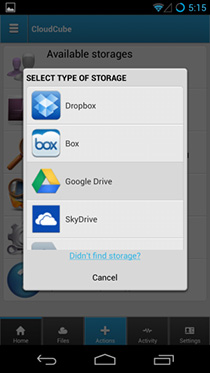
Cloud services, such as SkyDrive, Dropbox, Box.net and SugarSync, are a great way to store and access important data across all the configured systems without having to manually move the files around. With multiple devices like PC’s, tablets and even mobile phones becoming capable of creating and opening a large number of file formats, it is a tedious task to manually copy each file to every required device. This is where cloud services come in. The number of cloud services have increased a lot in the last few years, and with each new service, users get a considerable amount of cloud storage to store more and more data online. Even though the cloud-based services for syncing data provide you with a convenient way to access your data across all the configured devices, there is always the issue of security. We have found a service named Cloudfogger, that simplifies the two step process of manually encrypting and then uploading the files into one single step. Update: Now has an Android client and supports Google Drive. Read More

Cloud Service CX Launches Android App, 10GB Free Storage Up For Grabs

The number of cloud storage services have begun to increase exponentially. With each new service that emerges onto the global scene, not only do users get a considerable amount of cloud storage space to store their data, but also the option to access all the saved content from virtually anywhere. To add to the users' convenience, most services also have a dedicated mobile client that provides them with the option to remotely access, modify and share cloud content right from their devices. CX (Cloud Experience) is a relatively fresh entrant to the cloud service market. Apart from offering a larger than usual 10 gigabytes of free online storage space to each registered account, the service also lets you share data and chat messages with other users across various major platforms including Windows, Mac, iPhone, iPad, and Android. While the official iOS client of the service was released a few months back, the Android variant has just hit the Google Play Store. Read More

Super Flexible File Synchronizer: Backup Linux Files With FTP, Amazon S3, Google Docs etc

Super Flexible File Synchronizer is a cloud based backup and synchronization service, capable of supporting FTP, Amazon S3, SSH, WebDAV and Google Docs. Super Flexible File Synchronizer allows setting up different jobs to run manually, or to schedule them for syncing data between local directories or cloud based servers. It provides many synchronization modes, including Standard Copying, Mirror and SmartTracking. While Super Flexible File Synchronizer works on a number of platforms, only the Linux version of it’s (client) application is available for free. Read More

CloudMagic Releases Its Mail & Twitter Search Client For Android & iOS

Whether you’re a businessperson, a student or a casual web user, chances are that you often find yourself swarmed by plenty of emails, contacts, online documents, calendar events, social activities, and so on. Surely, with the consistent flow of information from so many various sources, it becomes a tad difficult to recall and pluck something at the time of need. CloudMagic is a cross-platform online search tool for Gmail, Google App accounts, Google Docs, Events and Contacts and Twitter that claims to fetch you required content from multiple accounts in just a few seconds through its handy web extension for desktop browsers as well as the recently introduced smartphone client for Android and iPhone. Read More

Cloud Printer: Send Files To Google Cloud Print From Desktop [Mac]

We’ve reviewed a Chrome extension in the past that allowed you to print webpages via a cloud printer associated with your Google account, but to print documents, you would have to access them through Chrome. Cloud Printer is a Mac app that lets you send print jobs to Google Cloud printers from your desktop. You do not need to access Chrome (although you must have it installed on your system), as the app lets you browse for the file and send it to a configured printer. The slight downside of the app, is that it does not let you choose printer preferences for a particular job, and if you want to restrict printing to simple black & white, you will have to set it from Chrome’s print page. Read More

Tappin Allows Secure Remote Access To View & Share Large Files

These days, we usually have our digital content stored in multiple locations at once. With so many electronic devices such as computers, tablets and smartphones, it's hard to keep a copy of everything in each device you own. To make the content available on every device, services like DropBox require you to upload files to access them from configured devices. Tappin is a cloud service that lets you access any file stored on your hard drive without the need to upload or sync your files to central server; the files stay safe and secure on your computer. It allows you to remotely access documents and media files from browsers, mobile devices (iPhone, Android, Windows Phone 7) and tablets. The application forces no size limits on the files, and you can access your data on another computer as well as share the files with others. Tappin not only provides secure and private remote access to you files, but also compresses and encrypts that content before making it accessible from other devices. Read More

How To Setup Dropbox-Like Synchronization Using Windows Live Mesh

Many users who use Dropbox and other cloud storage services, have recently been more concerned about security vulnerabilities that can compromise their personal data. While many people like using services like Dropbox because of the convenience that they provide, Windows Live Mesh can be used as a viable alternative for syncing multiple folders (instead of just one parent folder) between Windows and Mac computers. In this post, we will walk you through the steps of setting up your Windows Live Mesh synchronization folders. Read More

How To Delete Individual Photos From iCloud Photo Stream In iOS 5.1 Beta 2

iCloud is a feature in iOS which Apple is really proud of, as is evident from the recent iPhone and iPad ads. Despite being such a useful service, iCloud has its drawbacks as well. There have been many horror stories of people unintentionally sharing personal photos over the cloud, which were meant to be kept private for good. This is for the sole reason that once you have Photo Stream turned on, every photo you snap using your iPhone, iPad or iPod touch will be automatically shared across all the devices where your iCloud account is set up. If you fall victim to such a scenario, there is no way of deleting individual photos in Photo Stream, and you will have to remove the whole collection to get rid of one photo. However, with the latest version of iOS in its second beta testing phase, things are looking positive, as now individual photos can be deleted in iOS 5.1 beta 2. Having said that, this does not mean that there is some plain Delete button in clear view in the Photo Stream, you still need to know exactly what you are doing in order to get rid of photos. Read More

Screenshot Dam: Stop iPhone Screenshots’ Sync To iCloud [Cydia]

iCloud became an integral part of the iOS after release of iOS 5. It certainly is a pretty convenient service to have, especially if you own more than one iOS devices. With iCloud, the photos and apps on your iPhone automatically appear on the iPad and iPod touch you own (check out our detailed review of iCloud and all its features). Apart from that, it is a good way of backing up your data. However, with iCloud come certain annoying nuisances, with one being the syncing of items that you don’t want to go to the cloud, thereby cluttering up the storage and making it difficult to find the thing you were actually looking for. Usually, when you take screenshots on your iPhone, you probably won't want them to go to iCloud, as they are mostly for temporary usage. Screenshot Dam is a simple Cydia tweak that recognizes screenshots as separate entities from other photos, and doesn’t allow them to sync with the cloud. Read More

Share, Sync And Securely Backup Files With Power Folder

PowerFolder is a cross-platform folder sharing program to backup, sync and share data to and from multiple computers. It is designed for both advanced and novice users, and provides HTTPS/SSL and AES encryption. While PowerFolder has many Dropbox like features, it is distinctly unique in its own way, as its interface provides easier sharing and synchronization options for multiple folders. This ensures that you are conveniently able to sync different directories with the PowerFolder cloud, as well as multiple computers. Using PowerFolder, you can automatically synchronize files between numerous computers with the utility of configuring custom file versioning settings. Read More

SaveMeeting For Android: Record/Share Audio & Speech-To-Text Transcripts Of Meetings

Want to share the transcripts or audio recordings of a recently concluded business meeting with your colleagues? Why not do it with SaveMeeting – a cross platform mobile app that lets you easily record and share the audio, transcriptions (speech-to-text) and other details of your meetings right from your device. All recordings are automatically uploaded to the SaveMeeting cloud, thereby helping you as well as your colleagues to instantly access shared data anytime and from anywhere. Each recording is listed under a meeting date specified on calendar that can be accessed via the company’s website. Initially released as an iOS-only app, SaveMeeting has just made its way into the Android Market. Read More

Cloud & Social Media Data Aggregator ZeroPC Now Available On iPad

Dropbox revolutionized the field of data storage, and iCloud went a long way in bringing the concept to iOS. With cloud storage becoming the latest buzz in the tech world, it is understandable that a lot of cloud services have sprouted their wings in recent years. All this is useful but what’s the point of it all if you're using one too may services and can't remember which item is stored in which one? Recently covered Greplin for iOS and ZeroPC Cloud Navigator for Android are excellent solutions to said problem, and now, an iPad variant for the latter is available on the iTunes App Store. For those who haven't read our review of ZeroPC Cloud Navigator, it is a free app that integrates with almost all popular cloud services and social networks, and lets you browse directly through data stored on each. Read More

Instant Pages And Print Preview Debuts In Chrome 13

Google regularly updates Chrome but not all features it adds effect users on the front end and many go unnoticed. It is however, time to upgrade to Chrome 13 because two of the bigger more obvious improvements have made it to the stable version; Instant pages and Print preview. Print preview isn’t a new concept at all if you’ve used MS Word but it wasn’t available in Chrome and after Google Cloud print, it was badly needed feature. Instant pages however, is new. Chrome now pre-caches the first result on a Google search result page if it detects it is the one you’re looking for; when you click on the first result, the page loads in 0 seconds as it’s already loaded in the backend.

Read More

CloudScan – Scan Documents Remotely & Save To Google Docs As PDF File

CloudScan is a cloud based scanner sharing application which allows you to remotely scan documents and photos in PDF file. It can be particularly helpful for people who require working on numerous computers at home or office and wish to easily share their single scanner with other computers. It can also be handy when you might have problem sharing a scanner with different operating systems (e.g. separate computers running Windows, Mac, and Linux operating systems) due to driver incompatibility. You first have to download and install CloudScan on a PC and then run it directly from the developer’s website to initiate a remote scan. The scanned files can be saved in PDF or TIFF format and/or sent to your Google Docs account. Read More