Safe Makes SSL & Extended SSL Connections More Visible In Firefox

Firefox browser displays an HTTPS protocol in the address bar for websites, but sometimes we tend to ignore this indicator. For such situations, Safe is a Firefox add-on can be quite useful, as it makes SSL and extended SSL connections more visible in the browser. After you’ve installed the extension, it adds a green or blue border around the page, which indicates that the connection to the site is secure. The tabs are also colored along with the border (which might cause some problem in viewing the tab titles), and those with a blue border sport an SSL connection, whereas the green border indicates an extended SSL connection. Users who find the border quite thick can change its thickness from the add-on's options. Read More

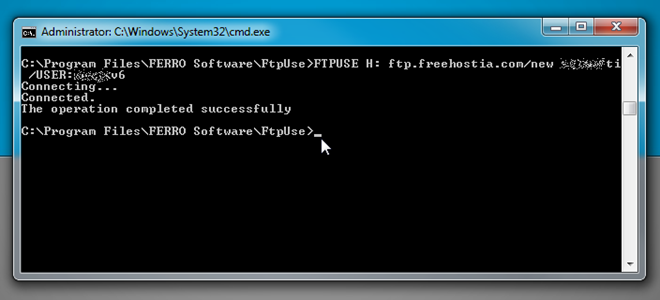
Map FTP Server As Local Disk Drive With FtpUse

Although Windows 7 allows users to map a remote location as network drive over FTP, it often fails to register the FTP account upon Windows logon, which compels users to manually map the network location after logging into Windows. FtpUse is a simple CLI based application for Windows operating system that lets you map FTP servers as local disk drive from Windows CMD. All it needs is a connection string including FTP host address, username and password to connect & map a FTP location. Moreover, if you want to connect with the remote server upon Windows logon, you can create a batch script, and then put it in Startup folder to establish FTP server connection as soon as you log into Windows. Read More

Connection Planner: Schedule Profiles For WiFi, GPS & More [Android]

Connection Planner is a simple yet very useful Android app that lets users schedule and lock status of various connections or profiles for Wi-Fi, mobile data, Bluetooth, GPS as well as airplane and silent mode. By automatically disabling/locking Bluetooth and GPS as per scheduled timings, not only can the app save you quite a few minutes (or even hours) of battery life, but also prevents any apps from using these connections without your permission. Similarly, by automatically activating silent/airplane mode on your device, Connection Planner saves you from the hassle of toggling these profiles manually while you’re at work or travelling. Read More

Create A Quick LAN Connection Between Two Computers In Windows

Last year I wrote a detailed guide for creating a quick ad-hoc wireless connection between two computers in Windows Vista. The problem is that not everybody has wireless card installed in their computers. So this guide will focus on creating a Local Area Network(LAN) connection between two computers in both Windows Vista and XP.

First go and buy the straight patch Ethernet LAN cable(make sure that ‘patch’ or ‘crossover’ is written on the cord) and connect them to both computers.

In Windows XP: Go to Network Connections Control Panel, right-click Local Area Network connection and select Properties. Now select Internet Protocol(TCP/IP) and click Properties.

In Windows Vista: Go to Network and Sharing Center, select Manage Network Connections, right-click Local Area Network connection and select Properties. Now select Internet Protocol Version 4(TCP/IPv4) and click Properties.

Read More

How To Monitor Your Internet Speed Or Network Bandwidth

Do you want to check the speed of your internet connection, monitor the network bandwidth, or check the time it will take to download a specific file? BitMeter 2 is a great little application that keeps track of your internet or network bandwidth. It counts the total download and upload speed every seconds, you can keep track of your bandwidth for the whole week or months. This can come handy if you are using broadband with limited bandwidth.

Read More

Create A Quick Ad Hoc Wireless Network Connection Between Two Computers In Windows 7/Vista

Do you want to create a quick network connection between two computers or laptops to share some files? Or maybe you want to share an internet connection? Windows 7 and Vista have a build-in feature to create a quick ad hoc wireless network connection, this means you can connect directly with another computer or laptop without the need of a router. Read More

How To Increase Your Network Speed Or Internet Speed By Over 20%

If you use Windows than it is possible to squeeze extra speed from your internet connection. By default, Windows reserve internet bandwidth up to 20% for various services such as Windows updates  and spyware checks by using QoS Packet Scheduler, it is a network bandwidth management tool that can monitor the importance of data packets and depending upon the priority of the packet, give it higher or lower priority or bandwidth levels. It's not very useful unless you're using apps which are QoS-aware or running a server, so you can gain some network overhead back by turning it off.

Read More

How To Test Your Internet Connection Speed Easily

The minimum speed of broadband service ranges from 64kbit/s to 1.0Mbit/s. However, in many occasions you may still feel frustrated with your broadband service provider and you may feel like cursing your service provider for slow internet speed . Actually, you can measure your broadband connection speed via some free online broadband speed test services and can find out whether the bandwidth that you are getting is the one you are paying for.

Read More

How To Maximize Or Increase The Speed Of Your Wi-Fi Connection

Today, enterprises are deploying wireless LANs for corporate applications and home users that involve e-mail, Web browsing, and access to various server-based databases. The need for higher data rates and techniques to improve performance of wireless LANs is becoming crucial to support these types of applications. To get that extra performance, you may have a lot to consider.

Read More