Evernote For Windows Phone Gets Checklists, Note Tiles & Improved UI

Thanks to OneNote and Windows Phone’s seamless integration with SkyDrive, a lot of people didn't think that Evernote for WP7 (and later for WP8) would gain a lot of popularity. Existing users of Evernote, however, are not likely to switch to a new service just because it has better integration with their smartphones. This has kept Evernote quite relevant for Windows Phone so far. Another contributing factor in the app's rise to fame in the WP Store is its Modern UI and regular updates. Despite all that, a few small but important features have been missing from the app's WP client so far. Evernote's latest update doesn't make it perfect, but it does bring some much-needed features to the mix. You can now pin notes to the app's main screen, browse through tags more conveniently, view your account's basic information in one place, and add checklists to your notes. Read More

Bubble Browser Is A Visually Appealing Three-Pane Viewer For Evernote

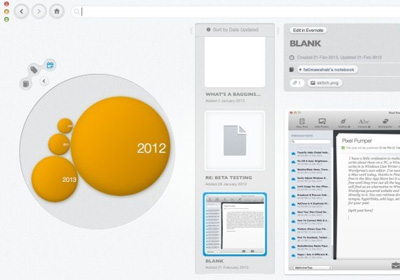
Evernote’s Mac app was recently revamped; the extensive interface overhaul gave us something much more beautiful to look at and use. This update was followed shortly by Evernote’s Menu Bar popup being redesigned. The app has come a long way interface wise but if you still don’t like it much and are looking for something different, Bubble Browser might be a worth trying out. Bubble Browser is a free app available in the Mac App Store that lets you visually browse your Evernote notes in an immersive, colorful interface. It’s not a full Evernote client, which means adding or deleting notes is not on the features list but as far as browsing notes goes, Bubble Browser has quite a unique approach. Read More

Evernote For Mac Gets New Menu Bar Helper; Adds Drag & Drop Clipper

Evernote for Mac underwent a major design overhaul a short while ago and the difference between the old and new version’s interface isn't just monumental; it’s amazing! Evernote 5 looks like a real Mac app now - beautiful and well designed. While the app's UI was overhauled significantly, Evernote didn't do much about its Menu Bar options until now. The Evernote Mac app has just been bumped to version 5.0.6 now, and this latest update features a Menu Bar popup that actually goes with the look of the rest of the app. The functionality is pretty much the same as before, but the new interface is easier to use and allows you to add files by dragging & dropping them on the popup. Read More

Access, Manage & Share Cloud & Social Media Content With CloudKafe

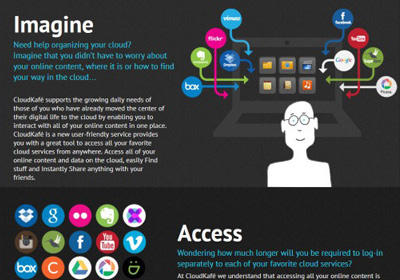
A decade ago, no one probably thought that cloud computing and social network applications would dominate our lives in such a short span of time. Though with so many such services and products at your disposal from the likes of Dropbox, Google, Facebook, Microsoft and many more, it can become quite difficult to keep a track of all of them in their separate apps. Thankfully, we've seen several apps for many platforms that let you manage them all from one interface, and CloudKafe is the latest to join that club. This web app allows to access, manage and share your content from many major cloud, social networking and image sharing sites and applications from a single window with ease. Read More

Penultimate For iPad Now Free; Gets Evernote Sync & Handwriting Search

Evernote is great if you want to make sure your idle scribbling and great ideas never get lost. There are times, however, when you don’t have enough time to type everything. Say, you are attending a lecture, and want to make notes quickly, your inclination might be to grab a pen and use your handwriting to get the work done. Fortunately, you can use your smartphone to achieve this in a really efficient manner. Evernote offers Skitch for annotating images, but if it’s a standalone sketching/handwriting app you want, give Penultimate a shot. Acquired by Evernote in 2012, Penultimate is a well-crafted, user-friendly sketching and handwriting app for the iPad. The app has just been updated with a revamped UI and Evernote integration, which includes handwriting search and the ability to sync all drawings and scribbles with your Evernote account. The character recognition makes your handwritten text searchable both from within Penultimate as well as any Evernote client. What's more, the app has gone free! Read More

Get Evernote Integration In Gmail With Powerbot For Chrome & Firefox

Gmail is an excellent email services, not just because of its speed but also because it’s great at helping us keep things organized. Evernote is an equally excellent service that helps you note down important things and access them from everywhere. Imagine if Gmail and Evernote could be connected. Powerbot for Gmail is an extension for Chrome and an add-on for Firefox that does just that. It lets you insert notes or notebooks from Evernote in to an email from Gmail’s web interface, and save an email thread, complete with attachments and all, to a notebook in Evernote. The notebooks/notes you add to an email become public in order to be viewed by your recipient. When you add an email thread to Evernote from Gmail’s interface, it lets you add tags and comments before saving it. Once saved, the extension will indicate where a message has been saved in Evernote, and also give you the option to view it there. Read More

Easily Copy Select Web Content To Evernote With EverClip For Android

While there’s no doubting the astounding note-taking proficiency of Evernote, things can become a bit tough while clipping stuff from webpages on your mobile device. This holds true especially if you’re looking to clip just select material instead of the entire webpage itself. For instance there might be just an image of interest on the webpage that you want to clip, or you might want to save just the main contents, a required text portion, an image snapshot of a part of the web page, or its URL, instead of the complete article itself. If you’re looking for an efficient web clipping app for Android that can store select content in your Evernote account, EverClip might be just what you're looking for. Let's find out more about this handy app after the jump. Read More

Evernote For iOS Gets New Card-Style Interface & Better Notebooks Management

Just when we thought that the post-iOS 6 flurry of app updates was over, a couple of other big names rolled out significant updates. This time its Evernote, with a major refresh (v5.0) of its iPhone and iPad clients. The app’s interface has been completely revamped, and the change isn’t just cosmetic. The new, card-style interface is actually more convenient for navigating through all your notes and notebooks. Another good thing about the update is that it is heavy on shortcuts, and almost all tasks require fewer taps than before. The app now lets you view a consolidated list of all the notebooks that are associated with your account, including your own and the ones in which you are tagged as a collaborator. The iPad version now has a new section on the main screen that displays all the most recently edited notes. Read More

Evernote 5 Beta Released; Interface Overhaul And Location Tracking

Evernote is a popular note syncing service and its presence on so many platforms is just one of the many things that makes it great. Oddly enough, as great a service as Evernote is, its Mac app is just as unflattering. This is about to change though and hopefully very soon. Evernote has released the Beta version of Evernote 5 for Mac and in addition to new features the interface has been overhauled completely. Not only are there significant cosmetic changes, but the flow of the app and how you view items has been changed for the better. The new version features several different ways for viewing the notes you’ve added in your notebooks. Navigation has been improved as has been the note editor and an Atlas has been introduced that lets you see the geographical distribution of where you added your notes. Additionally, keyboard shortcuts have been introduced. Read More

Evernote’s Image Editing & Annotation Tool Skitch Now Available For Windows 8

Skitch is a widely popular application, recently acquired by Evernote, that allows you to annotate, edit and share your images with others. It has been available for Mac, iOS and Android for quite some time and is considered one of the best applications for editing, annotating and uploading to Evernote accounts. Since the Windows 8 final, public release is scheduled for the 26th of October, a lot of apps by some major developers have released for upcoming version of Windows. Recently, we have covered apps for Windows 8, such as Dailymotion and Flux. Skitch has also hopped onto the Windows bandwagon. Currently available on Windows Store, it includes all the major features offered by the other variants of the app including webcam image capture, image editing and annotation. Read More

Evernote Hello For Android Brings A More Visual, Rich Contact Book To Your Phone

It’s been six long months since Evernote Hello was released in the iOS App Store to provide users of said mobile OS with a visually and functionally-enhanced contacts book. Just like their other products – Evernote and Skitch – the company has lived up to its reputation of offering multi-platform-supported mobile apps by releasing the official Android variant of Evernote Hello. Akin to its iOS counterpart, the Android version of the app is also all about letting you tie people and their photos to their contact details, manually logging your encounters with these contacts via photos, notes and locations, and viewing all the contacts on a graphically rich mosaic layout. The best part about the entire deal is that your Hello contact book is synced to the Evernote cloud, and can be accessed from virtually any other supported device. Another major trait of Evernote Hello for Android is its firm integration with LinkedIn, which means that you can find ample info about the required contacts from said service, provided they’re already registered LinkedIn users. Details to follow. Read More

Evernote For Android Gets Huge Facelift, Swipe Gestures, Location View & Plenty More

The official Android client of the popular cross-platform note-taking, syncing and sharing service, Evernote, has just been updated to v4.0.1. The favorite note-taking of many Android users (including me) looks an altogether new product as compared to what it looked just the last night, as the most recent update brings plenty of visual goodness, including a thorough ICS-style facelift, brand new homescreen interface with larger buttons to create notes, enhanced in-app navigation via various swipe gestures, context-sensitive action bars for every single app screen, map-view for notes, friendlier navigation while viewing/reading notes, new-look Notebooks and underlying Notes, revamped Notes list with option to switch between various views, and more user-friendly feel right throughout the app’s entire interface. Read More

BigNote: View All Your Evernote Notes On A Single Virtual Noticeboard [Android]

When it comes to selecting a convenient and feature-packed note-taking app, the popular cross-platform note taking, editing and sharing tool, Evernote, is undoubtedly the number one choice for many users. While the official Android client of Evernote is quite good at helping you with preparing text and multimedia notes, it is restricted to displaying the contents of just one note at a time on your screen (even in the tablet version). What if you wanted to take a look at all your notes from a specific notebook on the same screen? This is where BigNote for Android comes in handy. Fresh to the Google Play Store, BigNote presents all your Evernote notes from within a selected notebook on a single noticeboard of sorts (referred to as Notes board) that you can zoom in and out of - particularly useful on an Android tablet. That’s not all; you can also rearrange your notes on the noticeboard through simple drag-and-drop. The app also supports exporting the entire Notes Board as an image (JPEG) file so that you can share the notes with anyone on the go. Read More

Booknote Importer: Save Bookmarks To An Evernote Notebook [Mac]

Many people use more than one browser and save bookmarks separately to each. When you need to access a bookmark saved to another browser, you will simply have to switch to another app, but that’s about as all it takes to fetch a bookmark from another browser. If you use Chrome, you can sync your bookmarks between systems. You can also use Xmarks, a popular browser extension available for both Firefox and Chrome, that allows you to sync bookmarks between browsers and systems. This is in the event that you’re always on your own system. If you use a public system or are using one temporarily, you might want an easier setup that can be removed quickly. If you use Evernote, the answer is pretty simple. Booknote Importer is a free Mac app that lets you save your bookmarks as notes to an Evernote notebook. All your folders and their respective bookmarks are sorted the way they were in your browser, and you can access them by signing into Evernote’s web interface. Read More

Meshin Recall Lets You Tag Evernote Notes To Calendar Events [Android]

Evernote is undoubtedly one the simplest, most powerful and commonly used cross-platform note-taking apps around. Despite being hugely successful and popular among both desktop and mobile users, the app currently does not support integration with calendars; a massive drawback for users who wish to associate content-rich notes with their calendar events. Meshin Recall is a free Android app that fills this void, and in a very efficient manner at that. Effectively a calendar event aggregating app, Meshin Recall lets you view all your events from various calendars in one place, and more importantly, offers the option of adding a new ‘Evernote’ with the required event. Notes created via Meshin Recall can be edited directly via the official Evernote Android client, and shared from within the app itself. That’s not all; the app also lets you view only those calendar events that carry an Evernote with them and sports a built-in Evernote toolbar, which lets you access various features of the note-taking service from within the app. With Meshin Recall, you don’t have to be content with adding plain text descriptions to your calendar events, or wait any longer for Evernote to provide calendar integration. Read More

en2ki: Convert Evernote Notebooks Into Kindle MOBI Format

Ever wanted to read Evernote notebooks on your Kindle without going through the hassle of creating a MOBI file out of them? Enter en2ki, a simple, portable utility that can seamlessly convert Evernote notes into Kindle’s supported format. Additionally, you don’t have to manually download your Evernote’s notes to local disk in order to convert them into MOBI format. Using Dynamic-link libraries such as Evernote. dll and Thrift.dll from Evernote API and kindlegen.exe from Amazon, it automatically downloads your Evernote’s notebooks and converts them in Kindle’s MOBI format. Read More

Green Cloud Is A Virtual Printer Driver To Save Paper & Ink Costs

GreenCloud Printer is a virtual printer driver that helps you save money on your daily print jobs. With the help of this application, you can save up to 33% of paper, ink and toner costs, without reducing paper quality (as claimed by the developer). It completely integrates with installed applications as a virtual printer, and allows reviewing printing jobs, removing unwanted pages, grouping pages per sheet of paper and printing documents as PDF. Furthermore, you can directly send your documents to GoogleDocs, Dropbox, Evernote or Minus. Read More

Task Management App Nozbe Updated With New UI, Provision For Free Local Usage [Android]

Task and project management Android apps are abound in the Google Play Store. As with every other app category, the candidates belonging to this particular genre also keep constantly vying for the top spot. Then there is the ever-increasing threat of competition, meaning that the existing players simply cannot rest on their laurels. The only way to move is upwards, and for that, new features must be frequently added to the mix. The official Android client of the well-known web-based task-management service, Nozbe, has been updated to v2.0 with a complete UI overhaul and a bunch of improvements, such as better syncing and integration with content stored on Evernote, Dropbox and Box, easier access to your personal notes, to-do lists, inbox, projects, errands, reminders and lots more. In addition, the app has received quite a few much needed bug fixes and is now much more stable than previous versions. Read More

Evernote’s Skitch Now On iPad, Lets You Edit & Annotate Photos, Maps & Webpages

Yes, we know that there is a new drawing tool almost everyday in the App Store and there is absolutely no point in downloading another one, but if you get a combination of a drawing, map and image editing/annotating tool that has been launched by none other than the productivity app giant Evernote, then you ought to give it a second thought as, previously available only for android platform, Skitch by Evernote is now available for iPad users too. With Skitch, you can capture and annotate snapshots, navigate and mark map locations, or use the iPad's larger screen to create some elaborate sketches. Read More

Evernote Hello For iPhone: Remember People & Your Encounters With Them

Popular multi-platform note-taking service, Evernote seems to have decided to expand its areas of interest. The company launched two new apps for iPhone yesterday, namely Evernote Food and Evernote Hello. You can read all about the former in our review of the app. The latter, Evernote Hello, is an app which focuses on providing users with a way of remembering every person they meet along with all the details of the meeting. Read on past the break for details. Update: Evernote Hello is now available for Android as well, and the Google Play Store link for the app has been added at the end of this post. Read More