Keep Wifi Alive Makes Sure That Your Windows Phone Remains Connected To The Internet All The Time

Quite like iOS, Windows Phone also disables Wi-Fi if your phone remains in sleep mode for more than a few minutes. While this measure is useful for battery conservation, it can get a bit annoying if you have a download going on in the background, or if you don’t want to miss an important push notification. For iOS users having jailbroken devices, Insomnia is one tweak that never lets the WiFi go to sleep. Finally, the Windows Phone 7 community has got exactly the same option, thanks to Keep Wifi Alive. This new Homebrew will keep your WP7’s Wi-Fi connection active for as long as you want. The app takes advantage of the fact that the Mango platform does not kill the WiFi connection, even when in lockscreen, as long as you are streaming some audio file from the internet. So, Keep Wifi Alive streams a blank audio file continuously, making sure your connectivity is never lost. Read More

Improve Your Windows Phone’s Battery Life With Eco

Although Windows Phone features a battery saver mode in the Settings menu, most users aren’t really satisfied with it, and claim that it is not very useful in prolonging battery life. You can take matters in your own hands as well, and kill background tasks linked to several apps, but shouldn’t there be some way of automatically entering an effective power-saver mode? Thankfully, you can now use Eco, a new Homebrew app that aims to increase your phone’s battery life considerably, without any help from the user. You will need an interop unlocked device in order to use Eco, but once you have flashed it to your phone, you will not have to do anything else except launching the app once to make it optimize your device’s battery usage. The app lets you manually kill background tasks, or temporarily disable your Windows Phone's sensors while it is not in use. Read More

TrackUrSelf For Windows Phone Automatically Logs All Your Travelling For The Day

There are a few really decent maps and navigation apps on Windows Phone 7, and the Apollo update will bring Nokia Maps to all WP devices. So, while things might be looking on the rise for Windows Phone (in terms of maps apps), there is still a lot of room for improvement if you are a WP7 user who likes to take full advantage of the GPS unit in your device. TrackUrSelf is a Homebrew that might not prove to be the most useful app available for Mango phones, but it is based on a pretty neat concept, and is sure to appeal to a lot of users. This app will automatically track all your movements for any period of time, and you will be able to see your movements plotted on the map at the end of that period. In addition to that, TrackUrSelf also provides its users with a list of all the GPS coordinates of the places you have visited throughout the day. Read More

Lock Widgets 2: Weather Info, SMS & Battery Status For WP7 Lock Screen

WP Hacker’s popular Lock Widgets for interop unlocked Windows Phone devices awed a lot of users and amassed many fans. Even though the Homebrew was just a rough rendition of a concept, and there were more than a few bugs in the app, it served its purpose and showed some really useful data on WP7’s lockscreen. The Homebrew has just been updated, and if you have been using Lock Widgets, you are sure to be pleasantly surprised upon seeing Lock Widgets 2. Admittedly, the latest version of the app has taken away some of the options that were available in the original Homebrew, luckily the ones that are there are certainly more refined. A new feature added to Lock Widgets 2 is the SMS preview. The app now displays your most recent unread text message on the lock screen, along with weather details and the status of your battery. Read More

Get SMS Preview & Badge Count On The Messaging Live Tile In WP7

Rooting your Windows Phone 7 might reduce the overall stability of the device, but most people aren’t likely to notice that, thanks to the awesomeness Homebrew apps can bring to your Mango phone. You can get a lot of cosmetic and productive customizations for your WP7 if you have an interop unlock. Developed by Windows Phone Hacker, SMS Tile is a new homebrew that changes the overall behavior of the Messaging live tile in WP7. By default, the live tile only shows the total count of unread messages, and the smiley changes its mood with respect to the amount of messages in your inbox (winking on a new text, amazed at a lot of new texts and sad when a delivery fails). SMS Tile takes away the emoticon from the Messaging tile, and replaces it with a preview of your last unread message, while revamping the badge as well. The app doesn’t affect the banner text notifications, and you can learn all about SMS Tile by heading past the break. Read More

Get Windows 8 Themes On Windows Phone 7 With Themes Install [Homebrew]

Windows 8 is all about Metro, the beautiful interface that is full to the brim with live tiles and colorful themes. Before implementing the Metro UI to Windows 8, Microsoft used it in Windows Phone 7. We can’t say that WP7 doesn’t have its critics, but most people tend to agree that Mango has the most beautiful interface among all smartphone platforms. Despite the similarities in Windows 8 and WP7, you have to remember that Windows Phone is a mobile platform, and hence, can’t have all the features available in its desktop counterpart. Consider the accent colors for a basic example, where WP7 sports only approximately half of the themes available in Windows 8. Well, that’s one area where WP7 has caught up with the future desktop OS, thanks to the new Homebrew app named Themes Install. If you have a rooted Mango phone, you can now extend the themes section in your device to include all the Windows 8 color accents! Read More

CacheClearer For WP7: Clear App Cache Files To Speed Up Performance [Homebrew]

Anyone who has been using a Windows Phone 7 device for a considerably long time, must surely have noticed that their phone becomes a bit laggy with the passage of time. This issue is not exclusive to the Mango platform; the same thing happens on Android, iOS and even desktop platforms. This is owing to the fact that the system’s cache starts building up as the app count on your device increases. By default, or even through third-party apps, there is no way of clearing your WP7’s app cache. That’s where the new Homebrew "CacheClearer" comes into the picture. Using this app, you can free up a lot of internal space (in the order of several Megabytes) on your device. Not only does it let you analyze the cache usage of each app individually, you can use it to get rid of the device’s lag by cleaning up everything in a safe and convenient way. Read More

Set Any Custom SMS Ringtone On WP7 Using MyRingtone2SMS [Homebrew]

WP7 Mango brought some much-needed changes to Windows Phone 7, and also paved the way for many third-party custom ringtone apps in the Marketplace (a feature hitherto inaccessible for WP7 users having non-jailbroken devices). One small thing that most people failed to mention was the fact that the term “custom ringtones” didn’t seem to apply to SMS and notification sounds. There has never been any possible way of customizing the notification and SMS tones on a Mango phone, even if you had full unlocked access. Fortunately, things have finally changed for the better and you can now choose any sound as your custom SMS ringtone if you have an interop unlocked device! Sounds exciting? Head past the break to find out more about MyRingtone2SMS - the Homebrew that has made this feat possible! Read More

How To Set Any Image As The Splash Screen Of Your WP7 Device [Homebrew]

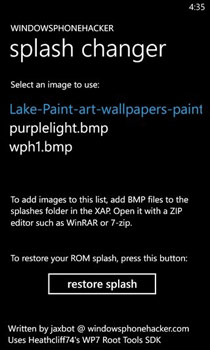
Anyone who says that Android is the only platform that offers true customization obviously hasn’t used a jailbroken iOS device, or even a Windows Phone 7 with root privileges. The Mango platform might not be able to do everything an Android device can, but it has slowly started to catch up. We have covered quite a few Homebrew apps that are capable of doing some amazing stuff, and the latest to join the ranks of such apps is Splash Changer. There are many apps that let you do this for Android phones (like this one), but Splash Changer is the first WP7 app that lets you set any image as the splash screen of your rooted Mango phone (the screen that appears when your device boots up). Read on for details. Read More

Snotify: Turn Off SMS, Email & Toast Notifications On WP7 [Homebrew]

If Microsoft allows all the stuff from Bazaar into the Marketplace, Windows Phone 7 can become a true competitor of other smartphone platforms. For now, if you tell someone about your Mango phone, they are mostly likely to say something like “isn’t that the phone in which you can’t even copy/ paste properly?” Although WP7 has come a long way since the copy/ paste update fixed that issue, there are still a lot of basic functionalities that are missing. Take a look at notifications, for an example - there is no way you can turn off notifications on your phone, and until recently, there wasn’t even any Homebrew app available for that. Not anymore, as Snotify is here. This homebrew brings the much-needed function of letting users turn off notification for SMS, email and other apps if you have root access on your device. Even a Homebrew with the ability to silence all notifications at once would have been pretty useful for most users, but Snotify goes a step ahead and adds the option to let users choose the individual alert types that they want to silence. Sounds cool? Read on for details. Read More

RandomRingtone Automatically Changes Default Ringtone After Every 30 Minutes [WP7 Homebrew]

I am one of those people who just loathe monotony, and a small testament to that is my habit of changing my WP7’s wallpaper every day. Since I have used an Omnia 7 for a long time, and that too with a custom ROM on it, I was pleased when Dynamic Background was released (you can read that Homebrew’s complete review here). Now, if you are interested in getting an app that does something similar for ringtones, one clever developer over at the XDA forum has got the perfect solution for you. RandomRingtone is a Homebrew that automatically changes your device's default ringtone after every 30 minutes. The app works on WP7 devices having root access, and should prove to be really handy if you have custom ringtones stored in your unlocked device. Read More

Take Screenshots On WP7 & Transfer Them To PC Over Wi-Fi [Homebrew]

No one is exactly sure why, but Windows Phone 7 makes a big deal about not letting any screenshot app slip into the Marketplace. This gets annoying on numerous occasions, and for us at least, the number one reason to be running a custom ROM on our Omnia 7, is the ability to take screenshots of the apps we review. So far only a handful of options exist if you want to take screenshots of your Mango phone, as you can read in our roundup of WP7 screenshot tools here. Now, WP Screenshot has become the newest addition to the rather short list of screenshot apps in WP7. However, WP Screenshot is no ordinary app, as it lets you do something which no other app has ever done before. This homebrew comes with a desktop client, and the screenshots you take with this app will show up straight on your PC, as long as both devices are on the same Wi-Fi network. Read More

WPH Tweaks: Customization Options For Unlocked WP7 Devices [Homebrew]

Windows Phone Hacker’s new homebrew, Tweaks, might not be something like the previously released Bazaar for Windows Phone 7 devices, but the rather small collection of tweaks offered by this WPH app is pretty impressive in its own right. If you own a Mango phone that is interop unlocked, then there is no way you are not going to like this homebrew. Some of the tweaks offered by WPH might not be new, but some are, and even for older ones, it is nice to have them in one place, where you can use them with convenient toggle buttons. Read on to know everything about all the options WPH Tweaks brings to WP7. Read More

XapHandler: Directly Install, Manage & Update Homebrews On Unlocked WP7 Without Connecting To PC

Windows Phone 7 is trying to follow the example set by iOS when it comes to jailbreaking. Like the Cydia store, unlocked Mango phones have got access to Bazaar. There is still a lot of room for improvement, though. Just take a closer look at Bazaar for instance. Unlike Cydia, there is no way you can manage, or even view, the tweaks and homebrews you have already installed to your WP7 device. It will be cool if Bazaar gets an update which lets you do that, but for now, homebrew fans will have to be contented with XapHandler, a homebrew to manage, well, homebrews. Using this app, you will be able to update any XAP file you have already got on your phone, and it will also let you perform a clean install on homebrews, making sure that they function properly. However, the most useful feature of XapHandler is its ability to show users the data and relevant information associated with XAP files before you flash them to your phone. All these features might be great for users with custom ROMs, and access to Bazaar, but the best thing about XapHandler is that, with it, users having unlocked stock ROMs will be finally able to install homebrews directly from Internet Explorer, email or any other method without even having to connect your device to a PC. Read More

Root Tools: Run All XAP Files On WP7 Without Full Unlock [Homebrew]

If you own a Windows Phone 7 device and are interested in getting the most out of it, then surely you know about the three root access levels in WP7, namely developer unlock, interop unlock and full unlock (which is accessible only via custom Mango ROMs). You can run a lot of XAP files if you have a device with interop unlock, but some of the most juiciest homebrews could only be used on custom ROMs. Until now that is! WP7 Root Tools have been released, and the homebrew brings full root access to devices which only have interop unlock so far. Previously it was possible to flash any XAP file to an interop unlocked device, but if it was intended for custom ROMs, the app did not do anything. With Root Tools, this is no longer the case, as you just have to install the homebrew to get all homebrews running. Read More

Custom Slideshows & Dynamic Bing Wallpapers For WP7 Lockscreen [Homebrew]

On the surface, it might seem like developers are not really interested in Windows Phone 7, but the truth of the matter is that the Mango platform does have its band of dedicated developers, not the least of whom is Jaxbot from Windows Phone Hacker. The WP7 wizard has done it again, and after Orientation Lock, Folders, Windows Break and various other groundbreaking homebrews, now you can apply dynamic images as the wallpaper of your Windows Phone. I am a big fan of new wallpapers personally, and that’s why I like to change the background of my phone’s lockscreen daily (computer as well). With the new homebrew (Dynamic Background), however, that problem has been solved, and I won’t have to change the wallpapers manually again. Dynamic Background can be used to set up a slideshow for the lockscreen, and it also comes with the option to tap into the dynamic Bing wallpapers, and your lockscreen will reflect the search engine’s background automatically. Read More

DS Marketplace: Get Homebrews, Wallpapers, & Games For Unlocked WP7

Despite its being rather new to the Windows Phone 7 development scene, Bazaar has become a fairly popular homebrew store for Mango phones running custom ROMs. It even has a desktop version, letting users manage their homebrew collection on a PC. However, it is always nice to see some competition, and it’s good to see that Bazaar isn’t going to monopolize the WP7 jailbreak scenario like Cydia does for iOS. This is owing to the fact that an alternative homebrew app store has been launched, titled DS Marketplace. The functionality offered by the store is almost identical to Bazaar, but with a few welcome additions. In addition to homebrews and tweaks, DeepShining Marketplace also features a lot of exclusive wallpapers, games and even a few rare apps. Read More

Bazaar For PC: Manage & Get Windows Phone 7 Homebrews From Your Desktop

If you have a Windows Phone 7 device, and you like to stay up to date with the latest developments going on for Mango, then you must be aware of Bazaar, the Cydia store for WP7. Bazaar is the app which lets users having a fully unlocked device to install homebrews to their phone. It is a Marketplace for XAPs, and replicated the official Marketplace’s features pretty accurately. However, if your device is not fully unlocked, i.e. you don’t have a custom ROM, then Bazaar is of no use to you. That situation has just changed, with the release of the desktop client for the homebrew store, titled Bazaar for PC. Using the application you can manage, browse, share and download XAP files available in the Bazaar store. Read More

How To Backup & Restore WP7 SMS And Export Them To PC [Homebrew]

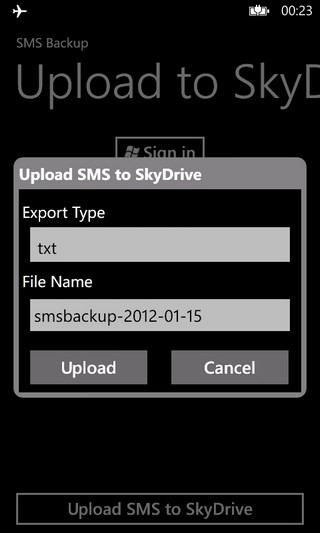
Windows Phone 7 Mango has a lot of features (not to mention the endearing metro interface) that have made many people fall in love with the platform. Take the Messaging hub for instance; it's efficient, simple to use, and even integrates with Facebook chat. Though, till now, there hasn't been an easy way to back up and restore texts before and after, say, factory resetting your device or trying something risky. SMSBackup is a new Homebrew that provides you with a simple way to do just that, provided you have interop unlock on your WP7 device. In addition to that, it presents backed up messages in a human readable format, unlike some of the other available solutions that give you nothing more than an XML file. Read More

Accelerometer Disabler: WP7 Finally Gets An Orientation Lock [Homebrew]

One thing that has always annoyed me while using Windows Phone 7, is the lack of an iOS-like orientation lock in the Mango platform. This oversight really comes to haunt users when they are trying to use the device while lying down on a couch, as the screen will keep rotating unnecessarily, and there is no way of stopping it. Microsoft has still not added that setting in their mobile OS, but fortunately for Samsung and LG users having an interop unlocked WP7 device, they can now get the much-needed functionality via the freshly released homebrew named Accelerometer Disabler. The Homebrew app does not come with too many complicated toggles, but that is still not as good or as convenient as having a hardware button for locking the orientation of your device's screen. Still, it is the first option of its kind that is available for Mango users. Read More