View 500 Image Formats, Convert Between 130 & Apply 50+ Effects With ImageCool

These days, one can find a large number of free and paid image editing tools. Some of them provide you with color correction controls like changing the hue, brightness, contrast and saturation, while others let you quickly apply different preset filters to your images. Most images captured with high resolution cameras are in resolutions much higher than our display devices. Having a 2560p image to view on a 720p or 1080p screen does not offer any benefit when it comes to the picture quality, and having a lot of such images on your disk can consume significantly high amounts of storage space. Image resizing is also very important if you need to frequently upload images online, because larger images take more time to upload and consume more space on the server. However, most image resizing applications can only handle the common image formats such as JPEG, PNG, BMP and GIF. Today, we bring to you ImageCool - an image converter for Windows that can handle up to 500 image formats. You can view images in any of these formats, convert between 130 formats, apply 50 different effects and filters, and perform other functions such as cropping and applying watermarks. Read More

Tinuous Is A Powerful Batch Image Editor With Support For Plug-ins

At first glance, Tinuous may seem to be just another image conversion app, but the tool offers some impressive image processing power under the hood. The software is designed to perform batch conversion of image files. This comes useful in instances when you don’t have time to convert each image file individually. It allows you to resize and rename images, adjust image quality, alter dimensions, change brightness, contrast, saturation and hue, and modify some other aspects of the images. The application supports most major image formats, including JPEG, GIF, PNG, BMP, TIFF and more. Keep reading for more details. Read More

Resize, Convert & Compress Images From ‘Send To’ Right-Click Menu

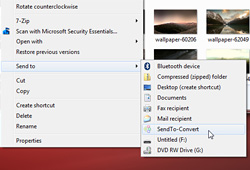
With all the high-resolution cameras out there these days, most of the images we capture are in resolutions much higher than our display devices. Having a 2560p image to view on a 720p or 1080p screen does not offer any benefit when it comes to the picture quality, and having many such images can consume significantly high amounts of storage space. Image resizing is also very important if need to frequently upload images online, because larger images take more time to upload and consume more space on the server. Moreover, people visiting your website will have to wait longer for the images to be properly loaded and displayed. SendTo-Convert lets you quickly resize multiple images from the 'Send to' option in the right-click menu or via drag and drop, based on a profile you can configure. Read More

Freemore Audio Video Suite Is Your One Stop Shop For Media Editing & Conversion

There are countless Audio and video conversion tools out there but with all the available options, it may get fairly tough to look for the right one at the right time. Even if you find the one that meets your requirements, odds are that it would be either be paid or in case of being free, have either way too many configuration options making it confusing to use, or offer too little control at what it does. Freemore Audio Video Suite takes care of this nuisance by amalgamating a number of different multimedia tools into a single freemium package that's easy enough to use for the average user while decently powerful enough for power users. It’s a compendium of various frequently used audio, video and document converters and editors that you would otherwise have to download separately when required. The suite includes audio editor, sound recorder, ringtone maker, MP3 cutter and joiner, audio and video converter, DVD burner, image and PDF converter, and the list doesn't stop here. It’s rare that you find such a huge collection of distinct apps in free software but Freemore not only delivers it; it delivers it exceptionally well. Read More

JPEG XR Exporter: Convert JPEG And PNG Files To WDP

I have known JPEG image format for as long as my first foray into the world of digital photography. It is supported by almost every multimedia device on the market, and a number of computer applications that let you view your images. While I can’t really argue whether the days of JPEG are numbered or not, there’s a new image format called JPEG XR that claims to provide better quality than JPEG. JPEG XR is Microsoft's proprietary image format and also casually referred to as HD Photo. There are various key advantages of JPEG XR over JPEG, as it provides better and lossless compression – hence the better image quality, improved color accuracy, tile structure support, metadata, transparency map and so on. Albeit the overall support is somewhat limited, all the major photo editors and image viewers let you work with this format. JPEG XR has a WDP file extension, and is contained by a TIFF package. After learning about all its feature one-upmanship, I thought of giving it a try and convert a few JPEG and PNG images into JPEG XR. Thanks to JPEG XR Exporter, it easily let me perform the conversion process. It’s an Adobe AIR based application that provides a feasible solution to convert PNG and JPEG files into JPEG XR, and exports them into WDP. Read More

FreeVimager: View, Edit & Convert Images, Audio & Video, All In One Place

Not stylish but certainly usable to a good degree; these words just about sum up FreeVimager. FreeVimager is a 3-in-1 application that can display, edit and convert images, videos and audio files. It’s basically a viewer and editor geared towards camera related applications. It supports BMP, JPG, PNG, GIF (both still and animated), TIFF, PCX and EMF image extensions; for audio it supports AIF, WAV, MP3, WMA, AU, MID and CDA file extensions, and AVI files for video as well as ZIP files for archiving.

Read More

PearlMountain Image Converter: Batch Photo Editing & Conversion Tool For Windows

Most free image editing tools are made for a specific purpose. For instance, you will have to use one tool to convert the image format, another to correct its colors, while a third will be required to add a watermark to the image. Having so many tools installed on your system not only creates unnecessary clutter, but also reduces the efficiency when you have to open this many programs every time you want to perform a simple editing operations on an image. PearlMountain Image Converter is an easy-to-use image editing & converting tool with an eye-candy GUI, which allows you to export an image in different formats, resize, crop and watermark it, rename it according to pre-specified criteria, perform color corrections, and apply borders. All of these functions can be performed at once in a batch operation, eliminating the time wasted in performing each function one by one. Read on to find out more about PearlMountain Image Converter. Read More

Plastiliq ImageResizer: Resize & Convert Images Using 7 Resizing Modes

Whenever you need to use an image in a project, the first thing that comes to mind is if it the selected image of the right size or not. Using the wrong image size will cause the whole project to look bad. For instance, if the image that you use is bigger in size than what the project requires, it might get distorted or even cut from one size and the complete image will not be displayed in the final version of the project. Some days ago, we covered an application by Plastiliq called Plastiliq PixelPicker, that allowed you to view color codes in 10 different formats, such as RGB, ARM, HTML, CMYK, HEX etc. Today, we have another application from the same developer, titled Plastiliq ImageResizer. As the name suggests, it is a simple image resizing application with a beautiful GUI, which allows you resize the height and width of your images, as well as change their output format just with a few clicks. Adding files and folders is just a matter of dragging and dropping them onto the main interface. Moreover, it can also convert files to different formats, and currently supports JPG, PNG, TIF and BMP output formats. More on Plastiliq ImageResizer after the break. Read More

Contenta Converter Basic: Image Compressor, Resizer & Converter [Mac]

Format conversion software aren't that hard to come by, as you can find even web apps that do as much, but there are few options for file compression, and not many of them deliver reasonable quality images. Contenta Converter Basic is a Mac app that converts between various image file formats, and compresses them. The app also helps you organize the converted images by setting renaming patterns based on one of several parameters provided in the app. Similarly, it lets you create folders for organizing images, where folder names can be pre-defined based on available tags. Read More

Converseen Is Batch Image Converter That Supports Over 100 Formats

Converting and resizing a single image files isn't a problem. The real caveat arises when you need to convert multiple images. Obviously, it would be a wastage of time to convert each file one by one. To cope with this nuisance, we have previously covered a lot of batch image converters and resizers, such as the minimalistic and simple looking Image Tuner and then, ImBatch with its attractive design, that let you perform different functions such as resize, rename and convert in batch operation. Albeit these tools are great, they are usually limited in the number of image formats they support. If you needed a converter with wide array of formats support then Converseen is probably what you need. It is an open source image converter and resizer that supports more than one hundred image format ranging from the most popular ones to those which are rarely used, such as DPX, EXR, GIF, JPG, PNG, PDF, RAW Samples, TIFF, PSD, BMP, and plethora of others. The application allows you to convert, resize and rename as many images as you want in one go. Read more about Converseen after the break. Read More

HDRtist: Combine Image Exposures & Apply Tone Mapping To Create HDR Image

Need to adjust light intensity levels and sensitivity in images? You probably need a HDR utility that can apply tone mapping techniques and merge multiple LDR or SDR images to define the higher dynamic range. For those who aren’t familiar with HDR (High Dynamic Range) Imaging, it’s a technique to bring real-life luminance range to photos; the purpose is to achieve utmost clarity and detail in photos by adjusting the brightest and darkest areas of an image. HDRtist is an HDR software for Mac OS X that uses 4 tone mapping methods to generate HDR image. These tone mapping methods, ranging from compression light, realistic to extreme can be applied to individual exposure to create a HDR image. Read More

Shrink O’Matic: Resize And Convert Images By Ratio

Resizing your images' resolution or shrinking down their size does make sense. Most of the web hosting services allow you to upload to image up to certain limit in size. Moreover, its better to reduce the size of your image before uploading them to forums or sending them as email attachment, because no one likes the image to take ages to download. Resizing one image file is easy and you can do it in most photo editing software, but if you have an umpteen number of images at your disposal, it becomes difficult to shrink them one at a time. In such situations batch image resizers come in handy. One such software we came across is Shrink O’Matic. It is an image batch resizer and image converter which works by simply dragging images over the application. It lets you choose the output size, output name and output format of the images. Currently, JPG, GIF and PNG formats are supported by the application. You can limit the output size according to pixels or resize the image using Ratio slider. The utility can auto-rename the files and save them in defined folder. Read More

Caesium – Batch Image Compressor And Converter

Image compression is useful for a number of reasons. Webmasters often compress images before uploading them to their website to save bandwidth, web hosting space and to reduce webpage loading time. Likewise, common users can save hard disk space by compressing images. For example, if you have a folder containing high resolution images as heavy as 1 GB, then you can compress and/or convert them to reduce the size to something like 400MB (approximately). Caesium is an open source image compression application which can batch compress and convert images within a short period of time. The supported formats include JPG, BMP and PNG. While many users (including us) prefer IrfanView for image compression, however, Caesium arguably provides easier options for batch image conversion and compression. Therefore, people who may not prefer IrfanView, can use Caesium. Read More

Adapter – Convert & Import Videos, Audio And Images Directly To iTunes

Adapter is a free media converter for Mac and Windows, supporting almost all the known image, audio, and video formats. While it offers a host of presets for different devices, including, Xbox, Apple, Sony, Microsoft Zune, Nintendo, Blackberry, Misc. Cell Phones, and supports many other DVD, Flash, Zen Vision W related formats, users who want to tweak with audio/video, bitrate, framerate, resolution, etc., can turn Advanced mode On. Unlike other media converters, it allows iDevices owners to directly encode video and audio and transform image formats to iTunes, so they can easily sync them with their devices without having to manually move converted files to iTunes folder. A small file viewer is also integrated within the application to get a preview of video and images and also to crop the defined frame of the file. You also have 4 different image and video size cropping options, namely, pad, crop, stretch, and zoom to change the image/video size according to your display monitor dimensions. Read More

XnConvert Is Powerful Image Editor And Converter Supporting 400 File Types

Earlier this year, we covered XnConvert, which has a slew of options and tools to quickly edit, convert and apply different pre-defined effects over images. Recently, it has been updated with a lot of improvements and now available for Mac and Linux OS platforms as well. The latest version 1.0 is more stable than previously covered version 0.90. The multi-platform  application offers almost all the image editing tools and features whilst supporting more than 400 image formats, including, Camera RAW, WEbP, TiFF, PNG, JPG, etc. All the options to convert images, overlay watermarks, set brightness, gamma, and other photo re-touching features, and image filters are provided in a user-friendly UI, which makes converting and editing images a breeze. Read More

DVDVideoSoft FreeStudio Is Complete All-In-One Multimedia Converter And Burner

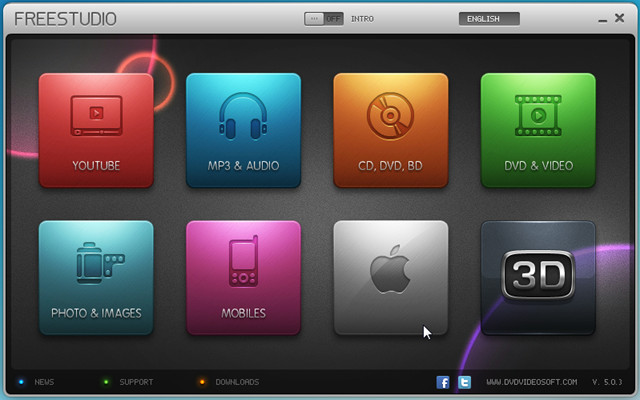
DVDVideoSoft FreeStudio packages more than 40 programs for converting and burning into one eye-candy application. You can convert YouTube videos to MP3, Audio CD to MP3, WAV, APE, and FLAC format, Video to Mp3, Flash, DVD, MKV, AVI, and MP4 format. Despite having a slew of conversion tools, it lets you burn CD/DVD and Blu-Ray discs on the fly. It offers plentiful of disc authoring tools to burn videos, DVD files, audio tracks, and to create Audio CDs from MP3 files. Features list doesn’t end here, image manipulation tools have also been included to convert and resize images, convert video files into pack of JPGs while both 3D photo and video maker are also available. It supports all Apple Devices, allowing you to convert audio and video files into supported formats for Apple TV, iPhone, iPod, and iPad. Apart from supporting all the formats, it has an ability to convert audio and video files into famous portable devices, gaming consoles, and other smart phone formats, including, Andriod, Blackberry, HTC phones, Motorola, Nokia, Xbox, Nintendo, and PSP. Read More

XnConvert – Apply Effects And Convert Image File Formats

XnConvert is a portable application designed by developers of famous XnView Shell Extension – which brings XnView image editing capabilities in Windows context menu. XnConvert provides image editing tools to let user change, edit, and apply effects over images without putting much effort. Unlike other image editing tools, the application is backed by many pre-defined actions for applying Image, Map and Filter related effects over selected images. Compared with XnView Shell Extension, it encompasses a great deal of interesting effects and options which are bundled into respective action categories. Furthermore, it not only enables user to apply effects but let them change Output formats as well. While you can change the output file naming convention, image type can also be specified to always convert those images over which you’ve applied effects for better image quality result. Read More