Prevent Users From Changing Windows 8 Start Screen Background On Your PC [Tip]

The Windows 8 Start Screen acts as a central hub for accessing all your apps, system components, control panel applets, Windows Store apps and more. Apart from providing quick access to apps that are arranged in a well-crafted tiled design, the Start Screen lets you customize the background according to your liking. You may know that Windows 8 comes packed with a slew of different Start Screen backgrounds, and you can switch between them from the PC Settings > Personalize window. It sounds cool, but what if your Windows 8 PC or tablet is shared among other folks and you frequently find the Start Screen background changed without your consent? If you don’t want anyone to manipulate the Start Screen background, you can disable the option entirely from the Local Group Policy Editor, provided you have administrative rights. In what follows, we will guide you through the process of restricting users from changing the Start Screen background. Read More

How To Enable Windows 8 Store On Windows To Go PC [Tip]

You may have thought that Windows 8 is all about tablets and desktops, and the integration between these two platforms, and of course, the all new Windows Modern UI. You’re right, actually; Microsoft has build the OS from ground up, but Windows 8 also includes some brilliant features that really enhance overall user experience. If you have been a Linux user, you may know that Linux distributions allow users to burn entire OS to optical disc and removable storage mediums, so that one can easily use the OS without having to install it on the auxiliary storage medium. Such feature has always remained absent from Windows since its inception. Unlike Windows 7, which lets user install XP mode to use Windows XP compatible applications, the Enterprise version of Windows 8 comes packed with Windows To Go feature. Read More

Enable Account Lockout Policy And Set Lockout Threshold & Duration In Windows 8 [Tip]

In Windows, User Account holds a lot of personal information related to the owner of that account. If any unauthorized person finds a way of accessing someone else’s account, it can be devastating for the account holder. Most users password-protect their user accounts to secure their personal information. Although it is quite risky, as accounts hold a lot of sensitive information, including financial information, passwords to different email accounts, online services, and communication clients, adding multiple layers of security sometimes makes it annoying for the users themselves to access the required information. Nowadays, smartphones hold as much, if not more, personal information, as computers. They also have the lock screen feature, and anyone attempting to unlock their phone must enter the password or PIN code. Entering the wrong password for a specified number of attempts locks the phone for a defined time. This option is also available in Windows, but it's disabled by default. In this post, we will explain how you can enable the Account Lockout option, set the number of logon attempts before locking the system, and specify the Account Lockout duration using the Local Group Policy Editor in Windows 8. Read More

Disable Task Manager & Remove Options From Ctrl+Alt+Del Menu For All Users In Windows 8 [Tip]

The Ctrl + Alt + Del menu in Windows allows you to Lock your PC, Switch the User, Sign Out of the current User and access Windows Task Manager. The Ctrl + Alt + Del hotkey combination used to accessing this menu takes precedence over every other command by Windows. The key combination allows you to reboot your computer, bring up the logout options and access the task manager. That is the reason why it is mostly used when the PC hangs and the application-specific input controls get disabled. Whenever any application goes to the not responding mode, it is not possible to close it by using regular methods, such as the Alt + F4 command or using your mouse to click the Close button. In this case, the Ctrl + Alt + Del menu is used to access the Task Manager, so that you can close the application by killing its process. However, novice computer users do not use, and don’t have a lot of knowledge about, the Windows Task Manager. So, if a lot of people use your computer - for instance if it’s a public computer - you might not want to disable access to the Windows Task Manager. In this post, we will show you how to disable Task Manager for all users in Windows 8. Additionally, it includes a guide to removing options from the Ctrl + Alt + Del menu in Windows 8 for all users. Read More

How To Disable Sync Settings For All Users In Windows 8 [Tip]

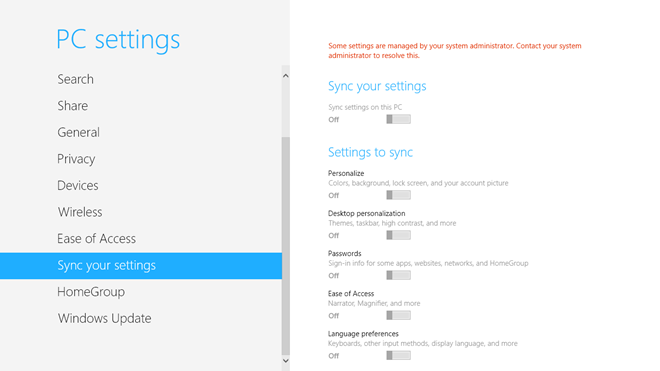
Unlike previous versions of Windows, Windows 8 comes with the Microsoft account (previously known as Windows Live account) integration that lets users easily sync their PC settings with other Windows 8 devices. If you choose to sign in using a Microsoft Account, you can synchronize all your settings, including your internet history, shortcuts, application settings, passwords for different services and a lot more with any other PC or tablet running Windows 8. To sync your settings, all you need is to sign in to the secondary PC using your Microsoft Account and enable sync feature from within PC settings. The PC Settings Sync menu even allows you to choose specific elements that you want to sync. If you wish to disable these settings, you can either create a new local account, or disable syncing from your Microsoft account (which will effectively turn your current account into a local one). Either way, this will disable synchronization for your user account only. However, if you're a system administrator, you can use Local Group Policy Editor to disable Windows 8 sync feature for all user account holders as well. In this post, we will guide you through the process of disabling syncing of selected and all supported elements for all users. Read More

How To Disable Windows Explorer Animations For All Users In Windows 8 [Tip]

Some days ago, we covered a tip on how to enable some hidden Windows Explorer UI animations in Windows 7 and Windows 8 using an application called AniExplorer. Even though, animations during different actions, such as maximizing and minimizing windows add the eye-candy factor to the interface, they also consume a lot of system resources. If you have an old computer, the system resources spent on animating windows  can be used for other useful functions, such as reducing system lag and making the general user experience smoother. If you want to turn off the Windows animations, you can do so from the Advanced System Settings dialog box in System Settings. However, it will only disable the animations for your own user and anyone working in a different User Account will still see all the animations. If there are multiple users for the computer, you can disable window animations for all of them using the Local Group Policy Editor. In this post, we will show you how to set system-wide settings to disable the window animations for all users in Windows 8 using the Local Group Policy Editor. Read More

Disable Lock Screen App Notifications For All Users In Windows 8 [Tip]

Since Windows 8 is optimized for both PC's and tablets devices, there are some features that seem more PC oriented, while others feel to be more useful for tablet devices. Yesterday, we brought you a tutorial on how to prevent users from changing the Lock Screen image in Windows 8. Other than the clock, date, time and battery icons, the Lock Screen of Windows 8 also allows users to view app notifications for different apps, such as Messages, Calender, People etc. If you have a new message waiting, or a reminder in your calendar, the Lock Screen will show a notification on the Lock Screen reminding you to check out the new event. You are allowed to enable and disable application notifications from the Notifications tab in PC Settings. However, these settings are only User Account-specific, and if you disable notifications from your account, other PC users can still check app notifications from the Lock Screen when they log in to Windows 8. If you want to disable the Lock Screen notifications for all users, you can do that using the Windows 8 Local Group Policy Editor. In this post, we will show you how to disable the lock Screen notifications for all users on a Windows 8 device. Read More

How To Prevent Changing Of Lock Screen Image In Windows 8 [Tip]

The Windows 8 Lock screen contains two basic elements: the lock screen image with dynamic icons for battery & network, application status message badges, and the login screen where you enter the password to log in to Windows. If you've been using Windows 8 beta versions, you may know that it allows users (administrators and standard users) to change the lock screen background image. If you're a system administrator, then you can prevent other PC users from changing the lock screen background image using Local Group Policy Editor. In what follows, we will guide you through the process of disabling lock screen image customization options. It will disable the Personalize >Lock Screen window (accessible from PC Settings) to restrict users from changing the default/currently applied lock screen background image. Read More

How To Restrict Account Users From Changing Personalization Settings In Windows 8 [Tip]

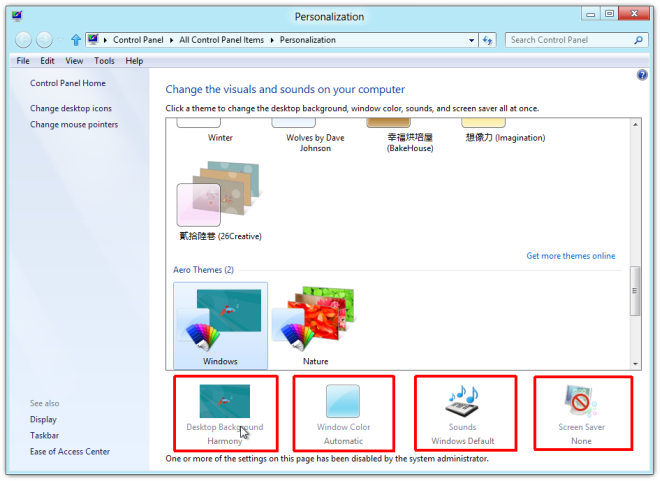
Like previous Windows versions, each user can keep their own personalization settings in Windows 8. That means that everyone can have their own customized desktop with respect to theme settings, screen saver, sounds, desktop background, and other visual styles. Yesterday, we published a tutorial on how to restrict users from accessing internet connection settings property sheet in Windows 8, using the Local Group Policy Editor. The Local Group Policy Editor allows users, with administrative permissions of the system, to specify a wide range of system components usage settings, and put restraints on the amount of control a non-administrative user has on the system. In this post, we will show you how to restrict Users from making changes to the Personalization and Visual Style settings in Windows 8. Read More

Clear History Of Recently Opened Documents & Jumplist Items At Log off In Windows 8 [Tip]
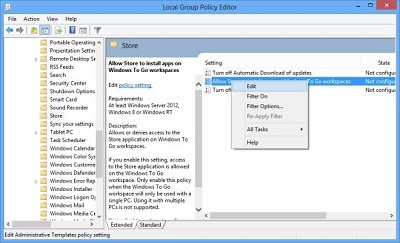
Like previous Windows versions, Windows 8 also saves shortcuts to all the recently used applications, documents, files, images, and folders in User Profile folder, namely Recent. These shortcuts help users easily access all the recently used items, but anyone with malicious intentions can use the shortcuts to get to the folders where your important files are saved. Although Windows 8, like Windows Vista and Windows 7, lets you permanently disable save recent documents shortcuts option, it can come useful in instances where you want to quickly view or open recently edited documents. Windows 8 MMC snap-in, known as, Local Group Policy Editor presents a simple, yet better solution for all user account holders. It allows Windows to automatically delete all the shortcuts to recently used documents as well as, Jump List items when user logs off. If this option is enabled, you no longer have to manually clear the history of recently used documents. Just log off the system, and Windows will clear shortcuts to documents created during the session. Read More

Turn Off Caching Of Thumbnail Pictures In Windows 7

In one of our previous post we discussed a simple way to stop Windows 7 from deleting thumbnail cache, but what if you want to stop Windows 7 from creating the thumbnail cache in the first place? It takes some HDD and CPU resources to create the thumbnails, and then takes some more resources to delete and recreate the cache. The best way to optimize your low-spec system is to turn off caching of thumbnail pictures all together.

Read More