Use Native WP8 Voice Commands To Get Directions To Any Location

The fact that Microsoft hasn’t given Windows Phone’s voice control feature a proper name in WP8 (it used to be TellMe until Mango) might have contributed towards it remaining a bit underrated. The fact remains though that WP8 supports some decent voice commands, letting you launch apps, perform searches, and even control some internal aspects of a few apps (like creating reminders). Having said that, some recent releases in the WP Store have demonstrated that there is even more to voice controls in WP8 than you might imagine. We all know that Windows Phone’s integration with HERE Maps, and Nokia Drive makes it a good platform of choice for people who rely on their smartphones for driving or walking directions. With the newly released Go To app, the WP8 navigation experience might just feel complete. The app lets you use WP8’s native voice commands to get driving, walking or public transit directions for any place you want. Read More

Replace Bing Maps With Google Maps On Facebook In Chrome & Firefox

If there’s anything Apple Maps has taught us, it’s that maps aren’t easy to make and Google Maps are awesomely awesome. Google Maps are the go-to maps for a large majority of people, and with the Google Maps app now available on iOS, it is bound to gain back any users it may have lost to Apple Maps when people upgraded to iOS 6. Google Maps is well known because it rocks, and Apple Maps is well known because it gets people in Australia lost in parks,which is why a lot of users were found to be rooting for the former. Though, there are other mapping solutions available on both mobile, desktop and web platforms that you might also want to replace with Google Maps. One common example is Facebook’s integration with Bing maps. In all fairness, Bing Maps aren’t all that bad, and if you weren’t to use them, it would be a matter of personal preference or low map detail in your region, and not because they don’t point you in the right direction. Should you want to replace them with Google Maps on Facebook, Facebook Panda is a Chrome extension and Firefox add-on that can do it for you. Read More

How To Get Back Bing Maps On Windows Phone 8

Unlike Apple's Maps saga, there weren't any complaints when Microsoft decided to ditch Bing Maps in favor of Nokia Maps for Windows Phone 8 devices. If you compare the feature list of both these services, Nokia Maps is the clear winner. However, that does not mean that Bing Maps was completely useless. After all, a lot of people (read Windows Phone 7 users) have spent the past couple of years navigating the roads thanks to Bing Maps. The unavailability of Bing Maps in WP8 can prove to be a bit of an inconvenience for users migrating to the new platform from Mango phones, if they are satisfied with what they were using and don't want to fix what's not broken for them. Also, Bing Maps offers better mapping for some areas as compared to Nokia Maps. Fortunately, now you can get the best of both worlds by enjoying Nokia and Bing Maps side-by-side on WP8. Read More

AR-MAPS For iPhone Combines Augmented Reality With Apple & Google Maps

Windows Phone 8 is off to a shaky start, but one of the points that can make the Lumia series a hit is its navigational edge over iOS. Not only does WP8 sport Nokia’s own transport and map apps, there is also the rather new LiveSight technology, which was used by the initially Nokia-exclusive City Lens. City Lens adds augmented reality to normal maps, making it a lot easier to find places in an unfamiliar environment. While there can be no denying the fact that Google Maps have far more detailed map data than any competing service, even they lack the convenience and magic of LiveSight. Well, not anymore. Thanks to AR-MAPS, you can now have augmented reality for maps on your iPhone. The app works with both Apple and Google Maps, and offers deep integration with Foursquare. Read More

Nokia HERE Maps App For iPhone & iPad Arrives With Voice Guided Navigation

Well, that didn’t take long. It's been less than a week after the world first heard the name Nokia HERE Maps, and the service’s official iOS app is now available on the App Store. While Nokia’s mapping service already had a mobile site, the iPhone and iPad apps add some much-needed features to the mix. The biggest advantage the app has over its mobile web counterpart would be voice-guided turn-by-turn navigation - a feature very few iOS apps offer. The feature is currently in beta and only supports walk navigation, though. 3D maps and Street Level are absent for now, but you do get Community view and all map modes, along with a special section where you can see the list of all the POI (points of interest) near a particular location.  In addition, Nokia HERE for iOS syncs with your here.net account and saves navigation history, caches up to 10MB of offline maps and lets you manage your “Collections”. Read More

A Look At Nokia HERE Maps & Its New Features [Review]

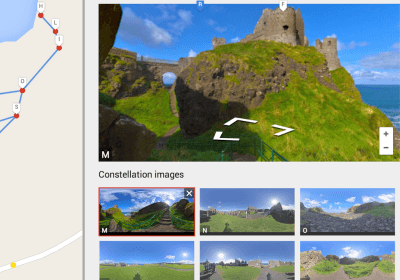
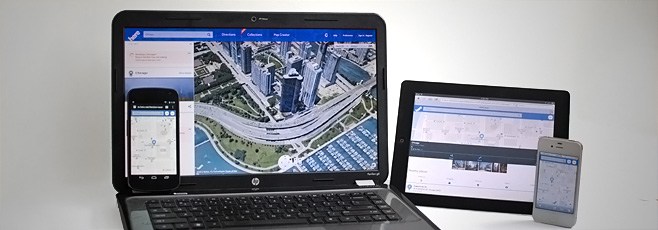
Recently, Nokia announced HERE, the new name for its mapping service, Nokia Maps. The new service, or rather, the new rendition of the existing Nokia Maps that combines Nokia Drive, Transit, Pulse and City Lens to give you a collective augmented experience of them. HERE has new features both for its mobile website and desktop web interface. It’s added a few new features like Street Level and Map Editor, both of which exist in Google Maps under similar names, i.e., Street View and Map Creator, respectively. There is also the addition of Collections which allows you to save different maps as a single group. If you use HERE on your mobile browser you will notice a significant difference in the interface from the one you see in your desktop browser. 3D maps still aren’t available on the mobile website but have been updated on the desktop version to include street view and work without needing a plugin. Users on mobile devices will be able to save a map for viewing offline. The Map Creator will allow users to edit maps and refine the map data directly whereas Community Maps allow users to benefit from maps created by other users. The new features and how they work are detailed below. Read More

Unlock All Apple Maps Features On iPhone 3GS, iPhone 4 & iPod touch 4G

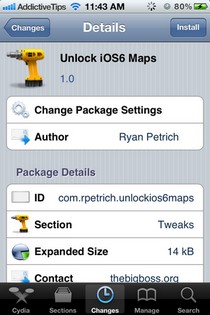
Just a couple of days ago, the famous Cydia developer, Ryan Petrich, made it into the news (again) by porting Google Maps to iOS 6. Although this really was good news for all the lost and confused users of Apple Maps, there is still no word on the public release of this port. To make matters worse, yesterday, Google’s chairman, Eric Schmidt, revealed that the company’s official Maps app might not be coming to the App Store any time soon. While the whole world complains about Apple’s Maps, owners of older iOS devices are even more crestfallen than 4S and iPhone 5 users, since turn-by-turn navigation and 3D view in maps is only available for devices having an A5 or better processor. According to Apple, the older devices aren’t capable of handling these advanced features, and enabling them universally will result in reduced system stability. Ryan Petrich, though, has other ideas, and has released a tweak that unlocks all the features of Maps for iPhone 3GS, iPhone 4 and iPod touch 4G! Read More

The New iOS 6 3D Vector Maps With Turn-By-Turn Navigation [Hands-On]

I never thought I’d say this, but iOS 6’s new Maps app has given Google Maps a run for its money. Extremely detailed vector based 3D maps courtesy of TomTom and OpenStreetMap and a few more unannounced sources, have given the all new iOS 6 some serious oomph. Apple is also reportedly using data from local sources in different areas for a more localized and up-to-date map data, like Yandex in Russia. This has led critics to question the accuracy and coverage of these maps, which, unfortunately, we cannot verify for ourselves right now. We can tell you public transit routes are missing for a quite a few areas, and it’s critical that Apple either fixes that or comes up with some updates quick. Other than that, Apple has boldly made a statement, and we take a look at what the fuss is all about just past the fold. Read More

Speedometer GPS+ For iOS Is A Nifty Trekking & Driving Companion

An iPhone can make you lazy if you fall in love with some of its really absorbing games, but it can also lead you to a more healthy lifestyle as there are many fitness-related apps available in the App Store. You can start jogging each day without an iPhone, but it is really motivating to track your progress and view it in statistical terms. Speedometer GPS+ is an iOS app that has all the functionalities of a speedometer, and even looks like one, too. The app can be used while walking, biking or driving, and has separate views for different ride types. It is also possible to use Speedometer GPS+ as a compass, and it shows its users both true and magnetic north in real-time. To make the app a complete trekking companion, you can use it as a route tracker and music player. Read More

Google Earth For iOS Updated With 3D Maps & Tour Guide For Popular Places

Most Apple critics have accused iOS 6 to be a collection of features “borrowed” from Android and other apps or tweaks. While this might not be entirely true, there are a few things that have been around for quite a while longer than what Apple’s iOS 6 event would have you believe. One example that often comes up in these arguments related to feature-stealing is the 3D view added to the stock Maps app in the next iteration of iOS. 3D view has already been around in Google Maps for quite a while now, but the Google Earth app for iPhone and iPad did not have any such feature until yesterday. Now, however, the app has received an update that brings 3D view of a few select cities to iPhone 4S, iPad 2 and the new iPad (all A5 devices). Not only can you fly over entire cities in 3D mode thanks to this update of the app, a new feature named Tour Guide has also been added to the mix, which suggests places that are worth a visit, and even comes up with textual instructions related to the destination. Read More

TileMill: Powerful, Cross-Platform GIS Mapping & Cartography Software

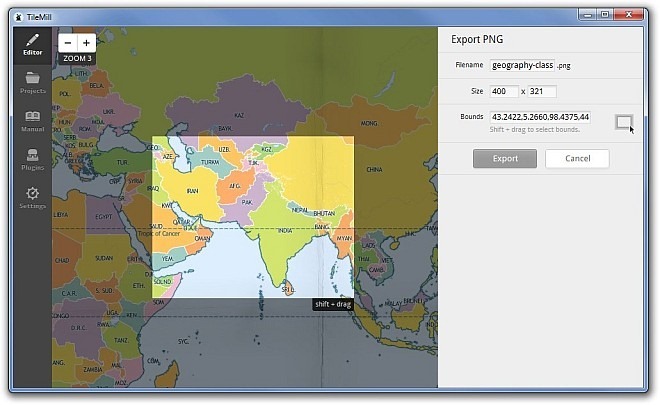
Many cartographers use a combination of Maptitude, Adobe Photoshop and Illustrator, or CorelDraw to make those gorgeous looking maps. Although these tools are very feature-rich, they do come with a hefty price-tag. However, graphic artists or cartographers will be delighted to know that we have an alternative solution for you. Labelled TileMill, this open source application for Windows, Mac OS X & Linux aims to let you create beautiful looking interactive maps with a multitude of options. It’s built on Mapnik’s map rendering library (another open source tool), and is designed to help folks who work on cartography and GIS (Geographic Information System) in map creation. Every map you create can be either uploaded to Mapbox, or be exported as PNG, PDF, SVG, MBtiles and Mapnik XML. Axiomatically, if you haven’t worked with GIS or cartography before, you might need some serious learning before taking the step and using this application, but a usage manual has also been included to make you quickly learn a few basic things. What’s more, it also supports a number of additional plugins for increased functionality. Read More

Map Ruler Touch: Trace Over A Map To Measure Distances [iPhone, iPad]

Maps are great for finding your way around and with smartphone map apps, things get even more interesting, as you can interact with the map of the entire world in different ways. While most maps apps (including the hugely popular Google Maps) do have a scale to indicate distances, at times you just need to measure them your way. Map Ruler Touch lets you do just that on your iPhone, iPod touch and iPad. For more details, continue reading. Read More

View GPS Coordinates For Any Location In The Stock iPhone Maps App [Cydia]

The iOS Maps app is rarely the focus of attention for Cydia developers, but there are still some pretty good tweaks available for its customization, like Compass for Maps (reviewed here) and Speed for Maps (review). A perfect Maps tweak should add some new feature to the app without affecting any of the existing ones. Coordinates for Maps is exactly that type. The functionality offered by the tweak isn’t too significant, but it can still prove to be helpful in a variety of situations, and that’s why we decided to take it for a spin. Basically, this tweak displays the exact GPS coordinates of any location in the iPhone Maps app. The tweak uses a HUD to show its data, and you can even customize the looks of that HUD. Read More

FastMall For WP7 Helps You Navigate Within Malls & Get Shopping Deals

Even though Google has finally started taking an active interest in indoor maps, this particular genre of navigation is still in its infancy. There aren’t any major apps that can help you when you are lost within some huge building, given the fact that your GPS will be nearly useless on most such occasions. Add the lack of internet connectivity to this scenario, and your smartphone is left utterly redundant as a navigational device. Fortunately, if you have a Windows Phone 7, there is now a really easy solution to said problem. Meet FastMall, an amazing Mango app that will let you find your way inside any major shopping mall, and that too without GPS or internet connectivity! Doesn’t that sound too good to be true? Wait till you hear the rest of it. Read More

Yellow Pages: Discover Businesses & Get Turn-By-Turn Voice Navigation [iPhone]

Even if you are living in a big city since you were born, it is not possible for an ordinary person to know of all the good places around town, and every once in a while, you are bound to be left helpless when you want to find a place to purchase a drill machine, or new wheels for you car. That’s what yellow pages are made for, so that people can find businesses with complete ease. With the advent of smartphones, everything is going digital, and yellow pages are no exception, for iOS users at least. Yellow Pages is an iPhone app that will let its users search for any place in their area. You can find products, restaurants, cinemas, banks and just about any kind of place you can possibly think of. Although Yellow Pages has been around for quite a while, the app’s recent update has made it even more useful by adding turn-by-turn voice directions to any place listed in the app. Details to follow. Read More

Trapster Brings Its Crowd-Sourced Navigation Assistance To WP7

Trapster is a well-known name when it comes to navigation apps for smartphones. Unfortunately, the app didn’t have a Windows Phone 7 client till now. Happily, that changes this morning, and the official Trapster app for WP7 is now in the Marketplace. If you don’t know what Trapster is, the service is designed to help drivers in finding out all about the roads they are travelling on. Many maps apps can plan routes for users, but Trapster uses feedback from users to generate a more practical and realistic map, which highlights all the obstacles you might come across when driving through any area. Like all good navigation apps, Trapster supports audio instructions, and will alert you vocally whenever you are near an trap or obstacle. Read on for details. Read More

Map Measure: Find Out Area & Distance Between Any Two Places [iOS]

Many people use maps pretty regularly on their iPhone, but it is always nice to have something out of the ordinary in your daily routine. While commuting to work or travelling to any new place, have you ever wondered how long will it take to get there? You can do that by plotting the route in the stock Maps app in iOS, but that’s where its ability to measure ends. In fact, there are many other things that maps can tell us, just if you have the right kind of app. Map Measure is one such app. This stock maps alternative will let you find out the exact distance between two points on the map, as well as the area of any polygon you define on the map, all of that in units of your choice. Read More

View Photos According To Their Locations With PhotoMaps For iPhone

As you might already know, most photos on the internet have got some location data associated with them, indicating the place where they were snapped. In most cases, this data is ignored, and nothing much comes of it. There are a few apps, however, which use this data with stunning results. One such app is PhotoMaps for iPhone, iPad and iPod touch, and using this iOS app, it is possible to view photos from any part of the world. PhotoMaps will pinpoint the exact source location of images on a map. Whenever you navigate to a particular area on the app’s map, the photos which have been captured there will be displayed, and you can share and comment on them with ease. Read on to know more. Read More

Weather Stats For WP7: View The Climate Data Of Any City In the World

After reading the title of this post, you might be thinking along the lines of “Here comes yet another weather app for Windows Phone 7”, but think again - Weather Stats is not just any weather app which will tell you if it will rain in your city today or not - there are many other apps for that (like AccuWeather and Weather Channel). Weather Stats is all about information, and detailed data. This useful Mango app showcases the climate data from just about all the weather stations in the world. Not only that, the app is also really useful if you want to learn the average temperature and rainfall values of any part of the world. Read More

GPS Calculator: Measure Distance, Area & Coordinates Of Any Location [WP7]

Every Windows Phone 7 out there has a GPS embedded in it. Mostly, this extremely useful part of the hardware is just used for navigation and while using maps, but actually, the GPS can be used to do a lot of other cool stuff as well. GPS Calculator is a new app for Mango phones, which unleashes the true potential of GPS, and lets you perform just about anything related to location and maps. Read on to know all about this new app, which comes with a refreshingly useful concept. Read More