DataCleaner Is All-in-One Data Analysis And Database Cleaning Software

Database analysis tools help DBAs in identifying the discrepancies and illogical connections between data sets, so that they can be removed from the database. However, the capability of database analysis tools depend upon the platform on which database is built. For instance, small-scale relational database created on MS Access needs a whole lot of different DB analysis utility than one created using MySQL. If you’re looking for an all-in-one database analysis tool that can help you identify and clean redundant entries from the database, odds of you coming across a paid utility are high. Today, we discovered an open source, java-based utility called DataCleaner that implements a variety of database analysis and cleaning concepts including Data Quality, Master Data Management, Data Profiling, and Data Quality Monitoring, to remove all superfluous data sets off the specified data store. The application supports a wide range of database platforms and data files including CSV, MS Excel (XLS and XLSX), MS Access, SAS library, DBase database, Fixed Width File, XML, OpenOffice Database, MonoDB, MySQL, Oracle and MS SQL Server. Read More

MySQLBackupFTP: Create, Schedule & Zip MySQL Database Backups

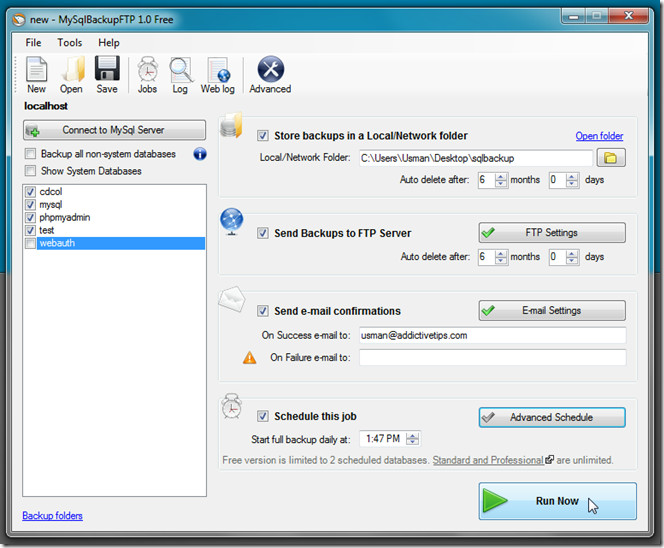
You may know that DBMS (Database Management System) backup tools offer a limited set of options to backup databases. That’s the reason why database managers rely on third-party, powerful database backup solutions which can automate the process of backing up all the system and non-system databases at convenient location. Take phpmyadmin as an instance, you may choose its Export tool to create backup of your database, but what if you want to create database backups on regular basis, or after every major update? Since it becomes tedious to manually pick output format followed by compression mode from Export tab to create backups, you may need a database backup automater like MySQLBackupFTP (a.k.a MySQLBF) to automatically perform the database backup operations. Read More

View, Analyze, And Filter CSV, TSV, XML Data Files With Cobynsoft’s Data Viewer

Cobynsoft’s Data Viewer is an all-in-one data manipulation program written to handle most commonly used data file formats, such as, CSV, TSV, XML, SQL view files, etc. Unlike other data file viewers which don’t give full control over data sets, Cobynsoft’s Data Viewer lets you perform numerous actions over the files; you can open and edit files, modify data structure, analyze the data flow, filter data values and most importantly export and publish them in Excel file formats (XLS, XLSX,), web archive format (HTML), RTF and in PDF format. Additionally, it allows users to not only print modified versions of data files but let them tweak with print view as well. The Print Preview feature holds all the basic tools to make changes to data file header, footer, vertical lines, margins, and width of the data set while showing live preview of changes you make to document. Read More

Edit Queries, Design DB, Export Table & SQL Scripts With kd MySQL

Want to get rid of web based MySQL database management tools that often take too much time to switch between table views, execute queries,  filter table data, build, execute and export queries, etc.? Desktop applications are, generally, preferred over web based MySQL Database managers mainly because of speed, complex MySQL script handling capabilities, and especially due to the fact that they don’t require specifying connection parameters each time to establish connection with specified online server. kd MySQL is an open source MySQL database management solution to execute MySQL scripts, view and filter table data, export table datasets and queries, and importantly to manage multiple MySQL databases without having to enter database details every time to establish connection. Read More

Edit Structures Of Different Databases With Database Editor

Dealing with different types of databases and tired of switching between different RDBMS software to establish and check connections, execute queries, handle forms and tables, generate reports, etc? Perhaps, a database management solution capable of handling multiple databases would reduce the time and effort involved in managing different types of databases. You may find a handful of database viewers, having the ability to render a range of databases but what about editing and modifying structure of databases? Database Editor is a database explorer and editor which supports all database types of ODBC whilst supporting schemas of Oracle, DB2, SQL Server, MySQL, Access, SQLite, InterBase, etc. Read More

FlowHeater – Import And Export Data Between Different Database Types

FlowHeater is a database transferring application which supports transfer of data to and from many database management systems, such as, MS Access, MYSQL, Oracle Database, ODBC data sources, .Net tables, MS Excel sheets, etc. For example, data from an Oracle database table can be copied to SQL Server database without going through complicated manual data copying procedures. Moreover,  the data can be converted, amended, transformed, manipulated and injected by a definition set. This eliminates the need of going through time consuming and error prone manual import, exports from CSV files and databases. When a Definition set is run, the adapter exports data from a data source and stores it internally. Once the input is complete, the data is transformed. Read More

MyWebSql Is Open Source MySql Client To Edit And Run SQL Commands

Many website hosting services do not provide an all-in-one and easy-to-use direct MySql configuration, which becomes quite a nuisance when you have to execute some queries, resolve database related issues, and tweak with databases default settings. Even if you’ve configured third party web server stack, like XAMPP or WAMMP and want an easy to use MySQL client to create and execute SQL queries, import and export databases and to perform other operations, check out MyWebSql. It is an open source MySQL client which requires a single click for setting up all the configurations. You can choose to use it with local web server or upload to live server via FTP to administer databases. Furthermore, it comes with a customizable UI with different theme packs to quickly overhaul the layout with a facility to create your own themes. Read More

Server2Go – Web Server That Runs From USB or CD/DVD-Rom

Server2Go is a portable webserver that can be run from a USB or CD/DVD without installation. The web applications designed for Server2GO can be directly run from a CD/DVD-ROM or USB Drive without the need of configuring a PHP, Apache or MySQL server. It allows creating a standalone website or PHP application on a removable media device, which can be helpful for calculation programs, catalogue software CMS-based image campaigns and CBT (computer based training) lessons. Server2Go can be used with PHP software such as Joomla and Moodle. Although, it is particularly designed for removable media, it can, however, also be run from the local system drives. Read More

Transfer MS Access Database To MySQL In 4 Simple Steps

Looking for an application that can help you easily migrate your MS Access database to MySQL without having to follow any tedious procedure? Transferring databases from one system to another is always a headache regardless of how big or small the database is. Therefore, database managers and administrators look out for a simple tool that can perform an export and import operations with all the variations involved. If you’re planning to migrate data from Access to MySql, you’d probably have a lot methods in mind to port databases. Before implementing any of them, try MS Access to MySQL. It is an ingeniously simple utility for Windows that is designed to quickly port Access database to user-defined MySql database. It supports a wide range of database formats, including, MDB, MDE, ACCDB, and ACCDE database formats, and also shows you the MySql database hierarchy to choose the destination database path. Furthermore, password protected (encrypted) databases can also be exported on the fly without having to decrypt them. The application supports two transfer modes – Direct transfer and Dump file creation. In direct transfer mode, you need to enter the host address, port, DB username and password along with the DB name where data has to be directly ported, whereas the Dump file creation method lets you choose a local location to create SQL dump file for importing it later. Read More

Monitor Health Of Your MySQL Servers And Visualize Trends via Real Time Charts

Mysql Monitor Tool is an opensource java application developed to monitor health of your multiple MySQL server instances. It comes with simple interface and multi-threaded mechanism to check the running instances on different scales. Using this application, you can chart all the running instances of MySQL to keep them under your surveillance, view and record process list of all servers, customize graph plotting, and record chart data. Read More

Backup MySQL Database To Local Server

MySQL Backup Tool is an open-ource application built to backup the MySQL database. Unlike other MySQL DB retrieving application, it has a snappy interface and much easier to use. What makes it a stand-out app among the list, is the ability to back-up databases in different structures and provides security option over the backed up data to mitigate the probable of vulnerability and eventually makes database more resilient from any unauthenticated use. Read More

How To Enable Remote MySQL Access In Ubuntu Linux

MySQL by default allows you to connect to it via localhost, you can not connect and make changes to it by directly connecting from some remote IP address. But it is a very common task, you often need to enable remote mysql access in order to access mysql server remotely. Read More