Auto-Organize Files Into Custom Folders Based On Extensions

Keeping our files organized goes a long way; with all our related files neatly organized together, it's easy to find our required files when we need them. With huge hard disks and broadband access becoming common, many of us don’t care about keeping everything organized anymore, and just keep on piling all our downloads in the default download folder. Later, the thought of going through such a huge pile often makes us shy away from the task. As a result, whenever you need a previously downloaded file, you have to do a manual search. One way to avoid all this mess is to transfer the files to different folders based on file types, as soon as they are downloaded. Desktop Intray lets you automate this process by organizing your files for you into folders of your choice, according to their types. Read More

Desktop Groups Is A Fences-Like Desktop Organizer For Mac OS X

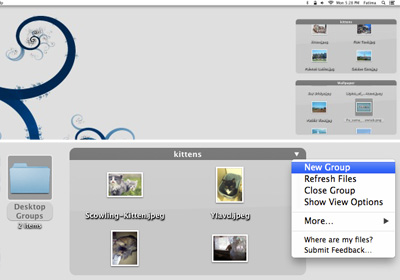
The best desktop to work on is the one with the least clutter. With the Dock, Launchpad, and Spotlight on Mac OS X, you certainly don’t need shortcuts for an app on your desktop so it’s mostly just your files that are there. Objectively speaking, the number of files you need to have on your desktop varies from person to person, but the one thing most users want is a clean and organized desktop. Desktop Groups Lite is a free Mac app that not only helps you organize files on your desktop, but also keeps it clean. It lets you create frames on your desktop that confine files dragged & dropped within their boundaries, much like Fences, a popular desktop organizer for Windows. You can add as many files as you like to a frame and resize it according to your requirements. A scroll bar allows you to see the files in a particular frame when they exceed the number that can be visible with the current size. The Lite version is a stripped down variant of Desktop Group (priced at $5.99) and allows adding only up to five frames. Read More

File Arranger: Backup & Auto-Sort Files For Better Organization

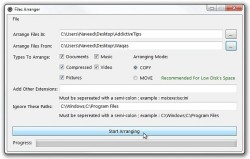
As we reach the apex of one version of Windows’ lifespan, Microsoft releases a new OS with latest enhancements and feature-sets. Just as we moved from Windows XP to Windows Vista, and then to Windows 7, time is not far when most people will a make jump to Windows 8. However, before hopping onto a new operating system, its quite important to backup your files to a safe location, in an organized manner, so that the process doesn't disturb your workflow, or if windows upgrade process gets screwed, for whatever reasons. Likewise, sometimes people are not moving to a new OS, but rather, just want to organize their cluttered up folders, especially if they keep downloading all kind of files onto a single directory. This also helps to easily find the required files, as you already know where to look. For example, you wouldn’t want your music, documents, videos etc, all residing under one large folder. Perhaps this is the sole reason behind Windows Library, so you don’t randomly place files here and there. I have always been actively involved in covering file backup and organizing applications, and this time I’ve found a combination in the form of File Arranger, an open source utility that aims to help you in both the scenarios, whether you want to create backup or just need to rearrange your files. It’s designed to move/copy files from one directory to the other, meanwhile creating appropriate folders for each file, leaving you with less than half the effort. Details after the break. Read More

QuickMove: Automatically Move Files To A Folder Based On Name & Extension

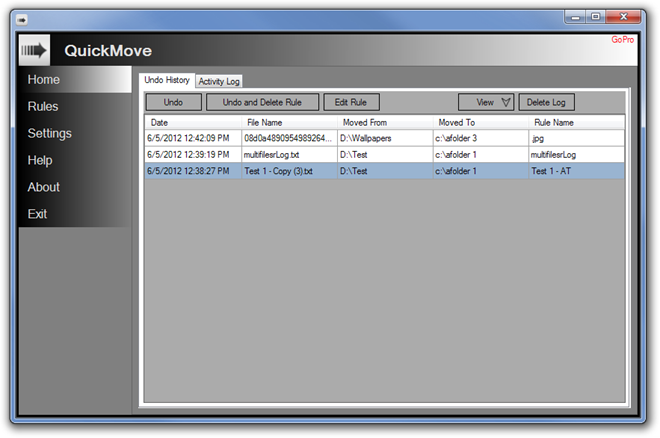
Most users download new items from the internet directly to their desktop or the default Downloads folder. Managing such a default download folder, where all types of downloaded items are present, is not only time consuming, but cumbersome as well. In addition, if downloaded files are not properly named, it becomes quite a tedious task to search for the required file from the huge pile. To be able to quickly search for a file, it is necessary that you have the file in its proper place, with the proper name, and in case of image, audio and video files, have the proper metadata information. Having the files in their separate folders allow you to avoid editing the properties of each file and just look it up in its designated folder. Today, we have an application for you that allows you to automatically move files from one folder to another according to pre-specified moving rules. QuickMove is an application for Windows that allows you to create rules for moving files to separate folders. For instance, you can choose to move the JPG files to Images folder, EXE to Apps folders, TXT files to Document folder and so on. Read past the jump for details. Read More

PictureSorter: Organize Camera Pictures & Videos Into Make-Model-Date Folders

Organizing photos is as important as organizing your wardrobe. Keep piling them up randomly and soon you will be in a tedious situation to manage them. For instance, snaps you took last summer doesn't have any place in your friend's wedding folder. Likewise, your last trip to Berlin was not in India. Some people give exceptional attention to detail in organizing their pictures, however, if you don't get the time to organize the massive archive of camera photos and videos into folders, PictureSorter may help you out. It's an open source application that sorts your images and videos by make and model of the camera, and the date they were taken on, the latter of which is quite helpful to create a Timeline. The application has the ability to search directories recursively, and read EXIF data from JPEG images and THM (movies) files. Based on metadata, PictureSorter automatically organizes images and videos into a hierarchy of camera make & model, followed by date-wise created folders. More details up ahead. Read More

Create Rules To Customize File Organization With File Sorter [Mac]

File managers mostly emphasize on moving, renaming and deleting files rather than actually organizing them according to user-defined rules. Since it’s practically impossible for an application to cover all the aspects of file organization, it’s advisable to use an app which allows you to create customized rules for organizing and sorting files as per requirements. One such file organizer is File Sorter. It is a rule based app for Mac which organizes files in exactly the way you want. You can create multiple rules to manage your frequently used folders, including, home, downloads, applications, documents, music, etc., within a few seconds. Once you have defined rules with actions which are to be performed on specific type of files, you just have to drag the cluttered up folder over its dock icon to perform the actions - move, copy, delete, rename, over the specified type of files. Read More

InWatch – Sort Files By Their Names Or Types In Different Folders

File categorization is one tedious task which can’t be performed unless you have a really good application which can automate the file copy and move operations. One folder in Windows and Mac which badly require file categorization is desktop, as it gets cluttered due to the fact that we usually throw almost every type of files on it. InWatch is the first application for both Mac and Windows, which is capable of solving such a mess for you. Being an efficient file categorization application, it allows you to specify type of files which are to be moved or copied to selected destination folders. Let me elaborate to give you an insight. You can, for instance, let InWatch observe desktop folder for music files. When you download, move or copy music file to desktop, it will immediately move the file to pre-defined destination folder, keeping your desktop clean and well organized. It doesn’t matter which type of files you want InWatch to look for in source location, it handles every file type smartly and perform specified action swiftly. Read More

Advanced File System Management Toolkit FlexTK Express

FlexTK Express is a toolkit developed to perform the most important operations and functions which are related with file management. It packages features like; searching and classifying files, scanning file system, file organizing and data migration, file/folder synchronization, analyzing storage utilization, and fault-tolerant copying of large files. The user-defined commands help execute any available function in the way user wants, allowing complete flexibility. Read More

Auto Organize & Sort Large Files Before Backup With Capacity

How many hours have you wasted calculating the file sizes and trying to find out if they will fit in the spare CDs or DVDs you have lying around? Most of us make backup of all important files to the DVDs before formatting the hard drive and some users love to organize their files by date and file type. The procedure of manually calculating and organizing the files is usually quite tiresome, until today. Read More

Free CD/DVD/Blu-Ray Catalog Indexer And Organizer

Do you backup(archive) all your songs, files, and documents to CDs, DVDs, or Blu-Rays? If this is the case then it must be quite frustrating for you to find out which file is in which disk. If you remember the file name but not the disk where it is located in, then Visual CD can help. What is does is fairly simple, index all selected drives and folders so that accessing them can be both quick and easy.

Read More