Quickly Share Mac Clipboard Over Email, Messages Or Social Media With Wrap

Mountain Lion’s new sharing options and its Flickr, Facebook, and Twitter integration is one of the best ways that social media could have been built into an OS. The only disappointing thing about it is that, for now, it’s limited to the stock apps only. You can use the share options from Finder or Safari only, so if you favor apps like Chrome or have a desktop reader for your RSS feeds, you will find that these options are not as conveniently accessible for you. The integration isn't as deep as one would hope, but that's where third-party apps (such as Eggy) come into the picture. Wrap is a Mac App worth $1.99 that takes these sharing options and puts them in the Menu Bar. It reads the text or images you’ve copied to your clipboard and, depending on the type of data you’ve copied, allows you to share it via email, Messages or Airdrop over Twitter, Facebook, and Flickr. Read More

Easily Delay OS X Mountain Lion System & Display Sleep By Set Time

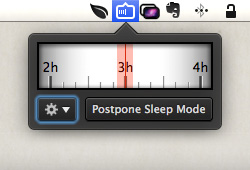
Mountain Lion is one very sleepy kitty. When it first debuted, users had problems trying to stop it from going to sleep, since it didn’t listen to the power settings in System Preferences. The caffeinate Terminal command is what came to the rescue then. The thing with the caffeinate command is you can’t reverse it. Once you’ve used it to disable sleep for a particular time period, you'll have to wait for it to complete its job. Sleep No More is a feasible alternative to this solution. It is a free Menu Bar app that stops your Mac from going to sleep. Using the app, you can tell your Mac how long it should stay awake and it will bypass the corresponding settings in System Preferences. The time period can be set as short as 10 minutes or as long as 24 hours. The app can be stopped any time and runs only in the Menu Bar. Read More

How To Disable And Delete Chat History In OS X Messages

iChat, OS X’s stock chat client, became Messages when Mountain Lion rolled out. For the most part Messages is the same as iChat with one major difference; it now saves your chat history and given someone has iOS 6 on their iOS device, you can make / receive FaceTime calls from them in Messages. Chat history was welcomed by many users given old conversations can be revisited, images and files can be sent, and reminders can be created from date and time mentioned in chat. Though chat history is a good feature, there's nothing to say that users wouldn’t like to disable it or occasionally clear their history. The process is extremely simple and detailed below. Read More

Windows 8 vs OS X Mountain Lion: A Battle Of Features

Three years after Windows 7, Microsoft has released the next version of Windows dubbed Windows 8. If you've been following any of the pre-launch buzz surrounding this release or have tried your hand at either the consumer or developer preview, you will know that it’s the largest interface overhaul that Microsoft has ever made to its operating system. It’s also something of a hybrid that’s meant for both desktop PCs and tablets, specifically the Surface. Windows 8 is mostly being compared to its predecessor and how easy or difficult it will be to adapt to for users running Windows 7. In what follows, we will take a look at some of the salient features of Windows 8 and Mac OS X Mountain Lion, and see how they are implemented in their respective OS. Read More

Use Keyboard Shortcuts To Tweet, Update Facebook & Send Messages In OS X

The major difference felt when updating from OS X Lion to OS X Mountain Lion is the obvious iOS-ification of the system. In addition to integrating several features that were previously iOS-exclusive, Mountain Lion adds greater convenience for social media enthusiasts with Twitter and Facebook integration, making it easier to share links, images or updates with your network. At the same time, you can consolidate your Contacts to include emails and phone numbers from Facebook friends and Twitter followers. The integration is seen throughout all stock apps and in the Notification Center, but what’s been left out are keyboard shortcuts. Mountain Lion lets you tweet or update Facebook regardless of which app or folder you’re working in, but for some reason, you have to always access the two using their respective widgets in the omnipresent Notification Center. Introducing Eggy, a free OS X app that lets you define keyboard shortcuts for posting to Facebook and Twitter, and sending an iMessage through the Messages app. It runs silently in the background without so much as adding an icon to the Menu Bar. Read More

5 Major New Features In OS X Mountain Lion 10.8.2

The iOS-ification of OS X in Mountain Lion has entered the next stage - syncing over iCloud. Apple has released the stable version of Mountain Lion 10.8.2 alongside the final version of iOS 6. iCloud graduated from beta just recently, and came out with two new apps, Reminders and Notes, which are the iOS apps of the same name ported to the web. This new release of OS X is centered around syncing to iCloud with iOS 6-powered devices now being able to sync that data back. Additionally, when Mountain Lion was first released, only Twitter integration was added, and Facebook integration was scheduled for Autumn. With the release of OS X 10.8.2, you can now post to Facebook that you’re going to crunch leaves, since Facebook integration has arrived (and the leaves have, indeed, started falling). Other features that will be significant for end users are the addition of shared lists in Reminders, Safari’s ability to restore previous sessions, Messages being able to receive iMessages and FaceTime calls made to your Apple ID, and Game Center providing friends’ suggestions from Facebook, as well as acting as a platform to challenge your friends to a game. Read More

Sharetastic Makes The Share Feature In Mountain Lion Omnipresent

Mountain Lion’s new features were guaranteed to give developers lots of new ideas for apps, and they’ve definitely come through with apps like iTunification, Now Playing and Hiss, to name a few right off the bat. These three apps are similar in what they do, but perform an essential function for the new OS. Sharetastic is a Mac app worth $1.99 in the Mac App Store and is perhaps the first of its kind. The app imitates the new share feature that has been integrated across all stock apps in Mountain Lion; it runs in the Menu Bar and supports 11 services: Aperture, iPhoto, Reading List, Email, Message, Flickr, Sina Weibo, Twitter, Tudou, Vimeo, AirDrop - that you can copy and share items to. Items are automatically added whenever you copy something to your clipboard. The app supports shortcuts not just for toggling its panel in the Menu Bar but also for quickly sharing an item to one of the services it supports. Read More

Get A “Now Playing” Alert From iTunes In Notification Center

A while back, we covered a little tip for viewing song alerts in the iTunes Dock icon. As useful as that tip is, with Mountain Lion’s Notification Center, alerts are handled differently. iTunes has been left out of though; with the release of Mountain Lion, there was no update for the iTunes app that would allow it to send alerts to Notification Center. iTunification is an app we covered that made up for this, but there were two problems with it. The notifications did not show up under iTunes in the Notification Center panel, and you also had an unnecessary icon in the Menu Bar. Working around both these problems is Now Playing, a free Mac app that does everything iTunification does, but without the Menu Bar icon. The alert you see when a song changes and the app’s notification in the side panel are also better, carrying no name of the app itself. Read More

Teach New Words To OS X Dictation By Adding Dummy Contacts [Tip]

Dictation, one of the new features in Mountain Lion, lets you dictate text to your Mac. With such a feature, the one thing that comes to question is how well it can understand you. Accents and dialects notwithstanding, Dictation appears to work well. That doesn’t mean it will get every word you speak right, since there will most certainly be other sounds in the room. Hence, for that reason, Dictation learns to understand you better the more you use it. To help it learn new words, you can employ this neat trick of creating rogue contacts, especially for those words that Dictation has been failing to learn despite multiple attempts, and one that you use quite often so it cannot be ignored, either. Read More

6 Handy Tips For Mountain Lion’s Notification Center

Notification Center has been one of the most impressive features in Mountain Lion, and undoubtedly, having that panel on the side makes it much easier to view multiple notifications. It’s very likely that this side panel that allows you to Tweet and view alerts from other apps might just be the difference maker between Growl, a popular third party app that largely took over notification management for apps in Lion, and itself. For those of you who are benefitting from the use of this feature, here are 6 little things you can do with it. Read More

Fix “App Can’t Be Opened Because It Is From An Unidentified Developer” Error In Mountain Lion
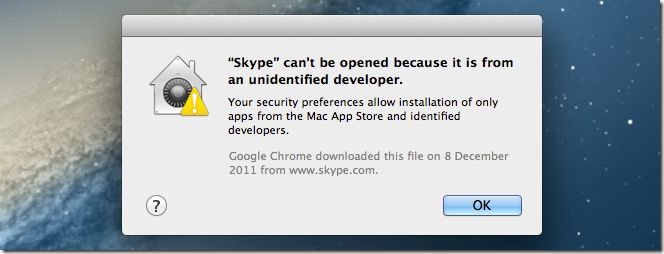
The past few months saw quite a number of Macs get infected with Trojans and what not, implying that security needs to be taken much more seriously. Even Apple has admitted that its miracle machines are prone to attacks, and as opposed to their notorious stance from the past, Macs can now get infected, too. Apple rightly thought they needed to be more proactive about this and introduced new security features in Mountain Lion, some of which target apps. The new OS by default restricts apps from running if they haven’t been downloaded from the Mac App Store and that means some of your favorite and frequently used apps will not open. This new security feature is called Gatekeeper, and it will give you a message that says ‘Application cannot be opened because it is from an unidentified developer’. Here’s how you can solve that little problem. Read More

How To Install OS X Mountain Lion On A PC [Hackintosh Guide]

Macs and PCs have competed with each other for a long time and a fairly large number of users run both OS X and Windows side by side. If you’d like to see what using a Mac feels like (and maybe you’re thoroughly impressed with the images coming out of NASA’s control room featuring multiple Macs), but aren’t in the mood of buying a real one, a Hackintosh is just the thing for you to try. Although a somewhat difficult feat, it is possible to run the latest version of OS X i.e. Mountain Lion on your PC given you have the right hardware devices. In the event that your hardware isn’t compatible, you will, very likely, have to go shopping for new ones. With the proper hardware, creating your very own Hackintosh is simple. This guide details the process for running Mac OS X Mountain Lion on a regular PC. Tests were carried out on an HP ProBook 4530s. No changes to the hardware were made. You will need a USB drive drive that has 8GB storage space and a friend who owns a Mac. Read More

10 Neat Tips & Tricks For OS X Mountain Lion

Mountain Lion is still pretty fresh out of the oven - not pipping hot, but fairly fresh - and people are still getting to know what it can do, what's new and whether or not to make the upgrade. The battery drainage issue is one that's definitely put a question mark up for some who might have been on the point of upgrading, but as an OS, Mountain Lion has been downloaded over three million times in just the first four days of its launch. It's safe to say that quite a few people might be tinkering with it as you read this. Of course, once you go over the new features in Mountain Lion, you'll probably want to check around to see what's under the hood, not so obvious or learn what tweaks have been discovered so far to make your experience better. Since with new restrictions come new annoyances, here is a list of some common annoyances and their fixes. Read More

Hiss: Reroute Growl Alerts To OS X Mountain Lion Notification Center

Mountain Lion’s Notification Center is one of the features that’s commanded a lot of attention and very little critique, if any at all. It’s also the feature that had everyone saying Growl, the popular notification app for routing and unifying notifications in OS X, would go the way of the dinosaurs. What some people forgot was that not all apps would be compatible with Mountain Lion, and not all developers would make supporting the notification center their top priority. That means for those who have upgraded to Mountain Lion, they now have two different kinds of notifications to watch out for. Hiss is a free app for Mac (Mountain Lion only) that makes the transition easier. It re-routes notifications that apps usually send through Growl, and displays them in the Notification Center panel. The slight downside is that unlike the stock apps that classify the notifications by the app name, all notifications are listed under Hiss. Read More

Change The Notification Center Background In OS X Mountain Lion [Tip]

Notification Center is one of the highlights in Mountain Lion, and it is a direct adaptation of the same feature from iOS. The execution is spot on, but you will see a rather familiar background in Notification Center; the very same grey linen background that was previously used in Dashboard, and is still used in iOS. Not many users felt enthusiastic about the said background in Dashboard, which could easily be changed with tweaking tools or from within the system files. It might not have mattered much though since the Dashboard can be disabled and few people use it; however, the Notification Center is an entirely different story. It can’t be disabled, and it’s also incredibly useful, which means you will be using it even if bleeding kittens are in the background. This post describes how you can change the Notification Center background easily for one that appeals to you. Read More

What’s New In OS X 10.8 Mountain Lion? [Review]

Mountain Lion, the latest installment in Apple's OS X, was released yesterday and brings the version to OS X 10.8. Available to download from the Mac App Store for the promised $19.99, it is a 4GB download and boasts some 200+ features as per Apple’s official page. We aren’t going to sit and count off each one on our fingers, but here’s a look at what’s new and noteworthy in the OS. Apple hasn’t just thought of what new features users need, it’s also executed them well keeping in mind the smooth UI it is well known for developing and maintaining.  The new OS integrates better with its mobile counterpart, iOS, and even borrows a couple of features from it. Apps have been added or renamed to create a better, more integrated feel between Mac and iOS devices but with Apple, it is safe to say that no functionality has been lost. Twitter has been integrated and the promised Facebook integration will arrive later this year in Autumn. Some features of the OS, though not many, are tied to iOS 6 and while they are still there, will not be fully functional until the latest version of iOS is released to the masses. Read More