Create Playlists For QuickTime With Up To 10 Items Per List [Mac]

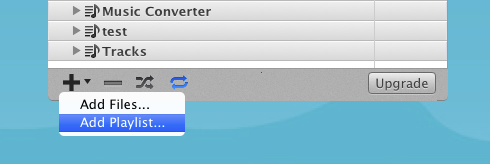
QuickTime player, Mac’s native video viewing and editing app, does everything except supporting Flash (obviously) and creating playlists. For some reason, this otherwise feature-rich and sophisticated app doesn’t let you create playlists, and there is no work around to it, at least natively. If you want to create playlists for movies, you will have to forget about viewing them in QuickTime and use iTunes instead. One alternative, although a limited one, is to use Playlist Lite, a free Mac app that lets you create playlists for QuickTime and for iTunes. Although for iTunes, you don’t really need an app like this, but Playlist Lite nevertheless aggregates from iTunes as well. The functionality is pretty straight forward, and as the name suggests, this is a "lite" version, hence limiting the number of items you can add to a playlist to 10. While this is indeed restricting, it appears that the Upgrade option won’t work either, and you are left with just the limited version. The app itself is only 2 days old at the time of writing, so, it’s probably just a bug that will (hopefully) be fixed soon, and allow users to upgrade. Read More

ListenItLater Is Like Read It Later Or Instapaper For Music [Web]

Music is believed to be the most vivid language in order to express the inexpressible. The passion for music has never been as alive and nourished as it is since the internet resources revealed music oriented communities that help everyone who is serious about music. In the realms of a wide range of such applications, ListenItLater (sounds similar to Read It Later, no? It’s not just the name, but the functionality too) grabbed my attention due to its potential to help you listen to a continuous stream of songs or be the DJ of your own music station. ListenItLater allows you to easily save the music you find so you can play it when you do have the time, helping you find, save and listen to your new music easier, better, and faster. Read More

Plug.dj: Internationally Available Tunrtable.fm-Like Social Network For Music & Videos [Web]

Popular social network Turntable.fm is one of the best ways to share songs online and socialize with music-lovers from across the globe. Unfortunately, it is only available for users in the United States. If you're based outside of the USand want to experience something similar, then Plug.dj is what you probably need. This social network cum web application lets you explore a wide variety of DJs and tracks, create playlists, join DJ waitlists, join online chatting rooms and choose dancing avatars that express your personality. The app is integrated with YouTube and SoundCloud, which means you have a heavy repository of songs at your disposal. Moreover, you can join or switch between any number of virtual rooms, where you can discover or share music, talk to people from different locales using real-time chat translations! Additionally, Plug.dj features a reward system wherein you can earn points by participating in different activities, like joining rooms, voting for different tracks and you can even get points when people add your tracks to their own collection. Read More

Mixy.tv: Create Playlists Of Videos From Facebook, Twitter & Reddit [Web]

If you like watching trending videos on social networks like Facebook, Twitter or Reddit, then Mixy.tv can be a great tool for you. This intelligent web application brings online videos together and gives you a streamlined video watching experience. It automatically imports and categorizes videos that your Facebook or Twitter friends are watching, and you can even manually add them from other online sources. The service comes with a beautiful interface that lets you filter results and create playlists. Moreover, by installing the Mixy.tv bookmarklet you will be able to add videos to your desired playlists from any website. Read More

Tube Player: Watch YouTube Videos Based On Social Network Popularity [Web]

If you like listening to YouTube videos shared on popular social networking websites, or if you're just simply bored of the same old style and interface of YouTube, then Tube Player, a new web application, finds the most popular videos from social networks and lets you listen to social playlists with the best videos. All you have to do is type an artist's name, and Tube Player will build a playlist for you based on social popularity. Videos are instantly retrieved and displayed in a compact player with multiple options displayed at the bottom of the player, such as Previous Video, Next Video, Reload Video, Like, Dislike and more. Additionally, you can shuffle and create a mix of music by different artists.  Read More

Generate Playlist For All Videos On A Particular Webpage [Chrome]

Everybody loves watching videos from sites like Facebook and YouTube, but sometimes, searching for videos/tracks in unending lists and feeds can become frustrating. So, if you're sick of scrolling Facebook feeds and YouTube playlists for music or entertaining videos, then Moovu Video Clipper pulls all videos from a particular webpage and lets you play them in a beautiful interface, without any clutter. With it, you can literally transform any webpage into a playlist and turn your browser into an amazing platform for viewing, collecting and sharing videos. Moovu makes sure that you stay tuned with all the videos on the web and never miss one again, with the best part being the fact that you can listen to all of them sequentially, without having to open all those YouTube links or scroll back and forth through your feed. You may share videos with your Facebook buddies and even play them in a pop-up. The Chrome extension works perfectly on websites like Facebook, YouTube, Vimeo and more. Read More

Hanso Player: Lightweight Music Player With Dynamic Playlist Function

Listening to music relaxes you and takes your mind off of stressful things. It can also help people block off the disturbing sounds while working on their computer. However, whether listening to music while working increases or decreases the productivity and efficiency, or lowers it down, is a debatable topic. Some days ago, we covered Hanso Tagger, an application for Windows that allows you to easily tag your music files and add or edit meta tag information to them. Today, we bring to you another tool, from the same developer, called Hanso Player. Just as the name suggests, it is a music player that lets you play audio files on your computer. The reason for selecting this music player for review is its simple, yet useful options, and the low memory consumption even during audio playback. The number of formats that the audio player is capable of handling covers all of the popular ones, including MP3, MP4, MPC, FAC, OGG, WAV, WMA etc. The capabilities of Hanso Player are not just limited to playing tracks, its easy-to-manage playlist feature allows users to control and listen to your favorite songs in a richer way. Read More

Create & Listen To Public Playlists With wahwah.fm For iPhone

There are thousands of radio stations all over the world, and the internet has brought them all within everyone’s reach. You can find any kind of music on the radio these days, but still it is a hectic task trying to find a station which is exactly to your liking. That’s where the awesome new iOS app named wahwah.fm can help you. Using this app on iPhone, anyone can create their very own radio channel and start broadcasting songs they like. The playlists shared over wahwah.fm are public, and users can listen to them. If you really think that a broadcaster’s shares match your taste closely, it is possible to follow them on the app, so you can stay up to date with their activity. Read on to know more about wahwah.fm. Read More

Calculate Total Time Of Audio & Video Playlists With PlayTime

Sometimes, while creating playlists, we want to create playlists according to the number of minutes they will last. For instance, if we are making a playlist of songs to listen to during a particular journey in our car, or we want to get a collection of songs together to play as background music in a party, we want to make sure that the music lasts for the whole time period and the songs are not repeated. Similarly, if you are planning a movie or TV series marathon to watch with your friends, you might want to know how long all the video files will last in order to make appropriate plans for having enough pop corns and drinks to last till the end of the session. What you can do is go to each file, check its properties, see its total running time and manually add them together to calculate the total running time, but that can turn out to be quite a time consuming and annoying task. Today, we have an application for Windows that automates the whole process and gives you the answer in an instant. PlayTime is a portable application for Windows that allows you calculate the total play time of a list of any type of music or video files. Read More

Freemake Music Box: Listen To Online Music & Watch YouTube Videos

Freemake Music Box is a music player that lets you search for free online music, and listen to millions of songs. It allows you to find, listen to and organize your favorite music, and automatically plays videos from YouTube. You can search the music by artist name, album name or the exact song name, depending on your choice. The application enables you to create and save playlists, change the order of songs in playlists, and keeps the playlists intact for listening to your favorite songs at a later time. Freemake Music Box makes sure that the music that you’re listening to is available legally on the internet, and provides you with all the basic options of a music player. Read More

Let Your Friends Choose The Songs At Your Party With Fonzi For iPhone

We have all been to parties where the music is just absolutely drab; enough to make you want to walk up to the DJ and have some groovy numbers added to the playlist. Fonzi for iOS does just that for you, and with just a tap of your finger. Just log in to the app with your Facebook account, and you can find whether a friend of yours is having a party nearby. Provided your part-hosting friend is using Fonzi too, not only can you track down the location of the party, but also choose the songs to be added to the party's playlist. Read More

Create M3U And M3U8 Playlist via Drag And Drop With sPlaylistMaker

sPlaylistMaker is a portable application that makes it easy to create M3U and M3U8 playlists. These playlists can then be played with popular media players such as iTunes, VLC, RealPlayer, Windows Media Player and many others. What makes sPlaylistMaker quite useful is that you do not have to configure separate playlists for multiple media players, and can simply create an M3U or M3U8 playlist by dragging and dropping media files onto sPlaylistMaker’s interface. Read More

Smarts: Add Custom ‘Smart Playlists’ To iTunes In Mac

You may know that iTunes includes Smart Playlists, such as, My Top Rated, Recently Added, Recently Played, etc., to help quickly view filtered songs from iTunes Music Library. iTunes allows tweaking with existing filter criteria of Smart Playlists via native Playlist Editor but many users find it quite hard to define a new criteria for their smart playlists. For example, if you want to create a playlist to include only long tracks having 10 minutes or more playback time or view all tracks with high bitrate, you have to manually search the specific filter fields in Playlist Editor to create a new smart playlist. Smarts saves you the extra effort involved in creating new Smart Playlists and defining custom filter criteria. Read More

Songza: Music Streaming iPhone & iPad App With “Playlists For Everything”

Where do you go when you want to listen to some good music? A majority is likely to name YouTube, some might tell of streaming websites or maybe the odd iOS app. It's pretty simple if you want to listen to a particular artist, or a specific song, but what if you are in a sad mood and feel like cheering yourself up by listening to some happy songs, where would you get that? For such occasions, Songza is what you need. Songza is an app which lets you stream a huge variety of playlists categorized according to a large number of criteria. Update: An iPad variant for Songza is now available on the App Store. Read More

Stream Free Music Playlists On Your Windows Phone Mango With 8Tracks

Music is an integral part of many people’s lives. Even now, while writing this post, I have Evanescence blasting away on my headset. If you yourself are fond of music and own a Windows Phone 7, then life just got better for you (or will, once Mango rolls out). What music lovers hate most about WP7 is that it lacks the ability to play music in the background while using a third party app. Mango finally resolves that issue by bringing true multitasking to Windows Phone and letting third party apps run in the background. For music, 8tracks becomes the first app to take advantage of this Mango goodness. 8tracks lets you listen to playlists pre-loaded by the users on the app’s website and the tracks can keep playing while you navigate anywhere on your phone! Read More

BeatBox – Ubuntu Music Player With Smart Playlist Editor & Album Art Support

BeatBox is a fast, simple, and elegant music player for Ubuntu Linux, with album art and playlist support. It allows creating playlists with detailed information regarding the track including the artists and album’s name, date, genre, comments, play count, year, rating, length and other related information. BeatBox volume options can be easily configured from the system tray. Album art and music files can be added by simple drag and drop. Read More

Get Video Streaming For Spotify Playlists And Songs In Tubufy

Spotify is a popular music streaming site currently open to select European countries and coming soon to the US. While the service is exemplary in itself, it is still just a music streaming site and leaves users wanting a video streaming experience. Tubufy is a service that finds the most relevant videos from YouTube for songs on your Spotify playlists and lets you play and share them on Facebook and Twitter. Read More

My Playlist Maker For Android – Create Playlists For Any Music Player

Having problems managing music on your Android device? Creating and managing playlists within the stock Music application far too inconvenient for you? Well, the answer to all your troubles lies in My Playlist Maker for Android, a free, handy app that lets you create M3U playlists for music-containing directories on your SD card in just a few taps. Courtesy of a simple interface and recently added support for the WMA media format, the app seems to be doing as good as similar apps (the likes of PlayListGenerator and Playlist Maker) on the Android Market, if not better. Read More

Create Audio Playlist From YouTube Videos With SongSprite

Wavelength.fm was a previously reviewed web service that let users create music rooms and stream videos from YouTube and songs from Grooveshark, the shortcomings of the service were that you couldn’t replay songs or save playlists. SongSprite is a web service that lets you create playlists by extracting audio from YouTube videos. If you frequently listen to songs on YouTube but usually minimize the window because you aren’t interested in watching the video, this service can save bandwidth, stream faster on a slow connection and of course you can share your playlist. Read More

1by1 Audio Player Organizes Music Tracks Without Creating Playlists

Organizing multiple playlists of your favorite music tracks is a hectic task, especially when you’ve separated each genre, artist, along with recorded sessions from your music archive into different playlists. If you’re looking for an audio player which doesn’t require creating playlists or tracks database to manage your collection, check out 1by1. It is un-obtrusive audio player with absolutely no configurations to tinker around. As far managing your big audio collection is concerned, it provides a handy navigation pane to explore directories for playing the selected music collection. The playback and other navigation controls are given on toolbar to play/pause the track, jump between different items, search music folders, enable/disable shuffle mode, toggle playlist view mode and so on. The simple track navigation and volume controls are placed underneath toolbar, whilst information regarding the current track is displayed on the bottom pane. Read More