PC & Mac Remote Control App Splashtop 2 Comes To Windows Phone 8

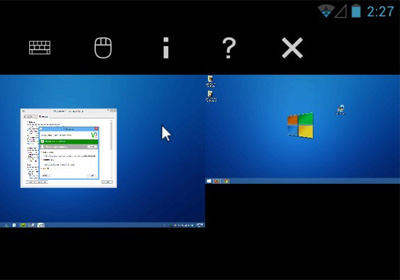
When it comes to apps that let smartphone users access their desktops remotely, Splashtop is sure to be among the first names that crop up. Splashtop became available for iOS quite a while back, and the Android app wasn’t too far behind. After some time though, the company behind the awesome remote access software decided to revamp it and came up with Splashtop 2. The new app became popular for its better streaming quality, and audio support. However, Windows Phone users could only watch in jealousy as their friends on other platforms went around using Splashtop 2 for playing PC games on their smartphones. Finally though, the situation has suddenly changed for the better. Despite the fact that the WP Store did not have the original Splashtop app, it has directly received Splashtop 2! The app isn't too different from its Android and iOS counterparts, but does have a few features designed exclusively for Windows 8 and WP8. Read More

[Giveaway] Play PC Racing Games With Your Android Or iPhone Using Tilt Racer

Though the trusty old keyboard and mouse combo works well for almost all PC games, the avid PC gamer never settles for anything less than what fits each genre the best, like the arcade fighting stick does fighting games and the Sidewinder does the racing genre. However, if your enthusiasm for PC games isn't at the point where you'd want to spend the dough required to buy a separate controller, you can always settle for using your smartphone or tablet as one. There are now more than just a couple virtual gamepad apps available for both Android and iOS; some meant for all genres - such as DroidPad and WiFiPad - and others, like FlyPad for iPhone, that are focused on racing games. New to the market, Tilt Racer for Android and iOS aims to improve upon the latter with a better control scheme. Join us past the break to learn what it has to offer. Read More

Get Screen Standby & Remote Control On Android When Connected To External Display

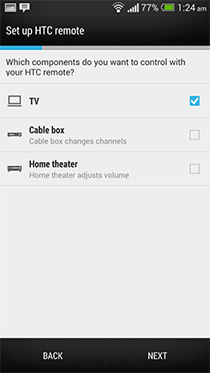
If you often connect your Android device to a TV or monitor, chances are you don’t want the device to keep its screen on throughout the time it's connected to the external display. Mirroring the device's display on a separate screen for watching a movie or playing a game nullifies the need for the device’s screen to stay on, as it drains the battery. Enter Screen Standby - the app that puts the screen of your rooted Android device to standby while the device remains fully active and continues it’s normal functioning. Screen Standby offers automated functions as well, including auto detection of attached screen(s) via USB, HDMI, Bluetooth etc. and activation upon launch of a defined app. You can even turn the device into a touchpad while the screen is off. If you want to remotely control another Android device, you can not only turn that device’s screen off, but also launch apps on it, control its volume and much more. More on the features of this app after the jump. Read More

Remotely Control Mac Brightness, Volume & Media Apps From Android

There are quite a few apps available in the App Store that allow you to control your Mac. Likewise, there is an equivalent number of apps in the Mac App Store that allow you to control your iOS device. We have covered a fair number of both, but if your desktop computer is a Mac and your preferred phone runs Android, you might not find many apps to bridge this gap. Mac Remote is an Android app that lets you control iTunes, VLC player, iPhoto, Spotify, Quicktime, MPplayerX, and Preview on your Mac. You can also use it to put your Mac system to sleep, shut it down, and increase or decrease its brightness and volume levels. Mac Remote works over your Wi-Fi network and requires you to manually connect your Mac to the app. No Mac app is required in the process. Read More

TheftSpy Has Everything You Need In An Android Anti-Theft & Remote Management Tool [Review]

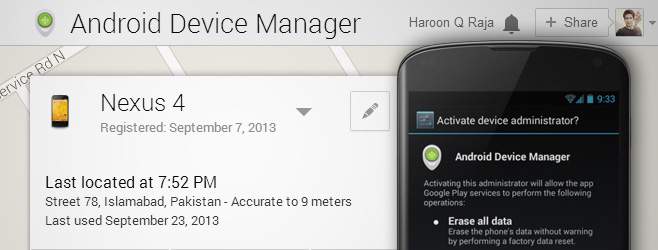
We have previously reviewed quite a few remote device management, location tracking, and anti-theft solutions for Android, but it’s hard to recall a tool that matches the proficiency of TheftSpy. Fresh to the Play Store, TheftSpy (Alpha) is a multipurpose Android tool offering web-based remote management, location tracking and anti-theft features. Besides offering services like remote contact list, call logs & message inbox access, location tracking via GPS, data wiping, device locking, and system rebooting & shutting down, the app brings several relatively new features to the table, such as the option to remotely take device screenshots, snap images via front-facing camera, push custom text messages as full-screen pop-up alerts, toast messages or as Text-To-Speech (TTS), encrypt entire mobile content, read & delete WhatsApp messages, secretly record audio via your device’s microphone and lots more, all from your desktop web browser. Read More

Xbox SmartGlass Brings Live ID Management & Remote Console Control To iOS

There aren’t many apps that come to Windows Phone, or even Android, before iOS, but Microsoft’s Xbox SmartGlass has taken that particular path. This Xbox remote controller and companion app was first released for Android, and recently, its integration with Windows Phone 8 was announced. To ensure iPhone users don't feel left out, the Redmond has just released an iOS version of the app. It is possible that you own an Xbox 360, but don’t know anything about SmartGlass. We can’t say that you will be missing anything important if you don’t have this app, but it is sure to make your gaming experience much more streamlined and manageable. The management options for Xbox Live are pretty great, but they don't even make up for half of what the app is capable of. Xbox SmartGlass can turn your iPhone or iPad into a remote controller for the console, so that you can stream content, launch apps or even play games using your device! Plus, it offers exclusive supplementary content for games. Read More

Retune Allows Remote Control Of iTunes Playback From Android

The Digital Audio Control Protocol (DACP) introduced by Apple allows iDevice users to remotely control the desktop iTunes application from their mobile devices over a shared WiFi network. Wish you could do the same through your Android device as well? Fresh to the Play Store, Retune allows Android users to remotely control the iTunes desktop application. There’s no need to install any additional desktop server apps or bear the hassle of manually configuring extensive remote connection settings. All you need to do is make sure that your computer as well as Android device is connected to the same WiFi network. The app pairs both devices via a unique pairing code, after which you can remotely control music playback & volume levels on your iTunes, view playlists, iTunes U content & Genius mixes, select your favorite radio channels, control your iTunes DJ, make iTunes stream to Apple TV, and search your iTunes library for required media. Read More

Remote Desktop App TeamViewer Touch Comes To Windows 8

Remote desktop applications are a great way to diagnose and solve problems on other computers over the internet. Remote access can be of multiple types; some connections allow you to just view the desktop screen, and whatever is happening on it, while others equip you with the ability to control almost all the aspects of a remote computer, letting you access different software, open menus, and perform actions as if you're physically present in front of it. People who frequently have to deal with complex computer issues can benefit from such solutions by providing remote access to someone who knows how to fix such problems. One of the most famous remote desktop solutions out there is TeamViewer, which is currently available for Windows, Mac, iOS and Android. Using TeamViewer, you can remotely control your computer from any Teamviewer-configured system. Today, TeamViewer has released the preview version of TeamViewer Touch, a Modern UI app that will allow you to remotely control computers from your Windows 8 and Windows RT-powered devices. Read More

Control The Camera Of One Android Or iOS Device Using Another With Remote Shot

Just recently, one of my AddictiveTips colleagues covered WiFi Camera, an iOS app that, by pairing a couple of iDevices together over Wi-Fi or Bluetooth, allows one to snap photos with the camera of the other. As is often the case, whenever an interesting app arrives on one platform, users across the other platform tend to become curious about the availability of similar apps for their devices. While it is unknown whether or not WiFi Camera will be made available to Android users, we do have a very fine alternative for our readers. Remote Shot is a free Android and iOS app that works in almost the same way as WiFi Camera, meaning that you can remotely view and capture whatever the camera of the other device is looking at. However, connection can only be established over Bluetooth. Once paired, you have complete control over the camera of the target device, including toggling between front and rear camera view, capturing images or videos, selection of flashlight mode, and triggering the self-timer or burst mode. Read More

pocket.do: Remote Android Management & Control Suite With A Spy Camera

When it comes to remotely managing an Android device, most users prefer AirDroid or Moborobo over any other alternative solution. With both said solutions being so comprehensive with their respective set of features, it is somewhat hard for a new entrant to impress the masses. That being said, there are still some areas of interest that can be tapped to present users with a rather different and refreshing solution, and this is exactly what pocket.do does. Fresh to the Play Store, this free Android app lets its user remotely control as many as five different aspects of their device from their desktop browsers. It supports managing text messages & contacts, viewing, editing & sharing Gallery photos, tracking lost device, triggering alarms, activating spy cam, capturing screenshots, and lots more, all completely wirelessly. Connection between the browser and the device can be established over Wi-Fi, as well as 3G, and the beautifully crafted layout of the web app makes accessing the required features a breeze. In addition, unlike most similar solutions, it supports multiple connection/pairing modes: using Facebook or Google ID, or by scanning a QR code from your device. Read More

PocketCloud For iOS: Mac & PC Remote Access App With VNC Support

There are more than just a few iPhone or iPad apps out there that let you remotely access and control your PC or Mac. However, most such apps are nothing more than a novelty, and it is usually pretty difficult to really do anything useful on your computer using your iOS device. The reasons for that can be manifold, like the lack of the ability to run applications on your computer and inconvenient controls. PocketCloud is an iOS app that counters all these issues in an efficient manner. The app truly lets you access all areas of your desktop. You can use it to surf the web through your computer’s web browser, or even to run applications or games. Imagine using Photoshop on your iPad! In addition, the app has support for VNC/RDP, which means you can directly connect to computers without a companion client by specifying their IP addresses. Read More

Comodo Anti-theft: Remotely Track Your Lost Android Phone Through Simple SMS Commands

Privacy and data security is one of the major concerns among smartphone aficionados. Our phones now carry so much of our credentials and personal information that we simply can’t afford to lose them. Nevertheless, accidents do happen, and whether you forget your phone at your local bar or someone intentionally steals this precious thing out of your pocket, all your personal data is compromised within a few minutes. Luckily enough, there are now various third-party apps available that give you the ability to pin point a stolen phone’s location, alert the surrounding folks and even remotely wipe-off your personal data from a stolen device. We have covered a number of such apps that provide device tracking and data protection facilities for your Android, including the popular TekTrak (reviewed here). Although this renowned app was shut down, you need not worry, as there are other alternatives to it, like Plan-B (reviewed here) or Bitdefender Mobile Security (reviewed here). Now, computer software security giant Comodo has come up with its own flavor of anti-theft technology, employed in its new app, Comodo Anti-theft. Read on find out how it works. Read More

Microsoft Launches on{X} For Android; Redefines Rule-Based Mobile Task Automation [Review]

Task automation or remote control is nothing new for Android. Those familiar with the likes of Tasker, Locale, or several other similar apps, like Modus Operandi, Sleep Timer, Bluetooth On CallProximity Sensor et al know very well what possibilities a task automation app can achieve by utilizing the various resources of the OS and device. However, when the tech giant, Microsoft, decides to enter the task automation arena with its very own solution, you can expect exactly what you’ll be getting. Labeled on{X}, this Android-exclusive app (currently in beta) is Microsoft’s attempt to make task automation easier. It provides users with remote control over automating every action or task on their devices from triggering a custom status bar notification upon unlocking your device to setting your favorite music player to start playing music when you begin jogging. Read More

sRemote: Remotely Execute Commands To Control PC via Gmail Account

If you've ever wanted to control your PC from a remote location (when you don't have ready access to the hardware itself, like on a vacation), you can do so now by sending certain predefined commands through your Gmail account. Indeed, it sounds more a gimmick, but this is what sRemote has to offer. It's an application for Windows that allows you to control and perform certain actions on your PC, such as shutdown, restart, log off, take screenshot etc, by sending various commands in an email subject field. It does so by continuously monitoring specified Gmail account, where the actual commands that are to be executed are sent, and applies the actions on the PC where this program is being run. The application may seem a bit difficult to configure at first, but once you get a hang of its options, it becomes fairly easy for you to monitor your PC from a remote location. Read on to find out how it works. Read More

Sophos Releases Anti-Malware, Anti-Theft & Privacy Protection App For Android

It is a well-known fact that among all popular mobile platforms, Android is unarguably the one that is heavily plagued with all sorts of malware and other potentially harmful entities. Despite the committed efforts of concerned authorities to make one of the world’s most widely-used mobile OS free of all the various vulnerabilities, new threats keep rearing heads on a consistent basis. Perhaps that’s the reason why Sophos, the trusted security hardware and software provider, has decided to stepped into the foray to provide Android users with a reliable and feature-packed mobile protection tool by the name of Sophos Mobile Security. Currently in Beta, the app vows to offer uncompromised security for your Android device through three nifty and most sought-after device protection and anti-theft tools, namely Scanner, Loss & Theft, and Privacy Advisor. Each individual tool features several handy options that we shall look at in detail. Read More

JumiAmp Allows Remote Control Of iTunes & WinAMP From Android Or iPhone

Back in January, we covered an Android app called TuneSync HomeStream, that allows users to wirelessly stream their iTunes music library from their PC or Mac to their Android devices. What if you wanted to remotely control music playback on your iTunes desktop application right from your Android device? Developed by Jumitech, JumiAMP is a stylish iOS and Android app that allows you to control music playback on iTunes and WinAMP desktop applications over WiFi or mobile data (3G, EDGE). While JumiAMP has been around in the iTunes App Store for quite some time now, its Android variant has just made its way into the Google Play Store. Read More

SoftPad Turns Your iPhone Into A Remote Control For Windows PC [Cydia]

There are many ways of turning your iPhone into a keyboard, mouse or a monitor for any desktop system. You can get a lot of apps and tweaks that let you do that, but not many of them have the ability to assume these roles simultaneously. SoftPad is one of the most comprehensive and easy-to-configure Windows remote control apps for iPhone that we have seen so far. The Cydia app has three main modes; you can use your iOS device as a mouse or keyboard for your PC, or control the entire Windows interface through your iDevice's touchscreen. Moreover, SoftPad makes it extremely easy to switch between the three modes, adding another layer of convenience over its functionality. Read More

AirDroid Receives Mega Update, Adds Screen Mirroring, File/APK Drag & Drop, Video Streaming & More [Android]

When we reviewed the debut version of AirDroid last November, it was already one of the best, most comprehensive Android managers out there, offering wireless control and management of almost every single facet of Android devices. If you thought that the app already had enough on offer and couldn’t get any better, think again! AirDroid has just recently received a massive update (to v1.0.5) that has helped the app step up several notches from the rest of the competition. Read More

Remote4Play: Remotely Control Google Music Playback From Android & iPhone

Remote4Play is a fairly lightweight yet effective Android and iOS app that connects you to your Google Play Music account via its Chrome Extension, so that you can remotely control music playback from your mobile device. Both the extension, as well as the mobile clients of Remote4Play, require minimal configuration. A remote connection is established between your web browser and mobile device as soon as you scan the QR code displayed by the extension. Once connected to your Google Play Music account, the mobile app presents you with its own Play Music interface, using which you can view the currently played track, along with album art. Using various controls on the player, you can control music playback and enable/disable the shuffle and repeat options. All the changes made through the mobile client are instantly implemented and replicated on the web interface. Read More

Splashtop Touchpad Turns Your iPhone Into A Remote Keyboard & Mouse For PC/Mac

Last month, we covered an app named Mobile Mouse Server, which turned an iPhone into a remotely controlled mouse for your Mac. That app was limited to Mac only, and although PC users have a few iOS alternatives for that functionality as well, among the most popular remote control apps is Splashtop Touchpad, which is compatible with both PC and Mac. The app goes one step further than Mobile Mouse Server, and not only functions as a mouse, you can even input text to your desktop using the app, as it features a full keyboard as well. The area where the app has the greatest advantage over its competitors is its ease of use. You can learn more by reading on. Read More