Nanoshot: Capture & Upload Screenshots To Cloud In Ubuntu

In a previous post, we showed you three different ways of capturing screenshots in Ubuntu and later reviewed, Lookit, which is a handy screenshot capturing utility for Ubuntu, which enables uploading captured screenshots to the cloud. Recently, we found another handy screenshot taking application for Ubuntu, known as Nanoshot. It provides users with the utility to capture screenshots to upload them to cloud services like Flickr, and to grab screens from specific elements such as a video frame or the Unity Launcher. Read More

MyUnity: Comprehensive Unity Tweak For Ubuntu 11.04 and 11.10

Ever since the introduction of Unity, the most tricky part of managing Unity-based options has been its customization. Previously, we brought you the Unity Launcher Editor and the Unity plugin for Compiz Config Settings Manager. Recently, a new tool was released for customizing Unity settings in Ubuntu 11.10, known as MyUnity. This tool provides full customization of Unity features, including the Unity Launcher, Dash, Panel, Desk and Font. MyUnity is a complete customization package for Unity users, and is far more comprehensive than other applications like Unity 2-D Settings, which are no longer compatible with Ubuntu 11.10. Details after the break. Read More

Quickly Access Tomboy Notes From Unity Dash With Tomboy Lens [Ubuntu]

A while back, we covered Tomboy, a cross-platform, note taking application that allows creating and synchronizing notes across numerous operating systems and mobile devices. Recently, an Ubuntu 11.0 lens was released for Tomboy notes, which provides access to your notes from the Unity Dash. Since Tomboy is the default note taking application for Ubuntu, therefore, accessing tomboy notes from the Unity Dash can help speed up the process of creating and accessing Tomboy notes. Read More

Take An Ubuntu 11.10 Test Drive Before Downloading It

Many Ubuntu users have been quite confused regarding upgrading to version 11.10. This seems to be a dilemma that is often experienced by Ubuntu users, due to the time it takes for the new version to become more stable. For example, many Ubuntu 10.10 users did not upgrade to Natty until Oneiric was released, mainly because it took Natty quite a while to stabilize before it could be trusted by users. Also, its not just the kernel and back-end issues that users are concerned about. With each upcoming version, Ubuntu is experiencing radical user interface changes, which can be difficult to predict. For this reason, Canonical has provided an official Ubuntu Tour via a simulator that you can access within a web browser. This tour provides automatic and manual simulations to help you test drive Ubuntu 11.10 before downloading it. Read More

Access Common Folders From Gnome Panel In Unity With Indicator Places

One of the biggest grievance of Ubuntu users with Canonical has recently been the emphasis on scrapping the classic Start menu. While one can acquire the classic start menu by installing Gnome Shell or ClassicMenu Indicator, some may prefer the classic menu to simply access common folders from the Gnome Panel. Indicator Places is an app-indicator menu applet that provides access to Ubuntu “Places”, including the Home Folder, “Computer”, "Network", Documents, Pictures, Videos and Downloads Directories. Read More

Force Quit: Forcefully Exit Ubuntu Applications From Unity Launcher

There are numerous ways of forcefully quitting an application in Ubuntu, including using the system monitor. Back in the day, we had an app-indicator applet which allowed performing this task with ease. With the advent of Ubuntu 11.10, this applet no longer works. Furthermore, Gnome 3 has modified the way applications are forcefully exited. Recently, a third-party developer has released a script to integrate Force Quit functionality to the Unity Launcher. Read More

Easily Find Firefox Bookmarks In Ubuntu With Unity Bookmarks Lens

We have covered a number of handy Ubuntu Unity lens including, Ask Ubuntu, Google Books, Gwibber and Unity Place File Search. Recently, we came across Unity Bookmarks Lens, which simplifies the process of searching Firefox bookmarks from Unity Launcher Dash. Currently, it only supports Firefox and is compatible with the latest Ubuntu 11.10 Oneiric Ocelot. With Unity Bookmarks Lensyou can easily search bookmarks and open bookmarked web links from Dash. To search the bookmark, you simply have to open the Dash and type in the bookmark title. Read More

Enable/Disable Auto Hide For Unity 2-D Launcher In Ubuntu 11.10 [Tip]

Since the inception of Ubuntu 11.10, users have had a number of complains regarding the bugs and UI issues. One such problem is the management of the auto hide feature of the Unity Launcher. While it was fairly easy to disable auto hide for the Unity Launcher in Ubuntu 11.04 with the help of Unity 2D-Desktop Settings tweak, it does not work with Ubuntu 11.10. Even the Unity Plugin does not disable the auto-hide feature for Oneiric. In this post we will provide you with instructions to disable the auto hide feature for the Unity Launcher in Ubuntu 11.10. Read More

Upload Notes To Evernote From Unity Launcher Quicklist In Ubuntu

Unity Launcher quicklists help users perform lethargic functions more quickly. We have covered a number of Unity Launcher quicklists for web services like Facebook and Google+. This time we have a Unity Launcher quicklist for the Evernote web service which can help you speed up your note taking tasks. Since Evernote does not have a native Linux application, this quicklist can be of immense utility for Evernote users. Read More

Jupiter: Toggle Power, Wi-Fi, Video & Bluetooth Settings In Ubuntu

Being able to configure hardware options from the system tray using an applet is much easier than searching numerous hardware settings from the Unity Dash or the Classic start menu in Ubuntu. There are a number of applets which provide the functionality to manage one or two kinds of hardware related settings from the system tray, however, their functionality is quite limited. Jupiter is an app-indicator applet for controlling power and hardware options of portable Linux computers. It provides quick access to common power and hardware options so that you can toggle settings to keep your laptop resource consumption to the minimum. The available options include settings for power, screen output, resolution, Wi-Fi , and Bluetooth. What makes Jupiter useful is the fact that it allows the utility to manage multiple hardware settings from a single system tray menu. Read More

The Complete Guide To Ubuntu 11.10 Oneiric Ocelot [Review]

The fifteenth version of the Ubuntu OS family known as Ubuntu 11.10 or Oneiric Ocelot has arrived. The first beta version of Ubuntu 11.10 was recently released with the stable version coming out in near future. Ubuntu has come a long way since version 11.04. In this post we will explore the new features and changes which have come with Ubuntu 11.10. For starters, we like to mention that Oneiric is much faster than its predecessor and some of the Unity hangs seem to have been resolved. Having said that, some hiccups still need to be sorted out as some legacy hardware users may experience compatibility issues with the new GUI interface. Check out new features and changes after the jump.

Read More

How To Create Totem Unity Quicklist In Ubuntu Linux

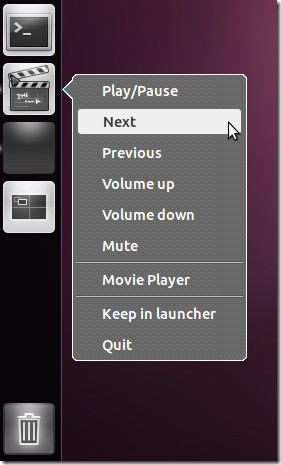
Totem is a GStreamer based media player for the Gnome desktop and comes pre-installed with Ubuntu. One of the features that Totem has lacked since the inception of the Unity launcher is a quicklist. As we all know quicklists provide easy access to major features of an application which is integrated with the Unity launcher. Not having a Unity quicklist has been bit of a short coming for Totem. However, that has now changed. A third-part developer has created a Unity quicklist for Totem which provides Play/Pause, Next, Previous, Volume Up, Volume Down and Mute options. This option makes it handy to run Totem functions right from the Unity Launcher by right-clicking on the Totem icon. Read More

Googlizer Searches Google For Text Copied To Clipboard [Ubuntu]

When using the Ubuntu Terminal or reading a text, PDF or Libre office document, one often comes across terms which are unheard of or require more elaboration for better understanding. Normally, one would copy these individual terms and launch a browser manually to search for them. A better alternative can be to copy the text to clipboard and launch Google search in a single click each time you require looking up a word, phrase or command. Googlizer is a Linux application which  has been designed to do just that. It does not have a GUI front end and merely requires being integrated with the Unity launcher to launch Google search for items saved to the clipboard. Furthermore, it also includes support for a command line option -u/--url, to select an alternative URL to search the clipboard text. Read More

Get Facebook Notifications In Ubuntu Unity Launcher With Faccialibro

In the past we showed you how to create a Google+ quick list and notifications indicator for the Ubuntu Unity Launcher. This time we have a similar launcher for Facebook. Faccialibro is a Unity launcher indicator which provides unread notification count from the Unity Launcher and also provides a quick list for launching Facebook notifications, messages and friends page from a quick list. Read More

Find Answers For Ubuntu Issues With AskUbuntu Unity Lens

We have reviewed both Google Books Lens and Gwibber Lens for the Ubuntu Unity launcher. This time we have the Unity Lens for AskUbuntu, which can help you quickly search and find answers to Ubuntu issues rather than having to endlessly search the internet. Ask Ubuntu is a community driven forum for the Ubuntu users. It’s members gain reputation based on the community's response (through voting) for questions and answers. Read More

Run Multiple Application Instances Simultaneously In Ubuntu Unity [Tip]

Workspaces in Ubuntu provide users the convenience of having multiple desktops to easily organize their active windows. But this utility becomes limited as one can't open an instance of the same application in another workspace in Unity. In this post, we will provide you with an easy way of opening multiple instances of the same application within different workspaces. This great tip was posted by Johneker in the form of a YouTube video which is also embedded at the end of this post. Read More

Create Google Plus Unity Launcher Quick List In Ubuntu Linux

Google+ is becoming more and more interactive due to third party development efforts and tweaks. In the wake of Google Plus hype, it is worth providing an Ubuntu based utility for it. In this post we will tell you how to create a Unity Launcher Quick list for Google Plus to instantly launch Google+ features in your default browser. As quick lists are one of the favorite features of Ubuntu users, therefore, this quick list is likely to make it easier and fun for Ubuntu users to instantly launch desired features of Google Plus from the Unity Launcher. Once the quick list is created, you will be able to instantly open your photos, stream, hangouts, notifications and circles from the Ubuntu Unity Launcher. Read More