Adobe Presenter Video Express For Mac Lets You Capture, Combine & Upload Videos And Screencasts

We’ve reviewed a few screencasting tools for Mac, of which the free Ripcorder Screen is a favorite. Users can turn to QuickTime, a stock Mac app, that lets you create screencasts as well. New on the screencasting front is Adobe Presenter Video Express, a free Mac app from Adobe that lets you record both screencasts and videos. You can edit videos, add closed captions, and view screencasts and recordings side by side. The final project can be uploaded to both YouTube and Dropbox, though it cannot be saved to your local drive; however, if you go for Dropbox, it'll get synced to your computer anyway. Read More

How To Apply Slow Motion Effect To Videos In The YouTube Editor

Hours and hours of videos are uploaded to YouTube every day and they all differ in quality. For amateur movie makers who don’t have access to expensive professional video editing software, and the skills to use it, there’s a whole host of simple and easier to use apps that can be used instead, not least of which is YouTube’s own video editor. The editor is easy to use for beginners and it has every basic feature you would need to edit a video as well as some effects, the latest addition to which has been the ‘Slow-motion’ effect. If you often edit videos, you might be aware how rare it is to find this effect as a feature in an app or service. Here’s how you can use it to edit a newly video you've uploaded to YouTube, or to an existing one. Read More

Vyclone Brings Its Collaborative, Multi-Angle Video Shooting To WP8

Apps like Streamweaver and WeVideo introduced the concept of collaborative media capturing and editing to the masses but in recent times, Vyclone has come up as the most popular release in this genre. The app has been available for both iOS and Android for quite a while, and out of the blue, it has arrived at the WP Store as well. It is a pleasant surprise to see that Vyclone for WP8 has an interface that goes well with the platform, and doesn't seem to be a mere port of its iOS or Android versions. In case you aren't familiar with Vyclone already, the app allows users to collaborate with others in their vicinity to shoot a scene from several angles, and then stitches the results automatically to give you a really cool end result. Read More

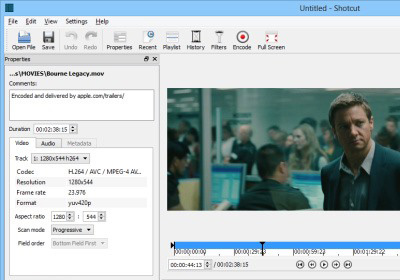
Shotcut Is A Nifty Multi-Platform Video Clip Editor With Custom Filters

Video editors like Adobe Premiere and Sony Vegas Pro are exceptionally powerful when it comes to professional-grade video production, but these programs don’t come cheap. If you’re looking for a powerful video editing application that won’t cost you an arm and a leg, try Shotcut. It’s an open-source, cross-platform app that provides an expanded workspace with a whole variety of features to let you quickly edit your homemade videos and recordings. In fact, it’s so powerful that you might soon find yourself carving out commercial-grade videos, after going through the initial learning curve, of course. It can encode videos at up to 1080p and packs a ton of options, while keeping the interface simple. Read More

WinX Premium HD Video Converter, Editor & Burner Free For Limited Time

Video Converters date back to as long as I can remember, though their need has been greatly diminished lately due to most modern media players having the capability to play a truckload of formats, and a shift to handheld devices by many of us, most of which natively support a wide range of file formats. Still, there are times when you do need to convert a video for better comparability or compression. In the past, we have covered countless video converters including Freemore, Ace, EasyBrake and Video to Video, just to name a few. WinX HD Video Converter Deluxe is a premium video converter for Windows boasting support for a plethora of formats, and the application has recently gone free for a limited time as an Easter gift, from its regular price of $49.95. Let's take a look at its features in detail after the jump. Read More

Adobe VideoBite Offers Simple & Quick Video Editing On The iPhone

The previously covered video highlights app Givit belongs to a category that has yet to see a lot of development. Fortunately though, a big name has finally shown interest in the genre by coming up with a nice highlights compilation app of its own. Adobe’s VideoBite could be labeled as a very simple video editor, but that might be overstating its functionality a bit. Basically, this iOS app lets you combine parts of different videos into a single clip. You can mark a particular moment as a ‘highlight’ while recording, or choose parts from videos that already exist in the camera roll of your device. These highlights can then be rearranged individually before you share them over Facebook or save them locally. Read More

Add Amazing Action & Sci-Fi Special Effects To Videos With FxGuru For Android

Remember Ultimate Special FX, a video editing Android app that let you apply stunning high quality visual effects to your recorded clips to make them look like a piece of some sci-fi action flick? The app received a lot of love from Android fans for its rather unique feature and the ease with which it let you add a lot of fun into your otherwise monotonous video recordings. However, with the app no longer available in the Play Store, you might be on the lookout for a similar – if not better – alternative. Search no more – we have found one for you! FxGuru is a free app that offers a huge variety of special movie effects that can be applied to your video recordings. Ranging from scintillating cruise missile attacks to the uninvited UFO Arrival effect, FxGuru has a massive compilation of goodies to offer. Better yet, the app is supplemented with a couple of powerful tools in MotionMatch technology and Virtual Decals to help you capture the perfect video of you destroying your enemy’s playground with a TNT barrel explosion, filming a UFO successfully land on your rooftop, or aiming a rocket launcher at your moving school bus. Read More

Cute CUT: Extremely Powerful Free iOS Video Editor With A Multi-Layer Timeline

Serious movie making requires a lot of practice and extensive knowledge of multiple applications. Editing a video thoroughly is such a complicated task that you aren't likely to associate it with an iPhone or iPad app, but these views are sure to change once you take Cute CUT for a spin. The app is universal (has dedicated iPhone and iPad variants) and packed with an impressive set of video editing tools, and though it does require a little getting used to, once you do get the hang of it, you'll find it to be an extremely powerful tool. The app lets you combine various media (videos, images, music, sound recordings and built-in sound FX), text and drawings in a multi-layer, non-linear timeline (much like Adobe Premiere) to produce professional-looking videos. More details after the break. Read More

Create Your Own Real-Time Video Effects With Videosis For iPhone

Photo and video editing apps usually have a lot of filters, but at times you might feel like none of them fits your needs perfectly. There are many apps that let users create their own effects, but that can be a bit too time-consuming and even intimidating for relatively inexperienced users. Videosis is a new iOS app that has a nice collection of predefined video filters and effects, and in addition, lets you easily create your own by simply combining available effects and changing their values. Videosis offers real-time filters, some of which even react to the sound around you. Read More

Directr Is A Movie Maker App For iPhone That Handles Video Editing By Itself

Today's age is all about automation. For now, we have a boatload of smartphone apps that offer a ton of options for accomplishing rather simple tasks like shooting and sharing photos, but everyone is sure to love an app that has the ability of making all the decisions for you and can come up with an acceptable end product. Directr is a step in that very direction. This iPhone app creates professional-looking movies and asks users to do nothing more than point their device’s camera at the subject of their choice. Everything from background music to transition effects between scenes is handled by the app automatically. To top it all off, Directr is full of ideas for new movies, so if you can’t figure out exactly what you should shoot, just launch the app and you are sure to find plenty of inspiration. Read More

VSDC Free Video Editor Offers Non-Linear Editing And Several Audio & Visual Effects

Editing videos using professional tools such as Sony Vegas Pro, and Adobe Premier is not an easy task. The high learning curve of these applications require you to spend a lot of time on them, plus the huge price tag can be a deterrent in acquiring the software. On the other hand, when it comes to free video editors, the list of decent ones is not that long. Many of them aren't feature rich enough for serious video editing, while the ones that do offer good options often embed a watermark with their name in the final product, or have restrictions on the output file. VSDC Free Video Editor is one great exception that lets you edit all popular video formats without any restrictions. Read on to learn more about this free tool and its features. Read More

Cinelab Is A Simple Video Editor For Windows 8 And RT

Almost every major modern computer platform offers some kind of video editing feature. If you have been following us for a while,  you must have come across our coverage of dozens of video editing tools for iOS, Android, Windows and Mac OS X. Today, we are bringing you video editing application for Windows 8 called Cinelab. While not exceptionally feature-laden, the app allows you to edit and merge your video clips into a single seamless file. The output file is processed and converted to MP4 format, and then saved to the directory of your choice. The interface looks clean, simple and easy to use, and is fully optimized for Windows 8 PCs and Windows RT tablets. Read More

Givit For iPhone: Create Video Highlights With Visual Effects & Music Of Choice

Videos might have a lot of advantages over still images, but one thing you can’t do in a video is focus on just one point in time. There are a lot of things going on in most videos, and if there’s a particular portion of it that you want to highlight, you will have to point it out to others. This is where apps like Givit for iPhone can help you. You can call Givit a video editor, although it doesn’t come with too many fancy options. The whole purpose of the app is to let you choose a particular instant, or time period, in a video and apply some dramatic visual effects and music to it. The best thing about Givit is that you can use it to highlight videos while you are shooting them, in addition to editing existing videos. Read More

Corel’s Pinnacle Studio Brings Easy Yet Powerful Video Editing To The iPad

The iPad offers alternatives to almost every application that you can find on a desktop computer. Be it games, photo editing or word processing, the iOS tablet has you covered. There are still some things, however, that just aren’t associated with an iPad. Moviemaking is one such thing. While there are desktop tools like Windows Movie Maker, Adobe Premiere Pro, Sony Vegas Pro and Pinnacle Studio for PC, the iOS App Store lacks such quality in this department. That’s what makes Pinnacle Studio for iPad so special. The mobile version of Pinnacle Studio is actually a revamped version of Avid Studio, an app that was acquired by Corel a while back, along with other products by Pinnacle Systems, a subsidiary of Avid Technology. Pinnacle Studio is quite feature-rich, but that does not mean it is very difficult to use. The app's look and feel is quite similar that of its desktop counterpart, so if you happened to have used the latter, it should just take you a few seconds to find your bearings - or a few minutes even if you don’t have any prior experience in moviemaking. Read More

Recood Pro: Capture Short Videos With Real-Time, Instagram-Like Effects

iOS apps that offer filters and effects for videos are quite rare, but if an app lets its users apply those filters in real-time, before they even begin shooting a video, then that really is something noteworthy. Recood Pro does exactly that, and much more. Thanks to the app, you can shoot short video clips with a bunch of really cool effects, and then share them over YouTube, Facebook, Twitter or the app’s own social network. Recood allows its users to comment on videos, follow other people and mention their friends during interactions. The maximum length of videos shot using Recood is one minute, and hence, it is not meant to be used as a complete replacement app for the stock video camera in your iPhone. Recood is just an app that will make sure that you get something that is more detailed than a photo, but is still short enough to keep users interested. Read More

Create Short Movies Out Of Music, Photos & Videos On Your iPhone

Photo sharing has really become popular among iOS users, thanks to services like Instagram, but there are still new apps coming out in the App Store that bring a whole new dimension to this genre of apps. Ptch is one such iPhone app that has been designed to let users share media after editing it, but rather than focusing on just photos, the app incorporates music, photos and videos into one short movie (called a “ptch”). You can apply a number of artistic effects to any ptch, and the media used to create it can be pulled from any of your social network accounts or the camera roll of your iDevice. In addition to having a sharing network of its own, the Ptch app lets users publish content to Facebook, Twitter, Viddy and a number of other similar services. Apart from that, if a shared ptch is public, users can re-share it after making changes of their own, too. Read More

ClickBerry Interactivity Creator: Add Interactive Elements To Videos & Share Them On Facebook

Clickberry Interactivity Creator is an Adobe AIR-based application that lets you add clickable elements to your videos. It is an excellent marketing tool for online campaigns on social media, as it allows you to overlay hyperlinks, link to any online video, tag your friends and more, over any selected video. It's basically designed to make interactive videos, which can include URLs to your websites, images, sidebars, and even the Facebook Like button.  The application offers an elegant user interface and straightforward usage. Just select your video and choose the interactive object that you wish to add. Read More

[Giveaway] Video Flow: Create Screencasts, Split/Merge & Annotate Them [Mac]

If you’re in the market for an amazing screen casting tool, look no further than Video Flow for Mac OS X. The app is a video creation and editing tool, which allows you to create screencasts, annotate them with text, and add videos or audio files to your screencast, or simply annotate existing videos that you may have downloaded or recorded yourself. The app lets you split videos, and also supports video-in-video frame sets (whereby you can start a video within the current one),  truly setting itself apart from its peers. It allows you to resize your screencasts to the right size for viewing on an iPod, iPhone, iPad or YouTube. Additionally, when saving your file, you can choose the frame rate it should be saved with. The available range is from 10 to 45 fps. The only downside is the rather hefty price tag, which stands currently at $50, but you can skip that if you're lucky enough to win a license in our giveaway. Read More

Shoot & Edit Slow-Motion HQ Videos With Your iPhone Using SloPro

Videos that are rich in action appear even more dramatic if they are played in slow-motion, and with the right sound effects int he background. SloPro is an iOS app that allows users to shoot videos in slow-motion, and that too, in high quality. There are a few video editing options available in the app as well, which allow you to adjust the frame rate and other aspects of your action sequences. The app also has a default soundtrack that is applied to each clip. This cancels out the original sound in the video by default, but you can opt to keep that as well. So, the app can be used for two main purposes; creating slow motion videos and suppressing undesirable background noise. Read More

Blux Movie: Shoot Videos With Effects & Add Background Music [iPhone]

Photo editors in iOS have become so commonplace that it really takes an exceptional app of that genre to make its mark upon iPhone users. The same does not hold true for video editing apps, however. There are a few apps that will let you make a few basic changes to the videos you shoot using the awesome camera in your iPhone, iPad or iPod touch, but there is no way of getting as many filters and effects for videos as there are for photos. Blux Movie is an app which gores against this trend, and brings some pretty decent video filters and editing options to users of newer iPhone models. The app comes with a handful of beautiful effects that can be applied to videos even as you are shooting them. In addition to that, Blux Movie has options to apply Split Screen frames to your videos, and to let users stream their videos to their PC over Wi-Fi! Read More