SoftPerfect WiFi Guard Protects Your Network Against WiFi Thieves

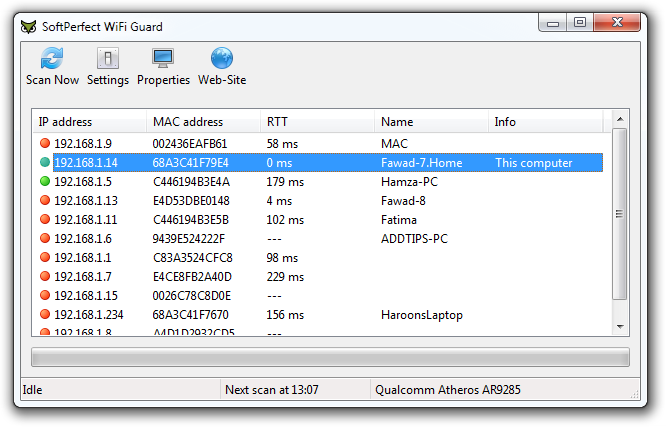
WiFi allows us the freedom to move about while using the internet on our portable devices, without worrying about the Internet connection being disconnected within the range. Though it does't come without a price. On one hand, WiFi gives us great mobility, but on the other hand, there's the problem of people stealing your WiFi data by free-riding over your network. You can avert this by setting a password on your connection; however, if someone manages to guess or hack your password, they can still log in. Since you cannot strictly define the perimeters of WiFi signals, if stationed near a Window or an external wall of your house, it becomes very easy for people to catch its signals. This can increase your internet bills and effect its performance for you, if they are using huge amounts of bandwidth. SoftPerfect WiFi Guard is an application for Windows that scans your network and displays a list of all the connected computers. It pings all devices connected to the network and shows everything that returns a ping. Moreover, if an unknown device connects to the network, you are immediately alerted through a notification on your screen. Read More

WifiInfoView: View And Monitor Wireless Networks Around You

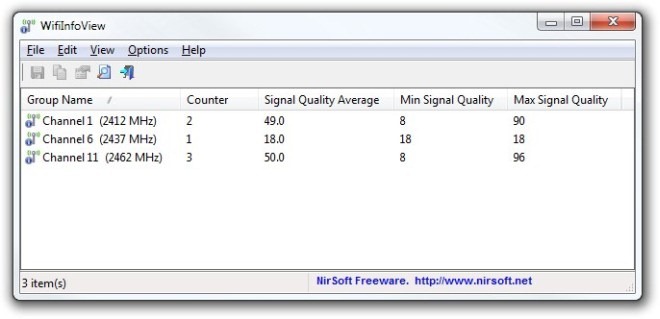
NirSoft is renowned for creating user-friendly and minimalistic applications. They never ceased to amaze us with simple yet highly useful utilities, especially their network related tools - such as the previously covered NetBScanner that lets you view computers on your network within specified IP range, and WakeMeOnLAN that remotely wakes up computers on your network. The company's latest creation, the WifiInfoView, is another addition to the ever-popular Nirsoft's software archive. It's a portable application that keeps an eye on wireless networks around you. WifiInforView is designed to scan all the wireless networks in your proximity and provide you with a wide range of information. You can view an Access Point’s SSID, Mac Address, PYP Type, Signal Quality and so on. The application also allows you to specify the refresh frequency for all Wifi related information. The users can also change the view mode of the application among five different categories. Read More

WiFi Protector: Secure Your WiFi Connection With 256 Bit Encryption & Change IP Address

When you connect to the internet using a wireless connection, you are always at the risk of a security breach. Someone with enough skill and knowledge can easily use the lack of protective measures and manipulate the connection to get access to your network and every device connected to it. An antivirus, too, only stops intrusions that are already available in its database, and cannot detect if someone is trying to hack into your system using a WiFi network. Other than hacking into your system, in the lack of proper preventive measures, you can also become a victim of identity theft. Keeping your network secure at all times is very important to avoid dealing with such issues. Today, we have a VPN service for you called WiFi Protector that allows you to keep your wireless network protected at all times. It is an extremely easy-to-use tool that protects your wireless connection using 256 bit encryption. No matter which network you connect to, WiFi Protector will hide your real IP, and allow you to visit websites and watch videos restricted in your region. More on WiFi Protector past the fold. Read More

AnySend: Easily Share Data Between Android Devices Over WiFi

From the makers of arguably one of the most popular cross-platform to-do list managers, Do It Tomorrow (read Android app review & web app review), comes a very nifty file-sharing Android app, called AnySend. Sporting an uncluttered interface and requiring minimal configuration, the app allows instant and wireless data transfer between two Android devices that are sharing the same Wi-Fi connection. File sharing via AnySend is done on a direct device-to-device basis instead of sending download links of shared content or resorting to FTP servers. When installed, the app automatically detects all other Android devices running AnySend, and lets you easily send files to the required device with just a few taps. The app supports running in the background, and alerts of any new incoming files via sound and status bar notifications, as well as vibrations. A feature that parts AnySend from other similar remote file-sharing apps is that it lets you specify a whitelist containing trusted users from whom your device will automatically receive shared files, without prompting you to select the appropriate action each and every time. Read More

How To Create Wireless Ad Hoc Internet Connection In Windows 8 [Tip]

Apart from Start Orb and classic Start Menu, what most Windows 7 users, who decided to take Windows 8 for a spin, miss in Windows 8 is ability to create ad-hoc network. If you’re a power users, you might’ve noticed that Windows 8 doesn’t include an option to create and setup ad hoc network connection to share files and internet with Wi-Fi enabled computers and devices. Windows 7 ad hoc connection feature does nothing except creating a shared connection with separate IP address to register the device on the virtual network. This allows users to use router’s default or specified DNS server address to easily connect to internet. Even though Windows 8 comes with ICS (Internet Connection Sharing) feature to allow devices  to connect to yours PC internet connection, it doesn’t allow creating a wireless network connection to share the internet. In this post, we will look at some tools that let you easily create and manage ad-hoc connections in Windows 8. Read More

MyPublicWiFi Creates WiFi Hotspot With Firewall & URL Logging

Normally, wireless internet connections can be easily shared using ICS (Windows' own Internet Connection Sharing), or by making an Ad-hoc network connection.  While you can use a Wi-Fi router for connecting an Android or Symbian phone to the internet, your router might not be able to support too many devices. In such a case, one can create a Wi-Fi hotspot with the help of applications like MaryFi. However, MaryFi is restricted to merely creating a Wi-Fi hotspot, and does not provide options to use a firewall for securing the network. MyPublicWiFi is an application for creating a free Wi-Fi hotspot that turns your computer into a wireless router with Firewall and URL tracking functionality. This can be useful for setting up a secure Wireless Access Point, with MyPublicWiFi’s firewall protection to restrict user access to specific servers. Using the firewall, you can also restrict certain types of services, which you may not want the shared users to access. Read More

Analyze Wireless Network Coverage In Mac With NetSpot Survey Software

Finding out whether your Wi-Fi is properly configured and placed at location where all Wi-Fi enabled devices can easily connect to network without encountering any signal strength problems is arguably a hectic task, as you have to move around the worksite to place your WiFi devices at hotspot reachable locations. In such situation, Wi-Fi coverage analysis tools can come extremely handy to map your different worksite locations with Wi-Fi devices covered area. If you own a Mac and are looking for a way to visualize your wireless network, NetSpot is probably the best tool you can try. It’s basically a wireless survey software that lets you draw map of your workspace to not only view availability of WiFi networks but to analyze WiFi coverage as well. In addition to checking your Wi-Fi network covered area, it also help users plan in setting up Wi-fi devices, so they can access WiFi hotspots without having to move around different locations to check signal strength. Read More

How To Access Hidden Wi-Fi Networks On Your Windows Phone 7 HTC Device

One of the features that distinguish Windows Phone 7 from other operating systems is the strict security measures it takes to ensure that it is almost impossible to break into the user’s privacy confines. Not only that, Microsoft certainly knows how to protect it’s own intellectual property too (nothing open source when it comes to Windows!). But they can go a bit overboard when trying to be secure and overdo the whole thing a little. People usually hide their Wi-Fi networks to ensure safety from casual hackers. But at the same time it leads a person into a false sense of security and this makes hidden Wi-Fi networks a security risk. Due to this, WP7 does not allow users to see and connect to a hidden Wi-Fi network. But if a hidden network is the only choice you have, then what to do? HTC users have a choice. Read More

WiFi Joiner For Android – Connect To WiFi Networks By Scanning QR Codes

WiFi networks at workplaces are often secured by ridiculously long WPA/WPA2/WEP keys, which make connecting to said networks from your new (or newly wiped) mobile device quite a hassle. Similarly, if you like to keep the WiFi access point at home considerably secure, sharing it with friends who come to visit becomes equally bothersome. Introducing WiFi Joiner for Android, a free, handy app that lets you create and share QR codes for new or saved WiFi access points and connect to them by scanning said codes, saving you the trouble of typing in long security keys or waiting for our device to detect networks. More after the break. Read More

Display Detailed Information Of Available Wireless Networks

WirelessNetView is an efficient wireless network scanner from Nirsoft. Even though Windows 7 has a lot better way to detect and show information about available wireless networks, there is still a need of one complete scanner which can retrieve all information of wireless networks. WirelessNetView displays wide range of information which spreads across the window in multiple columns, some of them includes; Last Signal, Average Signal, Detection Counter, Security Enabled, Authentication, Cipher, PHY Types, First & Last Detected On, MAC Address, and lot more. Read More

Scan And Identify Best Wireless Networks With inSSIDer [Windows]

Wireless network scanners can come in really handy for spotting, identifying and troubleshooting Wi-Fi networks. One of the widely used free software, NetStumbler, has been hailed long for it's well-proven performance, but does not work well with Windows 7, Vista and XP 64-bit. inSSIDer covers up this deficiency by adding full support for the latest generation of Windows OS as well as supporting x64 architecture. In short, it is a more reliable alternative to NetStumbler. Read More