New Pokki Adds A Rich Start Menu To Windows 8 With Controls For Start Screen & Hot Corners

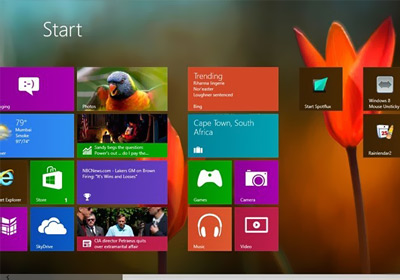
Ever since Microsoft announced Windows 8, the latest OS has been at the helm of discussion. One element that has faced incessant backlash, is the removal of Start Menu and Start Orb. Why Microsoft took such a bold decision is a different story, but it’s been in the spotlight for a while now. We have covered quite a few Windows 8 Start Screen modifiers in the past, Power8ViStart and Start8, just to name a few. Pokki For Windows 8 is a new addition to the genre. If you’re unfamiliar with Pokki, it is a Windows application that lets you use a multitude of web services such as Facebook, Gmail, Twitter, eBay, Instagram etc., right from your superbar.  It also offers an Apps Store that contains a plethora of absolutely free apps. Pokki For Windows 8, in addition to this, adds its own sleek Start Menu to where the original one should have been in the first place. Although it doesn't allow you to customize the menu, it surely is one of the best looking Windows 8 Start Menu replacement apps available to date. Read More

Easily Create Your Own Jazz, Dubstep & Tech House Tracks With Music Maker Jam For Windows 8

Listening to different genres of music has different effects on people, but the purpose behind it largely remains the same - recreation. Creating your own music, on the other hand, is no walk in the park. Even digital music composition requires a considerable level of skill and creativity, in terms of what instruments you choose and how comfortable you are with the technicalities behind the software. However, if all you want is a track that you can call your own without having to go through rigorous training, you should try Music Maker Jam, a simple Windows 8 app that lets you easily create audio tracks by putting together a variety of pre-recorded sequences played with instruments widely used in Jazz, Dubstep and Tech House music genres. Read More

IM+ Comes To Windows 8; Lets You Manage Multiple Chat Services Under One Hood

Logging in to different chat services and social media accounts can be quite a hassle, as one needs to use multiple desktop chat clients, or separately access each online chat service through the browser to keep a tab on all IM accounts. All of this can waste a lot of time. And time is money, right? IM+ copes with this nuisance by letting you sign in to various chat services and social media accounts under one roof. The chat aggregating application has been available on all major platforms for quite a while now, including desktop (Windows, Mac, Linux), iOS, Android, Blackberry and Windows Phone, and now, it is available for Windows 8 as well. The latest variant lets you connect to Facebook, Skype, Google Talk, AOL, Yahoo, ICQ, Vkontakte, Mail.Ru Agent, Odnoklassniki, Yandex Chat, Mamba, Ru, Mig33, SINA Weibo, Renren, Fetion, Gadu-Gadu, MeinVZ and Jabber. It also shows you all the conversations from different accounts in a single window. The app merges all the contacts from the logged in accounts and shows them in a separate section, so that you can easily start conversation without having to manually find a contact from within a certain chat service. Read More

Soundrivin Is A SoundCloud App For Windows 8 With Download Support

Nowadays, all one needs to do is open a music streaming service in a browser, and select a genre, artist or album to start listening to music of choice. Some of these online services provide you with song suggestions that match your taste, which lead to discovery of new music from both popular and budding artists. SoundCloud is one such online audio distribution platform that enables both amateurs and professional artists to collaborate, promote and distribute their work. Currently, you'll find plenty of third-party SoundCloud clients for almost all other major platforms, and it seems the Windows Store does not intend to stay behind long. Soundrivin for Windows 8 is a Windows Store app that provides direct access to SoundCloud database, with options to search, stream and download songs to the PC. Read More

Norton Satellite For Windows 8 Scans Local Files, Facebook Feeds & Dropbox For Malicious Content

Cloud storage is gaining popularity with each passing day. Online storage services such as Dropbox, Box and Google Drive let users easily store and access their data online. The reason why users love using cloud storage services is that they let them create a backup of sensitive data online and access it on the go. In Windows 8, Microsoft offers deep integration with SkyDrive. Plus, the upcoming Microsoft Office (2013) will also include support for saving all documents to your SkyDrive account. Some cloud storage services, such as Dropbox, allow you to sync specific local folders with online storage, meaning that any file saved in that will be automatically uploaded to online storage and any file uploaded to the latter will be downloaded to the folder on one or more devices. Although it is a hassle-free way of keeping your files up-to-date, should your system be infected with malware, there is no way of knowing whether that malware passed onto a synced file, and subsequently, another one of your computers. Today, we have a Windows 8 app called Norton Satellite that allows users to scan their Dropbox account for infected files, Facebook feeds for malicious links and local files and folders for any malicious script that may harm your PC. Read More

Retouch & Enhance Your Portraits With Perfect365 For Windows 8

There is no denying the fact that social media has taken the internet by storm. Facebook, Twitter, LinkedIn, Google+, all have become common ground for online interaction. One of the essential elements of your internet persona is the profile picture you use on social media networks. Therefore, it sounds like a wise choice to tweak the quality of your display photo. Sometimes, when we capture photos, we’re not sure of the outcome or whether it will look the same as we expected. Thanks to image editing software, we can tweak our portraits to look respectable after they have been captured. Earlier, we covered an impressive photo editing application called Perfect365. The developers have now released its Windows 8 counterpart with the same name. The Modern UI version of Perfect365 is designed to enhance portraits in a matter of few minutes. It automatically applies various photo filters to appropriate areas in a head shot to give it new life. Read More

Search For & View Lyrics Of Any Song With musiXmatch For Windows 8

Listening to songs is probably the best way to relax. Some people like to do it while working, and others like doing it in their free time. In the past, people had to buy cassettes and CD’s in order to listen to songs, but nowadays, you can just buy them online and download them to your computer, smartphone and portable media player. Another advantage of using the internet to listen to your music is that you can search for lyrics for each song. The Windows Store is slowly filling up with music related apps. Last week, we covered the TuneIn Radio app for Windows 8. Today, we have a lyrics app for Windows 8 that, like TuneIn, is already fairly popular on Android and iOS platforms.  musiXmatch Lyrics allows you to search for the lyrics of any song, whether on your computer or not, and view information about the artist, such as their biography, discography etc. Read More

Metro Commander Is A Windows 8 Modern UI File Manager With SkyDrive Sync

Windows 8’s desktop and tablet hybrid optimization is certainly something to look forward to. As it seems a lot of users will be using Windows 8 on the go, it’s quite handy to have a file manager app at hand, as the native File Explorer might not be as easy to use with a touch screen. Metro Commander is a Windows Store app that offers all basic file management options including copy, paste, move etc., so you don’t have to open the desktop for performing basic file management operations. Apart from providing you with a sleek, dual-pane Modern UI workspace to manage local files, the app lets you connect to your SkyDrive account to easily manage, upload and sync files and folders. Read More

SlapDash Podcasts Is A Sleek Podcast App For Windows 8 With Cloud Sync

Currently, SlapDash stands among the best podcast services out there. If you have recently switched to Windows 8 and are looking for a way to listen to your favorite podcasts, then try the official SlapDash Podcasts app. Calling it the best podcast app on the Windows Store is probably stretching it a bit, but it surely stands among the best-looking ones. Apart from its appealing design, the application boasts an extensive podcast catalog, comprising News, Food, Entertainment, Business, Health, Movies and more. Not to mention, you may also subscribe to custom podcast channels via RSS feeds. All your subscriptions are saved in the cloud, which means you may access them from the web by logging in to your SlapDash account or using its Windows Phone app. Read More

Pin Any Program, Folder Or Item To Windows 8 Start Screen

Microsoft replaced the Start Menu with the Start Screen in Windows 8, and since then, this new UI element has been in the spotlight. The Start Screen displays everything, such as apps, web URLs, pinned folders and files in the form of tiles. Even though it faced harsh criticism, it seems like people are now learning to embrace it. Every now and then, a new application hits the internet, usually focused on making the Start Screen more user friendly. One such tool is Start Screen Pinner, which allows you to pin Windows special folders, user profile locations, Library folders and numerous other frequently used functions such as Auto Play, Connect to etc., to the Start Screen. Although Windows 8 lets you pin custom app shortcuts to the Start Screen (all you need is to select Pin to Start from an application’s right-click context menu), it doesn't allow you to pin every type of program, file, folder and Windows special folders to the Start Screen. To do so, you need to tweak the registry to specify the target locations of the items that you wish to pin to the Start Screen. Start Screen Pinner makes this task much simpler. Read More

Create Custom Windows 8 Start Screen Tiles For Programs, Folders & More

Windows 8 Start Screen has been both lauded and loathed since its unveiling. Microsoft claims that the new Start Screen proposes a better way of user interaction, but to a vast majority of folks, Microsoft has actually doomed the OS by shrinking desktop usage. Whatever the case is, the Start Screen surely feels like it lacks some customization options. While you can pin any application (including both Modern and standard UI apps) to the Start Screen and personalize the background, there are no customization options for the tiles. A few days ago, we covered a Windows Store app called Custom Tile Maker, which lets you design and pin a grid of your own Start Screen tiles from an image of your choice, but the app is merely cosmetic; it doesn’t allow launching custom apps from the tiles. XDA member Argony-OT has developed a tool called OblyTile that lets you do just that. Not only can you launch applications through these custom tiles, you can also associate them with web URLs, network shared directories, files or folders to quickly access the target location from the Start Screen. Read More

Listen To Your Favorite Radio Stations In Windows 8 With TuneIn Radio

When radio was invented, it instantly became popular among the masses. Then came the television, which replaced radio as the most popular electronic gadget and had a good run until the invention of the internet. Even though the internet is now used to fulfill a lot of our entertainment needs, radio and television are still used by a lot of people. However, like all things, these two have also evolved over the years and now you can listen to a radio station or watch a television channel without leaving your computer. Radio streams allow us to listen to the stations, related to different categories, such as News, Music, Comedy, Discussions etc., from all over the world. TuneIn Radio, a fairly popular radio streaming app for Android and iOS, is now available for Windows 8. It allows users to listen to a variety of radio stations broadcasted from different corners of the world. You can browse for different channels, set them as favorites, and create tiles for frequently accessed stations to launch them directly from the Start Screen. Read More

Prevent Users From Changing Windows 8 Start Screen Background On Your PC [Tip]

The Windows 8 Start Screen acts as a central hub for accessing all your apps, system components, control panel applets, Windows Store apps and more. Apart from providing quick access to apps that are arranged in a well-crafted tiled design, the Start Screen lets you customize the background according to your liking. You may know that Windows 8 comes packed with a slew of different Start Screen backgrounds, and you can switch between them from the PC Settings > Personalize window. It sounds cool, but what if your Windows 8 PC or tablet is shared among other folks and you frequently find the Start Screen background changed without your consent? If you don’t want anyone to manipulate the Start Screen background, you can disable the option entirely from the Local Group Policy Editor, provided you have administrative rights. In what follows, we will guide you through the process of restricting users from changing the Start Screen background. Read More

Add Windows 7 Start Menu & Start Orb To Windows 8 With StartMenu 8

When I first began using Windows 8, it simply seemed awesome. The Modern UI apps, ribbon-based File Explorer, the snappier user experience, and a brand new Start Screen, all looked great, until I found that groovy Start Screen replaced the more endearing Start Menu, which I've grown used to. With such a high demand of Start Menu for Windows 8, every once in a while, we come across a Start Menu clone for Windows 8. Start8 from Stardock is, hands down, the best Start Menu we found for Windows 8. It comes with a customizable Start Orb and perfectly fits with the new Window 8 Modern UI. Start8 was free when it was first launched, but unfortunately, it's now available as shareware and costs $4.99. If you’re looking for a free Start Menu for Windows 8, give IObit Start Menu 8 a shot. It adds a Windows 7-like start menu to Windows 8. As of now (and seems always will be), the application is available for free and works without any issues. Read More

Create A Grid Of Custom Windows 8 Start Screen Tiles Out Of Any Image

A lot of us have condemned the usage of Start Screen, which has pretty much dominated the Windows 8 UI, although, sooner or later, we will have to embrace it anyway. Start Screen lets you pin apps, folders, webpages and other items right up front, for quick and easy access. Items that are pinned on the Start Screen appear as tiles – both static and dynamic – depending on the tile’s nature, which you may rearrange and even categorize in groups. To me, Start Screen has brought that svelte feel to the OS itself, since I always fancied the same look on Windows Phone devices. However, there is no way to add custom tiles to it for, well, any particular aesthetic reasons. Custom Tiles Maker (available at Windows Store) is a slick new app that allows you to create custom tile grids. You can create various tile arrangements from your favorite images, and pin these tiles to the Start Screen. Read More

Multimedia 8: A Feature-Rich Replacement For Native Windows 8 Media Player

There’s been a lot of discussion regarding how Windows 8 would end up as an entertainment platform. Since a media player is a keystone feature of any multimedia device, Windows 8 ships with one too (following the usual Windows Media Player norm from previous iterations). However, this time it also comes with a brand new Modern UI styled media player, even though it isn’t something astonishing. If you fancy the new Modern UI and find the default media player quite primitive for your taste, then Multimedia 8 is probably what you’re looking for. It’s a Metro Modern app that is more than capable of satisfying all your multimedia needs, and supports playback for both audio and video files. It also allows you to select from among a slew of different themes, play media files in loop, enable subtitles and trim down your favorite audio/video sections from within the player. Furthermore, Multimedia 8 contains an integrated audio and video recording feature. Read More

Browse Reddit The Windows 8 Way With Narwhal

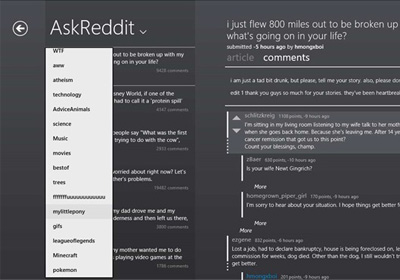
So you like lots and lots of cat pictures, right – and dog pictures, too? You may not know (or maybe you do), but Reddit is supposedly the only place where you’d find plethora of cats and dogs pictures, and a mix of other hilarious stuff. If you’re on Windows 8 and you can’t resist using Reddit - and you also like to stay within Metro the Modern UI - then Narwhal is probably what you need. It’s a Windows 8 Reddit client that lets you browse through your Reddit subscriptions and brings all your subreddits to the front page. It fully supports both tablets and desktops, the latter of which can be controlled using the mouse. Interestingly, Narwhal lets you browse the Reddit feeds even without a user account, but if you have got one or even multiple accounts, you may simultaneously handle them all, too. Continue reading for more details. Read More

Follow Major News Feeds With The Elegant ‘News Bento’ For Windows 8

One of the best things I like about Windows 8 is how the latest apps look and feel. Even though there’s been a lot of fuss regarding the all new hybrid OS and replacing Desktop with Start Screen, the winsome design of the Modern UI apps simply looks amazing. One of the latest addition we found on Windows Store’s ever growing population of apps, is News Bento. This beautiful app is for those who feel the urge to keep in touch with most of the latest happenings around the globe, so they don’t appear dull or boring during their next visit to a pub, or during water cooler sessions. News Bento allows you to personalize the news feeds from a selectable number of channels pertaining to News, Business, Technology, Entertainment, Sports and Photo & Design. Read More

How To Enable Windows 8 Store On Windows To Go PC [Tip]

You may have thought that Windows 8 is all about tablets and desktops, and the integration between these two platforms, and of course, the all new Windows Modern UI. You’re right, actually; Microsoft has build the OS from ground up, but Windows 8 also includes some brilliant features that really enhance overall user experience. If you have been a Linux user, you may know that Linux distributions allow users to burn entire OS to optical disc and removable storage mediums, so that one can easily use the OS without having to install it on the auxiliary storage medium. Such feature has always remained absent from Windows since its inception. Unlike Windows 7, which lets user install XP mode to use Windows XP compatible applications, the Enterprise version of Windows 8 comes packed with Windows To Go feature. Read More

Snoo: Windows 8 Reddit Client With A Tile-Based UI

Reddit has induced a never-ending addiction among social networking and media sharing aficionados, and has pretty much become an everyday internet chore. It’s a great portal to discuss and share anything you want, irrespective of any particular subject. In December 2011 alone, the social news site served almost 2 billion page views to 35 million visitors, which is quite an achievement for a social site other than Facebook. The folks behind this web juggernaut recently proclaimed the first Reddit Windows 8 client, the Snoo. Even though the app, as of now, is in its early stages, it still feels quite snappy and polished, and fully sports Windows 8 Modern UI. It provides an easy way to peek at everyday hot stories on Reddit and score your upvotes and downvotes, without firing up your web browser. The application includes almost all the functions that one would need to fiddle with Reddit. Read More