Crack 7zip Password Protected Archive [Hack]
7zip is the most recommended way of compressing the files into an archive. It is an opensource tool which allows quick compression and extraction of 7zip, Gzip, Zip, Rar, and other archives. Most users tend to lock the 7zip file with a password but hackers can still extract the archive by bypassing the password. Let me explain how.
7z Cracker is an opensource cracking tool which can extract any password protected 7zip file. It is developed for the purpose of helping users recover their files if they have forgotten the password.
The process is pretty straight forward, once you extract the 7z Cracker, grab the 7zip command line tool called 7za.exe(link given at the bottom of this post) and put it inside the same directory where 7zCracker is residing. Also move the password protected 7zip file (that you want to crack/extract) into the same directory. Now start 7zCracker.exe and enter the archive name along with the extension as shown in the screenshot below.
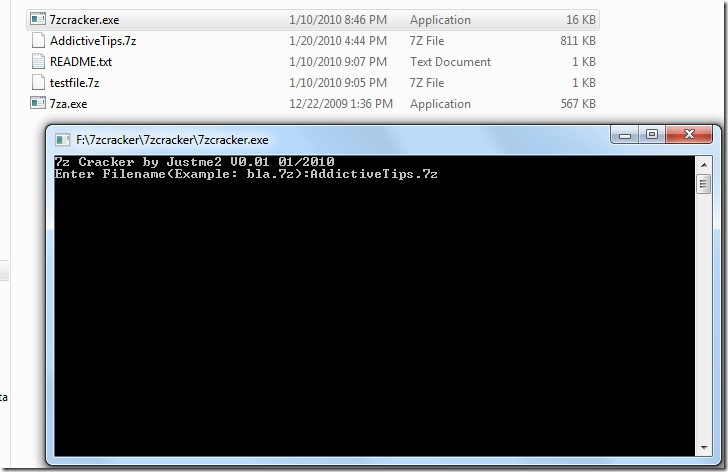
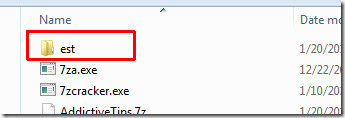
Once you hit Enter, the 7zip archive will be extracted and you will find the content inside the est folder.
Editor’s Important Note: While adding files to 7zip archive, just below the passwords field there is an option to encrypt the file name. I observed while testing that this is important for 7-Zip password security, because once this option is checked, 7zCracker will not be able to extract your files. So next time you password protect your 7zip archive, make sure that you have selected an option to encrypted the files as well.
Download 7zip Command Line Tool (7za.exe)
It works on all versions of Windows.

Ce programme teste les mots de passe composés uniquement de chiffres en commençant par ‘1″. A raison de 3.9 mots de passe par seconde ilpouurait mettre 40 minutes pour un code pin de 4 chiffres. Si vous entrez “0”, il s’arrête mais le dossier est est vide.
Ce programme est donc parfaitement inutile.
I forgot my 7z Password. So I tried these steps;
1. Extracted 7zcracker.exe in Folder 111
2. Placed 7za.exe with 7zcracker.exe in Folder 111
3. Placed the 7z Password Protected File in Folder 111
4. Started 7zcracker.exe with Admin User
5. Typed 7z Password Protected File name with extension, like: R.7z
6. It made est Folder, with all filenames inside the 7z Password Protected File
7. The files extracted were with 0 bytes.
8. So, can anyone explain, this application works these days or not?
I only need to identify the first letter of my Password, then I could get success!
Is it possible to do that?
Wow! It really works! Thanks man! Very cool app.
the file is empty 🙁
Produces 0 byte files in the est folder, no data. My files were actually encrypted while adding to the arcive, so this program is useless!
Works good in 2015
The last sentence in the Editor’s Important Note doesn’t seem to make any sense given your premise.
حسابي في استقرام هكروه
Likc
So cracker can extract ANY 7zip files… oh wait… except if you checkmarked the “encrypt box” when you added the files.
Huh?
So cracker can only encrypt files that I haven’t encrypted? That doesn’t make any sense at all.
> While adding files to 7zip archive, just below the passwords field there
is an option to
> encrypt the file name. While testing I observed that
once this option is checked,
> 7zCracker will not be able to extract your
files
So this app opens zip even with 16 letter pass (any of 0-9, a-Z, !-*^} included) ???
What a miracle, this really saved my bacon. Thanks.
what to do if the file i wanna to extract is have .part1.rar and .part2.rar…?
its say “Error : can not open file as archive” while it processing archive…
can someone tell me how to solve this problem..?
How did I exit the 7zcracker ?……won’t close
How do I*
Ctrl-C
It’s a worthless fake program. Don’t waste your time downloading this because all you will end up with in the “est” folder is what looks like your unzipped files but they will all be 0 bytes. A dog turd is more useful than this thing!
Thank you so much! now all the wifi passwords are mine! (i had to d a survey to get pass to use hack)
No chance i’m guessing the password, does this work or not?
It created all the directories and files within the .7z, but the files were all o bytes and nothing cameup when i tried to open them.
Not working
28 hours and still searching… omg…
will this crack password for extracting .exe files for packaging purposes?
Thanks, it worked.
it says that archive not found even though i copy the archive name into the cracker
i have a rar and zip passwpord protected file which i need to convert to 7z first then crack………..how to convert without giving the password?????
put and run all of the necessary files on your hard drive ROOT directory
I have facing the same problem like others. it’s show me ” password is 1″
Not worth it..
This worked for me. Didn’t print the password it found (printed’1′) but was able to decrypt a few files and put them in an ‘est’ folder it created.
Thanks
it can only crack number passwords!!!!!
^ this, and that’s really all there is to say about it so unless you regularly use all-digit pwds this is of no use to you.
useless! wasteoftime…
after 2 h im still waiting to find the code .. this program find letters and numbers or only numbers?
Useless
Testet with some file’s
Is this a fakeprogramm ???
This tool is just a simple C prog that tries the password 0 to 99999999 and doesn’t show any progress nor uses letters or special chars. So it’s mainly a simple program from someone who tries to learn a programming language, nothing more. It will fail on nearly all standard passwords, has no dictionary and prints no errors on wrong usage.
I agree
Fortunately, this tool does not work on the latest version of 7z – April 2010
oops sorry… the editor noticed already the “Encrypt file names” trick. so you can suppress all my comments…
it seems it only works fine with protected 7z files created with the option “Encrypt file names” checked. otherwise, it returns an empty file with ‘1’ as a password, as mentionned by zeragual.
The length of the file is 0. I've recorded it and you can see here : http://www.youtube.com/watch?v=-keYrIDL4IY
mate, perhaps your actual files are encrypted as mentioned, or are you extracting a self-protected 7zip ? Why i ask, is I am distributing 7zip protected works, and once we are paid, we will send the client the password. I’m just trying to find out if 7zip are secure or not, and if not what’s out there that we can use. I know zips are rars are no longer secure and havnt been for some time.
Best regards, i hope you have more success, for your sake, and not mine 😉
I've created archives with different passwords,it always writes that my password is '1' and creates empty files.
It writes that password is 1 but the files are extracted successfully inside the 'est' folder.
No its not… check the files! They’re empty. This tool is crap. It is exactly as good as claiming the regular 7za app can extract passworded files just by entering a random password. It extracts it, but they corrupted.
Delete the est folder and run it again. i have a core i5 and its running at 9 passwords per second all numbers atm. wud take a year to crack a basic pass 🙁
The file is empty.
idem!
Agreed
Maybe it only works with the 32bit version of 7zip? I tried it with 7z archives created using 64bit version and it didn't work…-EDP
Worked for me 5/24/2012! You never see the pw, but it extracts all the files! Fantastic. Thank you.