Fix Windows 7 Crash
It is quite hilarious to hear when people say Windows 7 is crash proof. Please note that no operating system is ever crash proof and there could be many reasons behind every crash. Back in year 2008, we talked about an application called WhoCrashed which helped user determine the real cause behind the crash.
The developer has now released the latest version(release 2.0) which is fully compatible with all versions of Windows 7. There is also an additional feature added to it – ability to reveal the exact drivers responsible for the crash.
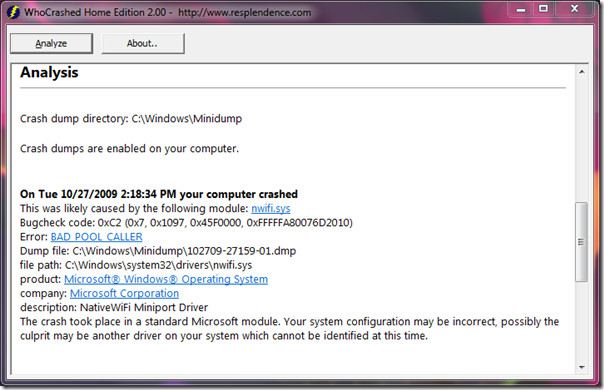
It downloads the Windows Debugging package before analyzing the cause behind the crash. If you already have this package, you can ignore this step. So how can it fix the Windows 7 crash? Once you know the real cause behind the crash it becomes fairly easy to fix the problem. The root cause is something everyone should look for, and tools like WhoCrashed or the BlueScreenView crash analyzer can help in this regard.
It even does the job of telling the reason behind every crash. Once it is fixed, your Windows won’t crash anymore. You can then pick up where left off with your work without worrying about system instability.
Download WhoCrashed (can be found in Download page)
It works on all versions of Windows, including the latest Windows 7. Both 32-bit and 64-bit OS are supported. Enjoy!

I recently had an update on my, not even 1yr old, Toshiba Qosmio which caused it to crash to blue screen requiring a total rebiuld.
I am not in impressed at all with microsoft, so much so that i am going to switch to mac.
No i am not a mac reseller but a really ticked of window user.
When i get the lap top back will get the offending download from history and out microsoft and take it further.
This was a business computer and lost a lot of data that is irreplaceable.
Windows 7 is a peice of crap very badly QA’ed OS….
The Windows 7 Team and their Testers should ALL be fired and their names recorded so that they never work for Microsoft again.
It’s so unfortunate to work with Microsoft then. Don’t buy Windows then. Heat is the problem.
Sad that you blame the test team, but not anyone else for the crash. You ARE aware that testers don’t create the bugs – the developers create bugs through poor coding, or bad/unclear design, right? I’m not excusing the test team, but there’s no way to know if it was a missed scenario, or something the product stakeholders chose to live with.
Quality is the responsibility of all members of the project, not just one area.
And if testing does catch bugs, that itself is no guarantee that they will be fixed – those decisions are made by the product stakeholders.
Win 7 loves to crash when running Firefox and streaming divx video.
This is truely silly hence Win 7 should be considered worse than Vista….
To be hosnest the Whocrash 80% of times will point to Windows Kernel NT because most of the time the WER fails to catch the actual driver or it might be a Hardware issue. Its best to seek help in some forums who could actually analyst it with Debugging Tools from Microsoft can easily find the cause. Well its just my opinion !
I didn’t have any crash with windows vista last 3years.
With windows 7 I had sudden crash just a little while ago… (I started using win7 2month
ago)
I was using Windows media player and Firefox. I was scrolling the media player window
and suddenly screen become full of colorful noise lines then blue screen, restarting.
Somebody said Memory leak caused the crash? I’m not keen at OS like this but
I thought recent OS is making a virtual memory to run program in it in order to
protect from memory leaking from vital area of main operation program.
anyways I just can’t believe this happened with latest OS and I wasn’t working today
but now I feel Win7 is so unreliable for working with.
I have had windows 7 since Christmas and my computer has only crashed 1 time! This was due to the new Memory leak in Internet Explorer unfortunately.
Sorry if you got confused by the title. I just wanted beginners to know what is possible with this tool. It helps us in fixing the problem rather than directly fixing the problem.
The article title is misleading. This program does not fix anything. The information provided may help diagnose the crash, but it's no more helpful than the details shown on the blue screen. Also check out BlueScreenView. It does not require Windows Debugging tools and shows you the same information this program does and more.
Sorry if you got confused by the title. I just wanted beginners to know what is possible with this tool. It helps us in fixing the problem rather than directly fixing the problem.
I have been running the Win7 RC since may and have not had one crash. None. Considering the amount of testing I run my computer through tells me Win7 is the most stable os release yet. YMMV.
Agreed. It is indeed very stable, but I encountered one crash in 4 months of testing. You never know which driver or software can bring the system down to it's knees.
Lucky you, I have been having crash issues on the average of 6 to 8 hours of use and the whole system locks up and nothing will respond. Just holding down the power key and full reboot. I have searched through the web and there are an endless number of sites concerning the same problem but no real solutions. My question is did you do a clean install on your machine with no previous OS or did you upgrade from Vista or XP? I have done the usual troubleshooting, like registry clean up, virus check, update everything with no change. I’m now wondering if the problem was due to me upgrading vista to windows 7. Maybe something got corrupt in that process. Any help would be great cause my next move to to go back to XP and wait for microsoft to figure this one out.
Heat is the best known problem for a stable OS like Windows 7. Mine crashes and cursor cannot be moved, that’s all I can do until I need to force shut the PC down. Hoist your laptop from the desk using a cloth or cooler.