How To Create Wireless Ad Hoc Internet Connection In Windows 8 [Tip]
Apart from Start Orb and classic Start Menu, what most Windows 7 users, who decided to take Windows 8 for a spin, miss in Windows 8 is ability to create ad-hoc network. If you’re a power users, you might’ve noticed that Windows 8 doesn’t include an option to create and setup ad hoc network connection to share files and internet with Wi-Fi enabled computers and devices. Windows 7 ad hoc connection feature does nothing except creating a shared connection with separate IP address to register the device on the virtual network. This allows users to use router’s default or specified DNS server address to easily connect to internet. You can also configure DNS in Windows to customize your network settings for optimal performance. Even though Windows 8 comes with ICS (Internet Connection Sharing) feature to allow devices to connect to yours PC internet connection, it doesn’t allow creating a wireless network connection to share the internet. In this post, we will look at some tools that let you easily create and manage ad-hoc connections in Windows 8.
Using Windows netsh Utility
The Network Shell (netsh) utility is basically developed to let users configure network devices in both client and server editions of Windows. The support for configuring WLAN using netsh was first introduced in Windows Vista, and it’s now available in Windows Server 2008, Windows 7 and Windows 8. Using netsh wlan command, one can easily use hosted network (virtualization) feature to create a virtual wireless connection. The Hosted Network is WLAN feature, which is designed to implement virtualization of physical network adapter. Since it plays a vital role in creating a virtual wireless adapter, it’s used by a majority of virtual Wi-Fi hotspot applications, such as Virtual WiFi Router, MyPublicWiFi, Marfi etc. So, if your NIC supports wireless hostednetwork / virtualization feature, then you can create an ad hoc wireless connection and turn your PC into Wi-Fi hotspot.
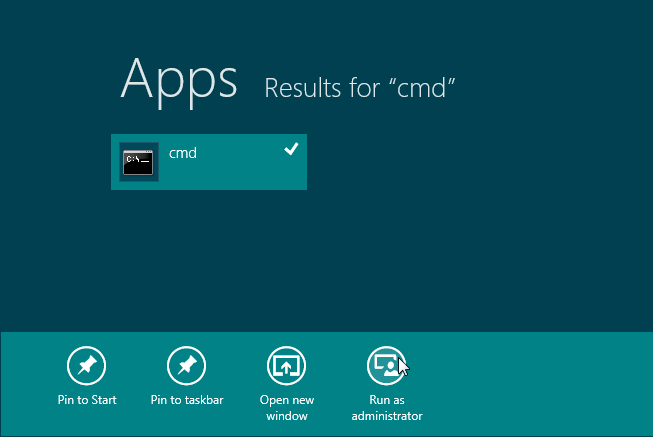
As stated earlier, both Windows 7 and Windows 8 natively support configuring ad hoc wireless connection using the netsh commands. In order to create an ad hoc connection in Windows 8 using netsh utility, run CMD with administrative privileges’; just type cmd on Start Screen, right-click it and select Run as administrator.
Now, first you need to check weather your network interface supports virtualization or not. Simply, run the following command to view Hosted network supported status.
netsh wlan show drivers
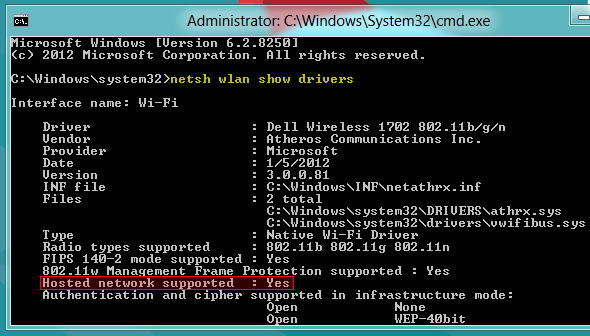
In case, it says No, you will need to update your network adapter’s driver. If your NIC supports virtualization, you’re good to go. Now, enter the following commands to configure an ad hoc wireless connection.
netsh wlan set hostednetwork mode=allow ssid=<network name> key=<passkey>
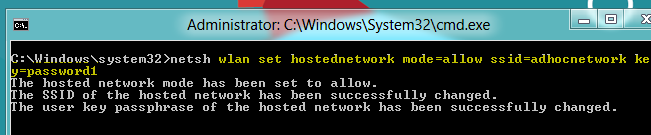
Once the hosted network has been set to allow, you need to start the mode to create an ad hoc connection. Just enter the command below.
netsh wlan start hostednetwork
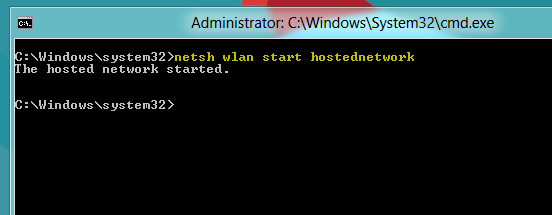
If it says “hosted network couldn’t started”, you need to disable current wireless network device and then enable it. You may also need to refresh network adapter list from Device Manger to install a virtual network device driver.
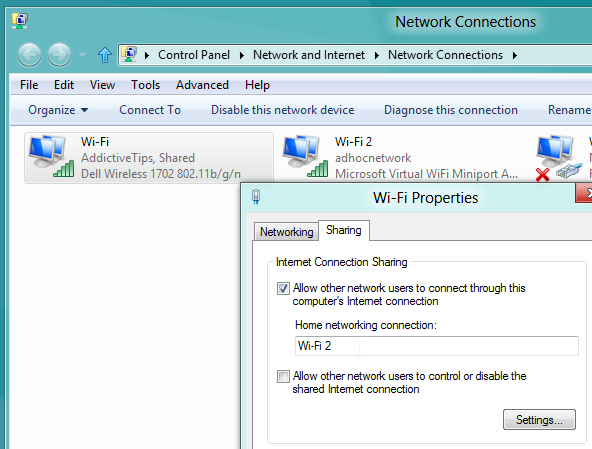
When the hosted network is started, enable ICS for newly created Wi-Fi connection, so that you can share your internet connection with others. In order to enable ICS feature, head over to Network and Internet –> Network Connections, and open Properties dialog of network device (which is connected to internet). Now, open Sharing tab, enable Allow other network users to connect through this computer’s Internet connection, and then choose the newly created ad hoc connection from the list. In our case, it’s Wi-Fi 2, as shown in the screenshot below.
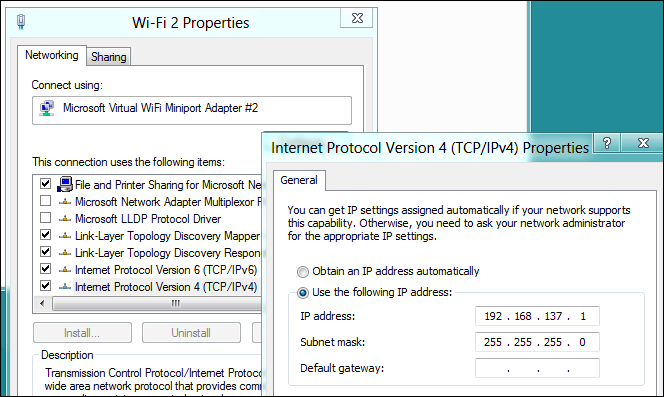
Once the internet connection is shared, check the IP address assigned to newly created ad hoc connection from TCP/IPv4 Properties to confirm the correct Wi-Fi IP settings. If it doesn’t assign IP address, then run netsh wlan start hostednetwork command in CMD.
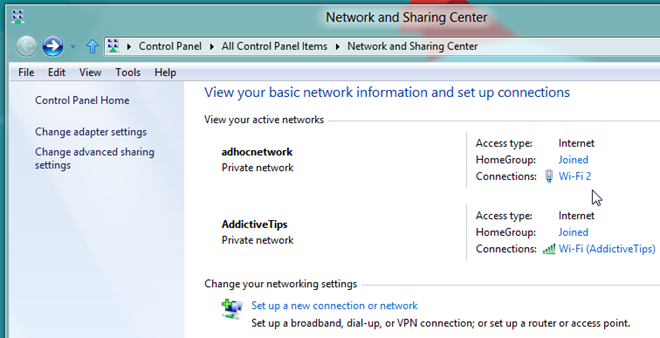
After following the above steps, you will be able to connect Wi-Fi enabled devices with your Windows 8 PC. As shown in the screenshot below, the current internet connection is successfully shared with ad hoc connection.
Using Third-Party Wi-Fi HotSpot Creator
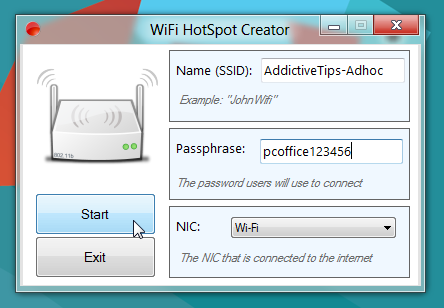
If you don’t want the fuss of having to manually configure a wireless ad hoc connection, then previously featured WiFi HotSpot Creator provides the best solution. It’s a zero-configuration software, designed to quickly create an ad hoc connection. It basically turns your PC into a virtual router, enabling all nearby Wi-Fi enabled devices to use your PC’s internet connection. All you need is to enter SSID name, passkey, and specify network interface to share the internet. When choosing your SSID name, you might want to get creative with amusing WiFi labels to make your network stand out. Clicking Start will turn your PC into a Wi-Fi hotspot.
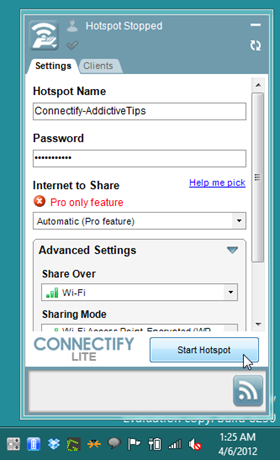
If you’re looking for a tool to configure the ad hoc connection and manage the connected devices from a unified interface, Connectify provides you with what you’ve been looking for. It’s an application that transforms your PC into a Wi-Fi hotspot, allowing you to share the internet connection with others. Apart from transforming your PC into a WiFi hotspot, it allows you to view and manage all connected devices, and set internet access permissions for each connected device.
It’s worth mentioning here that virtual WiFi creators require virtualization-enabled Network Adapter for creating WiFi Hotspot. So, if none of above methods work out for you, then you may need to install a NIC that supports virtualization feature.

I try to use my second Wifi stick as an access point that provides internet from my first wifi stick. But I fail.
Do you have got any experiences with that?
Ok I know this is an old post, but I am going to go ahead and spell it out since several people have asked about this on here.
Let me give you background…hotel room… wifi SUCKS but they have an ETHERNET connection that is OFF THE HOOK FAST. Bypass S%itty wifi and use ETHERNET.
NOW… based on what others have asked and not received an answer on, I have tried sharing the ETHERNET CONNECTION with the newly created virtual WIFI ADAPTER. I have done all of the steps and it either connects on the wifi device I am connecting with WITH NO INTERNET ACCESS or I get a STUPID A$$ message that says Connection TOO SLOW..BLAH BLAH.. RETRY on device connecting to shared internet connection? So without further adieu and some BS response.. can someone please help with that? I would love to know how to get this to work with an ETHERNET CONNECTION INTO DEVICE (LAPTOP OR DESKTOP RUNNING WINDOWS 8.1 AND WINDOWS 10 EVENTUALLY) sharing the connection to another WIFI device. Please refrain from responding if all you have is .. why do you want to do this and can you be more specific (as this is as specific as you can get).
“Why do you want to do this?”… for those of you that respond with this on a regular basis… do you have any idea how annoying you are and the fact this maybe your life? — Sorry I had to rant on that as I despise you people.
Thanks in advance with real solutions.
Great, thanks, works with me in windows 8.1
All of the above worked, but when I try connection from my other device, it asks for a network security key, any help ?
i had done everything as mentioned and its fine till i connect my phone to the established connection. I could not able to access internet but connection exist!!!!!!!
Plz help me.
how to see password when you forget it
doesn’t provide an IP to client on windows 8
I love you! they disconnected the wifi at work so my mobile phone bill was going through the roof, followed these instructions now I have wifi again on my phone 🙂 (used on win 8.1)
It worked! A little.
I managed to connect my computer to my android phone using the computer’s ethernet cable and my phone says it’s connected, but I can’t really acces the internet. I can still use whatsapp though.
Anyone know how to fix this?
There seems to be a problem with the DNS…
Thank you so much!
can you help me. when I try to connect using my ipad or any apple device, all it gets is the ip address and subnet mask. the part I highlighted in the picture says Ethernet and I can not change it no matter what I try. please comment me how
it doesnt work for my iPad 3, i followed all the instructions and everything 🙁
is there any way to create a wireless network without ad hoc i mean window 7 its easier to crate it but window 8 so much difficult
I made it, worked like a charm, for some reason the adhocnetwork disappeared
Hey guys I really need help, everything was working just fine then today I started the network as I always do “netsh wlan start hostednetwork” my tablet connected to it but there was no internet connection! I already tried everything but it just does not work any more! The problem is now I cant turn on the ICS (internet connection sharing) for my hosted network, when I try a new window opens and says “The service cannot accept control messages at this time”
everything owrks all right , connected to my iphone but it does not actually provide internet connection
It work perfect but after I restart it will delete everything.
i created my connection but i can’t connect because ip address
my local aria ip 192.168.1.2 /24 router 192.168.1.1
my shared connection ip 192.168.4.1/24
but what’s my gateway on shared network and the device that wants to be connect to the internet
there is a msg shown after “netsh wlan start hostednetwork” saying the group or recourse is not in th correct state to perform the requested operation……please help
Very neat and extremely useful! thanks mate
First I thought this would be cool, but then the more I read the more I got discouraged to do this. However, it could prove incredibly useful for those with a wired connedtion and no wifi router.
thk u so much
i tried it in cmd but i gate error “the hosted network couldn’t be started . The group or resource is not in not in the correct stat to perform the requested operation.” (my wifi is turned on during this time.)
This happen after you disable via Control Panel -> network adapters -> right click button on the virtual connection -> disable
To fix that go to Devide Manager (win-key + x + m on windows 8), then open the network adapters tree , right click button on Microsoft Hosted Network Virtual Adapter and click on enable.
Try now with the command netsh wlan start hostednetwork with admin privileges. It should work.
Note: If you don’t see the network adapter with name ‘Microsoft Hosted Network Virtual Adapter’ try on menu -> view -> show hidden devices in the Device Manager window.
I did exactly the same procedure. The Hotspot gets created and my ipad 3 does get connected too without any problem. But internet just doesn’t come. I tried several times with the same result. Is there anything to be tweaked on some other settings? What about the IP address?
it says “hosted network couldn’t started, I made your suggestions. But it did not fix. And it says ” A device attached to the system is not functioning”. Help me.
Thanks, well explained steps 10/10
Thank you! Works awesome! Just what I needed during my tour in afghanisan
with this can our computers lan to another computer to lan a game?
hey plzzz help!!! it worked fine on my android device but when i am unable to do so with my windows phone 8…plzzz help i really need it
I set up everything just perfectly, but when i go on my phone it wouldn’t open any webpage and wouldn’t load anything
Thank you. Worked brilliantly for me
i have created hotspot on my windows 8 laptop everything is fine but while connecting the created wifi with my other laptop it says connection failed plz help me
I mistakenly dissabled my ad hoc network and the icon suddenly disappeared. I tried repeating the steps but after typing wlan allow hosted network, it says “the group or resource is not in the current state to perform the requested operation” I also tried restarting my laptop, but it doesn;t seem to work. Any suggestions on how to enable it back again.
Thanks
Now Intel my wifi technology says no adapter found, and i can not use it anymore -_- .. can you please say how to revert this action ?
It does not generate a new IP adress, even after runing netsh wlan start hostednetwork command in CMD
The network is generated but my devices are unable to connect to it. Please help
Very helpfull
mu ckp senang a beruk ! mari wt a brayok
Why would you want to make this so difficult? I just “got a new laptop with Windows 8, my old laptop has windows 7, both versions of windows have a program called “Windows Easy Transfer”. If you need to transfer large files, contacts, settings, whatever, just start the “windows easy transfer” program on both computers, it will walk you through setting it up, choosing which pc is the “sending” and which is the “receiving” pc and voila, easy peasy.
You can even make it work between a windows xp pc and windows 7 or 8.
If you are trying to transfer files to or from your andriod phone, windows 8 has an app for that too.
Never could understand why techs and engineers have to try to make things so difficult and confusing. KISS=keep it stupid simple (or keep it simple stupid) which ever applies.
can u transmit internet (or create hostednetwork) in win8
If yes help me…
Thanks a ton .. the best solution available so far,, cheers
in network sharing center it shows no network acess please help
My System does not support “Hosted Network Support” can you kindly advise how can i do this on my system,
Hey there! This is great and seems to be the only way that I can connect my printer to my new (I hate it) WIN 8 machine. There used to be a startup option in XP that would allow me to run a .bat file to run at startup. I cannot seem to locate that on WIN8. So, how can I run this script on reboot with my (I hate it) WIN8 machine. So far, I am 3 hours into trying to consistently print with my printer. Thanks for your help!!!
Thanks!!!
how to connect internet on netsh wlan start hostednetwork
Hey thanks a million. I have another tech issue thou that I can’t fix. I clicked disable on the new network once I completed your adhoc proccess. How do I re-enable it?
An error acer to(“must run this command from a command prompt with administrator privilege”)
very helpful..thank u so much..
I have a friend who wants to revert back to Win7 just cause of this. This article helps, thanks.
Help…. I have encountered a problem, when I power down and restart the network and all the settings are gone. When I follow your cmd process it works fine and then I power down and its gone!! can you help please??
Please other computer can see my ad- hoc but when they connect to my ad-hoc the yellow caution sign shows on their laptop please what will i do??????
dear author , thanks
It’s ridiculous how many features they have removed from Windows 8…
thank you 🙂
This tutorial is very useful! 🙂 keep up the good work! its working!
HEY i USE A TOSHIBA LAPTOP RUNNING WINDOWS 8 AND WHEN I TRY TO SHARE MY ETHERNET CONNECTION WITH MY NEWLY ADDED ADHOC NETWORK I GET AN ERROR? PLEASE HELP!!
I’m trying to connect with my phone… It shows like it’s connected but… there’s actually no connection cause there’s no internet 🙁
some can help me. when I write (netsh wlan hostednetwork mode=allow ssid=adhocnetwork key=password1) doesn’t accept it and say (you must run this comman from administrator privilege? heeeeeeeeeeeeeeeeeeeelp please
right click command prompt and click run as administrator. that’s it. so you can write down the netsh.
run command prompt with admin rights
you dont write “adhocnetwork” or “password1” that is just an example you set up your ssid and key for whatever you want it to be
It shows in the tutorial you need admin cmd. You can get this by right clicking on it and click run as admistrator(need to know admin password to run it) or hit the windows button and x (may not work on versions below windows 8). One of the options is admin command prompt.
oops I meant right click on regular cmd.
I don’t see my newly created network in the ICS dropdown menu. Any help regarding this?
Nevermind, I managed to fix it:) This post helped me a lot, thank you!
Do you mind to tell how you fixed this? I’m stumped by the same issue.
THANK YOU very much .You done really great job.We are really appreciate you.Thank you.
hi dear
by mistake i disabled the local area network connection from properties of local area network in net and sharing center after that i am unable to start the hosted network from cmd it shows a message like “hosted network could not be started because the system is not in correct state”
please any body help me about it
pls enable network connection by right clicking on “network adapter”
i dont know my password…i wrote it 3640…but it cant join…help!
Same goes for me. But I think you need to have 8-64 charcters(32 binary). That is what it says after trying. AWESOME TUTORIAL!!!!
I have shared my network and the other system connected however cannot access internet… 🙁 any help much appreciated..
Its working properly…well explained. (Y)
hi. i have a problem with this step :”netsh wlan start hostednetwork”
when i enter that i see this error that “error message the group or resource is not in the correct state to perform the requested operation” and i disable current wireless network device and then enable it but i have problem.
please help me
I also face above problem plz help
just reinstall the wireless wifi driver and do scan for hardware changes in device manager u will their that virtual adapter disabled ,,,enable it…
How do you do that?
GREAT POST!!!!!!!!!! thanks a lot!!!!!
Will this work with a Windows RT device as well? I have a Surface and would like to tether to an iPhone app which specifies a SOCKS Proxy as well as the static IP Address and subnet mask. Thanks!
wifi is connected on my mobile but it is not able to open any web page
I am successful to set up a wifi hotspot and my cellphone is connected as wel, but unfortunately my android phone is unable to exchange bytes . can anyone help me to resolve this issue?
i craet anetwork but when i restart the bc it became dosnot work …. what is the prop…. please
awesome article and very helpfull…….thanks so much for great help…!!!!!!!
thank you so so much. i was hasseling with windows 7 network bridge and ad hoc network tips.
. how can i fix it ?? cmd says the hosted network couldn’t be started
on the 4th picture tips above i mean. please reply. thanks
Thanx, Thanx, Thanx a zillion, Usman! Just when I thought of downgrading to Windows 7, I came across your post.
Thanx again.
OMG! FINALLY!! I have been trying for 2 days to setup my windows 8 laptop as a wireless access point to save data usage on my (and my wife has one too) Samsung Galaxy Note 2, tried several programs, calls for help, etc. etc. THANK YOU!!! you guys are awesome!! had a problem with getting the Note 2 to connect, so I wrote down the info from the C: prompt window that was related to Wireless LAN adapter connection that I had just set up following your steps, chose advanced settings on my phone, entered the numbers shown and also selected static for IP address and it connected. WHEW! hopefully the desktop shrotcut I chose to create will make this easier to repeat. Thanks again-you are amazing!!
And I have to thank you for pointing out trying manually entering static IP address, now it works for me too. And while I’m at it I join you in thanking these guys who wrote the guide.
Thank you so much! I have the AT&T Communication Manger installed. I lost the ability to share my connection when I upgraded to Windows 8. Not only did this work, but it kicked something in the AT&T Software as well. Now I can share my connection using windows or the AT&T software.
Thanks very much
Thank you!!
Very useful…works a treat on W7 and W8.
When I Disabled It, it disappears from adapter settings and now its not even showing in device manager
Just go to device manager disable your Network Adapter wait for 5 sec then enable it. It should show Hosted Network then right click on it and enable. Hope this helps.
do you have to be connected via wireless to do this? my laptop is on a wired conection and trying to create a woireless access point for phone
verry usefull tutorial. Works like a charm! Thank you very much
other computer can see my ad-hoc but whenever i connect it requires password which i don’t know, reply please
use your key which is provided in command prompt while setting your hot spot.
thank a lot 🙂
The above article did not work using Windows 8. I want to create a wifi hotspot shared with an Ethernet connection as you would find in a hotel setup. Wifi hotspot creator failed to work with Windows 8! However!! Coneectify does work!! It appears that some .NET framework files were missing that Connectify identified and installed. It works a treat!! You can now do what Windows 7 did! Connectify Lite is free and is a great adhoc tool. Easy to setup and use.
You can do it with the above mentioned steps on windows 8. you need to connect from the Dialup connetion which created automatically when dongle your 3G Dongle instalation. make sure not to use your internet providers connection menu which is installing together with the 3G Dongle.
the problem is that everything is lost when the computer is restarted
Inorder to avoid the hassle of configuring again n again, put all the comands in bat file and run it as admin! ! 😀
Help…. I too have the same problem that when I power down and restart the network and all the settings are gone. I see you suggest put all the commands in bat file, how do I do that??
Create a Notepad/Wordpad file on your desktop. From there, type all the commands you would type into the command prompt. Example: line1 in notepad file: netsh wlan set hostednetwork mode=allow ssid= key=
line 2: netsh wlan start hostednetwork
After you are done, you save the file as “Whatever you want it named” with “.bat” after the name you entered with no spaces in between them. Throw that bad boy on your desktop and double click it when you turn on your computer, and BAM, there’s your network already made.
If you want to change the name or the password at any time, just right click the file, Open With either notepad or Wordpad, and edit your preferences. Then just save it again, and there ya go.
Hope this helps.
thank you 🙂 i can now connect my galaxy y to my laptop 🙂
Is there a way of doing this automatically on startup? It is working perfectly otherwise.
You can make a batch file after startup.
Thank You Very much
Lifesaver. Thanks for this. Very helpful
I cannot connect to more than one client at once.
I followed u’r instructions and everything went fine, but I don’t know why my computer uses the “Local area connection” as the ad hoc network!Therefore i can’t connect the “wi-fi” connection. I should mention that I use a DNS connection on my computer and I want that to be shared!
I cannot share enable sharing from virtual drive to LAN connection
I have no idea what the others are complaining about, I did this on Windows 8 and I can easily share my connection with adhoc. Works perfect for me, now I can use the wifi on my phone and laptop! Thanks a lot!
AWESOME. A very well written guide that worked perfectly for me.
HP dm4, late 2010. Windows 8 CP.
what wrong my windows 8 dont have adhoc. its only cmd. i try it but failed
Run Command Prompt as Administrative User.
you need to create adhoc first in network sharing center. after that run the command prompt as administrator to enable the microsoft wifi virtual miniport adapter
it is not adhoc connection, its called softAP, you cant create ad hoc connection because this feature is missing.