Microsoft Security Essentials Review (With Screenshots)
Microsoft Security Essentials is the name of Microsoft’s latest Anti-Virus/Anti-Spyware software for Windows operating system. It is already being tested internally at Microsoft and is rumored to launch in September of this year. We were lucky to gets hands on the pre-beta build version of Security Essentials. I tested it on Windows Vista and was quite impressed with it. Below is the complete review along with some interesting findings.
Update: Microsoft Security Essentials has finally been released to the public, check it out here.
Note: Click the images below to enlarge.
Installation
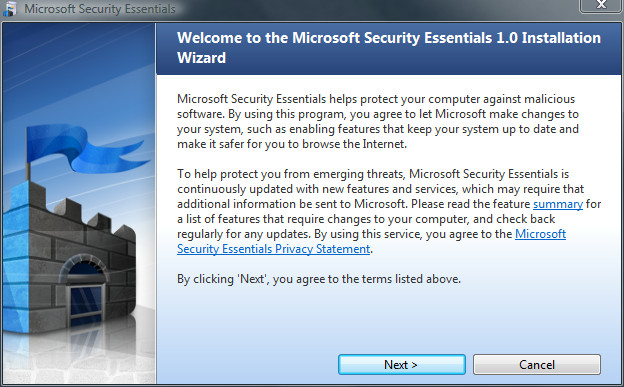
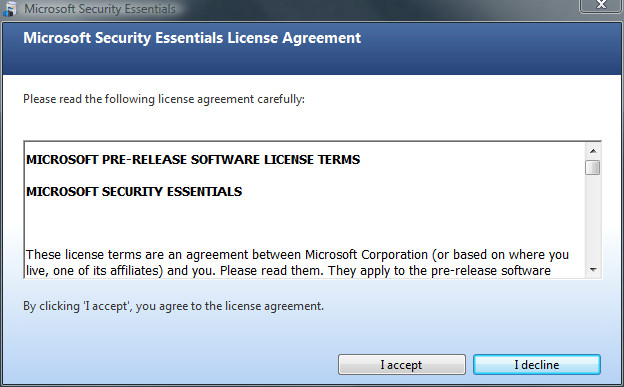
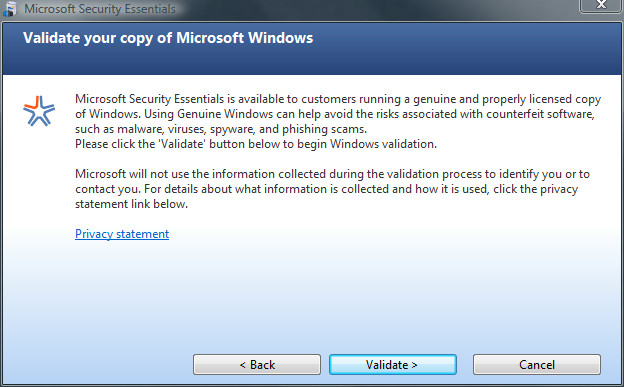
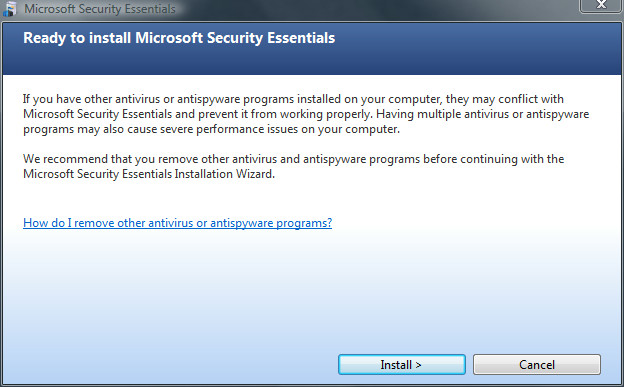
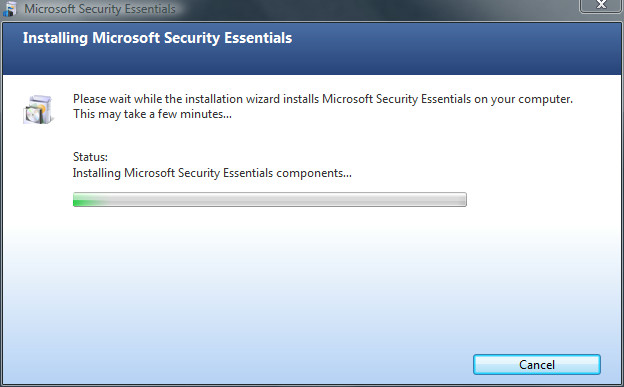
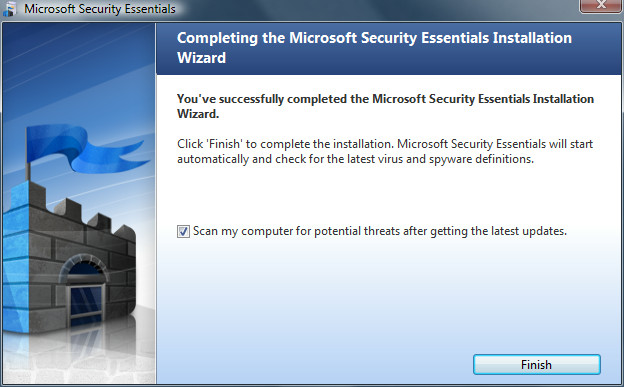
Installation was a breeze, here are the step-by-step procedure for installation. When you run the installer for the first time, you are shown the welcome screen, click Next.
Using Security Essentials
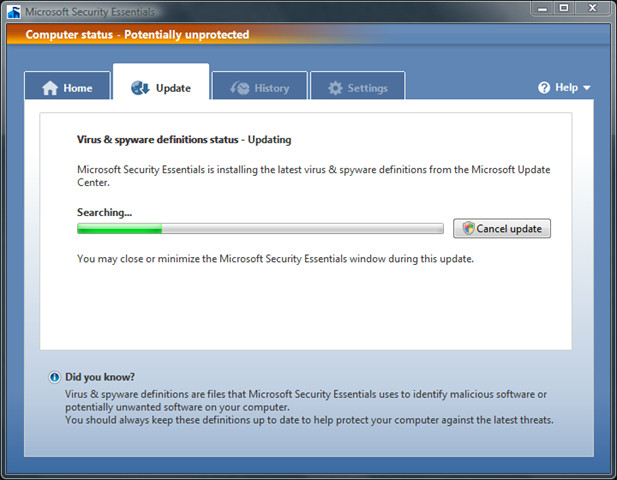
Once installation is complete, you will be redirected to automatic virus & spyware definition updates.
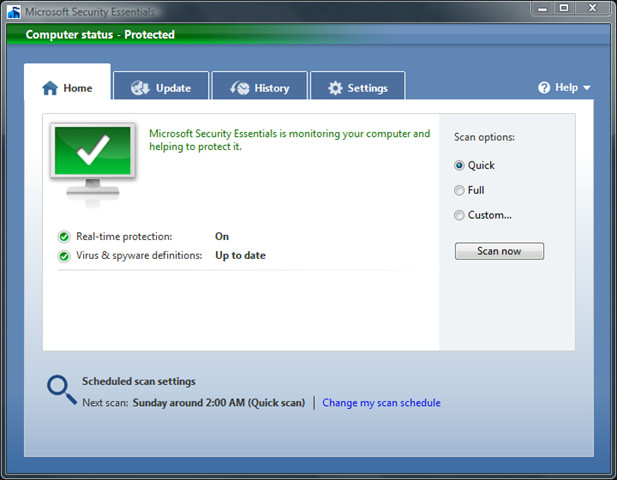
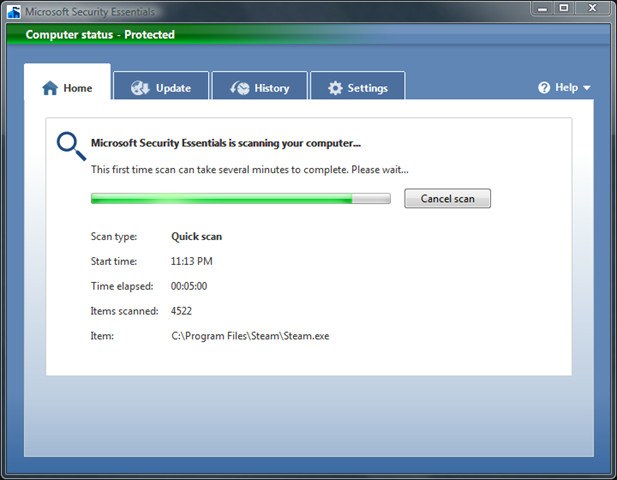
Update: For those thinking why I did not perform a full scan, the problem was not about time(although I did perform it later). There was no need to review the Full Scan option, because it is just similar to Quick Scan but instead scanned all locations of hard disk.
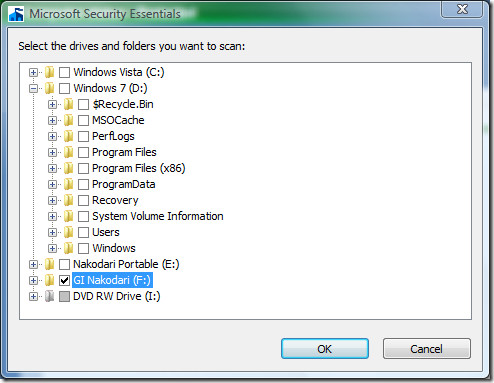
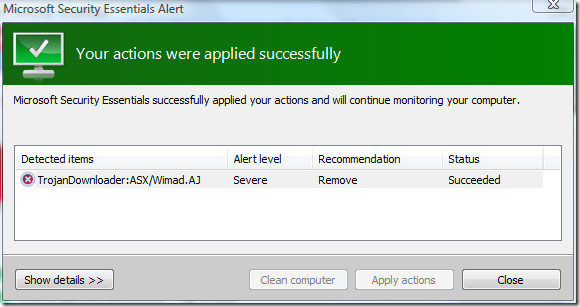
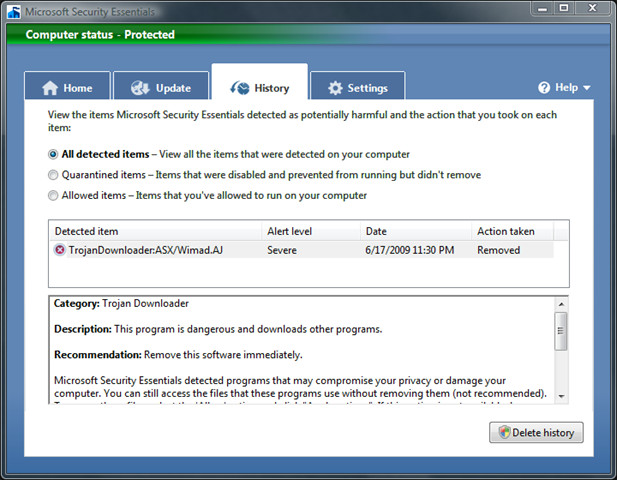
This is how the Home window looks like when a threat is detected.
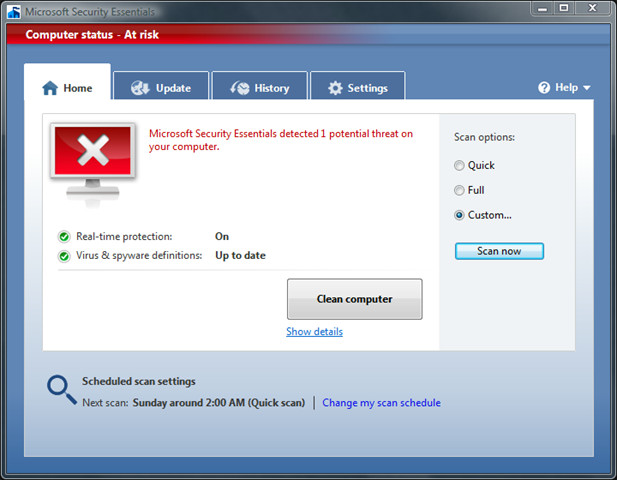
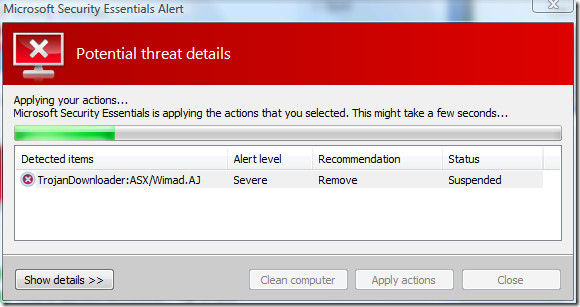
I have to commend Security Essentials for finding and removing this stupid Trojan.
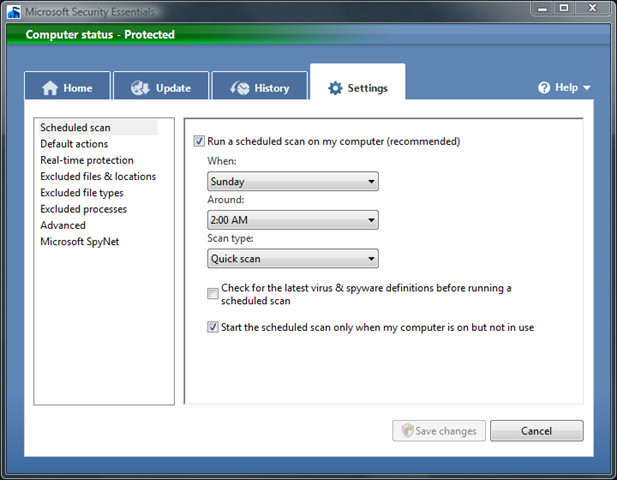
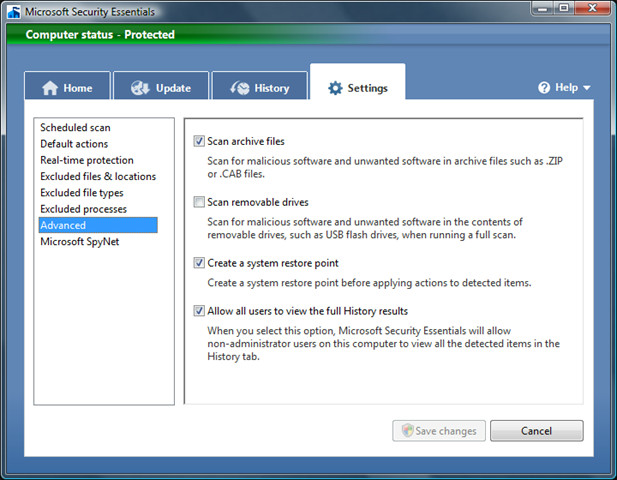
To schedule a scan you can either click Change My Scan Schedule link on the Home window or go straight to Settings.
Conclusion
Since I tested the pre-beta build, it is quite difficult to draw the final verdict. But one thing that held out is it’s ease-of-use and small memory footprint. The overall size of the software installer is only 4.8MB and takes around 6.6MB + 36MB(runs two different processes) when running on my system. Which is quite impressive if you look at the fact that it detected and removed a Trojan downloader that NOD32 even failed to detect in the first place. Just for the sake of comparison ESET NOD32 takes 35MB of system memory, which means approx 28.4MB more than Security Essentials. 😉 Enjoy!

Yeah… I never went through installation, never went through that process. Everything seems legit, but I’ve been having a HUGE slowdown issue with my computer, and I suspect it has something to do with this microsoft security essentials program… anybody got any pointers?
Maybe you can reduce the amount of power percentage the processor should dedicate to Microsoft Security Essentials. I have mine on 30% and don’t notice any slowdown.
Yeah… I never went through installation, never went through that process. Everything seems legit, but I’ve been having a HUGE slowdown issue with my computer, and I suspect it has something to do with this microsoft security essentials program… anybody got any pointers?
There is a 1800 Text installed on my C drive by Microsoft Essentials which is slowing my computer down. Unable to access your troubleshoot site.
i just installed Mse and are keeping kasperski to- hope it works
Not a good idea to keep 2 anti-virus on one system.
i justinstalled MSE and i am keeping my kasperski to, – will see what happens
im using mse for my dell inspiron it really rocks….. im not accessing internet frequently…so how many days once it needs to be updated?
im using mse for my dell inspiron it really rocks…….but how many days once it needs to be updated?
Read through alot of forums and windows itself that you should remove any other virus scanners in order for MSE to work properly.
I installed Microsoft Security Essentials today and im waiting till it updates.But i was told that it doesnt work properly unless your windows is genuine? Any Idea how thats working?
I had to ditch MSE from all three of my computers. On my newest W7 desktop, it gave me a scary message that my Windows wasn’t genuine a month after it had validated and loaded. Erased the sucker. On my 7-year-old XP desktop, it ran fine until I tried to do two things at once. Crashed so I erased the sucker. On my 5-year old XP laptop, it ran so slow that it took an hour to update the MSE definitions. Erased the sucker. This is as slow as AVG Free, it found diddly on all three computers and it gives scary messages for no reason at all. Erase the sucker is my advice.
I never believed in these MS apps. (defender) it never found anything. I’ve been using Avast Pro. for years. Did the job well until this week got infected with a bad Trojan called HOTFIX.EXE . It downloads into your appdata / roaming file and stopped EVERY thing form launching browsers, taskmanger, farther more NO antivirus or malware will even pick it up and it RUNS IN SAFE MODE. Had to use my other computer to get help and removed and cleaned it manually. Then I decided to give MSE a try. After installed I went back to where I got infected and tried it out and WOW to my surprise MSE got it instantly. MSE made me a believer. Best of all, MSE is free. Just making it a point to do daily updates on it. I don’t trust on these automatic updates. New harmful things are created by the minute, and these Anti-V’s definitions are created and accumulate before your auto-update sets off. I’ve done it manually and had updates that the auto didn’t get.
Thumbs up for ”MSE”.
hi all, anti-technology but have just had to get a laptop as live in a very isolated area. my laptop was running slowly and the free trial security ran out so i downloaded mse and it works faster now but i don’t understand why there is never anything in the history box. any ideas; otherwise, how do i know mse is functioning properly?
mse is the best antivirus
it does not even slow down your computer
and microsofts thing are always reliable but it does not detect spyware
there is a microsoft tool for this named microsoft malicious software removal tool
download it here
http://www.microsoft.com/security/malwareremove/default.aspx
I’ve used former antivirus programs such as Avast, McAfee, Norman and SuperAntispyware. That didn’t stop me from getting a virus. Then I installed MSE (and Malwarebytes as an extra) and have had no problems whatsoever. I’m on a site that apparently has had a lot of viruses running around and infecting a lot of computers and making them run more slowly. Not mine.
This worked better than any other commertial AV.
mse is the best anti virus of microsoft because it need no licence key
i need more powerfull anti virus because some virus delete my very important files . infact i was tottly depended on the microsoft security essentialls
Install PC Tools ThreatFire along with MSE. They work excellent together. Google it if in doubt.
THE SITE IS DOWN FOR NOW!!!!DONT KNOW FOR HOW LONG, BUT MAYBE THEIR ON VACATION!!!
i have just installed MSE. it asked for update n im shocked to find that www.microsoft.com is unavailable to solve my problem… im using windows xp servicepack 2 .. kindly help me out from this..
SP2 is dead you should be on SP3. Upgrade at Microsoft. They wont service SP2 anymore. Look at your automatic updates. You missed the boat.
FYI: Windows Defender is primarily a Spyware/Adware remover. MSE is an actual AV program, although I noticed that my MS |Defender was “upgraded” at some point to detect and remove viruses as MSE does. MSE seems to work efficiently for me.
MSE is the best av i have ever had its stronger than bit defender and than kaspersky !!!!!!!!!!!!!!!!!!!!!!!!!!!!!!
As a certified engineer for a Manage Server Provider I have extensive experience in all leading AV products. Over the years I have proved that the Mcafee, Trend and Symantec are popular because of their marketting machine and at the end of the day they all have there strengths and weaknesses and they cost more than they’re worth. In all the complex trials that I have conducted MSE is on par with the others yet it’s free. For any home\business to spend $XX/pc/year on SAV or Trend is outrageous. If you get viruses then your doing something you’re not supposed to be doing!. My first MSE deployment to a 30desktop network last year has been extremely successfull, no outbreaks, or killed PC. Forefront For Exchange complimented the desktop solution. F4E is so cheap. I have no intentions of recommending SAV\TRend\ CA ever again. I have saved companies thousand of $ since by recommending MSE. As if trend, Mcafee, SAV are going to reimeburse you if a definition screws up or a virus gets through. Microsoft are getting their act together.. lookout vendors.
“If you get viruses then your doing something you’re not supposed to be doing”
Point A: It’s you’re in both cases, not your.
Point B: Your statement is a bs generalisation, people can get viruses from the most innocent of search queries, and through Facebook friend requests, all manner of scenarios.
Hardly ‘doing something you’re not supposed to be doing’ in my view.
I have been using the MSE for a few weeks now & I found it extremely good in detection of spyware & Trojans & viruses..(this is subjected to the frequency on which the program is updated of course!!).. If you are updating with latest definitions per 2-4 days its the best AV program I have encountered yet ..
MSE was the first thing I installed on a new computer I just received after deleting all the bloatware programs that originally came on with the computer (Gateway FX6831-03). Then the tedious process of moving over all my files began. MSE detected and removed a Trojan called JS/Kak.gen. It was hiding in one of the many e-mail folders I brought over to the new computer via a flash drive. So tip of the hat to MSE for detecting a Trojan that had been sitting on my old computer, probably for years (was using McAffe on that one).
I like the new MSE but miss and need the options in windows defender, like to disable programs that start up with windows. I hope they stil provide a way to access the startup folder.
msconfig… type it in “start” search bar?
people are facing few errors and problems in Microsoft Security Essentials, like updating error; I got the solutions shared at under given URL for Microsoft Security Essentials. I like to share with others, perhaps this can help someone came to this website for Microsoft Security Essentials; PLease allow me to share with othershttp://www.itoperationz.com/2010/03/microsoft-s…http://www.itoperationz.com/2010/03/microsoft-s…
if you use microsoft windows then only use microsoft security because only microsoft knows there windows better then other heavy antivirus which actually updates viruses to ur computer microsoft is best!
very very VERY bad anti virus progammmy other anti spyware progamm already deleted 4 virusses, while microsoft security didnt even find onethis is by far the suckiest anti virus i had
I love ignorant posts like this. It means nothing.
One thing that I've noticed, while Nod32 interacts with Google Chrome browser (somehow, it doesn't affect IE8 or FF3.6), MSE does not. So I'm using MSE for everyday/real time use and am very happy with it. I do a full scan with both Nod32 and MSE once a week, and both seem about equal there.
I like MSE. I haven't used a virus scanner for years because of the overhead. Then I got one of those crappy virus alarms that some companies do to get you to use their rubbish. I confirmed that it was a false alarm with MSE, checked MSE's effect on performance (trivial) and have had it running for a couple of weeks now. I like everything about it, particularly the simplicity of the interface. MS should have done this many years ago. Any of the anti-MS freaks thinking of flaming me are wasting their time. I don't look at any threads regularly, and don't give a toss what anybody says about me anyway. My advice to anybody thinking of AV protection is try MSE. It's free, seems fairly effective, and the risk of virus infection is trivial if you're sensible in the sites you visit. I think I've had about 5 infections in 20 years, 3 from other people's disks and 2 from emails.
for me, its working great. affected with w32.silly. symantec failed to remove, MSE worked. I am using both on my pc. Cpu usage 4%. not slwoing down pc.
My opinion? Who would know what shouldn't be doing what on an MS OS better than MS themselves, and moreso, what should belong (hense less false-positives).Not an MS fanboy, but had it with Norton slowing machines to a crawl. Used to love it, now, not so much. Perhaps it might detect an extra virus or two over the long haul, but someone like me who knows enough to steer clear of most viruses, I will take the performance over Norton slowing me down. Can't beat the price either.I used to have the former MS OneCare which was great and likely what Security Essentials is based off.Sorry Norton, I think your antivirus may be trying to do too much these days, at least for an advanced user.
MSE is very good! It detects a worm that a LICENCED SYMMANTEC Antivirus failed to detect. I like it and I'm satisfied with its performance.
Too much hate and bulgarity, not enough civility and friendliness and love of neighbors.
Can It be Compared With Norton And Bitdefender 2010
Can It be Compared With Norton And Bitdefender 2010
I use Firefox 3.56 , and Essentials is playing nice with it in Vista. Love the light load on my system.
If you like using Firefox- DO NOT USE IT! Microsoft DOES NOT play fair with competition, especially if they are better. Firefox would freeze up and not connect with Essentials, Back to McAffe-No problems!
If you like using Firefox- DO NOT USE IT! Microsoft DOES NOT play fair with competition, especially if they are better. Firefox would freeze up and not connect with Essentials, Back to McAffe-No problems!
Microsoft epic pwns mac.
I re-installed XP after a series of virus damages.After the install, I also installed AVG.Then I installed Microsoft Security Essentials.It consumes about 50% of the CPU cycles for about 1 hour after startup. consumes about 100 Meg of paging during this period. The result is it is nearly impossible to do anything for the first hour of the day.What should I do? Should I remove AVG? Are the two compting? (no signs that I can see).Should I remove Microsoft Security Essentials? How.Thank you.
You should really really never install two virusscanners at once while using the on-access components of both simultaneously. Never! Apart from that it will slow your computer down to the extent of not being able to work with it anymore, there are most certainly conflicts turning up on a regular basis.
Microsoft Security Essentials seems to have no e/mailscanner. Should I uninstall AVG and skip e/mail scanning?Seems not. So, I can tell AVG not to do a full scan and useit for e/mail only, or I can disable Microsoft SecurityEssentials.Not sure how to disable MSE, but when I disable fullscanning on AVG, the startup problem still occurs.Microsoft Security Essentials is worse than the virus I'mtrying to prevent. It screws up my machine every time, notjust occasionally. How do I uninstall MSE? At least untilMicrosoft fixes it.Thank you. /Stu Stuart BellCell (561)352-1796 Voice/Fax:(561)355-8227stu@shearwater-sailing.com1993 Gemini 3400 #379: Shearwater
Evidently it's not the full scan that's giving you problems, but the ON-ACCESS scanning components trying to do the same thing simultaneously whenever you open/copy a file: scan it before you use it. A full scan is just a run through all your files at once, a procedure that shouldn't be necessary after the first time as long as the on-access scanner is constantly active.An email scanning component is overrated: it might even get you into significant trouble with messages having big attachments as the virusscanner downloads the message and the email client thinks it's suffering from a connection timeout. Most on-access scanners are sufficiently equipped to catch any email viruses before becoming active, so you can do pretty well without an email scanner.Evidently, your problem still occurs because you didn't disable the on-access scanning component. The only one screwing up your PC is you for installing two antivirus products at once. There is nothing to fix, other than you needing to make a choice: it's either AVG or MSE. But as I said, both products CAN work next to each other, as long as you disable any resident scanners (on-access) from either of the two products.
Thank you again for your comments.I'm made the choice, I just can't figure out how to removethe Microsoft product. I've partially disabled it in”services”, but it is still there and still takes upresources.Is there any way to remove it?/Stu Stuart BellCell (561)352-1796 Voice/Fax:(561)355-8227stu@shearwater-sailing.com1993 Gemini 3400 #379: Shearwater
As with ALL properly installed software, there should be an entry in 'Programs and Features' (just type that in the Start Menu and you'll get there). Just double-click on the entry for MSE. Don't disable the service manually (hence now re-enable and start) before the uninstall procedure, you'll never know whether this might give any exceptions during the removal procedure.
Thank you. I will try again later when Microsoft works thekinks out.Nice to have my machine back. /Stu Stuart BellCell (561)352-1796 Voice/Fax:(561)355-8227stu@shearwater-sailing.com1993 Gemini 3400 #379: Shearwater
Had to reinstall my XP. Lost Security Essential. I cannot reinstall. Getting as far as the forth sceen, – Install-then as soon as it starts to “Install” a error messege comes up, sorry , restart your computer and try again. Originally I have unistalled it. Any suggestion ?.Thank you, Bert
Did you wipe your drive before reinstalling or did you install it right over the old installation?
Obviously he would have done the latter(i.e, did not wipe out the drive). The only way to fix it would be to search for Security Essentials in Registry and remove the related keys.
Thanks, I am dennied to remove Security Essentials from the Registry.
Thanks, but cannot remove the old version from program files, Add-Remove. Cannot remove from registry. I am stuck. Looks like have to live without it.Bert
Correction, I could remove it from Add-Remove Programs. Just about thats all.Everything else is denied.Bert
Worked great… I had a laptop I was about to throw out it was so slow. Norton didn't do anything for it. I ran Essentials (long time – over 2 hours), but after it was done cleaning up multiple infections the laptop was running like new. Pretty good product, esp for free, if you ask me.
I'd say Norton could've been part of the problem 😛 What version was that? The 2003-2007(8?) versions slowed down most computers to a degree that made it impossible to work on them.
Where's the review portion? This is an installation and usage guide!
I agree, this is not really a review, more a sneak peek. I might be of some more help there: http://www.asymmetrics.nl/microsoft-security-es…
just being a polite guest here, but are you guys getting paid to argue about which is better ?if so can i join…… any ways i recently jumped of the pirated software ship and thougth i'd go windows vista ,before that i was using a copy of windows xp running AVG 8.5 (crack) it failed to detect a trojan win32.alureon.wk! which, A squared from emsisoft detected but couldnt remove , when i installed mse on first deep scan it detected not 1 but 2 trojans and some hidden drivers, point is all a/v are good but if you have a “free” or “cracked version you probably arent 100% protected
Holy crap! Remind me never to post anything positive about a Microsoft product. The writer of the article simply made some observations about the software based on what he had available. I didn't read any parts where he claimed it was perfect or that it was somehow better than everything else. Simply that it was easy to install, easy to understand and for something free it detected a trojan that something you pay for didn't. Its quite possible that NOD has a list of things it can detect that MSE can't. Atleast he took the time to try to tell people about it. If you guys have such a rager to bash the review(er) then download it yourselves and come to your own conclusions. At under 5 mb it would probably be quicker than spending the time writting nasty post. Reminds me of a bunch of quippy old women who's bus to the bingo game is running late. -Nakodari, thank you for the insight. I've downloaded it on a fresh system. It was simple as described. Now we'll see if it does the job. If it doesn't, then well it was free what's to complain about?
and the verdict is in… unfortunately upon install i ran into the catch, if you look in settings under the heading spynet, you will find that microsoft has graciously included their spynet community for free. by installing mse you effectively agree to all terms and conditions of the base program as well as spynet (which you can not opt out of). upon reading what spynet is you are informed that it collects data automatically and with out request (both personal and technical) and reports it to microsoft. again YOU CAN NOT OPT OUT OF THIS AND IT DOES NOT ASK PERMISSION. how can this be you ask, simple you agree to the terms when you install mse. if you read the agreement for spy net which is not included in the install (who reads that stuff anyway), you have to actually browse to the mse site to find it, microsoft basically absolves themselves of any wrongdoing and words the agreement in such a way that they can essentially do whatever they chose with the automatically collected data ( personal and otherwise) a good program it may be, i will never know as i am opposed to shuch information gathering tactics that give the user no choice. it’s your information, you should always have a choice in where it goes and when.
Don't be such a paranoid, it's not sending any personal data. In fact, in order to get you some better protection it's damn important that the data like file location, size, maybe hash or whatever is sent to an antivirus software company. I don't have any problems with this, and frankly neither should you. If you're paranoid, stay off of Facebook, Twitter, don't use a webmail service to archive your personal messages, but don't shout out loud that it's preposterous that a company tries to increase its service towards you by harvesting some harmless information.Have a look at my review, some more text, instead of mere screenshot-mania: http://www.asymmetrics.nl/?q=node/33
where i have not tested the mse as of yet, i must say this thread is quite nice aside from the obvious few posts of little “taste” lets say. i have to say that it is not a false positive. AVG, spybot, and adaware to name a few pick it up as well and it is a well documented bug if you care to do a quick google on it. nod32 missed it because of how it scans and how the virus it self is brought in to the system. this review has prompted me to give mse the benefit of the doubt and even a trial. there is a lot of good information here for, dare i say the less informed, to follow some key points being: no single program will catch everything, there is a huge difference between spyware/virus/and general malware, a good combination of streamlined and trustworthy programs, such as avg-spybot-ccleaner, and smart browsing practices are your best line of defense. at any rate getting a little rambled here so i close in saying thanks for the review and comments, and i am now leaving zone alarm security to test mse
Nice to know Ms comes out with something useful and free… But, Please don’t be so dependent to it… NO anti-virus can fully protect your computer 100%. I’ve been executing so many viruses on my computer the only thing I can say is NO ANTI-VIRUS CAN detect everything. Especially the 3rd generation virus which is no longer in .exe or .com or .ini or any other format
If one wants to install Microsoft Security Essentials, when does one uninstall windows one care.
Many people forget that Defender is not just an anti-malware: it has other interesting features you can explore in the Tools options…
For example can monitor what programs are currently only, at what port thery are connected etc.; can disable/enable AutoRun applications etc.
I’m afraid these useful options will disappear if they’ll merge everything in MSE.
What’s the difference between “Clean computer” and “Apply actions” buttons on the virus screen? Don’t they do the same thing…?
It found three trojans on my machine and none of the other virus checkers I have used have
picked them up so I’m happy……. Microsoft still sucks but I’m happy…
if you want to test your boxes with various antivirus then run different systems virtually with various antivirus solutions. Then place known viruses on the systems to see how the antivirus products act.
More simpler? Go back to grammar school.
Go back to troll school.
Yesterday I installed MSE on 2 of my pc’s
On one pc I’m using NOD32 / MSE found a trojan , which was not detctet by NOD32
On the other pc I’m using Trend Micro / here MSE found 2 trojan’s
I’m just wondering what is bad here ?
Microsoft gives there users an oportunity to have a additonal tool that detects things others do not .
I’m not an employee of Microsoft neither a share holder .
But my pc’s are cleaner now thank you Microsoft !!!!!!
Just go to http://www.virusbtn.com and create a free account and you can see every single antivirus on the market tested ever single month. NOD32 has not failed a test in 7 years back when it had first come out. Even Norton (terrible terrible software regardless of its detection rates) had not failed since 1999 failed last month’s testing for wildlist virii. There’s a 99.999999999% chance that you deleted a clean file. You should really adjust your article to reflect the fact that you have absolutely no idea if it was a virus/trojan.
Anyone know if I can install this on a computer connected to a domain?
Thanks!
Of course like some of Microsoft’s previous botched attempts to enter the antivirus business, this program no doubt is not removable , violating Microsoft’s own programming rules.
I will not install it until I hear from someone who has successfully removed it!
Who says it it not removable? You can find it listed under “Uninstall or Change a Program” feature in Windows.
Seems to me the biggest problem is that does not appear to check email for viruses.
I agree. I don't see where it checks email either. Have you found any other info on that issue?
Err, who needs that? As soon as you try to run anything from a mail, it'll catch it anyway. Email scanners are highly overrated: an on-access scanner should be in between the mail and running it anyway.
http://www.youtube.com/watch?v=qD1WfImw97E
this was a thorough test of MSE BY mrizos from Remove-malware.com whom had tested and showed great reviews of antivirus so far he said “This could change the anti-virus world as we know it. Microsoft’s Free Security Essentials Anti-Malware get’s a full review in this video.”
It works for me. I have never fallen for spin-doctor scaring tactics to get people to invest in paid-for anti-malware products. MSE has been the missing piece of the puzzle – I am only surprised it took this long – and it is here at last.
All I want is something simple (no nags) and something I can trust. Hate MS all you like but they had massive resources to fall back on when creating MSE, and I subsequently trust them to do a good job. All those years of sucking in data and examining it has, I believe, produced a product that will suit the masses perfectly and do an outstanding job. Why would you spend good money when this is free, very good, and trustworthy.
Bash it for technical reasons, but don’t knock it just because it is MS. If I had share in Symantec or Nod32 I would be worried.
I have always run XP with Windows firewall and Avast, but now with MSE on the scene I am all Microsoft. Incidentally I have never been infected.
Use it and enjoy the freedom from subscriptions.
I have used and dumped many Pay/Free Antivirus/Malware/Trojan/Rootkit Progs since the late 80s. I was using Comodo CIS, and was pleased. I use Vista x86, soon Windows7 x64. I have been testing and now have updated my MSE……it is great and easy and FREE! Finally Microsoft is doing an OS and Security Right for the Common User. I also run Linux and OS X…..I prefer Vista Sp2 and Windows Seven (I am Testing also)….they are Great. Newbies that cannot remember Dos days and huge floppies sound as young and stupid as I did when I thought Microsoft was a Joke as an Apple MacIntosh snob. Welcome to the future….Microsoft and Linux……the rest are no longer innovative. I was an Apple head since 1984……….but retired when it became another Intel OS.
Ken the aged Computer Geek.
Did I just say that? I still ponder the thought Antivirus/Malware Corps hire hackers to create the threats they ask PC users to pay them to remove with their software. Hmmm. Art Bell might know.And amybe, just maybe Microsoft is doing for free what other pay to cause? Nawww.
Ken the aged PC Geek.
I wouldn’t be too concerned about NOD 32 failing to detect one virus that Microsoft did detect. No doubt there are some viruses that NOD323 can detect that Microsoft can’t. While interesting, no valid conclusion can be drawn from one incident like this.
Please note that I am not a NOD 32 fan. I don’t like their somewhat secretive attitide toward their product–I quit using it when there was a potential exploit in their code and they failed to tell users about it in a timely manner–even when there was a manual fix available.
I am also not a Microsoft fan either. They have long neglected security in favor or marketing, and they are just now starting to do a better, more responsible job at security. It’s about time they came out with a good, unobtrusive, less resoursource-intensive security product. Let’s hope they do the same with their other applications!
Regards,
what really makes u think i might think of removing NOD and install a beta-version .. plus can they after releasing the non beta-version ask to be paid ?
@Nahabze
disable? you must mean the real time protection?
it’s there on the option I believe, just not as straightforward as other antivirus.
on a software note, tried this, but after some 3 hours+ of scanning almost full 1/2TB harddisk it hanged on me… back to Avira then… but honestly the product is not bad especially considering that it is FREE
I’ve been using it for about a month, and I’m very pleased with it’s overall performance and effectiveness. One thing I noticed yesterdaythough, is that there’s no way to disable it when you have it running. I haven’t looked at it closely yet, but I hope you don’t have to uninstall it to temporarily disable it. That would be a pretty heavy-handed approach to controlling the behavior of it’s users (what’s new there?). Perhaps that’s just one element of it’s still being in beta, however.
After I installed this program, my computer started hanging during shutdown. It would stop at “saving settings” for about 2 minutes then continue to shut down. After I removed MSE shut down took seconds to complete. I do have uphclean installed, but it did not help.
Maybe the beta needs some more work.
I’ve been using this software for some time now, and it seems to work great. It detected a simple BATCH virus that NOD32, AVG, avast!, and BitDefender failed to detect (it was on a removable thumb drive btw). It’s light on the system too–much more than avast! or NOD32. It is NOT however, a full fledged suite, which is something you might want (Zonealarm Extreme is good, but kind of heavy). Anyway, it’s made by Microsoft which means that it has wonderful integration with Windows. It replaces Windows Defender and will automatically turn it off (confirmed by a Microsoft Security Engineer). All in all, a good product!
Download All Version
Microsoft Security Essentials
http://www.softpedia.com/progDownload/Microsoft-Security-Essentials-Download-131683.html
Its true.NOD32 is NOT good to find,especially rogue trojans.But besides that,I think NOD32 isd a good antivirus.Its just the new Microsoft antivirus(I have used it a little over a week) do find those trojans NOD32 miss.And also very important,the new antivirus from MS is using almost less resources than NOD32.Not bad!
Since 3 years ago,where I switched from Kaspersky because it was too heavy on resources (IMO),I have tried to find an antivirus,that had:
1:The ability to find as much as possible
2:uses as little CPU and RAM as possible.
Until now I have found NOD32 and Antivir.Thats probably 2 of the best with these priorities.
But after I have tried MS´s new antivirus,I have switched to that one.And its even a beta at the moment.I think its gonna be a bomb under the antivirus vendors,with lawsuits and whatever.
Way to go MS (thats the first time I have wrote that, lol!)
Hi Nako, thanks for the review. Please ignore the flamers. I’ve been using this security software since it came out and it seems to work well. Although doing a full scan sure does take a long time (about 2 hours on 200 gigs!) on my p-7811fx.
One thing I have noticed, the first quickscan is slow, then half way thought it speeds along. All other scans are much faster so it must be white listing/doing something.
Tested on W7RC/XPSP3 and works fantastic. Caught 2 fake codec/anti virus that was leaking on twitter.
Its fast/light, and although not as feature packed as Onecare, it is free, so you can’t argue over that :).
I’m sure it will fly past the other Free antivirus’s/some paid due to it getting a larger market share (eventually). More computers–>Faster Detection–>Better Detection.
I like how in the help section you can send off a missed sample, I have done as such and you get a lovely email saying if it was detected/what it was/if it was added to list. (Which BTW it was).
If you are wondering what it detected, its here http://tinyurl.com/me4k73
http://www.youtube.com/watch?v=qD1WfImw97E&feature=channel_page
Here’s a link to a video of a computer technician reviewing windows security essentials.IMO its great.Its a big change from windows live onecare.And for your information, all links a re malicious.Just be thankful it the scan does not slow down your computer like kaspersky does.(not saying kaspersky sucks,it just uses a lot of ram during sanning)
it’s funny how some people always bash MS no matter what, even if the product is good. I am one of those that had OneCare and happened to like it. It did not slow my PC down and was very easy to use.
I tested AVG, McAfee, Avira and Norton 360. I eventually purchased Norton which I sent back since it prevented one of my PC’s running Windows Vista from browsing the Internet. It also slowed down my PC.
I am currently testing the Beta version of MSE and so far so good. For those that still want to bash MSE, here is a link to some information regarding MSE:
http://www.pcadvisor.co.uk/news/index.cfm?RSS&NewsID=118060
I hate to disagree Carbon.
But there is really no 100% Security Software out there. If there was one imagine how easy life is. It might as well be saying that we have an ideal world.
Let’s give it the benefit of doubt.
Heh. I doubt that ESET’s NOD 32 would fail to pick something up. It’s the highest rated program you can get. Top notch. MSE is nothing more than a free version of Windows Live OneCare with a new GUI and striped features. When OneCare was released and reviewed, it was deemed slow, which would explain why it took TEN minutes to do a quick scan. Also, OneCare had a very low detection rate. One of the lowest at that, it was utter crap. Along with having a low detection rate, which left the user open to vulnerabilities, it was known to often generate false positives. In other words, pick up a clean file, as malicious. The only thing you did was delete a clean file.
Also, there is no information on how this program affects the HDD, slowing your system down.
MSE:
Slow
Poor GUI
Vunerable
Faise Positives
One product I will NOT be installing on my computer.
I’ll stick with my version of ESET Smart Security 4. Thanks.
wow, how many statements based on missinformated assumptions.
IMHO you are totally wrong, but please try the software yourself and make your own conclusions, that if you even care to discuss about something you actually know.
I used Eset Smart Security 4 before, and it sucked up so much crap, and slowed vista down that I would not go back to it. I would not recommend eset SS4. I used nod32 which was good, but when they put out the eset SS4 it went downhill.
Already download. Works great. It’s light, that’s the best part of MSE
Nice job. Thanks for the hard work!
” Security Essentials will replace Windows Defender in the future ”
But now the good way is :
With Windows Defender + Morro + Updates = More secure OS and more stable OS.
🙂 ..
It will take time to complite the Beta testing and RC testing . i thing it will over in 2011 ..
When Microsoft finish Windows 7 and they will finish Morro .. 🙂
I found Morro.
Microsoft is holding everything in sicret antil 23/6 .
Her you go :
http://rapidshare.com/files/246020311/Microsoft_Security_Essentials_1.0.rar
Windows 7 is release this Thursday Oct 22nd, 2009, that is not 2011. LOL! Geez.
Microsoft Anti Virus is beter and more good and not “eating” memory and etc .
I dont understand one thing … why only today Microsoft did an a VERY good and VERY impressive.
With Windows Defender + Morro + Updates = More secure OS and more stable OS.
Microsoft did a very good work and the Beta is very good like Windows 7 RC1 .. most impressive …
Security Essentials will replace Windows Defender in the future. Since the version I tested was only Pre-Beta this is why it didn’t remove Windows Defender.
Nakodari,
Nod 32 is a true Antivirus, not a Spyware or a Malware program, which is why it will not detect, much less remove the Trojan. For that, you would need something like Malwarebytes AntiMalware or Super AntiSpyware. I have been using all the three programs for a quite a long time and have not had any problem so far. You must keep updating the latest definitions to be safe.
Regards
Nick
Wow your really pimping Nod 32. Have shares in the company or something? Nod 32 sapps your resources.And having to run 3 programs to do the job that one program should do is dumb. Microsoft could not bundle antivirus software and instead create a program that is stable and secure. 2cp
I got the finished build and is it still keep defender on.
Nope, you're wrong, I could not have Microsoft Security Essentials and Windows Defender on at the same time. MSE turns off Windows Defender, sorry.
I just hope that the new Adobe AntiVir will be as good as promissed. The lastet version is running very fast on my system.
Microsoft released that it was not going to be packaged with the release of Win7.
oh, how about leaking the beta? Thats the beauty of bit-torrent
All you have to do is type Microsoft Security Essentials into google and walla, there is a link to microsoft site and download it for free. It has been on download for a while now.
The word you're trying to use is “voila” not “walla”.
hahaha
I told my grndaomhter how you helped. She said, bake them a cake!
All in all, it was good to see screen preview of Microsoft’s upcoming AV, god knows how this individual got his hands on it.
Would like to see it professionally reviewed by a real security expert who could compare/contrast detection rates.
I also agree that its unfair to state this product did a good job based on it finding a single file entry that another scanner missed.
I dislike the fact that the reports fail to show the infected source file, just like Norton’s products, it makes it less-transparent to the more advanced user.
OneCare took a while to catch up with their virus defs to match other leading antivir companies. Even now, they still have room to polish their detection rates, however their false positives are low which is great. Now being a free product, I wonder how they intend to financially support the investment of time required to collect, identify, and create virus patterns, its not like MSN Messenger, where one has the client open and will be visible to banner ads, so whats the Microsoft catch to free AV? IMO, a win7 with its own av software included seems to sell better to the consumer, other than that, theres no financial benefit for microsoft in this?
“Here is the real bummer for those who are using non-genuine versions of Windows. This step will validate whether your Windows is genuine or not. Click Validate to check, if your Windows is validated you will be moved to next step, otherwise installation will fail.”
…funny. Of course, the second most popular OS behind Microsoft Windows is…. BOOTLEG Microsoft Windows. Take that, China.
I wrote this because most users around the world are using non-genuine Windows too. But I believe soon there will be a crack or some pirated version of this anti-virus that will make it possible to get installed on non-genuine Windows too.
Btw it has nothing to do with China, piracy happens all around the world, not only in one country.
Its only a installer WGA check, heck, one coud manually insert the drivers/services with a script to avoid it. But China (yes, its china) always releases wga circumvent tools for other wga checks.
False positives are very minimal in OneCare even in proactive (heuristic based detections) according to av comparatives testing. I assume MS Security Essentials is built off the same technology as the discontinued OneCare.
Does this replace Windows Defender, if so, does it uninstall Defender first automatically?
The small installer size seems to indicate the virus defs are not included, and are downloaded on first run.
Will this be natively included in Win7? a september release could indicate they intend to bundle this in the final release of Win7 is October, not sure if 1-2months is sufficient for going gold of the relase of win7 though.
The manual scan speeds seem poor, this would also be indicative of the realtime protection mbps throughput which would result in a slower system overall.
I wonder if they have worked together with the Win7 team to try and implement mechanisms to improve scanning capability with NTFS metadata?
I can answer your questions that I believe are correct in my opinion.
1. No, it did not remove Windows Defender from my system.
2. Yes, most virus definitions are downloaded on first run.
3. I am not sure whether it will be included in Windows 7 by default or not. I believe if Microsoft does include it, then they should be expecting hundreds of fresh lawsuits both from EU and other Anti-Virus companies.
4. It all depends on the user, for some 30 minutes would be quick and for some it would be too slow. The more files you have the longer it is going to take.
5. No idea about the last question.
Wow, most impressive..
What`s the difference between MS Live OneCare and MS Security Essential ? the point is MS said about their a/v that live oncare .. is not good
It is a more simpler version of it, and it is free. It does not auto defrag, or temp clean like onecare, but it is a free product, plus Vista+Windows 7 do that automatically.
Its basically the same engine though.
MSE is One Care without the bloat ,Onecare had the best proactive detection along with Nod32 & Kaspersky .Google avcomparatives proactive test results
Does that mean just because live one care was not good that MSE is not good? People need to chill.In here its one complaint after another that does not need to be
“It seems like a Trojan was sitting on my computer which NOD32 failed to detect.”
“Which is quite impressive if you look at the fact that it detected and removed a Trojan downloader that NOD32 even failed to detect in the first place.”
Pfff! N00b. Perhaps a false positive … perhaps not … a good test would be to run it for a few months while online, uninstall it and try NOD32 or whatever afterwards and then see who fails to detect.
For your information, I have used a lot of Anti-Virus software over time. This was not a false positive, it was indeed a trojan downloader which AVG also detected afterwards. But the first anti-virus to detect it was Security Essentials, thats my point!
Then you should know that each and every a/v package has strengths and weaknesses and they do suffer from false positives – perhaps not in this case. A common false positive is “pwdump” or the like. A/V apps often flag it, yet it is not a malicious program – it does what it says it does.
I wouldn’t rate missing one trojan as being a definitive decision to toss NOD32 for MS Essentials. What about rootkits? Spyware? Keyloggers? E-mail scanning? Web page protection? Removable device protection? Self protection? Update management? etc…. How well did Essentials do?
I thought this was a review not a “how to click-install with pics”?
Thought: given MS outward appreciation for DRM, how long do you think it will be before they start targeting DVD or MP3 ripping tools with Essentials? And then P2P software??
Pass.
I second your opinion where you say every a/v package has it’s strength and weakness. I did not infect my computer with all above mentioned viruses, so I wouldn’t know how they fared. It was just that NOD32 was running in my system, so I compared with it. This post is not about bashing NOD32 or any other anti-virus, it was just a general review showing all parts of Security Essentials.
NOD32 had it for 3 years. Great package. I work in IT and have come across various security packages on customers machines. NOD32 is one of the best along with Kaspersky. Forget the rest.
What rubbish! Are you insane? What does DRM have to do with MSE?
FYI, you can rip MP3’s using Windows Media Player itself.
You noobs can’t even come up with a good enough reason against Microsoft.
Have you tried to copy MP3s ripped with Windows Media Player on another machine?
Did it work?
Yes, works fine. MP3 files don’t have DRM, dingbat.
Only WMA files can contain DRM, and even then they don’t have DRM in them when you rip from a CD, ever. When you download DRM’d music from Zune Marketplace, it has DRM in the WMA, however. But most releases are moving to MP3 anyway so that’s a non issue.
Find another way to bash on MS.
ps, been using MSE since beta start, love it, it’s great.
@Zem you're a bloody moron. Ever heard of WMP ripping music? Home users 'Shouldn't Pay for Anti-virus software' Period.
if you are not satisfied with MSE, then u juz use ESET, dun comment on others when u urself have weaknesses. I thought ESET scans slower than MSE. And I have tested them (both ESEt and MSE) using various virus, trojan etc. test files. You know what? ESET missed two of the tests while MSE passed all of it. Why dun u try it urself and look at the results? and you will know MSE is very recommended. Well, i can't deny that ESEt is a powerful security programme, but MSE is really better. Sorry if i annoyed you…
Wow, since you fucking know everything, why don't you write the next anti-virus that detects all signatures and uses less than 40 kb (yes, kb) of RAM, asshole?
very well put, as I always am skeptical. People usually don”t know how to really test new software. Somebody out there has to prove me wrong that AVG has always been a great product for me for the past 9 years, not to mention the excellent job they do with their web scanning tool. Someone out there needs to contact me and prove another virus tool is better than AVG… Note: I am an independent, and am not associated with Grisoft in any way.
@Zem: Where are you coming from exactly?!? HAHA oh my GOD- where did you read anything about a “definitive decision to toss NOD32 for MS Essentials?” – The reviewer stated a simple fact- that MSE picked up a trojan that NOD32 did not- uh, that's it- then all of a sudden you ran off with it, getting all defensive, making arrogant (“Pfff! Noob”) & assanine comments- dragging it out & creating a way bigger deal out of a simple statement than was warranted. Well, unless… Is NOD32 your girlfriend? Regarding the graphics- people are drawn more to images than just text- especially in terms of a review- the images, which are used to illustrate for you visually what the text is describing- are an essential part of any review. MSE is divided into tabbed sections- so it makes sense to me to review it tab-by-tab, providing the relevent screenshots of which to accompany the words with- resulting in a clearer, more complete description of the application.
Nod 32 did not detect it MSE detected it before AVG,how many AV programs can one have installed on a P.C?
if you install a new AV you always find a “thing” that the previuos one didnt detect….and why?..because every AV detects certain threats which wants to detect, and considers as a threat…after unistalling norton due to licence expiration I also installed MS essential which detected a trojan forgotten by symantec…the thing I am trying to say is that measuring the AV quality by saying this AV detected this and that trojan and the other one didnt do so is completly wrong…maybe after a while when u make a decision to unistall MS essential and you go back to ESET, Symentec or whatever else I am pretty sure you’ll find some uncleaned threats forgotten by MS essentials ‘cos of the reason mentioned above
Moronic comment… Can’t come up with a good reason to bitch at MS that you have to make it a “probable” false positive.. Guess what? MSE got the highest score on “not getting a false positive.” While all the other anti-virus programs got a few–including NOD32 that you probably jerk off to every night–, MSE got none. Eat that douche.
That's because it doesn't have a heuristics scanner. And to be honest, I'd rather have false positives than no heuristics at all. Especially combined with the fact that MSE sometimes doesn't update for up to 7 days, leaving you totally unprotected for any new threats released in that period.
Pffft! FAG!! The only false positive in this comment section is you pretending know what you're talking about. Since you're such a damned genius, please tell us the cure for every disease and program the ultimate OS with anti-virus. We'll call it ZemOS-1, the OS of Jesus Christ. Watch it walk on fucking water.
Let's keep it nice here, shall we? Apart from the n00b-calling by Zem, he's posted very constructive comments and a nice thought to brainstorm on, as of all programs a virusscanner would indeed have the most power to corrupt illegal programs (or programs promoting illegal activities) while staying off the radar. I'm not saying it will be Microsoft that implements such, but it a virusscanner definitely the best type of program to allow this form of control.
It's All good Stuff. BUT,,, It seems to take a very long time when opening windows folders which have large *.exe files in them.I would like to see a password protected user interface, to stop others from turning of the real time scanning, which I know Slows Things down when exploring Folders.Otherwise All Is Good. I have since removed my Mcafee in favour.
Those sure were a ton of graphics. Nice review, it really told me how much time you took taking screenshots versus actually using the application.
The application is running on my system by default since installation. I have spend quite some time testing it out.
“Morro” looks promising.
Can wait to test out the beta!
You can download it here….
http://www.4shared.com/file/113585021/2c8ed604/mssefullinstall-x86fre-en-us-vista.html
Wow, most impressive.
Can I just say ignore the comments below this is a cool review and I like it. I was cuirous about the install and generaqlly dont use av programs I just dont download viruses lol.
You need help badly. If you do not use Antivirus. Sick.
I don’t use an anti-virus, am I a bad person? I had MSE installed, and it failed to detect one of the fake anti virus virus, I how ever armed with process explorer and msconfig found and removed it. MSE takes too much cpu and bandwidth when updating, and its annoying so I had to fully disable it since you cant disable auto updates.
That’s how real geeks take care of viruses.