Best Antivirus Software for 2026: Top Picks Compared
Picking the right best antivirus software can feel overwhelming when every product claims to be the best. The reality is that not all antivirus programs are created equal — and the wrong choice can leave your PC exposed, slow your system down, or cost you money for features you’ll never use. Whether you’re protecting a single Windows laptop or securing every device in your household, this guide cuts through the noise to show you exactly which programs deliver real protection and which ones are mostly marketing.
We’ve organized this roundup around the questions real users ask: What’s the best antivirus software overall? Is free antivirus actually good enough? Does Windows Defender do the job on its own? And what do you actually get when you pay for a premium suite? The answers depend on your situation — and that’s exactly why we’ve matched each top pick to a specific type of user.
How to Choose the Best Antivirus Software
The first thing to understand is that “best antivirus software” doesn’t mean the same thing for everyone. A gamer who needs a lightweight antivirus with minimal system impact has different priorities than a parent managing five family devices. A small business owner who handles sensitive financial data needs stronger ransomware protection and possibly a password manager, while a casual user who mostly browses the web might be perfectly fine with a well-configured free option.
When evaluating antivirus software, focus on four core areas: protection quality, system performance impact, usability, and value for money. Independent lab tests from organizations like AV-TEST and AV-Comparatives give you objective data on the first two. The rest comes down to what features you actually need and whether the price makes sense for your situation.
One more thing worth saying upfront: the antivirus market has changed significantly. Modern threats go far beyond traditional computer viruses. Today’s best antivirus software needs to block malware, ransomware, spyware, phishing attacks, and malicious websites — often in real time, before any damage is done.
What the Best Antivirus Software Should Protect Against
Viruses, malware, ransomware, spyware, and phishing explained
The word “antivirus” is a bit of a legacy term. Traditional viruses — self-replicating programs that attach to files — are just one piece of a much larger threat landscape. Today’s malware includes trojans that disguise themselves as legitimate software, spyware that silently monitors your activity, adware that hijacks your browser, and rootkits that can take deep control of your operating system.
Ransomware is among the most damaging threats for everyday users. It encrypts your files and demands payment for the decryption key. Attacks have hit hospitals, schools, and individuals alike, and paying the ransom doesn’t guarantee you’ll get your files back. Strong ransomware protection — including behavioral detection and protected folder access — is now a must-have feature in any best antivirus software, not a bonus.
Phishing attacks trick you into handing over passwords or financial information by impersonating trusted websites or services. These attacks are increasingly sophisticated and often bypass basic awareness. A good antivirus with web protection will flag or block known phishing URLs before you even land on the page.
Why web protection and safe browsing tools matter
Real-time web protection has become one of the most important layers of defense in modern antivirus software. Threats increasingly arrive through the browser — via malicious downloads, compromised ad networks, or fake login pages. The best antivirus software includes browser extensions or built-in URL filtering that check links against constantly updated databases of dangerous sites.
Banking protection is a related feature worth noting. Some suites open a hardened, isolated browser for financial transactions, preventing keyloggers or screen-capture malware from stealing your credentials. This is particularly useful if you regularly do online banking or shopping.
Our Top Picks at a Glance
Best overall antivirus software
Bitdefender Antivirus Plus — Consistently top-rated in independent lab tests, low system impact, and a strong feature set at a reasonable price. It’s our top pick for most Windows users looking for the best antivirus software.
Best free antivirus software
Avast Free Antivirus or AVG Antivirus Free — Both offer solid real-time protection at no cost. They share the same core engine and perform well in independent testing, though both display upsell prompts.
Best for extra security features
Norton 360 Deluxe — Bundles a genuinely useful VPN, password manager, parental controls, and cloud backup into one subscription. It’s one of the most feature-complete suites available and a strong contender for best antivirus software for families.
Best for single-PC users
Norton AntiVirus Plus — A focused, affordable option for users who only need to protect one Windows or Mac computer without paying for multi-device extras.
Best lightweight antivirus
ESET NOD32 Antivirus — Known for its exceptionally low system footprint, ESET is a favorite among users who want strong protection without any noticeable slowdown, including gamers.
Best for tech-savvy users
ESET NOD32 or Bitdefender — Both offer deeper configuration options and detailed reporting for users who want more control over their security settings.
Best Antivirus Software Compared
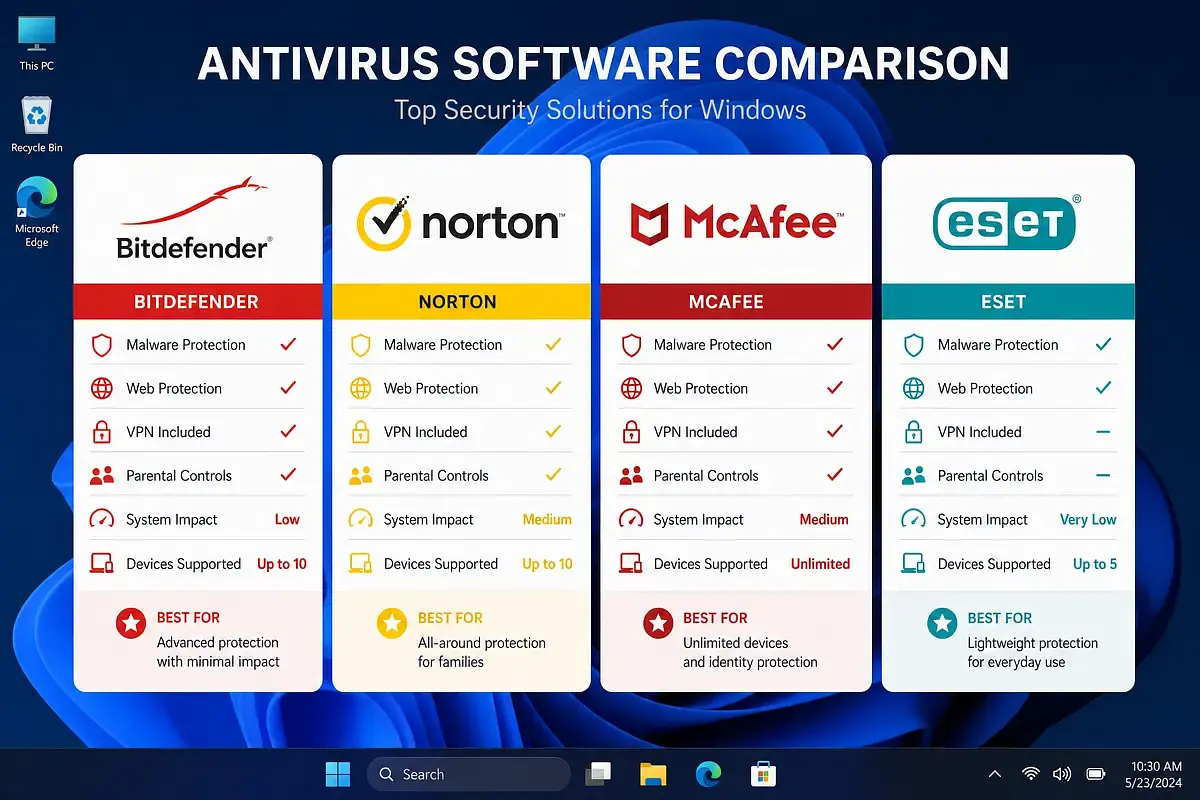
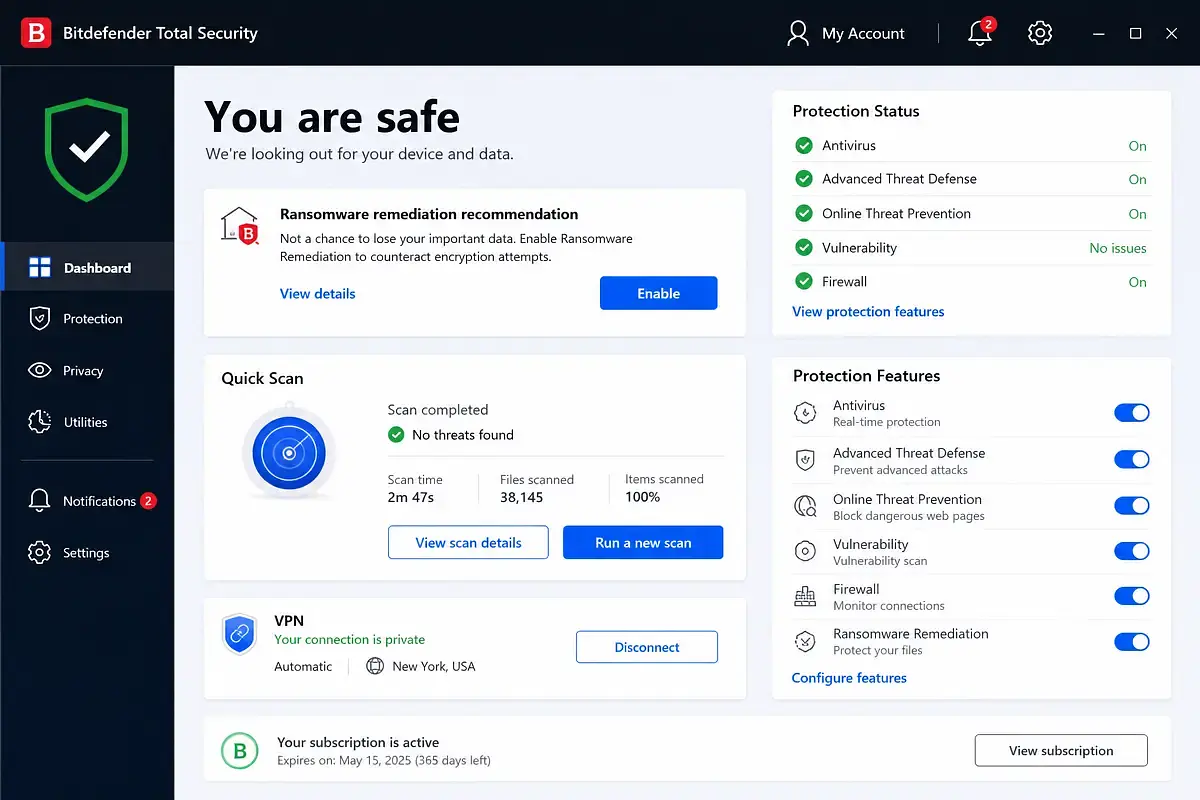
Bitdefender
Bitdefender is one of the most consistently recommended names in best antivirus software, and for good reason. It earns near-perfect scores in AV-TEST evaluations across protection, performance, and usability — a combination that’s harder to achieve than it sounds. Bitdefender Antivirus Plus is the entry-level Windows product, covering one to three PCs with real-time malware protection, web filtering, anti-phishing, and a limited password manager.
Pricing starts at around $30–$40 per year for a single device, often discounted in the first year, making it competitive with most rivals. Higher tiers like Bitdefender Total Security add multi-platform support — including macOS, Android, and iOS — along with parental controls, webcam protection, and a VPN with a daily data cap. If you want unlimited VPN, that requires a separate add-on or a higher plan.
Norton
Norton has rebuilt its reputation over the past decade and now sits among the top performers in independent antivirus lab tests. Norton AntiVirus Plus covers a single PC or Mac and includes malware protection, a smart firewall, and a password manager — a solid entry point. The more popular Norton 360 plans add a no-log VPN, parental controls on higher tiers, and cloud backup storage, which is a genuinely useful differentiator.
One thing to know about Norton: its renewal pricing is noticeably higher than the introductory rate. The first year is often attractively priced, but auto-renewal costs can be significantly more. Read the fine print before subscribing.
McAfee
McAfee antivirus has gone through significant changes and now positions itself primarily as a multi-device security suite. Its core malware protection scores are solid in lab testing, and the interface has improved considerably. McAfee’s main value proposition is coverage — plans typically allow unlimited device installs, which makes it appealing for households with many phones, tablets, and computers.
The trade-off is that McAfee’s individual feature quality doesn’t always match Bitdefender or Norton’s, and its system impact can be higher. It also bundles identity monitoring and credit score tools in higher tiers, which may or may not be useful depending on what you’re looking for.
ESET
ESET antivirus has a loyal following among technically inclined users, and its reputation for being lightweight is well-earned. ESET NOD32 Antivirus focuses on core protection without the extras — no VPN, no password manager, no parental controls — which keeps the software lean and fast. It’s an excellent choice for anyone who finds bloated security suites frustrating.
ESET’s detection engine is highly regarded, and the software performs well in independent lab evaluations. It’s available for Windows, macOS, and Android. The interface is more technical than some competitors, which is a plus for power users but may feel less intuitive for casual users.
Microsoft Defender
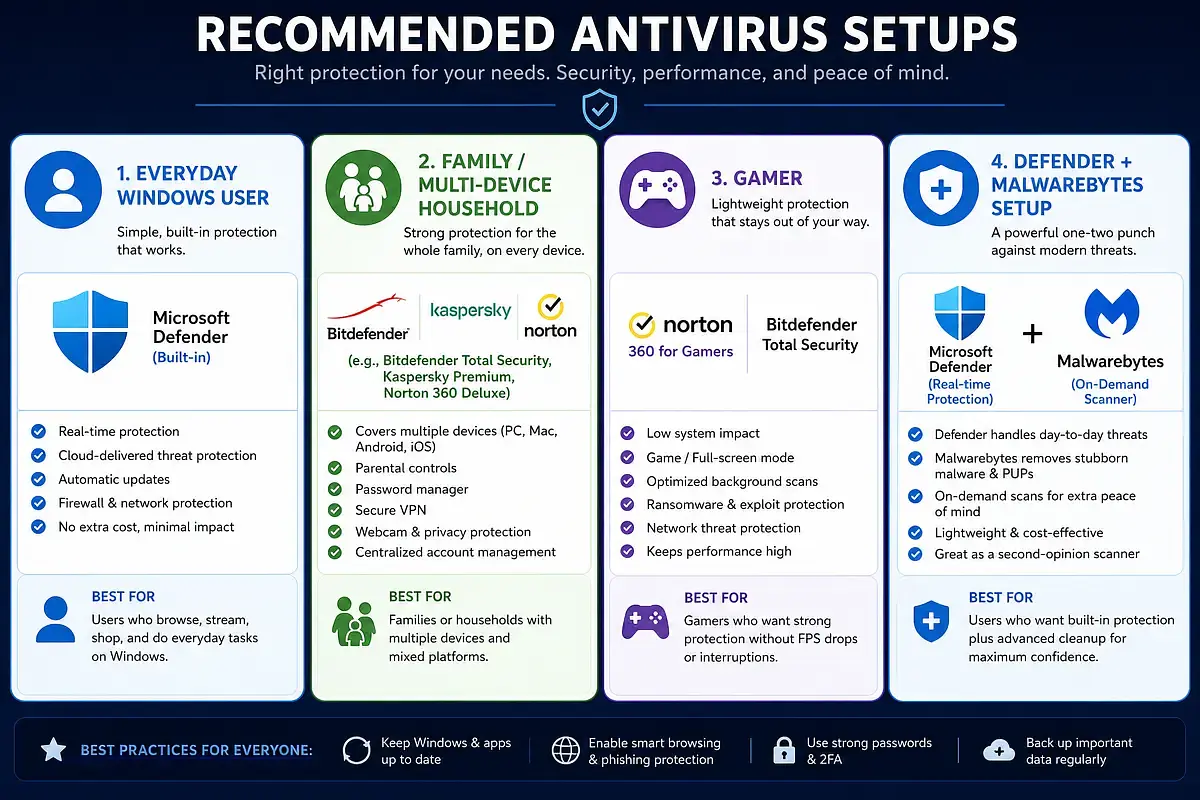
Microsoft Defender Antivirus, previously Windows Defender, is built into every Windows 10 and Windows 11 PC, and it’s no longer the afterthought it once was. In recent AV-TEST evaluations, Defender has scored competitively in protection — often matching or coming close to paid rivals. It’s free, requires no installation, and updates automatically through Windows Update.
The honest answer to “is Windows Defender enough?” is: for many users, yes. If you practice safe browsing habits, keep Windows updated, and don’t click on suspicious links or attachments, Defender provides a meaningful baseline of protection. Where it falls short is in extras — there’s no VPN, no password manager, no advanced ransomware controls, and no cross-platform support.
For users who want those features or who need stronger behavioral detection, choosing the best antivirus software from a paid provider is worth considering.
Avast, AVG, and Avira
Avast Free Antivirus and AVG Antivirus Free are the most capable free antivirus options for Windows users. They share the same underlying detection engine and both score well in independent lab tests. The free versions include real-time protection, basic web filtering, and email scanning. Paid upgrades unlock advanced ransomware protection, enhanced phishing defense, and a VPN.
Avira antivirus is another strong free option, with a particularly clean interface and a free version that includes a limited VPN and a basic password manager. Avira’s free tier is arguably more generous than Avast’s in terms of bundled extras, though its detection scores are slightly less consistent across all lab tests.
All three display upsell prompts in their free versions, which some users find intrusive. That’s the trade-off for getting solid protection at no cost.
Kaspersky and other notable options
Kaspersky antivirus has historically been one of the highest-rated products in independent lab tests, with near-perfect protection scores year after year. However, the U.S. government banned the sale of Kaspersky software in the United States in 2024, citing national security concerns related to the company’s Russian origins. As a result, we are not recommending Kaspersky for U.S. readers in this guide, regardless of its technical merits.
Other notable options include Malwarebytes, which is more of an on-demand scanner and remediation tool than a full-time antivirus replacement, and Trend Micro, which scores well in lab tests and offers straightforward pricing but lacks the brand recognition of the top-tier names.
How We Evaluated These Antivirus Programs
Protection, performance, and usability criteria
Every product in this roundup was assessed against the same core criteria used by the security research community. Protection refers to how effectively the software detects and blocks real-world threats — including zero-day attacks and widespread malware samples. Performance measures how much the software slows down everyday tasks like launching apps, copying files, and browsing the web. Usability covers false positives, legitimate software incorrectly flagged as dangerous, and how easy the product is to configure and understand.
These three pillars mirror the framework used by AV-TEST, one of the most respected independent antivirus testing organizations. Products that score well across all three — rather than excelling in one area while struggling in another — are the ones that earn top recommendations as best antivirus software.
How independent lab tests influence rankings
Independent antivirus lab tests are the most reliable way to cut through marketing claims. AV-TEST and AV-Comparatives test dozens of products multiple times per year using standardized methodologies and real malware samples. Their results are publicly available and updated regularly.
When a product consistently earns top marks from multiple independent labs over multiple testing periods, that’s a strong signal of genuine quality. Conversely, a product with impressive marketing but inconsistent lab results deserves skepticism. For this guide, lab test performance was weighted heavily — particularly for protection scores, since that’s the core job of any best antivirus software.
How pricing, features, and platform support affect value
A product that scores perfectly in lab tests but costs three times more than a comparable alternative isn’t automatically the best choice. Value matters. We considered introductory pricing, renewal rates, device limits, and whether key features are included in base plans or locked behind higher tiers.
Platform support is also a practical factor. If you use Windows primarily but also have an iPhone and an Android tablet, a multi-device antivirus plan that covers all three platforms may be more cost-effective than separate solutions. Products like Norton 360 and Bitdefender Total Security are designed for exactly this kind of household coverage.
Free vs Paid Antivirus: Which One Should You Get?
What free antivirus usually includes
Free antivirus software has improved dramatically over the past several years. Products like Avast Free Antivirus and AVG Antivirus Free provide real-time malware scanning, basic web protection, and email filtering — the foundational layers of defense that most everyday users need. Microsoft Defender, which is already installed on your Windows PC, adds another layer at zero cost.
The catch with free third-party antivirus is that the business model relies on upselling. You’ll see prompts to upgrade, and some features that sound essential — like advanced ransomware protection or a VPN — are reserved for paid tiers. That said, the free protection itself is genuine and functional.
What paid antivirus adds
Paid antivirus suites earn their price by going beyond basic malware detection. The most meaningful upgrades typically include:
- Advanced ransomware protection with behavioral monitoring and protected folder access
- Phishing and fraud protection that works across browsers and email clients
- A VPN for private browsing on public Wi-Fi
- A password manager to generate and store strong, unique passwords
- Parental controls for managing screen time and filtering content
- Cloud backup to protect important files from ransomware or hardware failure
- Multi-device coverage across Windows, macOS, Android, and iOS
Not every paid suite includes all of these, and not every user needs all of them. The key is identifying which extras are genuinely useful for your situation rather than paying for a feature-packed bundle you’ll never fully use.
When Windows Defender is enough
Microsoft Defender antivirus has earned a place in this conversation. For a Windows 10 or Windows 11 user who keeps their system updated, avoids sketchy downloads, and doesn’t regularly use public Wi-Fi, Defender provides a solid, zero-cost security baseline. It integrates seamlessly with the operating system, doesn’t require any setup, and doesn’t slow your PC down.
Where Defender falls short is depth. It doesn’t offer a VPN, a password manager, or cross-platform protection. Its phishing detection is functional but not as aggressive as dedicated third-party tools. And if you want features like webcam protection or banking browser isolation, you’ll need to look elsewhere. For users who want those extras — or who simply want the confidence of a dedicated best antivirus software product — a paid antivirus is worth the investment.
Key Features to Compare Before You Buy
Ransomware protection and phishing defense
These two features should be non-negotiable on your checklist. Ransomware protection in premium suites typically goes beyond signature-based detection to include behavioral monitoring — watching for programs that try to encrypt large numbers of files rapidly, which is a hallmark of ransomware activity. Some products also offer protected folders that block unauthorized apps from modifying your documents.
Phishing defense works at the browser level, checking URLs against blocklists and using heuristic analysis to flag suspicious pages even if they haven’t been formally reported yet. The quality of phishing protection varies significantly between products, so it’s worth checking independent test results specifically for this category.
Firewall, VPN, password manager, and banking protection
A software firewall monitors incoming and outgoing network traffic and can block suspicious connections. Windows has a built-in firewall, but paid antivirus suites often offer more granular control. A VPN encrypts your internet connection — useful on public Wi-Fi but less critical at home. Note that many antivirus-bundled VPNs come with data caps unless you’re on a higher-tier plan.
A password manager is one of the most practically useful extras in a security suite. Reusing passwords across accounts is one of the most common ways people get compromised, and a good password manager eliminates that risk. Banking protection — typically a hardened browser mode — adds a layer of isolation when you’re handling financial transactions online.
Parental controls, cloud backup, and webcam protection
Parental controls in antivirus suites range from basic content filtering to detailed screen time management and location tracking. Quality varies widely — some implementations are genuinely useful, while others are too easy for tech-savvy kids to bypass. If parental controls are a priority, check reviews specifically for that feature rather than assuming the suite’s overall quality applies equally.
Cloud backup is a genuinely valuable addition for ransomware defense. If your files are encrypted by an attack, having a recent cloud backup means you can restore without paying a ransom. Norton 360 plans include cloud backup storage as a differentiator. Webcam protection blocks unauthorized apps from accessing your camera — a niche but real concern, especially for users who are particularly privacy-conscious.
Device limits and cross-platform support
Most antivirus products are sold with a specific device limit — one, three, five, or unlimited devices. If you’re only protecting a single Windows PC, paying for a five-device plan is wasteful. Conversely, if your household has multiple Windows PCs, Macs, Android phones, and iPads, a multi-device plan with broad platform support is far more cost-effective than individual subscriptions.
It’s worth noting that the best antivirus software for macOS and mobile protection are often secondary features in Windows-first suites. The depth of protection on non-Windows platforms varies considerably, so if Mac or mobile coverage is important to you, verify that the product’s macOS and Android apps are fully featured rather than stripped-down versions of the Windows product.
Which Antivirus Is Best for Different Users?
Best for most Windows users
For the majority of Windows users — someone who browses the web, shops online, uses email, and wants reliable protection without thinking too much about it — Bitdefender Antivirus Plus is the strongest all-around choice. It consistently earns top marks in independent lab testing, installs quickly, and runs quietly in the background without noticeably slowing down everyday tasks. The interface is clean enough for non-technical users while still offering configuration options for those who want them.
If your budget allows for a step up, Bitdefender Internet Security or Bitdefender Total Security adds multi-platform support and parental controls. But for a single Windows PC user who just wants dependable, set-it-and-forget-it best antivirus software, Antivirus Plus covers all the essential bases at a price that’s hard to argue with — especially in the first year.
Best for families and multi-device households
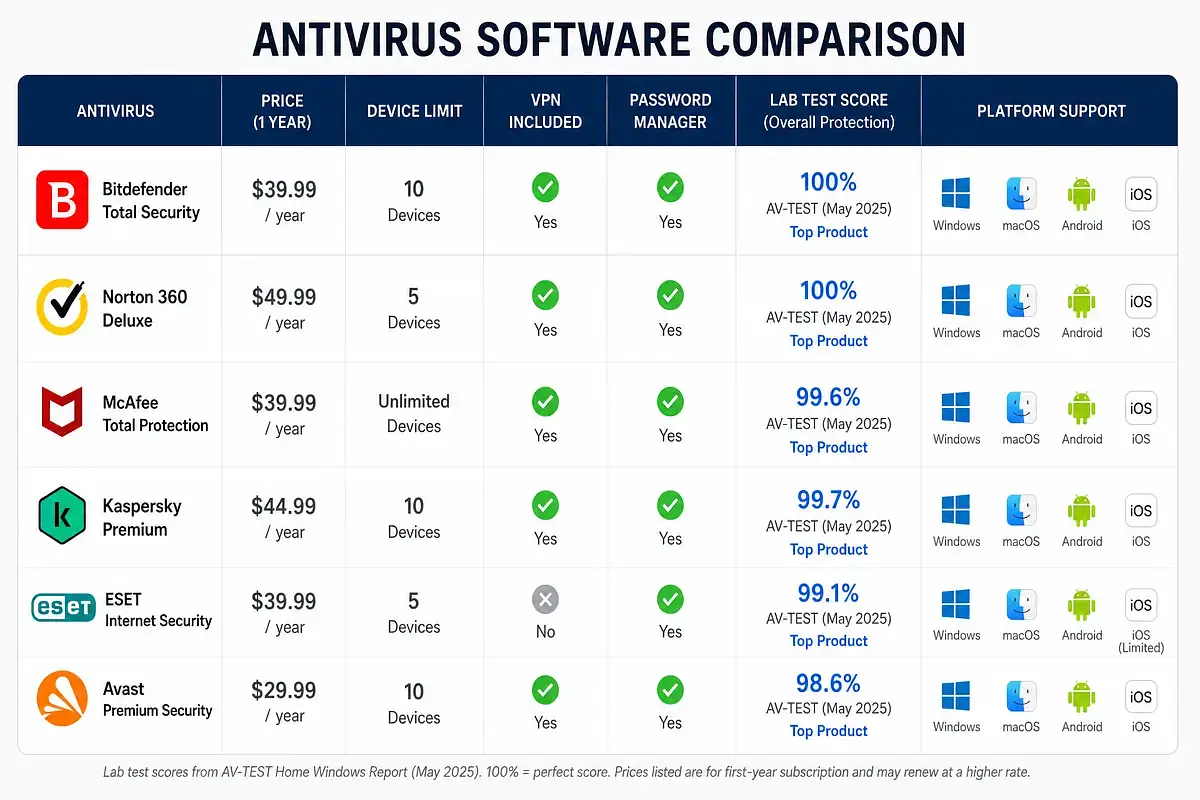
Families with multiple devices across different platforms have different needs than single-user households. The priority shifts from raw protection scores to coverage breadth, parental controls, and cost efficiency across several devices. Norton 360 Deluxe is the strongest fit here. It covers up to five devices across Windows, macOS, Android, and iOS, includes parental controls through Norton Family, bundles a no-log VPN, and adds cloud backup storage — all in a single subscription.
McAfee Total Protection is worth considering as an alternative if your household has more than five devices. McAfee’s plans typically allow unlimited device installs, which can make the per-device cost very low for large families. The trade-off, as noted earlier, is that McAfee’s individual features don’t always match Norton’s in depth or polish. For most families, Norton 360 Deluxe strikes the better balance between coverage and quality.
Best for gamers and low system impact
Gamers have a specific complaint about security software: it gets in the way. Background scans that kick in during a gaming session, pop-up notifications that interrupt full-screen mode, and CPU usage spikes that cause frame drops are all real grievances. ESET NOD32 Antivirus is the consistent recommendation for this use case. Its system footprint is among the smallest of any product in this category, and its game mode automatically suppresses notifications and reduces background activity when a full-screen application is running.
Bitdefender is also a strong option for gamers. It includes a dedicated Game Profile that activates automatically and has consistently performed well in AV-TEST’s performance benchmarks, which measure real-world impact on tasks like launching applications and downloading files. Either product is a significant improvement over heavier suites if system performance is your primary concern.
Best if you want built-in extras like VPN or password manager
If you want your security software to double as a privacy and productivity hub — covering a VPN, password manager, and potentially cloud backup under one subscription — Norton 360 Deluxe is the most complete package available. The included VPN is genuinely usable with no data cap, the password manager is functional and well-integrated, and the cloud backup adds a meaningful layer of ransomware resilience.
Bitdefender Premium Security is a strong alternative if you want the same combination with Bitdefender’s protection engine, though it comes at a higher price point. It bundles unlimited VPN access and a password manager alongside Bitdefender’s industry-leading malware detection. The key question to ask yourself is whether you’ll actually use these extras — if you already pay for a standalone VPN and use a dedicated password manager like 1Password or Bitwarden, a leaner, cheaper best antivirus software option may serve you better.
Best if you prefer to use Microsoft Defender plus on-demand scans
Not everyone wants to pay for a third-party antivirus, and that’s a legitimate position. If you’re running Windows 10 or 11, keeping your system updated, and practicing basic safe browsing habits, Microsoft Defender provides a solid foundation. The practical way to strengthen this setup without adding a full-time third-party antivirus is to supplement Defender with a reliable on-demand scanner.
Malwarebytes Free is the most widely recommended option for this role. It doesn’t run as a real-time protection layer in the free version, but it’s excellent for periodic manual scans to catch anything that may have slipped through. Running a Malwarebytes scan once a week or whenever something feels off gives you an additional detection layer without the overhead of a second real-time antivirus competing with Defender.
This combination won’t give you a VPN or password manager, but for users who manage those needs separately, it’s a capable and cost-free setup. It’s also worth noting that this approach works best for users who are already comfortable with safe browsing habits — for everyone else, investing in a dedicated best antivirus software product remains the more reliable choice.
Frequently Asked Questions
What is the best antivirus for PC?
For most Windows PC users, Bitdefender Antivirus Plus is the best overall choice based on consistent top scores in independent lab testing, low system impact, and solid value for money. Norton 360 Deluxe is the better pick if you want a full suite with VPN, password manager, and cloud backup included. If budget is a concern, Microsoft Defender combined with Malwarebytes Free provides a capable no-cost setup for users with safe browsing habits.
What is the most widely used antivirus software?
Microsoft Defender is technically the most widely used antivirus software in the world, given that it comes pre-installed on every Windows 10 and Windows 11 PC. Among third-party products, Norton and McAfee have historically had the largest consumer install bases in the United States. Avast also has a very large global user base, largely due to the popularity of its free tier.
What is the best free antivirus software?
Avast Free Antivirus and AVG Antivirus Free are the strongest free third-party options for Windows, sharing the same detection engine and performing well in independent lab tests. Avira Free Security is also worth considering for its cleaner interface and more generous free-tier extras. For users already on Windows 10 or 11, Microsoft Defender is a fully capable free option that requires no installation or configuration.
What is the best antivirus for macOS?
macOS faces fewer threats than Windows, but it’s not immune — malware targeting Mac users has grown steadily. Bitdefender Antivirus for Mac and Malwarebytes for Mac are both well-regarded options. Bitdefender offers real-time protection with a very light system footprint, while Malwarebytes is particularly effective at catching the adware and potentially unwanted programs that are most common on Mac. Norton 360 Deluxe also includes a capable Mac client if you’re already subscribed for multi-device coverage.
McAfee vs. Norton: Which is better?
For most individual users, Norton is the stronger choice. Norton’s protection scores in independent lab tests are consistently higher, its suite features — particularly the VPN and password manager — are better executed, and its interface is more polished. McAfee’s main advantage is its unlimited device coverage, which makes it more cost-effective for large households with many devices to protect.
If you’re managing more than five or six devices across a family, McAfee’s pricing model can be genuinely competitive; otherwise, Norton delivers better quality for comparable money.
What is the best virus protection according to independent tests?
Based on results from AV-TEST and AV-Comparatives — the two most respected independent antivirus testing organizations — Bitdefender and Norton consistently rank among the highest-scoring products for protection. Both regularly achieve perfect or near-perfect scores in real-world protection tests against zero-day threats and widespread malware. ESET and Trend Micro also perform well across multiple testing periods. Kaspersky has historically earned top marks as well, but as noted earlier in this guide, it is no longer available for sale in the United States.
What’s the best antivirus for malware protection?
Bitdefender is the top recommendation for malware protection specifically. Its multi-layered detection engine — combining signature-based scanning, behavioral analysis, and cloud-assisted threat intelligence — consistently catches a very high percentage of malware samples in independent testing with minimal false positives. Norton is a close second. Both products detect and block malware in real time before it can execute, which is the most important line of defense.
What’s the best antivirus for ransomware protection and firewall?
Norton 360 Deluxe and Bitdefender Internet Security are both strong choices for ransomware protection specifically. Norton includes cloud backup, which provides a recovery path if ransomware does encrypt your files. Bitdefender’s Safe Files feature blocks unauthorized applications from modifying protected folders, adding a behavioral layer on top of standard detection.
For firewall functionality, both Norton and Bitdefender offer more granular control than Windows’ built-in firewall, with Norton’s smart firewall being particularly well-regarded for its balance of automation and user control. Either product represents a strong choice when selecting the best antivirus software for comprehensive ransomware and network defense.
Final Verdict: The Best Antivirus Software for Your Needs
Choosing the best antivirus software comes down to matching the product to your actual situation rather than chasing the highest-priced or most feature-loaded option. For most Windows users, Bitdefender Antivirus Plus delivers the best combination of protection quality, system performance, and value — and it’s the product we’d recommend to someone who just wants reliable security without overcomplicating things. If you need a fuller suite with a VPN, password manager, and family coverage, Norton 360 Deluxe is the most complete package available at a reasonable price.
Free antivirus is a legitimate option for users who are careful online. Microsoft Defender handles the fundamentals competently on any Windows 10 or 11 machine, and supplementing it with occasional Malwarebytes scans adds a meaningful extra layer at no cost. Avast Free and AVG Free are solid alternatives if you want a dedicated third-party engine without paying for it, with the understanding that upsell prompts come with the territory.
The most important takeaway is this: the best antivirus software is the one you actually have installed, configured, and kept up to date. A premium suite left on default settings beats an uninstalled one every time. Pick the product that fits your budget and your device setup, make sure automatic updates are on, and pair it with basic habits — strong passwords, skepticism toward unexpected email attachments, and keeping your operating system current. That combination will protect the vast majority of users from the vast majority of threats.