Outlook 2010: Receive Notification On Email With Attachment

Outlook 2010 includes a feature that alerts user on new mail, but sometime we ignore the notifications alert and miss out mails that contain important attachments. In this post we will create a simple rule that alert differently on receiving email with an attachment.

Launch Excel 2010, head over to Home tab, and click Manage Rules & Alerts from Rules drop-down button.

manage rules and alerts

You will reach Rules and Alerts dialog, select an account and click New Rule to apply rule on mail contains attachment.
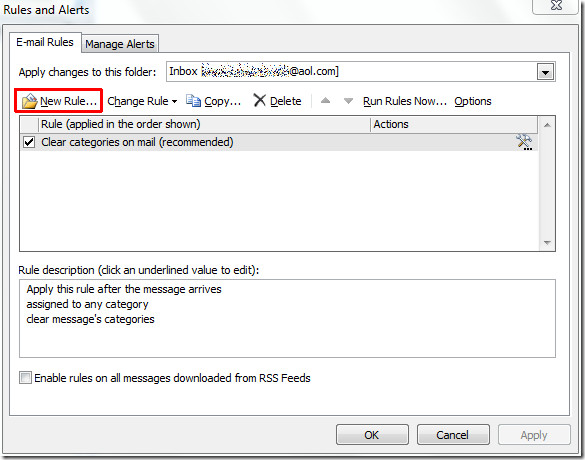
Rules and Alerts

In Rules Wizard, we will start off with creating blank rule, click  Apply rule on messages I receive and hit Next.
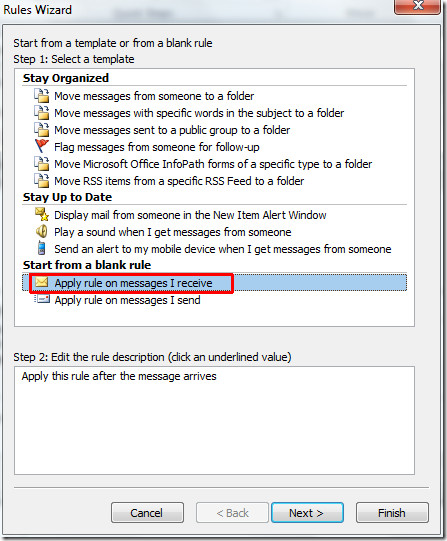
rules wizard 1

In this step, under Step 1 enable Which has an attachment option and click Next to continue.
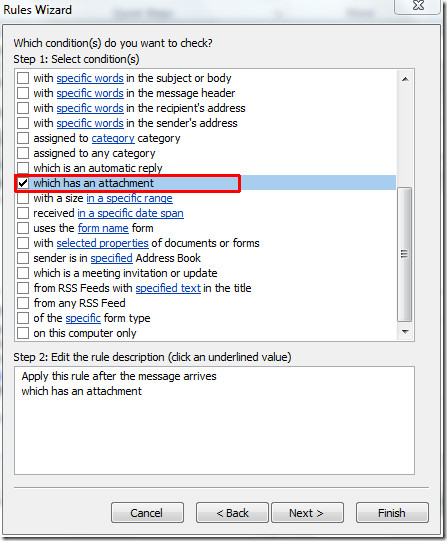
attachment dialog 1

Now scroll down the list of actions, enable Display a Desktop Alert and Display a specific message in New Item Alert window options respectively as show in the screenshot below.
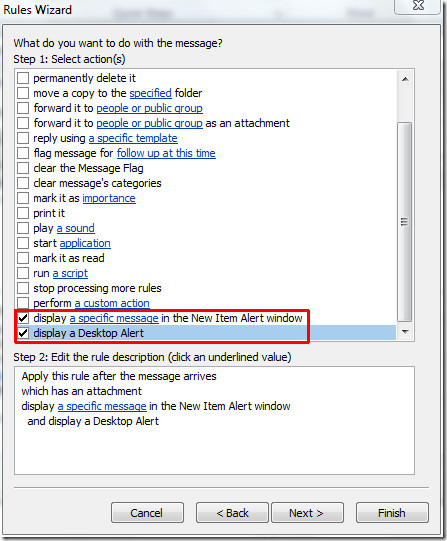
specific alert 1

Now from Step 2, click a specific message to write a message for item alert window, click OK and then Finish to end the wizard.
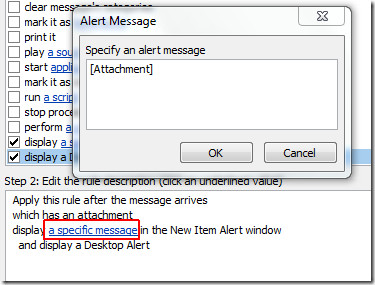
attachment message 1

It will bring you back to the Rules and Alert dialog showing new rule with a message alert window, click OK to apply the rule on mails with attachments.
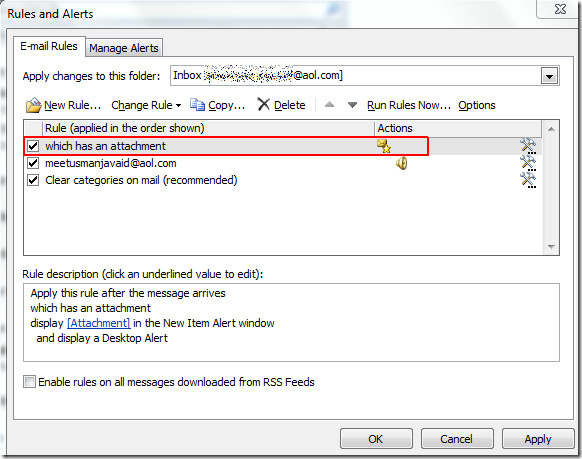
has an attachment 1

On receiving mail with an attachment, you will see message alert window with desktop alert notification.
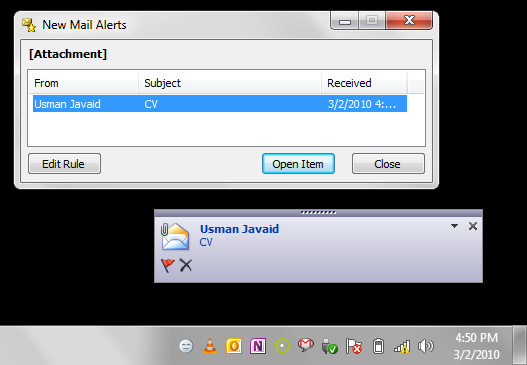
attachment 1

You can also checkout posts from Outlook 2010 notification series:

  • Share this article!

    • Digg this!
    • Bookmark on Reddit
    • Bookmark at Delicious
    • Stumble this!
    • Share this post at Facebook
    • Tweet this!
    • Share on Yahoo! Buzz
    • Add AddictiveTips to your Technorati favorites
    • Share on Friendfeed
This entry was posted in Office and tagged , , . Bookmark the permalink. Post a comment or leave a trackback: Trackback URL.
Office 2010 Club For more guides, tips, and tutorials, please visit our sister site Office 2010 Club.

It is a forum managed by experts and enthusiasts, where you can find help, share problems, and participate in discussions.

2 Trackbacks

  1. [...] Outlook 2010: Receive Notification On Email With Attachment [...]

  2. [...] only for the important ones.You can also checkout posts from Outlook 2010 notification series:Notification on email with attachment Notification alert on IMAP accountvar linkwithin_site_id = 40104; (function () { var elem = [...]

Post a Comment

Your email is never published nor shared. Required fields are marked *

*
*

You may use these HTML tags and attributes: <a href="" title=""> <abbr title=""> <acronym title=""> <b> <blockquote cite=""> <cite> <code> <del datetime=""> <em> <i> <q cite=""> <strike> <strong>


More in Office (5 of 5 articles)