Easily Create, Design & Publish Your Own eBooks Online With Papyrus

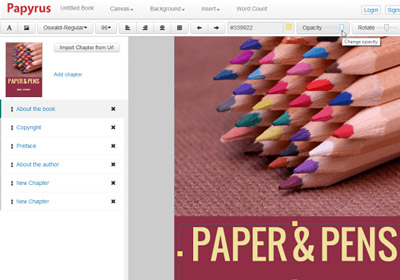
For authors looking to crash through the exclusivist publishing gateway, self-publishing online can be quite a liberating option, and many contemporary and struggling writers have lately been using it as their primary publishing option. Amazon’s direct publish has helped thousands of writers achieve a greater audience than ever before, and there are many other like it. We’ll be taking a look at one such today, Papyrus. What sets this web app apart from the competition is its overall approach to the business of online publishing. More details after the jump. Read More

Create App Mockups Or Get A Resizable Dummy Window With FrameDummy

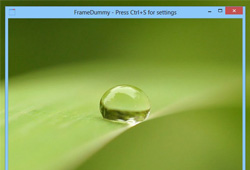
FrameDummy is a Windows application that lets you overlay a dummy desktop window frame over different objects such as photos, wallpapers, webpage screenshots, application UI etc. If you are wondering why anyone might want to do this, it can be useful in a lot of scenarios where you need to present something in a window frame. Its possible applications include software development where programmers often require to showcase early prototype of projects to their clients, or simply showcasing a part of a window in a presentation or blog post, while still giving it a full window look. You can also create fake window frames around your photos and upload the images on social media network such as Facebook or Twitter etc. just for fun. Not only is the application fairly easy to use, but it also presents everything in a simple fashion. Details to follow. Read More

Niice Is A Unified Search Engine For Behance, Dribbble & Designspiration

The world of digital art is amazing; whether you’re an aspiring designer, or just someone looking for cool posters to hang at your work space, you can go online and lose yourself in the vast variety of images available. Niice is a little web app that you are bound to like if you’re a designer. It’s a three-in-one search engine that displays digital artwork from Behance, Dribbble, and Designspiration. You can search for artwork related to anything from these three sites. The images that match your search are previewed on Niice’s own interface, and clicking any of them opens it at its source. The interface is somewhat like that of Pinterest, without the clutter of social media buttons and comments. Niice isn't built to create any sort of social network; it is rather meant to help you find inspiration art for your projects or everyday life. Read More

Design Floor Plans & Generate 3D Renders Online With Planner 5D

Whether you’re an architect or someone looking to buy or build their first home, you need blueprints and floor plans to get the job done. Even if you decide to hire someone to design your house for you, you might want to play around with a few different layouts. Planner 5D is a web service that home owners, builders, architects, real estate renovators, and contracts will find extremely useful. It’s a home planner that lets you create building plans complete with rooms, fixtures, furniture, landscaping, and people. The service isn't just easy to use, but also gives you complete freedom to add or remove any element you want. It’s equipped with basic furniture and fixtures, and will even let you select furniture that is available from IKEA. Last but not the least, it gives you both 2D and 3D views of the rooms, office space, or house that you create. Read More

Easily Design Custom Tabs With Media Content For Facebook Pages

Facebook Pages are so common that everyone and their cat seems to have one. Though easy to create, they can prove to be somewhat difficult to customize for the average Joe, especially when it comes to tasks like adding multimedia to a tab. Tab Creator is a Facebook app that gives you an excellent tab creator and editor for your Facebook Pages. It allows you to create new tabs and provides built-in templates for Pages related to music, photography, artists, restaurants, online shops, and real estate. You can also create a blank tab, and use Tab Creator's excellent editor to add elements to it. Taking hint from Photoshop, each element that you add to a Page represents a layer, and layers can be organized any way you want. Read on for more information. Read More

Test & Easily Present Responsive Websites To Others With Dimensions

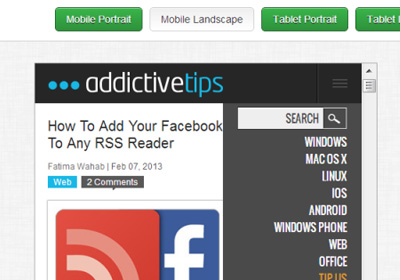
Websites are increasingly being accessed from mobile devices instead of PCs. When viewed on a tablet or a mobile phone, not all websites scale properly to show a mobile-friendly UI. To overcome this issue, website owners have the choice to either make a dedicated mobile version of their website, or develop a responsive design that scales based on the device it is being accessed on. That’s where an app like Dimensions comes handy. It’s a simple web app for developers, designers, and website owners that lets you view any website in your browser as it would appear on three different types of devices: mobile phones, tablets, and PCs. The app is excellent for both testing and demonstration purposes. Read More

Snap Guides To Measure Website Elements With Tape For Chrome

Good web design relies on several factors, one of which is the right placement of every element. Tape is a Chrome extension to help web designers with this by allowing you to add rulers to a web page. Tape goes beyond what common pixel-measuring extensions offer; it doesn’t just tell you the area occupied by a particular element in pixels, but also lets you add as many rulers to the browser interface as you want, to measure and outline the relative distance of different elements from each other. You can add rulers both horizontally and vertically, define origin points (yes, more than one), and set the pointer to automatically snap to different elements in a web page as you move over them, much like in Photoshop. Tape is enabled on a webpage through a button and is controlled solely through your keyboard. Obviously, the web page itself does not remain functional while Tape is enabled, so you won’t miss the normal key functionality. Read More

Official Autodesk ForceEffect Android App Hits The Google Play Store

Such enormous has been the impact of smartphones and tablets on our lives, that these powerful gadgets are now starting to emerge as helpful tools in their own accord. In fact, their usage has transcended beyond just calling, texting, navigation and socializing to a point where you can expect your device to assist you with virtually anything that AI possibly can. Ranging from resolving medical issues to helping engineers with complex calculations and measurements, rest assured that you’ll find an app designed for a specific purpose. With renowned companies, such as Autodesk, diverting their attention to mobile platforms, users belonging to the latter category know that they can breathe easy, since they have been, thus far, introduced to some quality apps on a consistent basis. Be it Design Review, AutoCAD WSPixlr-o-Matic or any other Autodesk app, each presentation of the company has been praised and acknowledged alike. The latest to join the club is Autodesk ForceEffect – an Android and iOS app aimed specifically at engineering students. Featuring a host of easy-to-use, state-of-the-art designing and measurement tools, the app makes design analysis and report generation on mobile a breeze. Read More

3D Cover Box Designer: Create Virtual Packaging Models For Your Products

A proper packaging and cover design is one of the most important aspects of selling your products. Perhaps that's the reason many marketers put an utmost effort behind product packaging. Nobody likes a dull and boring product packaging anyway, as it raises hundreds of questions in our mind about quality and durability of the commodity in question. And as it's the first thing that we get our hands on, during any product purchase, both the design pattern and box style should be appealing to the buyers. Well, you might have noticed those thumbnail virtual cover boxes that are embedded into most software websites. If you have been wondering how to design one of your own, then give 3D Cover Box Designer a try. It is a small application that allows you to create virtual 3D cover boxes for any software product you might be selling, and embed the image on your web page. In fact, you can create a cover box for any product that you want to showcase on the web. The supported output image formats include JPEG, BMP and PNG, and it provides both the 2D and 3D pattern view of the designed boxes. Whilst customizing all the respective sides of the box, you can also change the background color, as well as ambient and directional light according to your preferences. Read More

CaseApp Lets You Design & Order Your Personalized iPhone 4 Or 4S Case

The iPhone is one of the very few handsets that come with a glass back, making the device particularly vulnerable to scratches and even some serious damage. To counter this, most iPhone covers are focused on protecting the device’s back. Apart from that, iPhone covers are a good way of making a fashion statement and giving your iDevice a personal touch. The problem with the personalization part of covers is the fact that there is a limited amount of covers available in the market, and you might have to look for ages if you are trying to find the perfect cover for your iPhone. Designing your own iPhone cover sounds too difficult, and that’s why most people never even give it a thought. That’s exactly what CaseApp intends to change. This free iOS app lets users design a case for their iPhone using images from their device’s camera roll and some beautiful theming templates. Once you have designed the perfect cover, you can request the CaseApp team to ship it to you (no matter where you are), and you will get the new, customized iPhone cover for just under $30! Read More

ColorMania Color Picker Lets You Zoom In To Select Individual Pixels

When I got my first computer,  256 colors was the highest number of colors the computer systems of that day were able to display. Today, 32 million colors are the standard for any PC. Even smart phones are capable of displaying millions of colors in high resolution. If you are developing a website, or doing any other designing project, picking colors from such a huge range for designing graphics is not an easy task. Choosing the right or wrong color can mean the success and failure of your project. Previously, we have covered a lot of color picking applications, such as Instant Color Picker, an application for Windows that has 6 different and unique shade extraction tools, allowing you to find the right color shade, and Just Color Picker, an application with a host of color picking features to view, as well as customize chosen colors to fit your design. Today, we have another great color picker called ColorMania. It is an advanced utility for picking colors that is created especially for web-designers, graphic artists and application developers. Various color modes are supported by ColorMania, and it allows you to pick any color available on your screen. More on the features of ColorMania after the break. Read More

SpringPublisher: Create Business Cards, Flyers & Letterheads With Embedded QR Codes

Business cards, Flyers, Post Cards, and Letterheads, if you want to print any of these items, you will need to go to a publisher. You will tell him what you want, and he will create and print it for you. Even if you don't like the final product, you have to accept it because when the printing is done, it is too late to change anything in it that you don't like. Usually, the applications required to create the design of these publications are very difficult to use. That is why everyone cannot use them properly and you need to go to a professional to get your work done. Today, we have an application for Windows that allows users to easily design their own Business cards, Post Cards etc. SpringPublisher is a professional and easy to use desktop publishing application that allows you to create and print Business cards, Flyers, Postcards and Letterheads within minutes. You can add images, texts, QR codes, maps, vector shapes, logos and arrange them according to your preference. The application lets you start designing the required project from scratch, or choose and edit a pre-designed template. The templates can be selected both from inside the application, and are also available in an online template store, which lets you download high quality templates. More on SpringPublisher after the break. Read More

BuildApp Is A Comprehensive 3D House Modeling App For Android

Developed by DivisionSystems, BuildApp is a highly productive and simple to use 3D house modeling Android app that lets you design, edit, visualize and share your house plans on the go. Using the app, you can develop the virtual (interior and exterior) plan of your entire house in 3D using essential designing and measurement tools. To help you present your plan, the app even lets you take a virtual tour of the house. That’s not all; the app offers ample customization and easy controls for designing of plans. Read More

Autodesk Design Review: View And Annotate 2D & 3D DWF Models On Android

In an attempt to help Android users with reviewing and redlining their DWF (Design Web Format) models on the go, Autodesk – the team behind the famous AutoCAD and DWG file editing, viewing and sharing tool, AutoCAD WS – has just released the official Design Review app to the Android Market. Using the app, you can now view your multi-sheet, 2D and 3D DWF models on the go, layer-by-layer, instantly switch to a preferred model view/perspective with a simple tap, add markups (callouts and text notes) to the designs, and easily explore every single portion of each model using simple zooming, panning and rotation controls. In addition, the app lets you access your Autodesk cloud content (for subscribed users only), and keeps a log of recently accessed documents. The app might be new to the Android Market, but its iOS variant has been around for quite some time now. Read More

Sweet Home 3D: Cross-Platform, Interior Home Design Software For The Average Joe

Sweet Home 3D is an open source, Java-based interior design application that lets you place your furniture on a 2D plane with 3D preview. It allows you to draw walls and rooms, drag and drop doors, windows and furniture from a catalog into the plan, change colors, texture, size and orientation of walls, floors, ceilings and furniture. While designing and decorating the home in 2D, the application lets you view all the additions and changes simultaneously in a 3D preview. You can create photorealistic images and videos with various light sources to choose from. Moreover, you can export the interior designing plans in various standard formats and import additional 3D models to the application. Read more about Sweet Home 3D after the break. Read More

Autodesk Homestyler: Design Home Interior With Creative Ideas

Autodesk is a 3D visualization software giant that requires no introduction. It provides 3D visualization software for architecture, engineering, 3D modeling for industry manufacturing and media. A while back, they introduced their interior design and modeling online web service in the form of Autodesk Homestyler, where you can create 2D and 3D design and modeling visualizations. Autodesk Homestyler offers options for building, furnishing, decorating and landscaping your home or any section. It has a simple drag and drop interface that does not require consulting any tutorial. You have to register to use this web service, which can be done using your Facebook, Twitter, Google, Yahoo! and Windows Live accounts. This web app has video tutorials, help forum, design tips and a design gallery, where you can publish your personal designs as well. You can create multiple levels when designing your home with Autodesk Homestyler, and all these feature come for free. Read More

Spur – Check If Your Website Conforms To Design Basics

If you’re either a designer or run a website, your life at one point might have been ruined by phrases like ‘make it pop’ and ‘edgy’ etc. Sure they mean something to both designer and website owner but trying to understand what exactly it means can often make you miss out on the basics of a web design. Spur is a web application that helps you check if you’ve covered everything there is to cover on design basics. The app itself doesn’t run an analysis on your design, rather it provides you tools to analyze the design for yourself. Read More

Present, Share & Collaborate On Design Projects With Clients And Teams

It’s always a challenge to find a good, easy and affordable (free) way to present work to a client and it’s equally difficult to get feedback. Cage is a web app that not only simplifies presenting work to a client but also facilitates collaboration, making it easier to get feedback. To share your project renderings with the client, or perhaps a team member working remotely, create a project, add images of your renderings in either JPG or PNG format and send them either a password protected or publicly viewable link where they can see the design and post comments on. Read More