Disable Display Of Recent Search Entries In Windows 8 Explorer [Tip]

Just like Windows Vista and Windows 7, Windows 8 File Explorer includes real-time search feature to let you instantly find the required files and folders from any location. It shows you search results for files, folders, apps and other items as soon you start typing in search keywords. Although it provides users with quick search feature, it also displays search suggestions while you enter the search keywords in Explorer search bar. The search suggestions belong to MRU list that is stored and managed in Windows Registry, and if you want to remove the recent search suggestions, then you need to find and remove registry keys where all search suggestions are maintained. Windows 8 Local Policy Editor offers a simple policy setting for Windows Explorer search entries. Instead of manually removing the search entries from Windows Registry, you can use Local Group Policy Editor to permanently turn off display of recent search entries in Windows Explorer. In this post, we will guide you through the process of disabling search suggestions in Windows 8 Explorer. Read More

How To Turn Off Windows Store In Windows 8 [Tip]

Taking a page out of Apple's Mac App Store, Microsoft has begun to build its own version of application marketplace. This new-to-Windows notion is called as the Windows Store, and is designed to hold many Windows 8 applications. Although the introduction of games and other features are already in the pipeline, right now, the number of apps in the latter is nowhere near the amount available for Mac users. Just like the other app stores, Windows Store also features both free and paid apps, and anyone with access to your system can easily download them to your computer. If your system is also shared among other individuals or is currently available to some pesky guests, and you are looking for a way to temporarily disable Windows Store, then you are at the right place. In this post, we will let you know how you can disable the Windows 8 Store for all user account holders on your PC. Read on! Read More

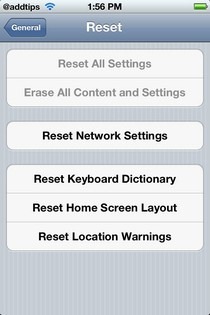
Disable iOS Reset & Erase Content Buttons With ResetAllKiller [Cydia]

If you have ever watched cartoons or read comics, then you are sure to have mused at one point or another why there is always a “self-destruct” button in all sophisticated machines. Seems like the phenomenon is not just limited to cartoons, but has managed to seep into real life as well. If you own an iPhone (or any other smartphone for that matter), then you must have noticed the “Reset All” button in the stock Settings app. Admittedly, there are occasions when this button really comes in handy, letting you wipe out everything in one go, but it is also true that many iOS users have lost their precious data and apps by unintentionally hitting the reset option. Now, it is possible to avoid that situation if your iDevice is jailbroken. ResetAllKiller is a Cydia tweak which disables the self-destruct button in your iPhone, iPad or iPod touch. Read More

AntiScreensaver Automatically Disables Screensaver While Specific Programs Are Running

Screensavers were initially designed to prevent phosphor burn-in on CRT and plasma computer monitors. They work by either blanking the screen or displaying random colors or images on it when the computer is not in use for a specified time. However, the advanced LCD and LED monitors of today do not experience phosphor burn-ins and today, screensavers are only used for entertainment or privacy purposes. For the same reasons, many of us still use screensavers on our computers, but how many times has it happened that you are in the middle of something, like an important presentation, and the screensaver pops up covering your desktop and diverting your attention? Today we have a tool called AntiScreensaver, which allows you to stop the screensaver from getting activated when a user-specified application is running. Keep reading to find out more about AntiScreensaver. Read More

Autorun Manager: Disable & Re-Enable Autorun Feature In Windows

Whenever you plug in or insert a new device into your computer, Windows tries to automatically run it for you. Sure that is convenient, but this is one of the most common ways that viruses spread in to systems. If you plug in an infected USB flash drive or a CD drive, the Autorun feature of Windows automatically executes an autorun.inf file located in the root of removable devices. This option can be used by malicious programs to run any unwanted script or program on your computer if it contains some malicious code to gain administrative privileges on your computer. The damage can be anything from someone else using your computer to stealing files from your computer. Previously, we have written an article to guide you through the process of disabling Autorun behavior in both Windows 7 and Windows 8. We also covered a tool called Windows 7 Autorun Disabler that allows you to disable autorun feature for CD/DVD Roms, Ram Disks, Removable devices and Network Drives. Today, we have a portable application called Autorun Manager, which lets you quickly disable and re-enable autorun feature for a lot of devices. More on Autorun Manager after the break. Read More

How To Disable SuperFetch In Windows 8

Whenever we open an application in Windows, it loads in to the system memory before it gets presented to us. All the applications that we use don't have an equal priority, for instance, you'd rarely use sound recorder than you'd do Windows Media Player. Obviously its just an example to make it a bit clear for you, but this is how it works. Instead of reloading commonly used programs again and again, Microsoft came up with Prefetcher fuction in Windows XP, and then SuperFetch in Vista and above OS versions. SuperFetch is a technology in Windows operating systems that automatically preloads commonly used application into the computer memory which in return greatly reduces their loading times. The purpose of SuperFetch is to increase the performance of the PC during regular tasks performed by the user. SuperFetch was introduced in Windows Vista and is a step ahead from prefetcher function of Windows XP. Superfetch is also present in Windows 8. If you got the chance to get your hands on Windows 8 and you don’t need SuperFetch for some reason, Windows allows you to disable it. In this post, we will explain how to disable SuperFetch in Windows 8. Please keep in mind though, it is not advisable for the common users to disable SuperFetch as it might cause lag when loading applications and other slowdowns. Read More

KeyboardClean: Disable The Keyboard To Easily Clean Between Keys [Mac]

We’ve all eaten with our laptops and netbooks resting on our laps; some of us prefer to lean back in bed and get comfy with a bag of chips while we browse online for a few lulz, while others just plainly use any space that the keyboard and touchpad leave free to set a drink or bowl of nachos on. This means you might have enough crumbs between your keys to satiate an ant farm, and possibly, enough grease on your screen to make a few curly fries. While you can wipe the screen down any time, spills on the keyboard are best cleaned promptly (I once waited too long to clean a ketchup spill at my home system, and it haunts me to this day). KeyboardClean is a simple Mac app that locks your keyboard and allows you to clean it without worrying about doing/executing something. Read More

Disable & Group Extensions In Chrome With Context

Context extension for Chrome allows you to group extensions under a particular umbrella as per your use. You can group extensions under customizable tags of home, work, games, reading material etc, depending on how you use them. The extension lets you switch between these extension groups, so that you have only the relevant ones enabled. Context adds a small button next to the URL bar, which gives quick access to all extension groups with just one click.  When one group is enabled, the rest of the extensions (associated with other groups) are disabled. Read More

Win Eight Metro UI Switcher: Switch Between Windows 7 And Windows 8 UI

A while back, we covered Windows 8 tweaking applications including Metro Controller and Metro UI Tweaker, to bring the Windows 7-styled Start Menu and disable the Ribbon-based Windows 8 Explorer. If you’re looking for a comprehensive Windows 8 tweaking application to completely disable all Windows Metro UI elements such as Search, Settings and Share panes, revamped UAC prompts, Ribbon-based Windows Explorer, extended Task Manager, and Immersive Start Menu, Win Eight Metro UI Switcher is probably just what you need. This multilingual application lets you switch between Windows 7 and Windows 8 UI elements with one click. Read More

How To Remove All Effects Of A Virus From Your Windows System

If a virus attacks your system, the first thing you will do is to remove the virus with an anti-virus software. But what then? Your system will still likely to remain corrupted. This is because some types of viruses usually tweak the system registry and file systems. If you remove the virus, your system registry and file systems will still remain corrupted. Virus Effect Remover is a free opensource tool which helps you to remove the effect of viruses from the Windows Registry and File System easily. Also it can detect the registry error caused by a virus.

You must have noticed that some viruses disable task manger, registry editor, folder options, etc, you can use this tool to enable them back instantly.

Read More

Firefox: Disable Automatic File Scanning After Download

Firefox automatically scans the file after the download is complete which may cause exuberant amount of time in some low end computers. This function is vital to protect your computer from viruses, but you may find that it takes a lot more time in scanning if the file is huge. You can disable this feature if your antivirus is up to date and you don’t need Firefox to scan the file for you.

Read More

Enable “Show Folder And Search Option” If Disabled By A Virus In Windows

In Windows, NoFolderOptions policy hides the folder options from control panel and even disables the Show Folder and Search options from the command under Tools Menu in Windows Explorer. If your computer is not a part of an office environment or any other organizational network than you might be having a risk of a virus which disables these options as a part of infection. This policy in the registry also hides the file extensions to known file types so that the virus may infect your system in stealth. To enable this option, follow these simple steps.

Read More

Disable NVIDIA Control Panel From Desktop Right-Click Context Menu

Do you have a Nvidia Graphic card? The latest firmware from Nvidia installs a script that enables Nvidia Control Panel on desktop right-click context menu. This can slow down the loading speed of the context menu when you right-click on the Desktop if you are using a low-end computer. In my case, I simply don’t need this option because it’s useless. If you are in same situation like me, its time to disable/remove it.

Read More

Remove Useless Items From Right-Click Context Menu By Hacking Registry

Have you ever noticed that some applications like Antivirus software, WinZip, SmartFTP, and others, add some items to the context menu when you right-click on a file or folder? Apart from Windows Vista, these software install shell extensions to add applications in the right-click context menu. If you delete the appropriate shell extension in the registry, you won't get these additional menu items. Read More

How To Disable Automatic Driver Installation In Windows 7 / Vista

Suppose you have connected a device with your computer, Windows 7 / Vista will now automatically search for the driver and install it. If you want to select every driver manually(because you have a manual driver that is better), then you should disable automatic driver installation. To do this you don’t need to install any software at all, you can do this using Windows Driver Settings. Read More

How To Disable Windows Task Manager Using Registry

Note: If you are looking to enable your task manager if it got disabled by your administrator or some virus, then have a look at this post. This tip is for disabling your task manager, not enable it.

Sometimes one needs to disable the task manager to give clients limited access in a network or to prevent other users from doing a specific task. There are multiple software available for this purpose, but the best way is to disable it using Local Group Policy Editor which is build-in your Windows and does not require any software to be installed.

Read More

What Is Data Execution Prevention(DEP) And How To Disable It In Windows 7 / Vista

What is DEP ?

In Microsoft’s own words,
Data Execution Prevention (DEP) is a security feature that can help prevent damage to your computer from viruses and other security threats. Harmful programs can try to attack Windows by attempting to run (also known as execute) code from system memory locations reserved for Windows and other authorized programs. These types of attacks can harm your programs and files. DEP can help protect your computer by monitoring your programs to make sure that they use system memory safely. If DEP notices a program on your computer using memory incorrectly, it closes the program and notifies you.

Why disable DEP ?

I was running multiple processes on different tabs in Firefox 3,  finally my Firefox crashed and Microsoft gave a very beautiful reason for the crash which you have read above. Actually it happened the moment I clicked on a YouTube video, it sounds weird, right? If you are a heavy geek like me, who works on multiple Firefox tabs and also use online services that need to access your system memory, then your Firefox is definitely going to crash unless you don’t disable DEP. Another reason to disable it is when it does not allow you to open Executable files that needs to access your system memory. Read More

Stop An Application From Running Automatically At Startup In Windows 7 / Vista

We covered a way to manage startup programs easily so that it  can increase system performance here almost 2 weeks back. Today we will explain another method to stop startup programs through Windows Defender that is installed by default in Windows Vista. If your computer seems to be starting up slow, it is most likely because of startup programs. These are programs, often unnecessary, that boot up automatically when the computer does. New computers are notorious for having this problems as vendors reduce the price of their computers by making deals with software providers to preinstall their programs. These programs are often worthless, and are usually trials and not even the full program and such programs are normally referred to as bloatware. This said, below is an outline of ways to remove these unnecessary start up programs from starting up automatically. This method also works in Windows XP. Read More