Automatic Wallpaper Switcher With Multi-Monitor & Collage Support

We all love changing wallpapers. In fact, it’s one of those tasks we frequently perform. Even though Windows 7 provides integrated wallpaper switching functionality, it’s not as robust as it should be, and is neither very feature-laden. Earlier, we took an inside look at John's Background Switcher – probably one of the most comprehensive wallpaper utilities you can find over the internet. The software was both feature-rich and intuitive, and left us utterly impressed. However, not everyone wants to play with plethora of options and settings, and some simply need simpler and minimalistic solutions. Today, we have a wallpaper application for you called WallSwitch. WallSwitch, as the name implies, is a handsome software to easily switch your desktop wallpapers, either using hotkeys or by setting predefined time intervals. What makes it stand out from default Windows 7’s Personalization menu, is its multi-monitor support – which means it can set separate background for each screen. You can make multiple profiles and set different configurations for each of them. Read More

Comprehensive App To Manage All Aspects Of A Dual Monitor Setup

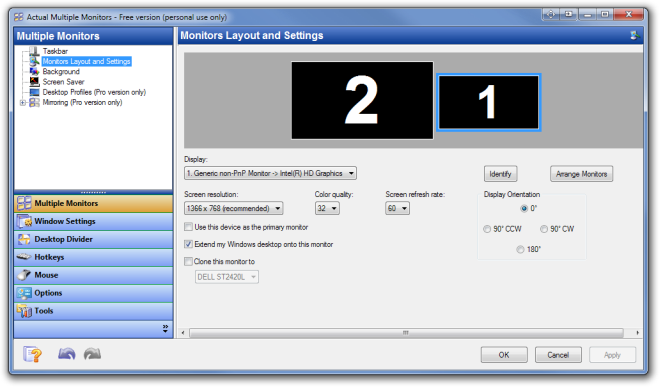
Even though Windows allows you to connect and use more than one monitor at a time with your system, there are no extended options for controlling the dual monitor setup; for instance, applying a different wallpaper on each, changing the primary monitor through a shortcut, mouse cursor wrapping, switching applications between monitors, launch applications on a specified monitor etc. If you want to switch between primary monitors, you have to open the Personalization dialog box and go to the Adjust Resolution option to make the selected monitor your main display. To save you from all that trouble, some days ago we covered a tip on how to quickly change the primary monitor using a hotkey. However, a shortcut to change the primary monitor lets you control just one aspect of a dual monitor setup. If you are looking for a comprehensive tool that enables you to control different elements, such as the wallpaper, screensaver, taskbar, monitor layout, mouse and keyboard shortcuts and a lot more, give Actual Multiple Monitors a try. It is an application for Windows that provides you with options to control all the aforementioned, an a lot more elements of a multi-display setup, all from a unified interface. Read More

Quickly Switch Primary Display With A Hotkey For Games Without Dual-Monitor Support [Tip]

Since I have a dual monitor setup (one 4:3 monitor set as primary and a 16:9 one as secondary), I was, until recently, running into the problem that whenever I had to play a full screen game that supports wide screen mode, I had to switch the primary monitor, and then switch it back when I quit the game. Some modern games allow you to switch the primary display from their settings, but not all games allow you to do that (in my case, Dota 2). The default method for switching the primary monitor in Windows 7 is a bit tedious, as one requires to open the Personalization dialog box, select Display, choose Adjust Resolution, and then select the Primary Display. Today, I discovered a miniscule tool called Make Primary Monitor that allows you change any of your secondary display monitors to primary by launching the application from the secondary display. Read More

MultiWall: Set A Different Wallpaper For Each Monitor Or Stretch One Across All

Wallpapers Desktop customization is rather important for one to increase overall productivity. While working, a good wallpaper can have very pleasant and positive effect on you. The default Windows 7 wallpaper management for a multi monitor setup is a little different from Windows 8. For example, in Windows 7 when you set a wallpaper as desktop background, the same wallpaper is applied on both monitors and there is no option to set a different wallpaper for each display monitor, while Windows 8 lets you set a different wallpaper for each screen and span one wallpaper across multiple monitors. A while back, we covered an application for Windows named DisplayFusion, a multi-display desktop window manager that lets you adjust the Resolution, Refresh Rate and Color Depth of each monitor separately and set primary monitor, manage its position and change wallpapers for both monitors. Today, we have another application, called MultiWall that allows you to set an individual wallpaper for each monitor and stretch a single wallpaper across all connected monitors. Read on to find out more about MultiWall. Read More

[Giveaway] EdgeCase Prevents Unintentionally Moving Mouse Cursor Between Displays [Mac]

If you work with multiple monitors, you must have noticed that your mouse doesn't always understand that you didn’t mean for it to move to the next display, even though you continued to move it to the left or right of the screen. The mouse is meant to act like that, and it only makes sense that you would be able to move the mouse comfortably between two displays. There are, nevertheless, usage scenarios where the second display attached to you system is really meant to monitor a feed or an app or any other system activity. You don’t necessarily need it for performing your ‘work’, and that’s when your cursor jumping between monitors gets irritating. EdgeCase is a Mac app worth $4.99 in the Mac App Store that prevents the mouse from accidentally jumping between displays. Read More

Dualless: Split Chrome Windows Into Two By Different Ratios

There are times when you may want to view two websites at the same time, for instance, if you want to compare two pages or simply want to read an article and watch a video side by side. Dual monitor setups can be quite useful in such a case, but what if you don’t have one? If you want to simulate the environment of a dual monitor for multi tasking or for other viewing purposes, then Dualless is a Chrome extension that splits your browser window into two, with a ratio defined according to your needs. The extension utilizes the space and moves the current browser tab as a new window, changing its size and position together with the original window. Dualless offers users with six different ratios for splitting the screen, 7:3, 6:4, 5:5, 4:6, 3:7 and 1. The extension can be perfect for people who don’t have a dual-monitor setup but want to achieve similar functionality. Read More

Windows 8: Extended Wallpaper And Taskbar Across Dual Monitors

After years of offering only the bare minimum dual monitor support with its operating systems, Microsoft has finally decided to change things for the better. The recently released Developer’s Preview of Windows 8 has added better dual-monitor support natively to the OS, letting you extend your wallpaper across multiple monitors as well as extending your taskbar across them automatically, without the need for any third-party apps. For more information and how to get it going, continue reading after the jump. Read More

Extend Windows Taskbar To Multiple Display Monitors With zBar

Handling multi-monitor setup is arguably tiresome, especially when you need to access desktop items or active application taskbar controls. As you need to move across the screen to primary monitor where taskbar is lying to access active application’s taskbar controls, system notification area, etc, it is quite unproductive. By default, taskbar can only be accessed from your primary monitor, therefore, accessing applications is a bit dragging when two or more displays are attached with your system. zBar is developed to solve such problems related with multi-monitor setup. The application places the taskbar on each monitor attached with your system, so you can access the application taskbar controls from the monitor where it is being used.  Not only does it move application taskbar icons, it also brings the system tray clock along with multiple calendars which can be accessed from each monitor’s notification area. Read More

Swap Your Dual-Monitor Display Screens For Better Readability With SwapWin

Most users (including me) work on second or third monitor to assist with the work which is taking place on the primary monitor. For example, we google for solutions, check references, or just start reading a long article. After a while, we hear our necks complaining and have no choice but to drag the active window to the primary monitor. This is one of the major annoyance I face when working with multiple monitors, and I am sure the same is with you. SwapWin is a brilliant open source app which solves this problem by swapping display screens of any extended monitor with primary monitor. Please keep in mind that it does not completely swap the screens, only the active applications or windows get swapped. The taskbar remains in the primary monitor. Read More

Keep Flash Videos In Full Screen On Dual Monitor When Focus Is Lost

If you’ve had the experience of working in a dual monitor environment, you may have come across the fact that you cannot play a flash video in full screen on the second monitor and perform some other task at the same time. Supposing that one of your monitors is playing a flash video in full screen mode, as soon as you perform some other activity on the second monitor you’ll notice that the full screen mode is gone. Apparently, this is one of the limitations of the flash plugin for almost all modern browsers. Read More

Slow Down Mouse Movement At The Edge Of The Screen [Dual Monitors]

Have you used dual-monitors only to find it difficult to use due to the sudden jump of the mouse pointer from the first to the second monitor, whenever you are trying to scroll or close the window? You are not alone, it is all too common these days. Dual Display Mouse Manager (DDMM) fixes this little annoyance by slowing down the mouse pointer when it reaches the edge of the screen. Read More

Extend Windows Media Center On Dual Monitor Display

Windows Media Center is a nice piece of high-functionality software from Microsoft. While it is aesthetically pleasing and convenient, one issue that users with dual or multiple displays face is the restriction of mouse to only the WMC window, especially when maximized. Maxifier is a free tool that answers this problem, freeing mouse movement even when Windows Media Center is itself running full screen mode. Read More